
Bot Framework Overview
Microsoft Bot Framework is a set of tools, services, products, and APIs to build and deploy software bots. A bot is a software that interacts with human to provide human functions such as chat, recommendations, travel booking and so on.
Microsoft Bot Framework consists of a number of components including the Bot Builder SDK, Developer Portal and the Bot Directory.
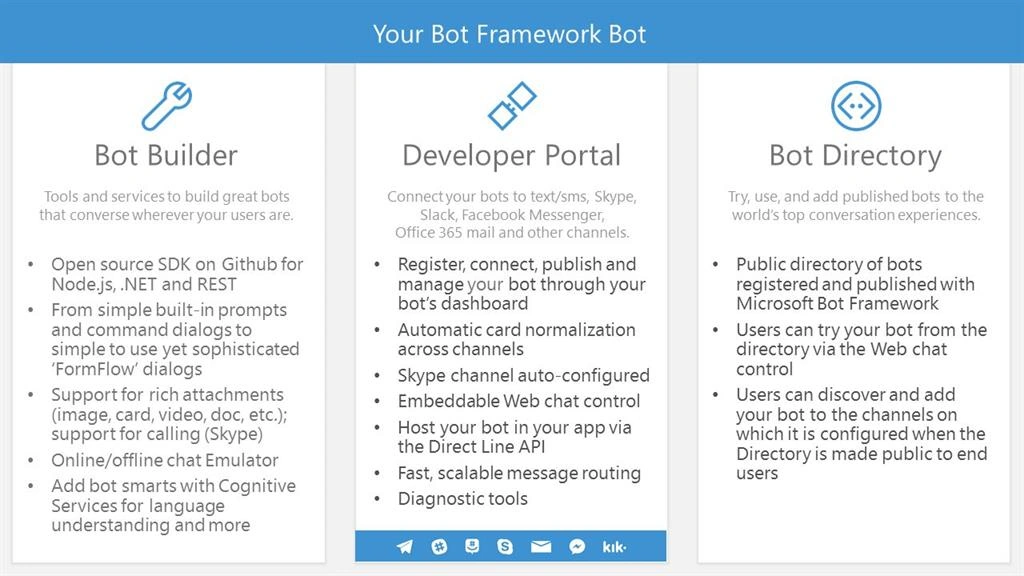
Image source: Microsoft
The Bot Builder SDK is an open source SDK that provides tools and services required to build bots. The bots can be build using .NET, Node.js, or REST API.
The Bot Framework Developer Portal lets you connect your bot(s) seamlessly text/sms to Skype, Slack, Facebook Messenger, Kik, Office 365 mail and other popular services.
The Bot Directory is a public directory of all reviewed bots registered through the Microsoft Developer Portal. Users will be able to discover, try, and add bots to their favorite conversation experiences from the Bot Directory.
Bot Framework ConnectorThe Microsoft Bot Framework Connector is a communication service that allows us to connect a Bot with multiple communication channels like Email, SMS etc. Microsoft introduced Bot Framework in Build2016. The Microsoft Bot Builder SDK is one of three main components of the Microsoft Bot Framework. The Microsoft Bot Framework provides just what you need to build and connect intelligent bots that interact naturally wherever your users are talking, from text/SMS to Skype, Slack, Office 365 mail and other popular services.
To use Microsoft Bot Framework Connector, you need following things:
- A Microsoft Account to log into the Bot Framework developer portal.
- An Azure-accessible REST endpoint exposing a callback for the Connector service.
- Developer accounts on one or more communication services (such as Skype) where your Bot will communicate.
- Visual Studio 2015
- Download Bot template: Visual Studio Bot Template - C#
- Save the zip file to you Visual Studio 2015 template directory “%USERPROFILE%\Documents\Visual Studio 2015\Templates\ProjectTemplates\Visual C#"
- Start Visual Studio 2015
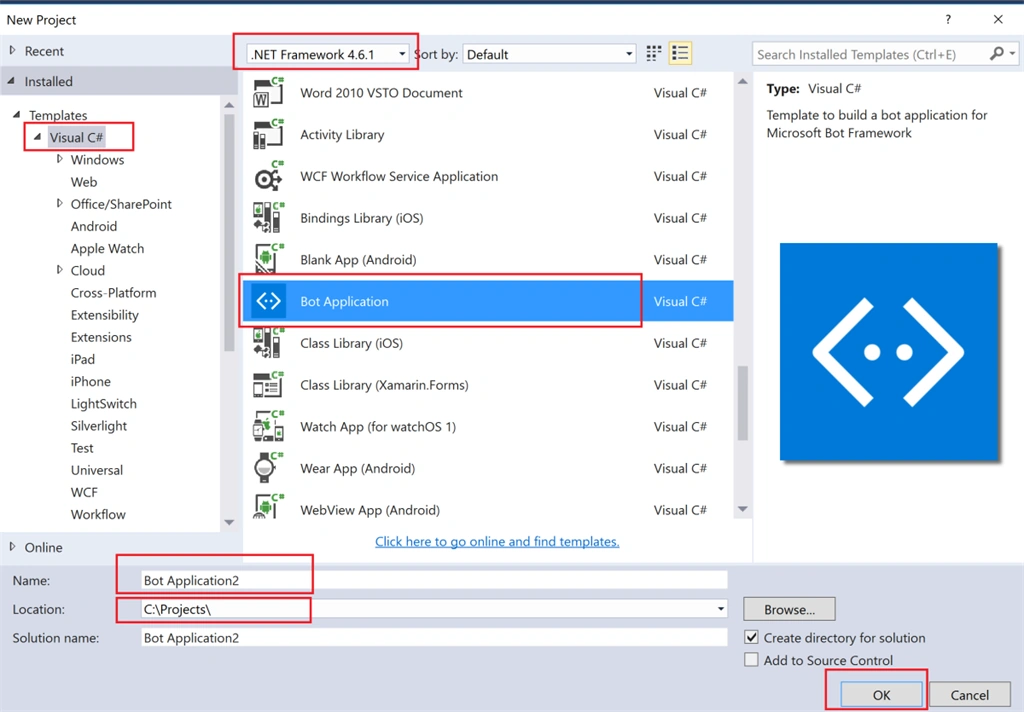
- From the file menu, select New, then Project
- Select Visual C# template
- Select .NET Framework 4.6.1
- Select Bot Application
- Enter Name
- Browse save location
- Click OK
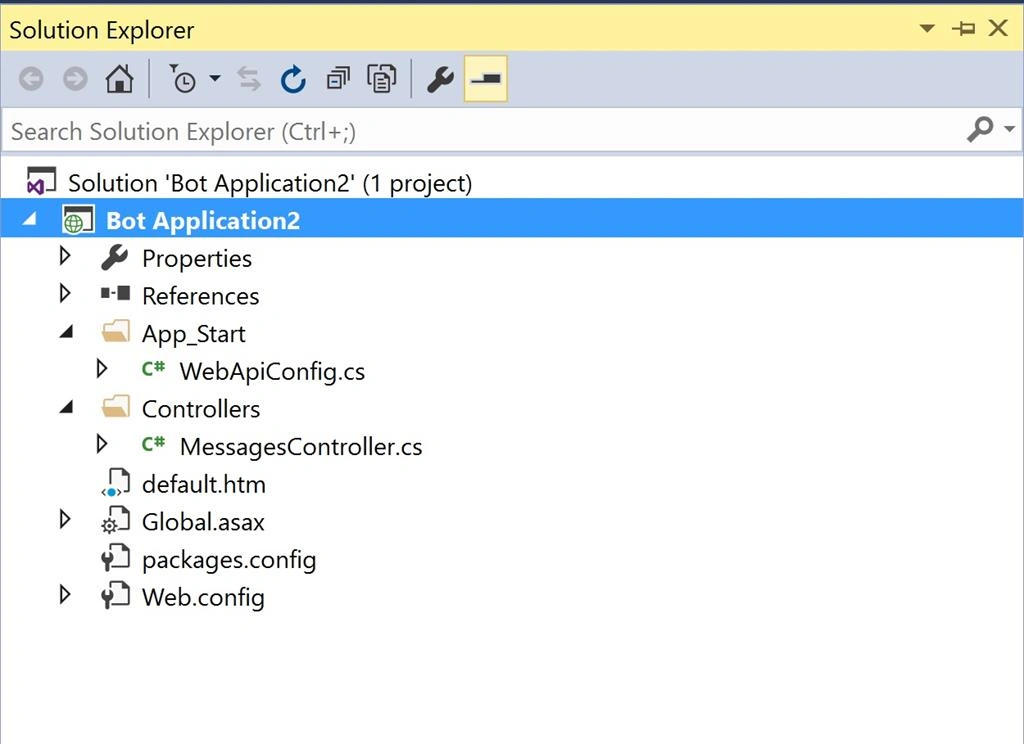
Run the application to see output.
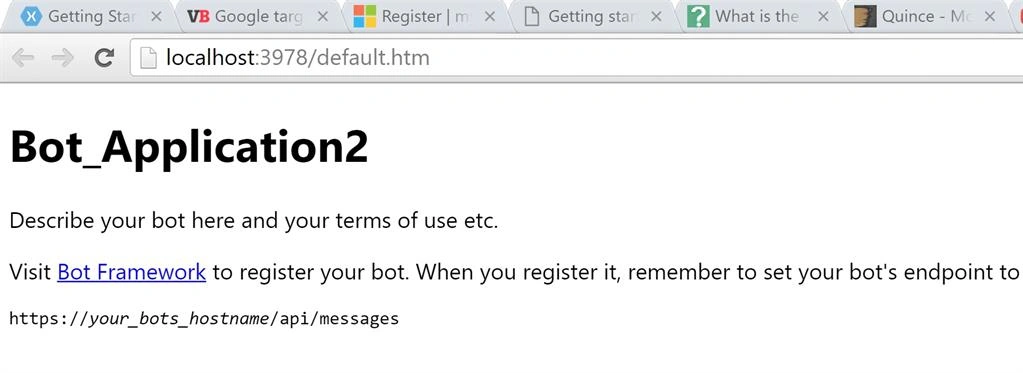
The Bot Framework provides an emulator that lets you test calls to your Bot as if it were being called by the Bot Framework cloud service. To install the Bot Framework Emulator, download it from here.


prasanna rajPosted Dec 19, 2017, 11:47 PM EST
Is there any possible to use autocomplete from database or JSON in emulator ?
Haytham Ben SlimanePosted Aug 15, 2017, 6:36 AM EDT
Does the bot emulator require internet connection to test my bot locally ?? because when i test my bot locally when am online it works but doesnt work when am offline.
vijayPosted Jan 20, 2017, 9:10 AM EST
I am planning to create bot application for my customer. is there any way that I can deploy into private customer server. we don't want to use cloud registration.
Sandeep SinghPosted Aug 15, 2016, 6:09 AM EDT
Thank you for sharing with us.
Sumit AroraPosted Aug 10, 2016, 4:35 AM EDT
Nice share....
Hanif HefazPosted Jul 26, 2016, 9:50 AM EDT
Thank You sir
Prasanna MuraliPosted Jun 23, 2016, 9:18 PM EDT
Nice one..
Sanjay SabariyaPosted Jun 8, 2016, 7:48 PM EDT
nice one..
Bhavik PatelPosted Jun 8, 2016, 6:21 PM EDT
nice
Asad AliPosted Jun 8, 2016, 12:28 PM EDT
Do we really need MS Azure account?
Thiruppathi RPosted Jun 3, 2016, 3:27 AM EDT
Good One..
Debasis SahaTOP 100Posted May 29, 2016, 9:33 PM EDT
Nice share..
Praveen KumarPosted May 29, 2016, 9:31 AM EDT
Nice
Bhuvanesh MohankumarPosted May 29, 2016, 8:45 AM EDT
Good one
Avinash BarnwalPosted May 29, 2016, 4:22 AM EDT
nice article, but looks like a full copy :)
Nitin PanditTOP 100Posted May 28, 2016, 11:01 PM EDT
application option in that so I need to update that or any other version I need to use ??
Humayun Kabir MamunPosted May 28, 2016, 9:51 PM EDT
Nice...
Humayun Kabir MamunPosted May 28, 2016, 9:50 PM EDT
Nice...
Munesh SharmaPosted May 28, 2016, 11:11 AM EDT
nice
Rajeesh MenothPosted May 27, 2016, 9:43 PM EDT
Thanks for sharing Raj Kumar sir :)
Ajay MalikPosted May 27, 2016, 8:41 PM EDT
nice sharing..
Vignesh ManiTOP 100Posted May 27, 2016, 12:27 PM EDT
nice
Sonu ChaudharyPosted May 27, 2016, 12:13 PM EDT
nice share
Thiruppathi RPosted May 27, 2016, 10:30 AM EDT
NIce...
Debasis SahaTOP 100Posted May 27, 2016, 10:04 AM EDT
Nice sharing..
Munesh SharmaPosted May 27, 2016, 9:57 AM EDT
good one
Prasanna MuraliPosted May 27, 2016, 6:27 AM EDT
Nice one..