
Introduction
In this article we will see how to have Grouped rows in DataGrid in WPF.
Crating WPF Application Project
Fire up Visual Studio 2008 and Create a WPF Application and name the project as GroupingDataGridWPF.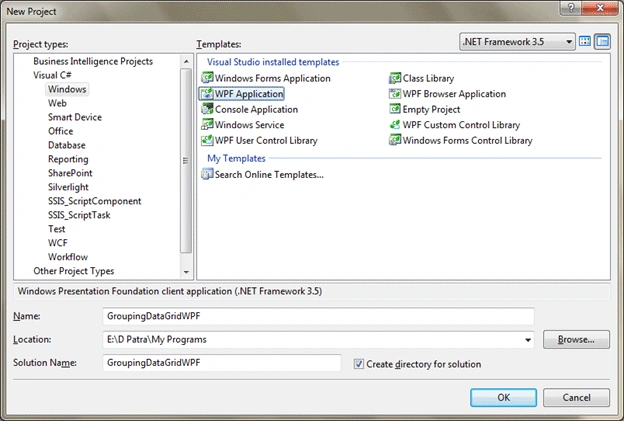
First we need sample data to load into DataGrid, let's have a Class called Employee which is having the following properties.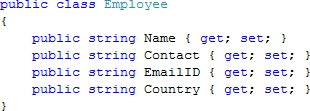
Now in the Constructor we will have some sample data and bind to DataGrid.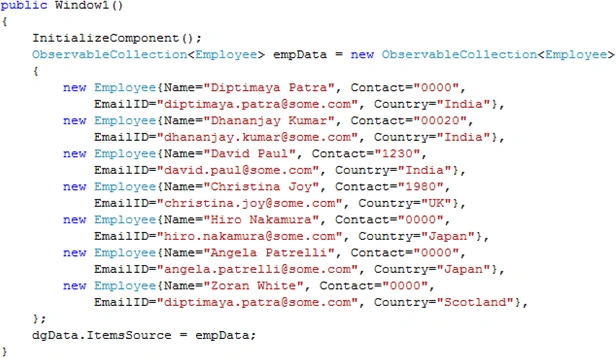
Now that we have Sample data let's see how does it look like.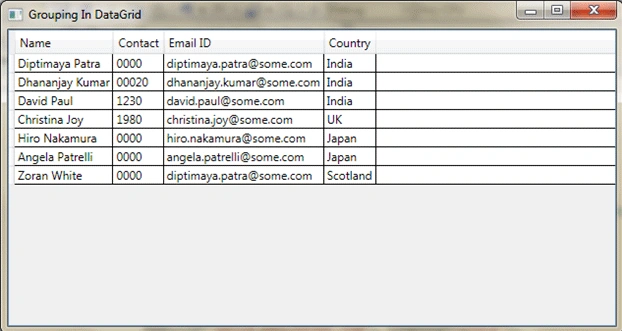
Looks good to proceed.
Now we will create a Style that will hold the Grouped Data.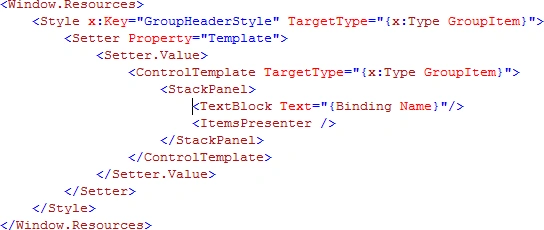
To use it in DataGrid, use the following XAML inside DataGrid.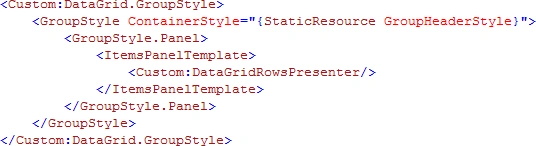
Now go back to C# code behind and add the Grouping definitions.
Now we are ready to test our application.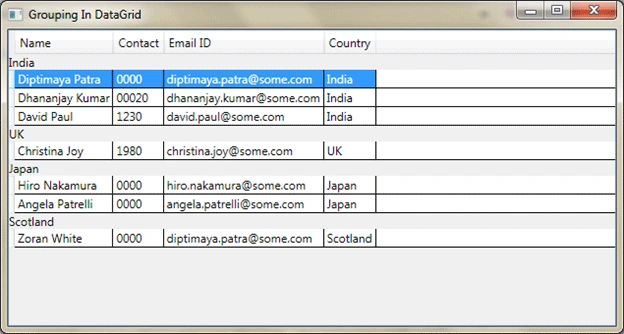
Yes, we have achieved grouping. Now we need to have Expand and Collapse functionality of the Group Header.
So in the Style defined for GroupItem let's add an Expander control.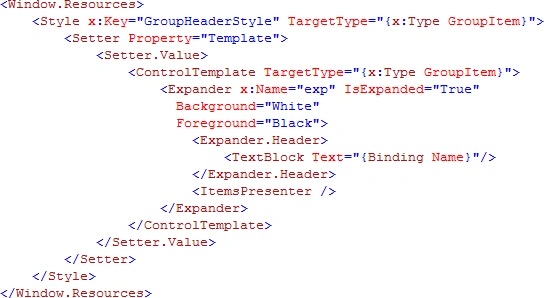
Now let's test the application.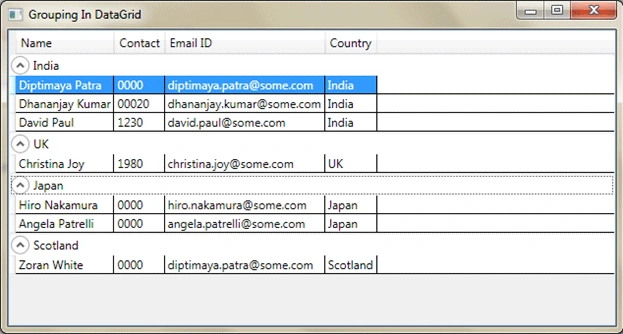
Now we can expand and collapse any Grouped Item.
Hope this article helps.
13 comments
Join the conversation! Your thoughts help the community grow.

Join to leave a comment
Members earn 10 SHARP for a comment, 10 SHARP for a reaction, and 1,000 SHARP for every article they publish.

Anderson AssisPosted Feb 15, 2019, 8:39 AM EST
Custom:DataGrid does not exists in VS 2017...
Jack DanielsPosted Dec 4, 2018, 8:26 PM EST
Even in 2018, this tutorial worked perfectly with minor modifications. Thanks a ton!
Brian WilliamsPosted Aug 1, 2013, 10:56 AM EDT
Excellent article. Your example was very clear and easy to follow.
Moussa TourePosted Aug 16, 2012, 4:31 PM EDT
Hello, i Want to know why you use <TextBlock Text="{Binding Name}"/> Name ?
Dhruv ShethPosted Jun 7, 2012, 9:17 AM EDT
Nice Article keep writing bro....
Kunjan MantaraeditedPosted Mar 12, 2012, 12:12 PM EDTEdited Mar 12, 2012, 12:12 PM EDT
This is my listview control as you can see I am binding group header with "Name.ActualGrossValue" (Classname.Property). I am binding columns too. Somehow column values are changing dynamically but the column header values are not changing dynamically. But when I re open the window containing the listview proper values are coming, . . . . . . . . . . . <GroupStyle HidesIfEmpty="False" > <GroupStyle.ContainerStyle> <Style TargetType="GroupItem"> <Setter Property="Template" > <Setter.Value > <ControlTemplate TargetType="GroupItem" > <Expander IsExpanded="True" Name="ListViewExpander" > <Expander.Header > <ScrollViewer VerticalScrollBarVisibility="Disabled" HorizontalScrollBarVisibility="Disabled" > <Border BorderBrush="#FFC0C0C0" BorderThickness="1" Padding="1,1,1,0" CornerRadius="4" Background="#06505050"> <Grid > <Grid.ColumnDefinitions> <ColumnDefinition Width="120"></ColumnDefinition> <ColumnDefinition Width="50"></ColumnDefinition> <ColumnDefinition Width="70"></ColumnDefinition> <ColumnDefinition Width="150"></ColumnDefinition> <ColumnDefinition Width="80"></ColumnDefinition> <ColumnDefinition Width="150"></ColumnDefinition> <ColumnDefinition Width="25"></ColumnDefinition> </Grid.ColumnDefinitions> <my:ctlCellName Margin="8,0,0,0" Grid.Column="0" NameType="Firm" SmallLabelString="" NameString="{Binding Name.FirmID}" Tag2="{Binding Name.BrokerID}" VerticalAlignment="Stretch" MouseLeftButtonUp="ctlFirmName_MouseLeftButtonUp" /> <!--<TextBlock Grid.Column="0" Text="Firm:" Margin="5,14,0,0" /> <TextBlock Grid.Column="0" Text="{Binding Name.FirmID}" FontWeight="Bold" Margin ="44,14,0,0" />--> <StackPanel Grid.Column="1"> <TextBlock Text="Equities" FontSize="10" Margin="0,2,0,0" /> <TextBlock Text="Options" FontSize="10" Margin="0,10,0,0" /> </StackPanel> <StackPanel Grid.Column="2"> <TextBlock Text="Daily Value:" FontSize="10" Margin="0,2,0,0" /> <TextBlock Text="Daily Value:" FontSize="10" Margin="0,10,0,0" /> </StackPanel> <StackPanel Grid.Column="3"> <my:ctlPBCell6 ShowDollerSign="True" ValueActual="{Binding Name.ActualGrossValue}" ValueLimit="{Binding Name.DailyLimits.MaxGrossValue}" Margin ="0,0,0,0" /> <my:ctlPBCell6 ShowDollerSign="True" ValueActual="{Binding Name.OptionsCurrentGrossValue}" ValueLimit="{Binding Name.DailyLimits.OptionsMaxValue}" Margin ="0,0,0,0" /> </StackPanel> <StackPanel Grid.Column="4"> <TextBlock Text="Daily Shares:" FontSize="10" Margin="10,2,0,0" /> <TextBlock Text="Daily Shares:" FontSize="10" Margin="10,10,0,0" /> </StackPanel> <StackPanel Grid.Column="5"> <my:ctlPBCell6 ShowDollerSign="True" ValueActual="{Binding Name.ActualGrossShares}" ValueLimit="{Binding Name.DailyLimits.MaxGrossShares}" Margin ="5,0,0,0" /> <my:ctlPBCell6 ShowDollerSign="True" ValueActual="{Binding Name.OptionsCurrentGrossContracts}" ValueLimit="{Binding Name.DailyLimits.OptionsMaxContracts}" Margin ="5,0,0,0" /> </StackPanel> </Grid> </Border> </ScrollViewer> </Expander.Header> <ItemsPresenter/> </Expander> </ControlTemplate> </Setter.Value> </Setter> </Style> </GroupStyle.ContainerStyle> </GroupStyle> </ListView.GroupStyle> . . . . . . "Name.ActualGrossValue" is a normal dataclass object. It is getting value from some another class(which I dont have code). But I am calling INotifyPropertyChanged property after every time I get new/updated value of "Name.ActualGrossValue" dataclass. Can anybody please help me. Many thanks in advance.
Sujit PatileditedPosted Aug 30, 2011, 1:55 AM EDTEdited Aug 30, 2011, 1:57 AM EDT
Thanks. So Usefull
nmjh ShettyPosted Apr 25, 2011, 11:32 PM EDT
Hey Your code was very useful,but i would like to know more information about mutiple grouping which can be done at run time. Regards, Nmjh
srinivasPosted Apr 14, 2011, 10:46 AM EDT
Hi this is very nice article. I need some more extra in this like comparing that grouped data.... eg.in japan group there are two rows . now i have to compare each row1 with row2 in japan group and heilight cells of row1 only if there is any mis-match in the data.........
Rajendra TripathyPosted Sep 23, 2010, 8:35 PM EDT
Hi diptimaya. I need some help on (How do I group columns in a WPF DataGrid? ).Actually I am using DXGrid..But any help in WPF DATAGRID is also helpful for me. I mean Headers are grouped. Say I have a column Street, City, Country. Then these columns are under a column named Address. & I have another group of column named Student and under that I need a column Roll no,Class,Section. Hope u can understand. Plz mail me I am in hurry. If u have any sample application then it would be a gr8 help.
Vinod DPosted May 13, 2010, 3:25 AM EDT
Thanks this what iam looking for. Just i need to customize look and feel for this with blend. thanks. I can make it for webapp mode as well.