Background processing is an essential part of modern web applications. Tasks such as sending emails, generating reports, processing files, syncing data with external services, or running scheduled maintenance should not block user requests. Hangfire is one of the most popular libraries in the .NET ecosystem for handling these background tasks reliably.
This article covers Hangfire configuration, different types of jobs, and the modern features available in recent versions of Hangfire.
What is Hangfire?
Hangfire is an open-source framework for performing background job processing in .NET and ASP.NET Core applications. It stores job information in persistent storage (such as SQL Server, PostgreSQL, or Redis), ensuring that jobs survive application restarts and server failures.
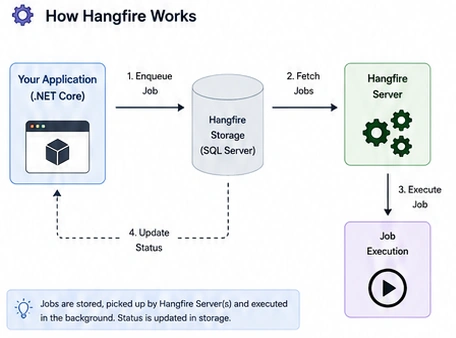
Unlike simple background services, Hangfire provides:
Persistent job storage
Automatic retries
Job scheduling
Dashboard for monitoring
Distributed processing
Queue management
Cron scheduling
Dependency Injection support
When Should You Use Hangfire?
Hangfire is ideal for operations that do not need to complete during the HTTP request.
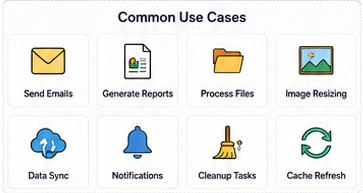
Examples include:
Sending emails
Processing uploaded files
Generating PDF reports
Image resizing
Import/Export operations
Database cleanup
Scheduled synchronization
Notification processing
Cache refresh
Data migration
Instead of making users wait, these tasks can run in the background.
Installing Hangfire
Install the required NuGet packages:
dotnet add package Hangfire.AspNetCore
dotnet add package Hangfire.SqlServer
For PostgreSQL:
dotnet add package Hangfire.PostgreSqlConfiguring Hangfire in .NET Core
appsettings.json
 {
  "ConnectionStrings": {
    "HangfireConnection": "Server=.;Database=HangfireDb;Trusted_Connection=True;"
 }
Program.cs (.NET 8)
using Hangfire;
using Hangfire.SqlServer;

var builder = WebApplication.CreateBuilder(args);

builder.Services.AddHangfire(config =>
{
    config.SetDataCompatibilityLevel(CompatibilityLevel.Version_180)
          .UseSimpleAssemblyNameTypeSerializer()
          .UseRecommendedSerializerSettings()
          .UseSqlServerStorage(
              builder.Configuration.GetConnectionString("HangfireConnection"));
});

builder.Services.AddHangfireServer();

var app = builder.Build();

app.UseHangfireDashboard();

app.Run();
Hangfire Dashboard
The dashboard provides a web interface for monitoring jobs.
https://localhost:5001/hangfire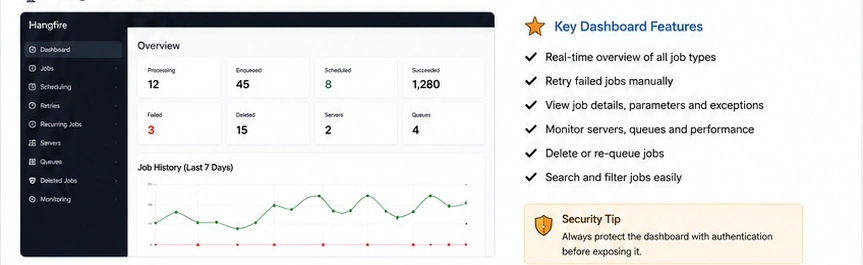
The dashboard displays:
Processing jobs
Scheduled jobs
Recurring jobs
Failed jobs
Deleted jobs
Servers
Queues
Job history
Retry information
It also allows manual retries and job deletion.
Creating Your First Background Job
Create a service:
    public class EmailService
{
    public void SendWelcomeEmail(string email)
    {
        Console.WriteLine($"Sending email to {email}");
    }
}
Enqueue a job:
BackgroundJob.Enqueue<EmailService>(
x => x.SendWelcomeEmail("[email protected]"));
The job executes immediately after the request finishes.
Types of Hangfire Jobs
Hangfire supports several job types.
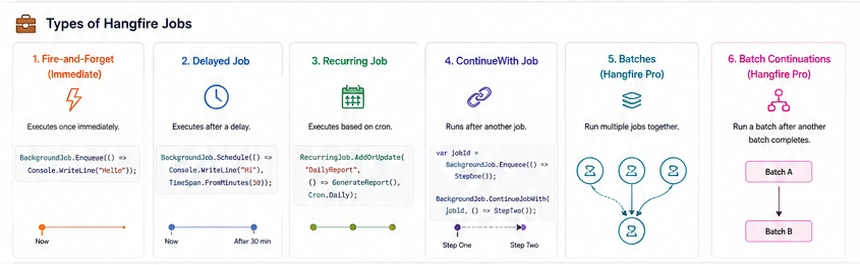
1. Fire-and-Forget Jobs
Executed only once immediately.
    BackgroundJob.Enqueue(() =>
    Console.WriteLine("Job Executed"));
Use cases:
Send email
Process image
Create invoice
Generate PDF
2. Delayed Jobs
Execute after a specified delay.
    BackgroundJob.Schedule(
    () => Console.WriteLine("Executed after 30 minutes"),
    TimeSpan.FromMinutes(30));
Use cases:
Reminder emails
Delayed notifications
Payment reminders
3. Recurring Jobs
Run on a schedule using Cron expressions.
    RecurringJob.AddOrUpdate(
    "DailyReport",
    () => GenerateDailyReport(),
    Cron.Daily);
Other schedules:
Cron.Hourly
Cron.Daily
Cron.Weekly
Cron.Monthly
Cron.Yearly
Custom Cron:
"0 */2 * * *"Runs every two hours.
4. ContinueWith Jobs
Run after another job completes successfully.
var jobId = BackgroundJob.Enqueue(() => StepOne());
BackgroundJob.ContinueJobWith(
    jobId,
    () => StepTwo());
Useful for:
Multi-stage workflows
ETL processing
Report generation pipeline
5. Batches (Hangfire Pro)
Allows multiple jobs to execute together.
    BatchJob.StartNew(batch =>
{
    batch.Enqueue(() => Job1());
    batch.Enqueue(() => Job2());
    batch.Enqueue(() => Job3());
});
Useful for:
Bulk email sending
Import processing
Parallel execution
6. Batch Continuations (Hangfire Pro)
Execute another batch after the first completes.
Batch A
   ↓
Batch B
Useful for:
Data import
Data validation
Report generation
Dependency Injection Support
Hangfire integrates seamlessly with ASP.NET Core DI.
public class NotificationService
{
    private readonly IEmailService _email;

    public NotificationService(IEmailService email)
    {
        _email = email;
    }

    public async Task SendAsync()
    {
        await _email.SendAsync();
    }
}
Schedule the service:
    BackgroundJob.Enqueue<NotificationService>(
    x => x.SendAsync());
Job Queues
Separate different workloads.
    BackgroundJob.Enqueue(
    () => ProcessEmail());
Specify queue:
[Queue("emails")]
public void ProcessEmail()
{
}
Configure server:
builder.Services.AddHangfireServer(options =>
{
    options.Queues = new[] { "critical", "emails", "default" };
});
This prevents long-running jobs from blocking high-priority tasks.
Automatic Retries
Hangfire retries failed jobs automatically.
[AutomaticRetry(Attempts = 5)]
public void ProcessOrder()
{
}
Disable retries:
[AutomaticRetry(Attempts = 0)]Job Filters
Filters work similarly to ASP.NET middleware.
Examples:
Logging
Authorization
Retry policy
Exception handling
Performance tracking
Example:
public class LogFilter : JobFilterAttribute
{
}
Monitoring Failed Jobs
The dashboard shows:
Exception
Stack trace
Retry count
Processing server
Execution duration
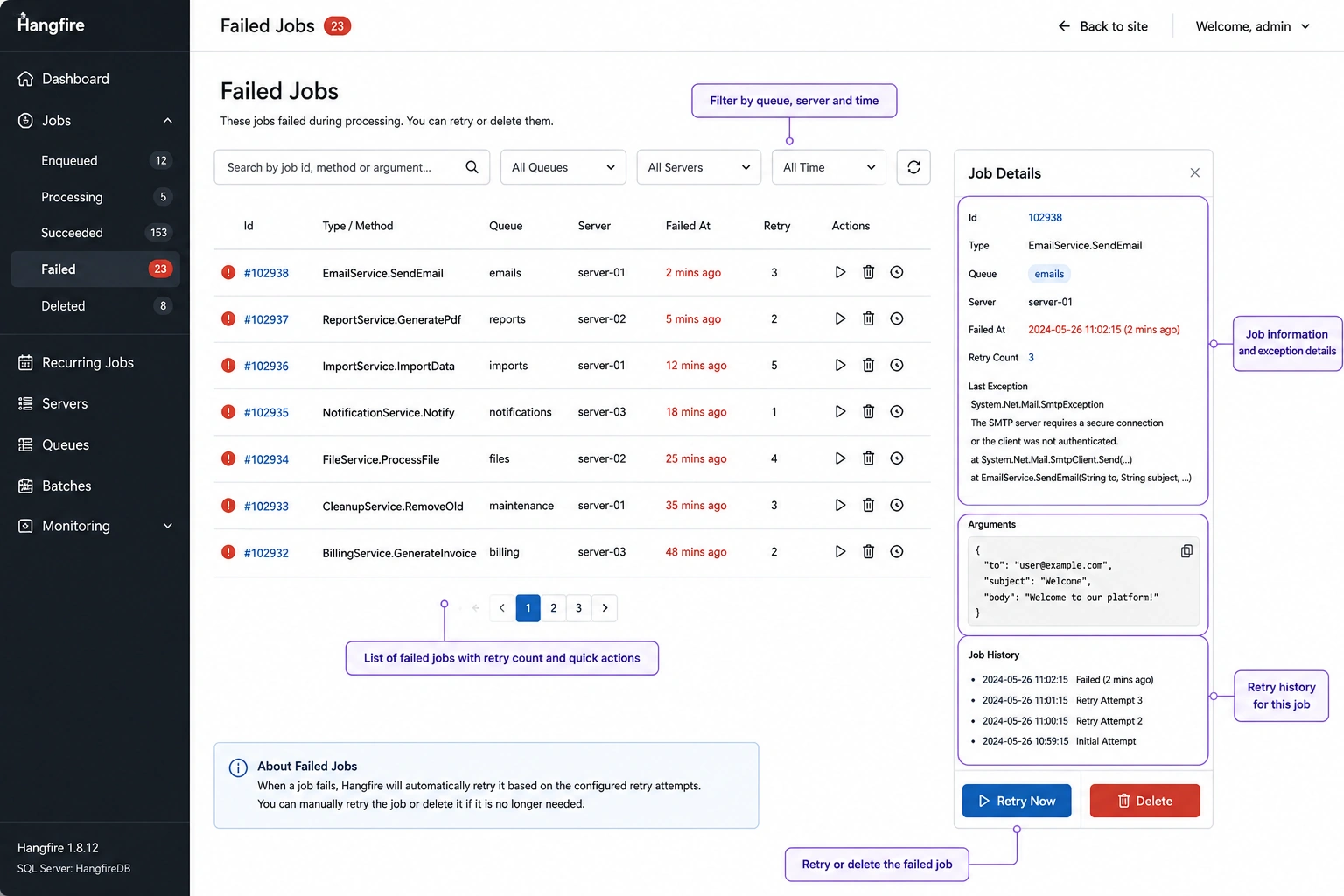
Developers can:
Retry
Delete
Requeue
without writing custom tooling.
Modern Features in Hangfire
Recent versions of Hangfire provide several improvements that make it suitable for cloud-native and enterprise applications.

1. Async/Await Support
Hangfire fully supports asynchronous methods.
public async Task SendEmailAsync()
{
    await _emailService.SendAsync();
}

BackgroundJob.Enqueue<MyService>(
    x => x.SendEmailAsync());
2. Built-in Dependency Injection
Works naturally with ASP.NET Core's built-in DI container.
No custom job activator is required for most applications.
3. Distributed Job Processing
Multiple application instances can process jobs simultaneously using the same storage.
    Server A
      \
       SQL Server
      /
Server B
Only one server executes a specific job.
Perfect for Kubernetes and cloud deployments.
4. Queue Prioritization
Configure multiple queues:
critical
emails
reports
default
Critical jobs can execute before less important ones.
5. Dashboard Authorization
Restrict dashboard access.
    app.UseHangfireDashboard("/hangfire",
    new DashboardOptions
    {
        Authorization =
        [
            new MyAuthorizationFilter()
        ]
    });
Never expose the dashboard publicly without authentication.
6. Cancellation Token Support
Gracefully stop jobs during application shutdown.
 public async Task ProcessAsync(
    CancellationToken token)
{
    while (!token.IsCancellationRequested)
    {
        await Task.Delay(1000, token);
    }
}
7. Multiple Storage Providers
Supported storage includes:
SQL Server
PostgreSQL
Redis
MySQL
SQLite
Oracle
In-memory (development/testing)
8. Concurrency Control
Prevent duplicate execution.
[DisableConcurrentExecution(60)]
public void GenerateReport()
{
}
Only one instance runs at a time.
9. Rate Limiting (Hangfire Pro/Ace)
Limit execution frequency.
Example:
Maximum 10 API calls per minute
Maximum 5 report generations simultaneously
Useful for third-party API integrations.
10. Observability and Logging
Hangfire integrates well with modern logging and monitoring tools:
Serilog
Microsoft.Extensions.Logging
Application Insights
OpenTelemetry
Sentry
This enables centralized monitoring of background job execution.
Best Practices
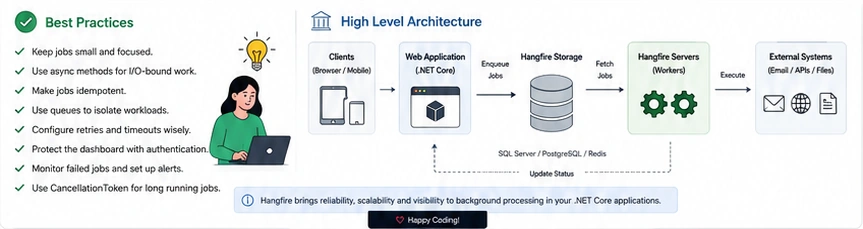
Keep jobs small and focused.
Prefer asynchronous methods for I/O-bound work.
Use Dependency Injection instead of static methods.
Separate workloads into dedicated queues.
Protect the Hangfire Dashboard with authentication.
Configure retry policies appropriately.
Use recurring jobs for scheduled tasks rather than timers.
Make jobs idempotent so retries don't produce duplicate side effects.
Use
CancellationTokento support graceful shutdowns.Monitor failed jobs and set up alerts for recurring failures.
Common Use Cases
| Scenario | Recommended Job Type |
|---|---|
| Send welcome email | Fire-and-Forget |
| Generate monthly reports | Recurring |
| Process uploaded file | Fire-and-Forget |
| Send reminder after 24 hours | Delayed |
| Import CSV then generate report | ContinueWith |
| Bulk notifications | Batch (Pro) |
| Database cleanup | Recurring |
| Sync with external APIs | Recurring or Queue-based |
Conclusion
Hangfire is a robust and production-ready solution for background processing in .NET Core applications. Its persistent storage, automatic retries, scheduling capabilities, and monitoring dashboard make it significantly more reliable than implementing custom background workers for many scenarios.
Whether you need to send emails, generate reports, process files, or schedule recurring maintenance tasks, Hangfire provides a clean programming model with strong integration into ASP.NET Core's dependency injection and logging infrastructure. By organizing jobs into queues, securing the dashboard, and following best practices such as idempotent job design and proper retry handling, teams can build scalable and resilient background processing systems with minimal effort.

Join the conversation! Your thoughts help the community grow.