
It uses strongly-typed delegates to log messages, which means no more messing around with string manipulating at runtime. It’s like having a pre-baked log template that’s ready to go whenever you need it.
A Simple Comparison with Benchmark
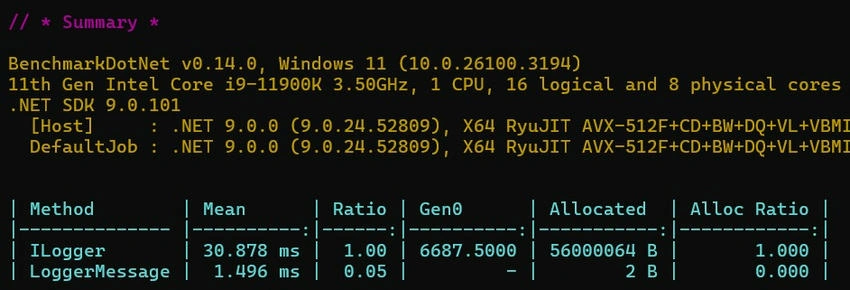
I tested two ways to log 1M user IDs.
- ILogger extension methods: Most of us are used to this. It formats the log message at runtime, which can be slow and memory-heavy.
- LoggerMessage: This pre-compiles the log template, so it’s lightning-fast and super lightweight.
Why Is It So Fast?
- ILogger extension methods: Every time you log, it has to parse the template, format the string, and allocate memory for the result. This happens every single time you log something.
- LoggerMessage: The log template is pre-compiled, so there’s no runtime string formatting.
It uses a reusable Action, so it just plugs in the values and logs the message. While there's still a small amount of work to insert the values, it's drastically faster than full string formatting. No extra work, no extra memory.
Some Pitfalls and Considerations
- Not Always Necessary: For simple, infrequent logging, the performance gains of LoggerMessage might not be noticeable.
- Context: LoggerMessage primarily focuses on the formatting aspect. It doesn't inherently provide richer contextual information..We'll still need to handle things like log levels, event IDs, and structured logging separately.
C#
public static class LoggerMessageTemplates
{
    // A reusable logging delegate for informational logs
    private static readonly Action<ILogger, int, Exception> _logInfo =
        LoggerMessage.Define<int>(
            LogLevel.Information,
            new EventId(1, "LoggerMessageTemplates"),
            "Processing user from template: {UserId}");

    // Helper method for informational logs
    public static void LogInfo(this ILogger logger, int userId)
    {
        _logInfo(logger, userId, null!); // For info, pass null for the exception parameter
    }
}
Benchmark Code & Result
C#
[Benchmark(Baseline = true)]

public Task ILogger()
{
	for (int userId = 1; userId <= 1000000; userId++)
	{
		_logger.LogInformation("Processing user {userId}", userId);
	}
	return Task.CompletedTask;
}
[Benchmark]
public Task LoggerMessage()
{
	for (int userId = 1; userId <= 1000000; userId++)
	{
		_logger.LogInfo(userId);
	}
	return Task.CompletedTask;
}

Join the conversation! Your thoughts help the community grow.