
Introduction
In this article, we will learn how to create a document viewer in an Angular 10 application. We can show many different document formats in Angular applications.
Prerequisites
- Basic Knowledge of Angular 2 or higher
- Visual Studio Code
- Node and NPM installed
- Bootstrap
Create an Angular project by using the following command.
ng new TimepickerOpen this project in Visual Studio Code and install Bootstrap by using the following command.
npm install bootstrap --saveNow open the styles.css file and add the Bootstrap file reference. To add a reference in the styles.css file add this line.
@import '~bootstrap/dist/css/bootstrap.min.css';Now install ngx-doc-viewer by using the following command.
npm install ngx-doc-viewer --saveNow create a new component by using the following command.
ng g c DocviewerNow open the docviewer.component.html file and add the following code.
<div class="row">
    <div class="col-sm-12 btn btn-primary">
        How to Add a Document Viewer in Angular 10
    </div>
</div>
<ngx-doc-viewer [url]="DemoDoc" [viewer]="viewer" style="width:100%;height:100vh;"></ngx-doc-viewer>
Now open the docviewer.component.ts file and add the following code.
import { Component, OnInit } from '@angular/core';
@Component({
  selector: 'app-docviewer',
  templateUrl: './docviewer.component.html',
  styleUrls: ['./docviewer.component.css']
})
export class DocviewerComponent implements OnInit {
  viewer = 'google';
  selectedType = 'docx';
  DemoDoc = "http://www.africau.edu/images/default/sample.pdf";
  constructor() { }
  ngOnInit(): void {
  }
}
Now open the docviewer.component.css file and add the following code.
:host {
    display: block;
}
p {
    font-family: Lato;
}
Open the app.moudle.ts file and add the following code.
import { BrowserModule } from '@angular/platform-browser';
import { NgModule } from '@angular/core';
import { FormsModule } from '@angular/forms';
import { AppRoutingModule } from './app-routing.module';
import { AppComponent } from './app.component';
import { BsDatepickerModule } from 'ngx-bootstrap/datepicker';
import { BrowserAnimationsModule } from '@angular/platform-browser/animations';
import { NgxDocViewerModule } from 'ngx-doc-viewer';
import { DocviewerComponent } from './docviewer/docviewer.component';
@NgModule({
  declarations: [
    AppComponent,
    DocviewerComponent
  ],
  imports: [
    BrowserModule, BrowserAnimationsModule, FormsModule, NgxDocViewerModule,
    AppRoutingModule
  ],
  providers: [DatePipe],
  bootstrap: [AppComponent]
})
export class AppModule { }
Now open the app.component.html file and add the following code.
<app-docviewer></app-docviewer>Now run the project by using the following command: 'npm start'
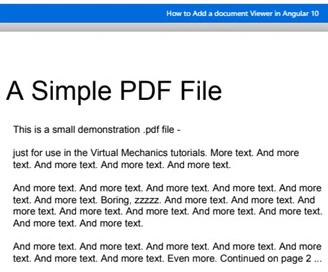
We can view many different document formats using this library. Create another component and check another file format. Create a new component using the following command.
ng g c DocviewerdemoNow open the docviewerdemo.component.html file and add the following code.
<div class="row">
    <div class="col-sm-12 btn btn-primary">
        How to Add a document Viewer in Angular 10
    </div>
  </div>
<ngx-doc-viewer [url]="DemoDoc" [viewer]="viewer" style="width:100%;height:90vh;"></ngx-doc-viewer>
Now open the docviewerdemo.component.ts file and add the following code.
import { Component, OnInit } from '@angular/core';

@Component({
  selector: 'app-docviewerdemo',
  templateUrl: './docviewerdemo.component.html',
  styleUrls: ['./docviewerdemo.component.css']
})
export class DocviewerComponent implements OnInit {
  viewer = 'google';
  selectedType = 'txt';
  DemoDoc = "https://www.le.ac.uk/oerresources/bdra/html/resources/example.txt";
  constructor() { }
  ngOnInit(): void {
  }
}
Now open the app.component.html file and add the following code.
<app-docviewerdemo></app-docviewerdemo>Now run the project by using the following command: 'npm start'
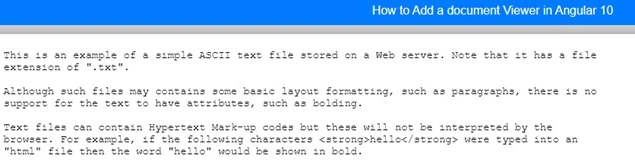
Summary
In this article, we learned how to add a document viewer in Angular 10 applications.


Muhd AmerPosted May 25, 2022, 11:18 PM EDT
How to use this plugin using return data base64 ?
Hasmukh ManiyaPosted Apr 25, 2022, 12:21 AM EDT
Hi, Can you please tell us how we can show base64 encoded documents using this plugin ?
Hamid KhanPosted Dec 17, 2020, 8:48 AM EST
Very informative post thanks
Mahesh ChandTOP 10Posted Dec 8, 2020, 4:20 PM EST
Interesting Sanwar. Thank you. What types of documents can you view in this viewer?