
Introduction
In this example, we will describe how to add a jQuery Datepicker to an MVC application. jQuery is one of the widely used scripting languages for web development. jQuery provides built-in support for a DateTime picker. In this article, I explain how to add a jQuery Datepicker with MVC.
The following is the procedure to add the jQuery Datepicker to an MVC application.
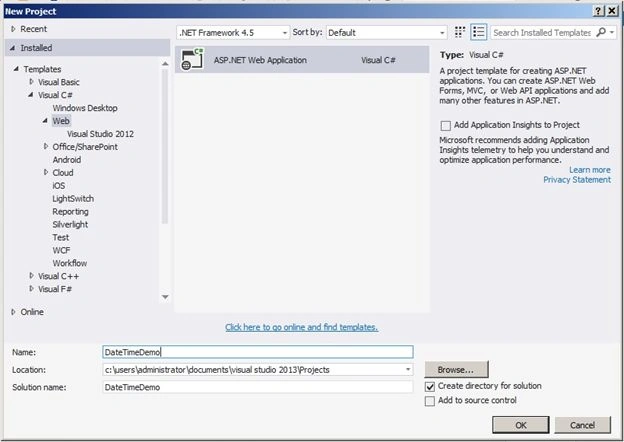
Step 1. Go to New Project and select the Web tab and select ASP.Net Web Application. Provide a suitable name for your project, such as DateTimeDemo, and click the OK button.
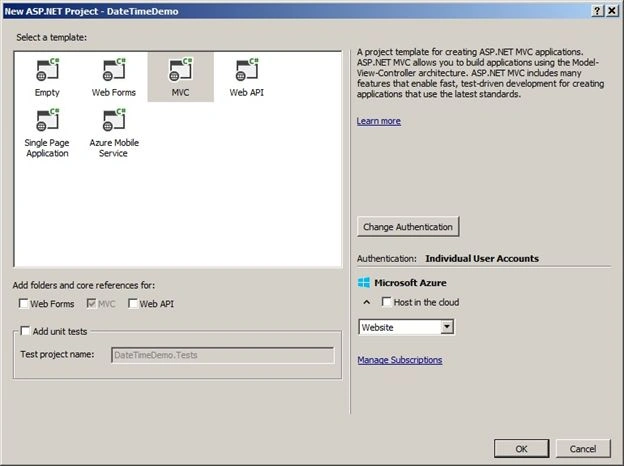
Step 2. Then the following screen will appear. Select the MVC tab and click the OK button.
Step 3. A project solution has been created with some pre-defend controllers, scripts and so on. Now go to the Model folder and a class called Employee with three auto-implemented properties like.
public class Employee
{
    [Required]
    [Display(Name = "Id")]
    public int EmpId { get; set; }
    [Display(Name = "Name")]
    [Required]
    public string EmpName { get; set; }
    [Required]
    [Display(Name = "Date Of Birth")]
    [DisplayFormat(ApplyFormatInEditMode = true, DataFormatString = "{0:dd/MMM/yyyy}")]
    public DateTime DOB { get; set; }
}
In this code, I have done some basic Data annotation validation with all those three properties. You can ignore if you want.
Step 4. Now go to the Controllers folder and right-click on the Add Controller option then the following window will appear. Select MVC5 Controller-Empty. Provide a name for the controller, say Employee, and click on the Add button.

Step 5. Controller code will be automatically generated with one Index action method like.
public class EmployeeController : Controller
{
    // GET: Employee
    public ActionResult Index()
    {
        return View();
    }
}
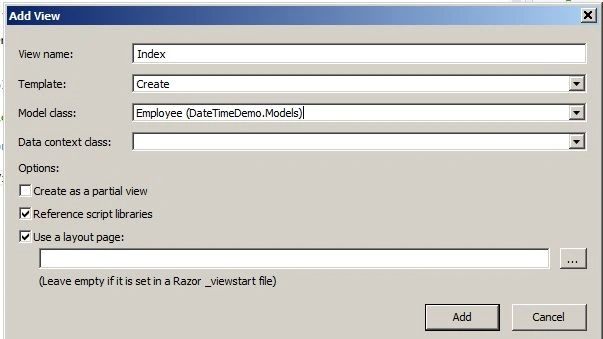
Step 6. Right-click anywhere on the Index action method and click add view then select the Employee model class and add that view of type Create as in the following.
Step 7. Then the Employee Create view will be automatically generated with the following code.
@model DateTimeDemo.Models.Employee
@{
    ViewBag.Title = "Index";
}
<h2>Index</h2>

@using (Html.BeginForm())
{
    @Html.AntiForgeryToken()

    <div class="form-horizontal">
        <h4>Employee</h4>
        <hr />
        @Html.ValidationSummary(true, "", new { @class = "text-danger" })
        <div class="form-group">
            @Html.LabelFor(model => model.EmpId, htmlAttributes: new { @class = "control-label col-md-2" })
            <div class="col-md-10">
                @Html.EditorFor(model => model.EmpId, new { htmlAttributes = new { @class = "form-control" } })
                @Html.ValidationMessageFor(model => model.EmpId, "", new { @class = "text-danger" })
            </div>
        </div>
        <div class="form-group">
            @Html.LabelFor(model => model.EmpName, htmlAttributes: new { @class = "control-label col-md-2" })
            <div class="col-md-10">
                @Html.EditorFor(model => model.EmpName, new { htmlAttributes = new { @class = "form-control" } })
                @Html.ValidationMessageFor(model => model.EmpName, "", new { @class = "text-danger" })
            </div>
        </div>
        <div class="form-group">
            @Html.LabelFor(model => model.DOB, htmlAttributes: new { @class = "control-label col-md-2" })
            <div class="col-md-10">
                @Html.EditorFor(model => model.DOB, new { htmlAttributes = new { @class = "form-control", placeholder = "Employee Date Of Birth", @readonly = "true" } })
                @Html.ValidationMessageFor(model => model.DOB, "", new { @class = "text-danger" })
            </div>
        </div>
        <div class="form-group">
            <div class="col-md-offset-2 col-md-10">
                <input type="submit" value="Create" class="btn btn-default" />
            </div>
        </div>
    </div>
}
<div>
    @Html.ActionLink("Back to List", "Index")
</div>
@section Scripts {
}
I have made some basic changes to the HTML of the DOB properties of this model, you may ignore it if you want.
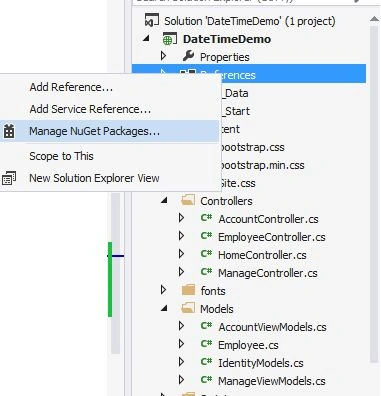
Step 8. Now we need to add the reference of jQueryUi to the project. By default, Visual Studio will not add a reference to jQueryUI for us. So to add the jQueryUi reference right-click on the References tab then select Manage NuGet Packages as in the following.
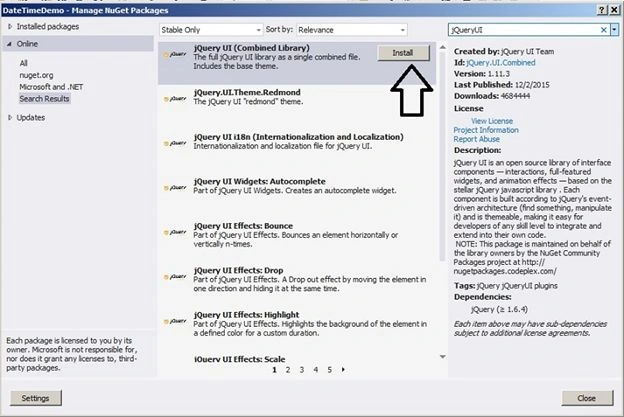
Step 9. Now search for jQueryUI and select Install to install it.
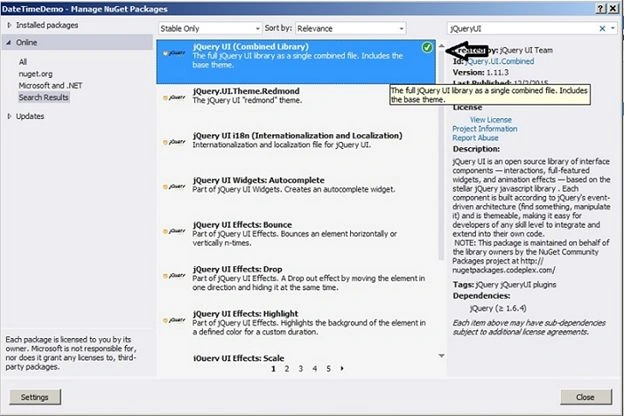
If your project already has the reference of jQueryUI then it will show as in the following tik mark.
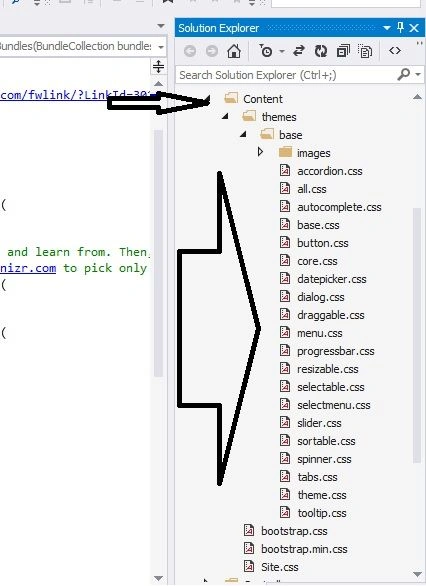
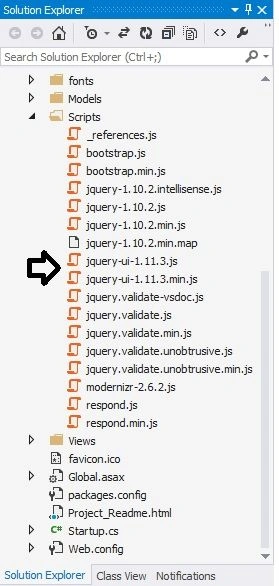
Step 10. Once the references for jQueryUI have been added to your project you can check your Content and Scripts folder and it will have the files showing in the following images.
Step 11. Now simply go to the App_Start folder and open BundleConfig.cs. There will be some default code there. Leave the code and add the following code.
// Create bundle for jQueryUI
// js
bundles.Add(new ScriptBundle("~/bundles/jqueryui").Include(
    "~/Scripts/jquery-ui-{version}.js"));

// css
bundles.Add(new StyleBundle("~/Content/cssjqryUi").Include(
    "~/Content/jquery-ui.css"));
The preceding code will create a bundle for jQueryUI scripts and CSS. Now you just need to add those bundles to the page where you want the DatePicker.
Step 12. Now go to the index view and add the following code to the Scripts section of the view.
@section Scripts {
    @Scripts.Render("~/bundles/jqueryui")
    @Styles.Render("~/Content/cssjqryUi")

    <script type="text/javascript">
        $(document).ready(function () {
            $('input[type=datetime]').datepicker({
                dateFormat: "dd/M/yy",
                changeMonth: true,
                changeYear: true,
                yearRange: "-60:+0"
            });
        });
    </script>
}
Step 13. That's it. Run the Index view and you will get the date picker as in the following.
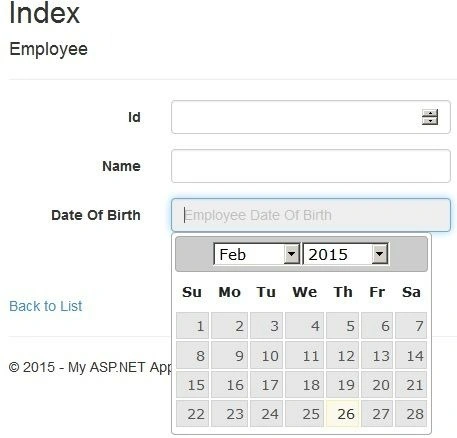
Notice the code inside scraps I have used the following code there.
dateFormat: "dd/M/yy",
changeMonth: true,
changeYear: true,
yearRange: "-60:+0"
These are the customizations of jQueryUI that provide customization of the DatePicker depending on the needs of the developer. For all the default customizations go through jQuery Documentation.
Summary
In this illustration, you came to understand how to add a DatePicker to MVC. Download the sample code for a better understanding. Thanks. I would like to get feedback from my readers. Please post your feedback, questions, or comments about this article.


Anandu G NathPosted Feb 21, 2024, 1:22 AM EST
Nice article
Jasmine MerchantPosted Nov 16, 2020, 1:16 AM EST
Great article with step by step guidance, solved my problem
shiva kskPosted Jun 19, 2020, 2:49 AM EDT
Hi you have edit date code send me manish
Mahavir SharmaPosted Jun 13, 2019, 1:02 AM EDT
Nice Article and solved my problems thanks
احمد صدقیPosted Mar 14, 2019, 9:07 PM EDT
How can I add TimePicker in it?
Babeyo ShafiqPosted Jan 25, 2019, 9:44 PM EST
Thanks alot, great help.
DennisPosted Dec 17, 2018, 8:39 AM EST
I am using MVC 5.2. Would you happen to know why placeholder is not working?
Yogesh VedpathakPosted Dec 26, 2017, 12:37 AM EST
Nice article but how to change backcolor of DatePicker ?.
satyesh soniPosted Nov 9, 2017, 7:10 PM EST
Hi, what can i do, if i want date in dd/MM/yyyy format. your code is displayed date 02/Nov/2017. i don't want it. kindly help me..my email is [email protected]
Siddi Khadar ValiPosted Sep 7, 2017, 3:10 AM EDT
Thanks you Manish for the Article, Explained the concept in very simple steps. A beginner like me can follow the article and understand the concept very easliy.. Please keep sharing.. I tried the below step to resolve the css issue Updated the path of the jquery-ui.css in Step 11 of the articale as bundles.Add(new StyleBundle("~/Content/cssjqryUi").Include( "~/Content/themes/base/jquery-ui.css"));
Sibin ThomasPosted Aug 9, 2017, 8:25 PM EDT
I am not getting the 'datetimepicker' design properly.
gitika vyasPosted Jun 21, 2017, 1:05 AM EDT
It works fine bit good work fine but not show previos and next button on datetimepickerut not show next and previous image in datetime picker
Zaid AhmedPosted Apr 22, 2017, 7:38 AM EDT
It gives me an error of layout page render...... what should i do?
abhishek singhPosted Apr 20, 2017, 3:08 AM EDT
Nice Article..Thanks a lot .
Ramadoss EPosted Dec 12, 2016, 12:03 AM EST
Nice Article. Easy to Understand
AathiraPosted Oct 23, 2016, 8:28 PM EDT
Great tutorial .Thanks a lot :)
Tarkesh NimjePosted Jun 16, 2016, 2:01 AM EDT
pls tell me how to add timepicker i want to show only time
Ricardo SanchezPosted Jun 12, 2016, 9:04 AM EDT
It fails with over 100 errors
Onald BautPosted May 8, 2016, 12:38 PM EDT
At last.. WooooW!!!!, it worked for me too.. Thanks alot!!
Vipan SharmaPosted Jan 24, 2016, 9:43 PM EST
its not working for me :(
moeen moeenPosted Dec 27, 2015, 3:47 AM EST
thanks it helped me
Doc CanadaPosted Aug 26, 2015, 10:02 AM EDT
A good tutorial, easy to understand and follow for someone like myself that is new to ASP.NET and MVC. My thanks for sharing!
Manish Kumar ChoudharyPosted Apr 27, 2015, 12:20 AM EDT
Thanks Santhakumar Munuswamy for reading and commenting on this article.
Manish Kumar ChoudharyPosted Apr 27, 2015, 12:20 AM EDT
Thanks Bruno Péterson.
Santhakumar MunuswamyPosted Apr 25, 2015, 4:07 AM EDT
Thanks for nice article
Santhakumar MunuswamyPosted Apr 25, 2015, 4:07 AM EDT
Good work
Bruno PétersonPosted Apr 21, 2015, 8:24 AM EDT
Thanks for share it!
Manish Kumar ChoudharyPosted Apr 14, 2015, 11:51 PM EDT
Thanks Gowtham Rajamanickam.
Gowtham RajamanickamTOP 100Posted Mar 13, 2015, 1:24 AM EDT
Good article !
Manish Kumar ChoudharyPosted Feb 28, 2015, 8:43 AM EST
Thanks Vithal Wadjem sir.
Vithal WadjeTOP 100Posted Feb 28, 2015, 8:04 AM EST
nice
Tom MohanPosted Feb 27, 2015, 6:52 AM EST
Your are welcome
Manish Kumar ChoudharyPosted Feb 27, 2015, 6:51 AM EST
Thanks Tom Mohan sir.
Tom MohanPosted Feb 27, 2015, 5:52 AM EST
nice
Manish Kumar ChoudharyPosted Feb 27, 2015, 3:21 AM EST
Thanks Abhay Kumar.
Abhay KumarPosted Feb 27, 2015, 2:37 AM EST
very helpful. Thanks for sharing.
Manish Kumar ChoudharyPosted Feb 27, 2015, 2:06 AM EST
Thanks Shridhar Sharma sir.
Shridhar SharmaPosted Feb 27, 2015, 1:59 AM EST
nice article..
Sibeesh VenuTOP 100Posted Feb 27, 2015, 12:48 AM EST
Manish Kumar Choudhary You are welcome.
Manish Kumar ChoudharyPosted Feb 26, 2015, 11:56 PM EST
Thanks Khargesh Rajput.
Khargesh RajputPosted Feb 26, 2015, 11:43 PM EST
nice sir
Manish Kumar ChoudharyPosted Feb 26, 2015, 11:02 PM EST
Thanks Joginder Banger sir.
Manish Kumar ChoudharyPosted Feb 26, 2015, 11:02 PM EST
Thanks Sibeesh Venu.
Joginder BangerPosted Feb 26, 2015, 10:33 PM EST
yeah Good one sir again...
Sibeesh VenuTOP 100Posted Feb 26, 2015, 10:24 PM EST
Nice one!!!
Manish Kumar ChoudharyPosted Feb 26, 2015, 8:16 PM EST
Thanks Rahul Saxena sir.
Rahul Kumar SaxenaTOP 100Posted Feb 26, 2015, 8:02 PM EST
Good Work Manish Kumar Choudhary....