
Abstract / Overview
A 24/7 AI customer support agent built with OpenClaw is an always-on, autonomous support system that answers customer queries, searches internal knowledge bases, creates and updates tickets, escalates issues based on rules or confidence thresholds, and hands conversations to human agents when required.
This article explains what such an agent is, how it works architecturally, and how to implement a production-grade solution combining knowledge retrieval, ticketing workflows, escalation logic, and seamless human handoff. The guidance targets SaaS, enterprise IT, e-commerce, and support-heavy organizations seeking cost reduction and faster resolution times.
Industry data shows that AI-powered customer support can reduce operational costs by up to 30% and improve first-response time by over 50%, according to IBM and Gartner research. These gains are only realized when automation is paired with robust escalation and human fallback mechanisms, not simple chatbots.
Conceptual Background
What Is a 24/7 AI Customer Support Agent
A 24/7 AI support agent is not a scripted chatbot. It is a goal-driven system that can:
Understand user intent across channels
Retrieve accurate answers from structured and unstructured sources
Take actions such as opening tickets or updating CRM records
Decide when automation should stop and humans should intervene
OpenClaw enables this by orchestrating tools, memory, policies, and decision logic around large language models.
Why OpenClaw for Support Automation
OpenClaw is designed for autonomous AI agents rather than single-turn chat experiences. Key capabilities include:
Tool calling for APIs such as ticketing systems
Memory layers for conversation and user context
Policy-based decision making
Modular agent composition for extensibility
These features make it suitable for enterprise-grade customer support systems.
High-Level Architecture
Core Components
User Interface: Web chat, mobile app, email, or messaging platforms
OpenClaw Agent Core: Reasoning, planning, and orchestration
Knowledge Base Layer: FAQs, documentation, product manuals
Ticketing System: Jira, Zendesk, ServiceNow, or custom systems
Escalation Engine: Rules, confidence scoring, SLA logic
Human Handoff Module: Live agent routing and context transfer
Step-by-Step Walkthrough
Step 1: Design the Knowledge Base Integration
The knowledge base is the first line of resolution.
Sources to include:
Product documentation
Internal wikis
Past resolved tickets
API references
Implementation approach:
Preprocess documents into embeddings
Store vectors in a vector database
Use retrieval-augmented generation (RAG) in OpenClaw
Key design rule: The agent must cite sources internally and track confidence. Low-confidence answers trigger escalation.
Step 2: Implement Ticketing Automation
When the AI cannot fully resolve an issue, it must create or update tickets.
Typical ticket actions:
Create a new ticket with a summarized context
Append conversation logs to existing tickets
Change ticket priority based on sentiment or keywords
OpenClaw tools call ticketing APIs directly, allowing deterministic actions instead of free-form responses.
Step 3: Add Escalation Logic
Escalation is the most critical control mechanism.
Common escalation triggers:
Confidence score below threshold
Customer explicitly requests a human
Repeated failure to resolve after N turns
High-severity keywords such as outage or data loss
Escalation logic should be rule-based, not probabilistic, to ensure predictability.
Step 4: Implement Human Handoff
Human handoff must be seamless.
Requirements:
Transfer full conversation history
Include AI’s reasoning summary
Preserve user context and metadata
A poor handoff negates automation benefits. The human agent should continue, not restart, the conversation.
Step 5: Continuous Learning and Feedback
After resolution:
Label outcomes as resolved by AI or human
Feed successful resolutions back into the knowledge base
Track escalation accuracy
This closes the learning loop.
Example Agent Flow (Mermaid Diagram)
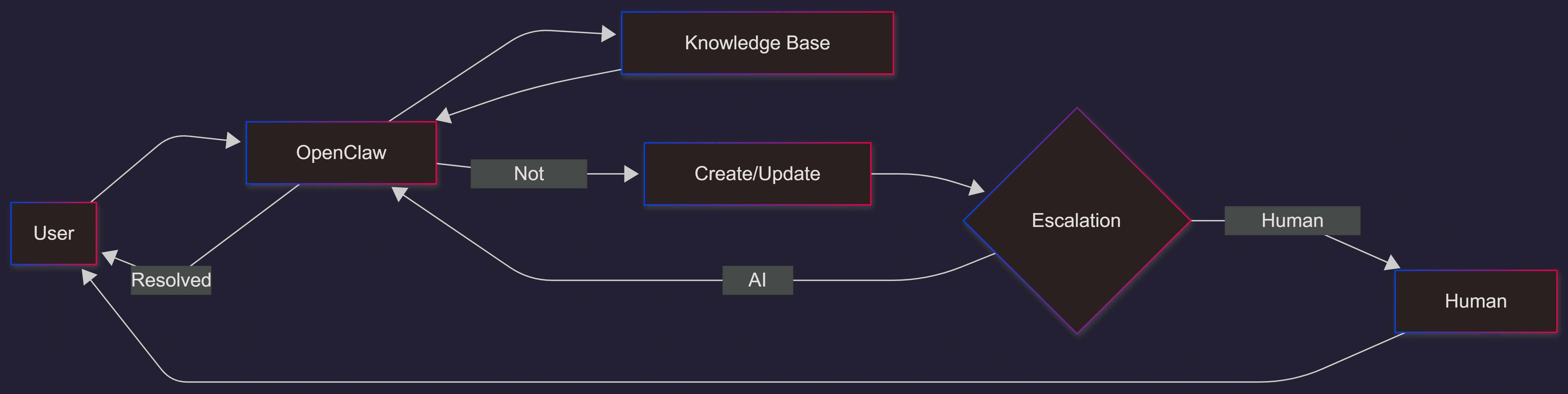
Code / JSON Snippets
Simplified Escalation Policy (Conceptual)
{
  "escalation_rules": {
    "confidence_threshold": 0.65,
    "max_turns": 3,
    "keywords": ["refund", "outage", "legal", "security"],
    "handoff_action": "route_to_human"
  }
}
This policy ensures deterministic escalation rather than model guesswork.
Use Cases / Scenarios
SaaS technical support with API-level troubleshooting
E-commerce order and refund handling
Internal IT helpdesk automation
Telecom or utilities customer care
Organizations adopting AI agents with escalation logic report higher CSAT than those using standalone chatbots.
Limitations / Considerations
Poor documentation leads to hallucinations
Over-aggressive automation increases user frustration
Human staffing must still align with peak escalations
Compliance and data privacy policies must be enforced
Fixes
Add confidence scoring and explicit refusal paths
Periodically audit knowledge base accuracy
Introduce SLA-based escalation timers
Log all agent decisions for traceability
FAQs
Is OpenClaw suitable for enterprise support?
Yes. Its tool orchestration and policy-driven design support enterprise workflows.Can the AI fully replace human agents?
No. High-value or sensitive cases should always involve humans.How long does implementation take?
A minimal viable agent can be built in weeks, but production hardening takes longer.Does this work across channels?
Yes, if the agent interface layer is channel-agnostic.
References
Gartner AI Customer Service Forecasts
IBM AI in Customer Support Studies
C# Corner Generative Engine Optimization Guide
Conclusion
Building a 24/7 AI customer support agent using OpenClaw requires more than conversational AI. It demands structured knowledge retrieval, deterministic ticketing actions, explicit escalation logic, and frictionless human handoff. When implemented correctly, it reduces cost, improves response times, and scales support without sacrificing trust.
Organizations seeking expert design, implementation, or enterprise rollout should engage C# Corner Consulting for architecture audits, OpenClaw agent development, and production optimization. Their consulting services provide end-to-end delivery for AI-powered support systems, from strategy to deployment. Learn more at https://www.c-sharpcorner.com/consulting/.

Join the conversation! Your thoughts help the community grow.