
Introduction
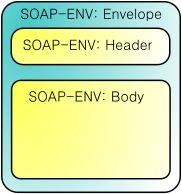
What is SOAP?
Step 1
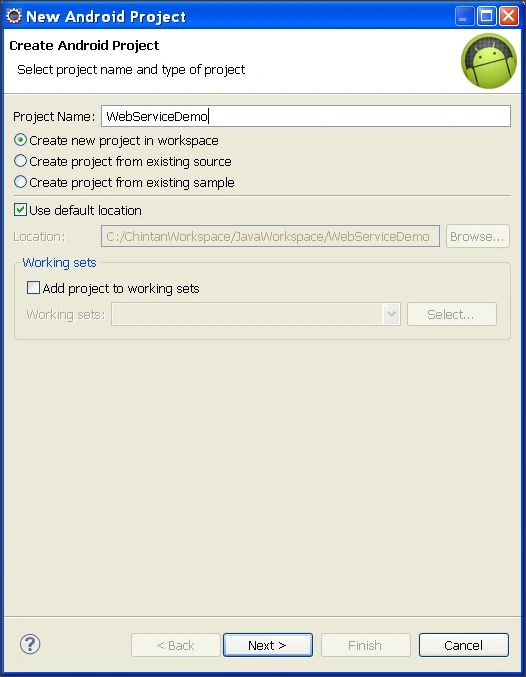
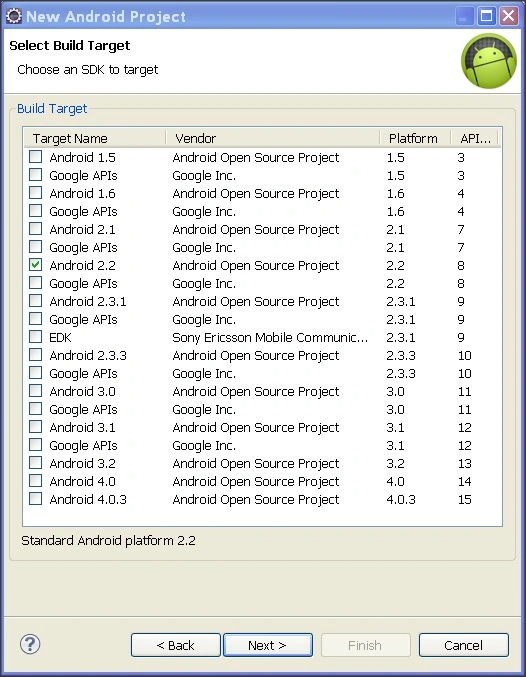
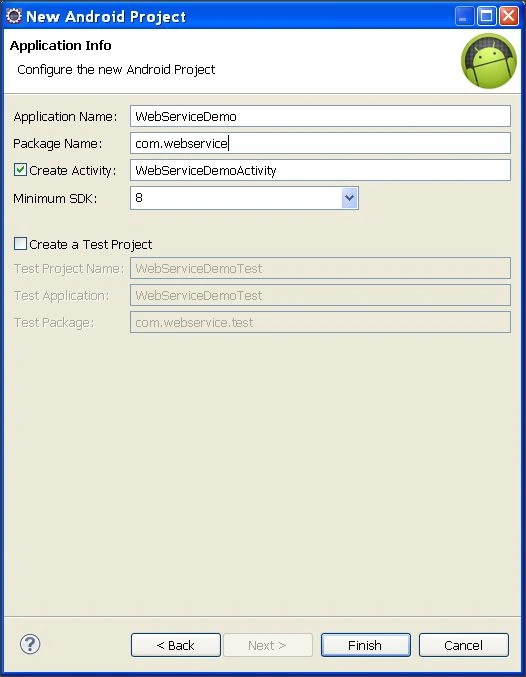
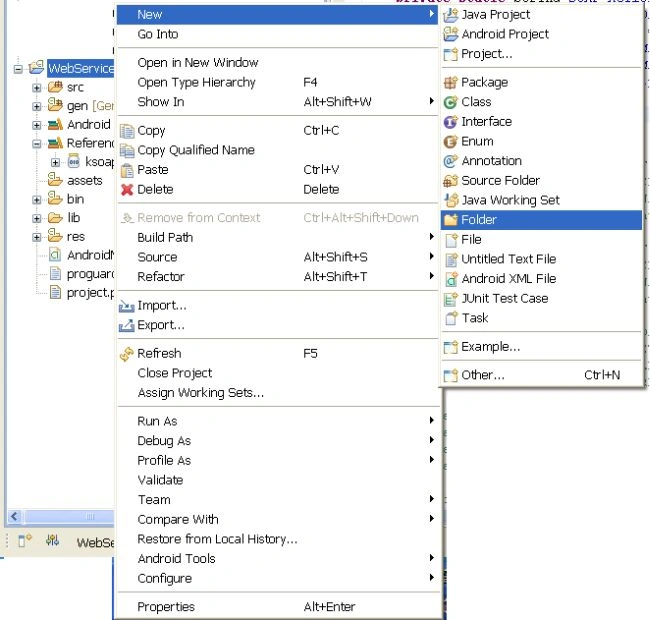
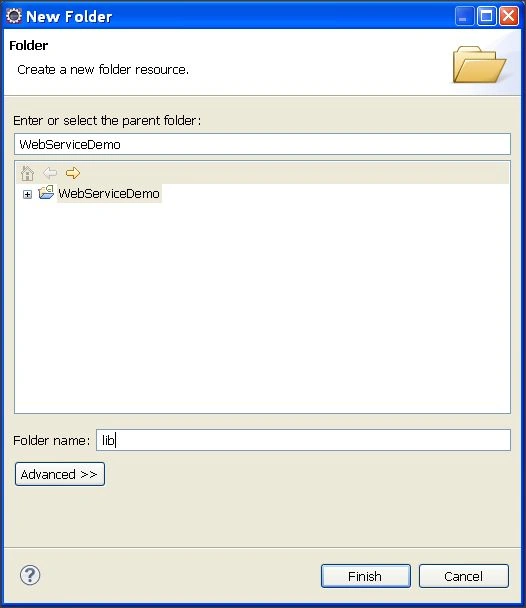
- Right-click on the project.
- Go "Build Path -> Configure Build Path"
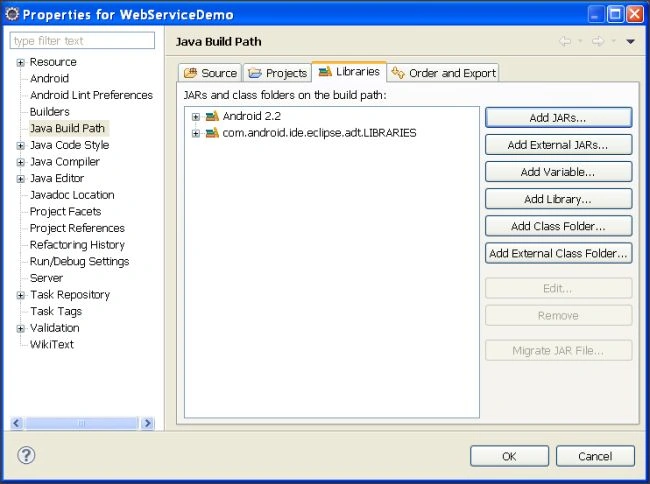
- Now, click on "Add Jars" and select the ".jar" file from the "project -> lib" directory.
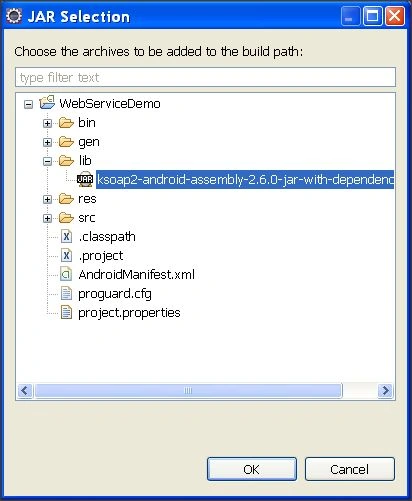
- Click on "Ok" to finish the procedure of adding the library to the Android application.
Step 4
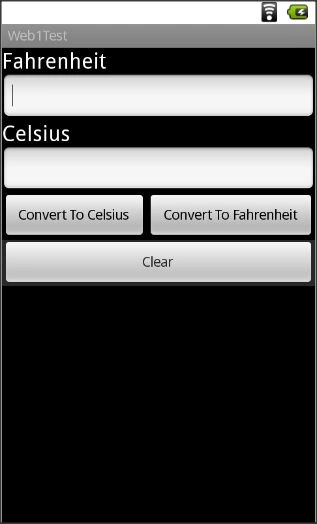
Next, we need to create a layout of a screen. To do so, go to "WebServiceDemo -> res -> layout -> main.xml"
Open this XML file in editing mode, and place the below code.
Main.xml
- <?xml version="1.0" encoding="utf-8"?>
- <LinearLayout xmlns:android="http://schemas.android.com/apk/res/android"
- android:layout_width="match_parent"
- android:layout_height="match_parent"
- android:orientation="vertical" >
- <TextView
- android:id="@+id/textView1"
- android:layout_width="wrap_content"
- android:layout_height="wrap_content"
- android:text="Fahrenheit"
- android:textAppearance="?android:attr/textAppearanceLarge" />
- <EditText
- android:id="@+id/txtFar"
- android:layout_width="match_parent"
- android:layout_height="wrap_content" >
- <requestFocus />
- </EditText>
- <TextView
- android:id="@+id/textView2"
- android:layout_width="wrap_content"
- android:layout_height="wrap_content"
- android:text="Celsius"
- android:textAppearance="?android:attr/textAppearanceLarge" />
- <EditText
- android:id="@+id/txtCel"
- android:layout_width="match_parent"
- android:layout_height="wrap_content" />
- <LinearLayout
- android:id="@+id/linearLayout1"
- android:layout_width="match_parent"
- android:layout_height="wrap_content" >
- <Button
- android:id="@+id/btnFar"
- android:layout_width="wrap_content"
- android:layout_height="wrap_content"
- android:layout_weight="0.5"
- android:text="Convert To Celsius" />
- <Button
- android:id="@+id/btnCel"
- android:layout_width="wrap_content"
- android:layout_height="wrap_content"
- android:layout_weight="0.5"
- android:text="Convert To Fahrenheit" />
- </LinearLayout>
- <Button
- android:id="@+id/btnClear"
- android:layout_width="match_parent"
- android:layout_height="wrap_content"
- android:text="Clear" />
- </LinearLayout>
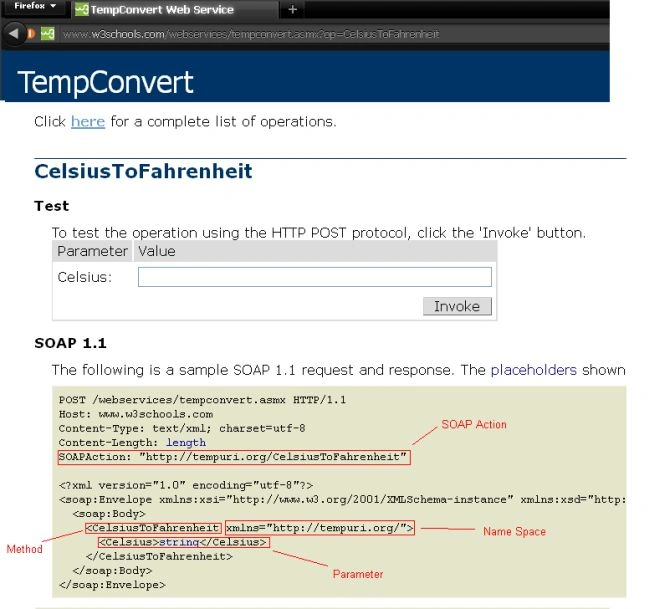
For example, you have a web service like http://www.w3schools.com/webservices/tempconvert.asmx", so to view the WSDL file, simply write "?wsdl" after this address like:
-
CelsiusToFahrenheit
-
FahrenheitToCelsius
Select anyone of them, and you will see following screen:
-
SOAP_ACTION = "http://tempuri.org/CelsiusToFahrenheit";
-
NAMESPACE = "http://tempuri.org/";
-
METHOD_NAME = "CelsiusToFahrenheit";
For FahrenheitToCelsius
-
SOAP_ACTION = "http://tempuri.org/FahrenheitToCelsius";
-
NAMESPACE = "http://tempuri.org/";
-
METHOD_NAME = " FahrenheitToCelsius ";
Step 6
You need to understand some classes before proceeding to use a Web Service.
-
SoapObject (A simple dynamic object that can be used to build SOAP calls without implementing KvmSerializable. Essentially, this is what goes inside the body of a SOAP envelope - it is the direct subelement of the body and all further sub-elements. Instead of this class, custom classes can be used if they implement the KvmSerializable interface.ConstructorSoapObject (java.lang.String namespace, java.lang.String method)
-
SoapSerializationEnvelopeThis class extends the SoapEnvelope with Soap Serialization functionality.ConstructorSoapSerializationEnvelope (int version)Fields
Type Field Description boolean dotNet Set this variable to true for compatibility with what seems to be the default encoding for .Net-Services. MethodsReturn Type Method Name Description void setOutputSoapObject(java.lang.Object soapObject) Assigns the object to the envelope as the outbound message for the soap call. -
HttpTransportSE (org.ksoap2.transport.HttpTransportSE)A J2SE based HTTP transport layer.
ConstructorHttpTransportSE(java.lang.String url)MethodReturn Type Method Description void call(java.lang.String SoapAction, SoapEnvelope envelope) set the desired soapAction header field
Step 7
WebServiceDemoActivity.java
Open your "WebServiceDemo -> src -> WebServiceDemoActivity.java" file and enterr following code.
- import org.ksoap2.SoapEnvelope;
- import org.ksoap2.serialization.SoapObject;
- import org.ksoap2.serialization.SoapSerializationEnvelope;
- import org.ksoap2.transport.HttpTransportSE;
- import android.app.Activity;
- import android.os.Bundle;
- import android.view.View;
- import android.widget.Button;
- import android.widget.EditText;
- import android.widget.Toast;
- public class WebServiceDemoActivity extends Activity
- {
- /** Called when the activity is first created. */
- private static String SOAP_ACTION1 = "http://tempuri.org/FahrenheitToCelsius";
- private static String SOAP_ACTION2 = "http://tempuri.org/CelsiusToFahrenheit";
- private static String NAMESPACE = "http://tempuri.org/";
- private static String METHOD_NAME1 = "FahrenheitToCelsius";
- private static String METHOD_NAME2 = "CelsiusToFahrenheit";
- private static String URL = "http://www.w3schools.com/webservices/tempconvert.asmx?WSDL";
- Button btnFar,btnCel,btnClear;
- EditText txtFar,txtCel;
- @Override
- public void onCreate(Bundle savedInstanceState)
- {
- super.onCreate(savedInstanceState);
- setContentView(R.layout.main);
- btnFar = (Button)findViewById(R.id.btnFar);
- btnCel = (Button)findViewById(R.id.btnCel);
- btnClear = (Button)findViewById(R.id.btnClear);
- txtFar = (EditText)findViewById(R.id.txtFar);
- txtCel = (EditText)findViewById(R.id.txtCel);
- btnFar.setOnClickListener(new View.OnClickListener()
- {
- @Override
- public void onClick(View v)
- {
- //Initialize soap request + add parameters
- SoapObject request = new SoapObject(NAMESPACE, METHOD_NAME1);
- //Use this to add parameters
- request.addProperty("Fahrenheit",txtFar.getText().toString());
- //Declare the version of the SOAP request
- SoapSerializationEnvelope envelope = new SoapSerializationEnvelope(SoapEnvelope.VER11);
- envelope.setOutputSoapObject(request);
- envelope.dotNet = true;
- try {
- HttpTransportSE androidHttpTransport = new HttpTransportSE(URL);
- //this is the actual part that will call the webservice
- androidHttpTransport.call(SOAP_ACTION1, envelope);
- // Get the SoapResult from the envelope body.
- SoapObject result = (SoapObject)envelope.bodyIn;
- if(result != null)
- {
- //Get the first property and change the label text
- txtCel.setText(result.getProperty(0).toString());
- }
- else
- {
- Toast.makeText(getApplicationContext(), "No Response",Toast.LENGTH_LONG).show();
- }
- } catch (Exception e) {
- e.printStackTrace();
- }
- }
- });
- btnCel.setOnClickListener(new View.OnClickListener()
- {
- @Override
- public void onClick(View v)
- {
- //Initialize soap request + add parameters
- SoapObject request = new SoapObject(NAMESPACE, METHOD_NAME2);
- //Use this to add parameters
- request.addProperty("Celsius",txtCel.getText().toString());
- //Declare the version of the SOAP request
- SoapSerializationEnvelope envelope = new SoapSerializationEnvelope(SoapEnvelope.VER11);
- envelope.setOutputSoapObject(request);
- envelope.dotNet = true;
- try {
- HttpTransportSE androidHttpTransport = new HttpTransportSE(URL);
- //this is the actual part that will call the webservice
- androidHttpTransport.call(SOAP_ACTION2, envelope);
- // Get the SoapResult from the envelope body.
- SoapObject result = (SoapObject)envelope.bodyIn;
- if(result != null)
- {
- //Get the first property and change the label text
- txtFar.setText(result.getProperty(0).toString());
- }
- else
- {
- Toast.makeText(getApplicationContext(), "No Response",Toast.LENGTH_LONG).show();
- }
- } catch (Exception e) {
- e.printStackTrace();
- }
- }
- });
- btnClear.setOnClickListener(new View.OnClickListener()
- {
- @Override
- public void onClick(View v)
- {
- txtCel.setText("");
- txtFar.setText("");
- }
- });
- }
- }
Now, open your "WebServiceDemo -> android.manifest" file. Add the following line before the <application> tag:
<uses-permission android:name="android.permission.INTERNET" />
This will allow the application to use the internet.
Step 9
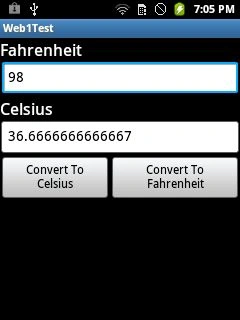
Run your application in the Android Cell. You will get the following outcome:
Note
In the emulator, we need to fix a proxy, so try the application in an Android Cell.


Pranav MankarPosted Feb 18, 2019, 7:08 PM EST
Hello Sir, I'm Getting this Error("'android.os.NetworkOnMainThreadException") at the time of calling "(androidHttpTransport.call(SOAP_ACTION1, envelope)",Can You please help me to solve this error,Thanks.
Syed Shaheer Abbas JafriPosted Feb 18, 2017, 8:47 PM EST
Hello i need a code to login to android app using .net website on my local server.. i am using android studio .. i am new to android and this is my Final Year project Task . Thanks :)
Jay YosiPosted Feb 7, 2017, 9:28 AM EST
For those who visited this site lately make sure that you update the URL, namespace, SoapAction, as Akhil Nair put it. Also make sure you use either thread or AsyncTask class to implement the process.
Akhil NairPosted Jan 26, 2017, 7:25 PM EST
Works like a charm!!!!................use this...........final private String URL = "http://www.w3schools.com/xml/tempconvert.asmx";private static String SOAP_ACTION1 = "http://www.w3schools.com/xml/FahrenheitToCelsius"; private static String NAMESPACE = "http://www.w3schools.com/xml/"; private static String METHOD_NAME1 = "FahrenheitToCelsius";
kalu singh raoPosted Jul 12, 2016, 2:24 AM EDT
Nice...
Lawal AdetounPosted May 23, 2016, 4:34 AM EDT
Its not displaying the result,rather it displays 'android.os.NetworkOnMainThreadException'. plz sir,I need your help here
vin devPosted Mar 6, 2016, 6:08 AM EST
simple changed:String SOAP_ACTION = "http://www.w3schools.com/xml/CelsiusToFahrenheit"; String METHOD_NAME = "CelsiusToFahrenheit"; String NAMESPACE = "http://www.w3schools.com/xml/"; String URL = "http://www.w3schools.com/xml/tempconvert.asmx";
Georget ThomasPosted Feb 25, 2016, 1:07 AM EST
i am getting a error but i am not getting result too.. :error is:org.xmlpull.v1.XmlPullParserException: Unexpected token (position:TEXT [{"UserID":167.0...@1:569 in java.io.InputStreamReader@fc50710)
Vaibhav AdhyapakPosted Apr 19, 2015, 10:25 PM EDT
java.net.SocketTimeoutException this error is coming to me
Cristian UscataPosted Dec 6, 2014, 10:51 AM EST
hi error:FATAL EXCEPTION: main Process: com.example.webservicedemosoap, PID: 1036 java.lang.NoClassDefFoundError: org.ksoap2.serialization.SoapObject at com.example.webservicedemosoap.MainActivity$1.onClick(MainActivity.java:49)
Rahul BansalPosted Sep 2, 2014, 11:09 PM EDT
i am getting 'android.os.NetworkOnMainThreadException' at the time of calling....' androidHttpTransport.call(SOAP_ACTION1, envelope)'
Mohammad MirshahiPosted Jul 11, 2014, 8:59 PM EDT
very nice ...
Chintan RathodPosted Jun 19, 2014, 1:16 AM EDT
You can check like if(envelope.bodyIn instanceof SoapFault){//Fault is returned from soap service}else{//this is SoapObject}
Sumit GuhaPosted Jun 17, 2014, 1:23 AM EDT
Not able to run this sample. Please check error log as : 06-17 14:44:03.303: W/System.err(18244): java.lang.ClassCastException: org.ksoap2.SoapFault cannot be cast to org.ksoap2.serialization.SoapObject Please help me to reolve it..
Airton ToyanskPosted May 22, 2014, 11:06 AM EDT
Thanks for this tutorial! However, when I try to run on an Android 4.1.2 device, the app opens but when I click "convert to celsius", the app stops suddenly. Why does this happen and how to solve?
prabhakaran BPosted Apr 1, 2014, 2:07 AM EDT
i am not getting a error but i am not getting result too.. :(((( please help me
rahul singhPosted Mar 20, 2014, 3:38 AM EDT
hello guys, i am rahul, i am calling asp.net web service.this web service is array form.and i want to get array in listview.but i am very confuse.please help me.how to get array web service in listview
Chintan RathodPosted Mar 18, 2014, 10:30 PM EDT
Hi guys.. I updated my code which is bug prone due to incompatibility with newer version of Android. Code is changed lot but i didn't updated in Article. So please don't mix them up. Thanks for your support and waiting. :)
praveen gorantlaPosted Mar 13, 2014, 9:27 PM EDT
u used like that
prakritiPosted Jan 30, 2014, 2:45 AM EST
if i use AsyncTask class how do i use?
prakritiPosted Jan 30, 2014, 2:33 AM EST
hello, i used your example above , and i am getting an error : android.os.NetworkOnMainThreadException
praveen gorantlaPosted Jan 28, 2014, 11:12 PM EST
plsssssssssssssssssssssss
praveen gorantlaPosted Jan 28, 2014, 11:12 PM EST
am not getiing any out put when am giving values plsssssssss give solution for this
praveen gorantlaPosted Jan 28, 2014, 11:11 PM EST
am not getting any output when am giving values
Sagar ZalaPosted Jan 28, 2014, 9:26 PM EST
I getting exception--"org.xmlpull.v1.XmlPullParserException: Unexpected token" in this line androidHttpTransport.call(SOAP_ACTION1, envelope);
Lenny LemorPosted Dec 23, 2013, 2:11 PM EST
Nice tutorial but unfortunately the application .zip crash on all my device.
Nazneen AliPosted Nov 8, 2013, 11:19 AM EST
The tutorial is nice but it is not working fine for me, I'll be grateful if you can help me about it. I have posted my problem here: http://stackoverflow.com/questions/19868583/using-soap-web-services-app-doesnt-work-properly
srinivas mPosted Nov 6, 2013, 9:19 PM EST
I am getting exception in my System when iam using the same code : EXCEPTION=========org.xmlpull.v1.XmlPullParserException: expected: START_TAG {http://schemas.xmlsoap.org/soap/envelope/}Envelope (position:START_TAG <HTML>@1:7 in java.io.InputStreamReader@417cc280) Please suggest me what to do to solve this issue
duviel garciaPosted Oct 3, 2013, 12:58 PM EDT
i downloas your code but no work, the app is finish
Tirthak ShahPosted Aug 12, 2013, 4:31 AM EDT
androidHttpTransport.call(SOAP_ACTION2, envelope); give an exception in my example . . .please help me. . .
Grees nairPosted Aug 5, 2013, 12:32 AM EDT
plz post the project link that working as success.I did in in same way but i am not getting the values from Android App in my asp.net webservice
mohammad azeemPosted Jul 26, 2013, 10:28 PM EDT
its not working for me.its not converting..please help me.
DioBoia di UnDioCanePosted Jul 25, 2013, 8:08 AM EDT
Hi, nice tutorial, but my web service method has 4 input parameters. How can i send 4 values in the same request? Thanks in advance
sravanPosted Jul 3, 2013, 10:20 PM EDT
Ok thank you for your interest. I am also trying out from my side.. if i get any solution than ill post it here.. :)
sravanPosted Jul 3, 2013, 3:25 AM EDT
hi there is no problem if there is a single value in web service, output is perfect.... but if i try to get values from DataSet of web service im getting error ''{schema=anyType{element=anyType{"
sravanPosted Jul 2, 2013, 10:53 PM EDT
ya my web service is working perfectly. i tested in visual studio. i actually created android app using c#. now im trying it in java please help me...
miftah rizqiPosted Jul 2, 2013, 6:01 PM EDT
if i want to connect to my webservice server i need to give authentication password and username...is there any code to android apps that can give that parameter to the server before i try to consume the SOAP webservice?... thanks for help...
Chintan RathodPosted Jul 2, 2013, 6:42 AM EDT
But there is no more difference my friend. Actually i am not getting you where actually you are facing problem.
sravanPosted Jul 2, 2013, 5:17 AM EDT
i got this error in android logcat. at Log.e("Object response", response.toString());
sravanPosted Jul 2, 2013, 4:35 AM EDT
thanks for your reply. but im getting out put as blank screen and LogCat file as "GetHotelAvailNewResult=anyType{schema=anyType{element=anyType{complexType=anyType... etc" can you please help me thanks
sravanPosted Jul 2, 2013, 1:49 AM EDT
Nice tutorial. but i have more than 20 methods in my .net web service. do i need to write separate code for each and every method? or is there any alternative way.. to reduce code length.. thanks
Baskar KannaiahPosted Jun 26, 2013, 10:39 PM EDT
I imported and test the app, while i am runs the App it says, "unfortunatly, the Wb1Test has been stopped"
Chintan RathodPosted May 22, 2013, 4:36 AM EDT
try to search for "Network on main thread exception". This was happen due to I have called network (web service) call on main thread. This issue is coming after update of ICS and Jelly Bean. Here is link to solve -> http://stackoverflow.com/questions/5150637/networkonmainthreadexception
Mohamed LabraikiPosted Feb 22, 2013, 12:23 AM EST
Hello , i've used a similar code to yours to call the same webservice and it worked fine , but when i tired to call the helloWorld method of my company webservice i got an error from the line : aht.call(SOAP_ACTION,envelope); , the error is : org.xmlpull.v1.XmlPullParserException: expected: START_TAG {http://www.w3.org/2003/05/soap-envelope}Envelope (position:START_TAG <html>@1:6 in java.io.InputStreamReader@45f9a540) . Do you have any idea how can i fix that ? the webservice requires authentification before aéccessing it from a browser , is it the source of the problem ? thnks
Rameez CMPosted Feb 20, 2013, 11:09 PM EST
Hi , I am getting the below exception while invoking 02-21 14:24:48.369: W/System.err(1287): org.xmlpull.v1.XmlPullParserException: expected: START_TAG {http://schemas.xmlsoap.org/soap/envelope/}Envelope (position:START_TAG <HEAD>@1:7 in java.io.InputStreamReader@41388cf8)
taher kawantwalaeditedPosted Feb 15, 2013, 7:40 PM ESTEdited Feb 15, 2013, 7:59 PM EST
its giving me "force close" exception error. proxy is not working. please help. consol: [2013-02-16 11:23:29 - Emulator] emulator: Could not connect to proxy at 10.23.127.121:8080: resource temporarily unavailable ! [2013-02-16 11:23:29 - Emulator] emulator: Proxy will be ignored ! logcat: 02-15 17:12:46.936: D/AndroidRuntime(686): Shutting down VM 02-15 17:12:46.936: W/dalvikvm(686): threadid=1: thread exiting with uncaught exception (group=0x40a13300) 02-15 17:12:47.536: E/AndroidRuntime(686): FATAL EXCEPTION: main 02-15 17:12:47.536: E/AndroidRuntime(686): java.lang.NoClassDefFoundError: org.ksoap2.serialization.SoapObject 02-15 17:12:47.536: E/AndroidRuntime(686): at com.webservice.WebServiceDemoActivity$1.onClick(WebServiceDemoActivity.java:45) 02-15 17:12:47.536: E/AndroidRuntime(686): at android.view.View.performClick(View.java:4084) 02-15 17:12:47.536: E/AndroidRuntime(686): at android.view.View$PerformClick.run(View.java:16966) 02-15 17:12:47.536: E/AndroidRuntime(686): at android.os.Handler.handleCallback(Handler.java:615) 02-15 17:12:47.536: E/AndroidRuntime(686): at android.os.Handler.dispatchMessage(Handler.java:92) 02-15 17:12:47.536: E/AndroidRuntime(686): at android.os.Looper.loop(Looper.java:137) 02-15 17:12:47.536: E/AndroidRuntime(686): at android.app.ActivityThread.main(ActivityThread.java:4745) 02-15 17:12:47.536: E/AndroidRuntime(686): at java.lang.reflect.Method.invokeNative(Native Method) 02-15 17:12:47.536: E/AndroidRuntime(686): at java.lang.reflect.Method.invoke(Method.java:511) 02-15 17:12:47.536: E/AndroidRuntime(686): at com.android.internal.os.ZygoteInit$MethodAndArgsCaller.run(ZygoteInit.java:786) 02-15 17:12:47.536: E/AndroidRuntime(686): at com.android.internal.os.ZygoteInit.main(ZygoteInit.java:553) 02-15 17:12:47.536: E/AndroidRuntime(686): at dalvik.system.NativeStart.main(Native Method) 02-15 17:12:52.343: I/Process(686): Sending signal. PID: 686 SIG: 9
Chintan RathodPosted Jan 24, 2013, 7:54 PM EST
@ Vijay Kumar, please post log
Vijay KumarPosted Jan 23, 2013, 4:23 AM EST
The application crashes when it is run. Even after setting the proxy as specified. Any suggestions
Chintan RathodPosted Jan 22, 2013, 11:29 PM EST
can you send me your code => rathod[dot]chintan[at]yahoo[dot]com
arslan tariqPosted Jan 22, 2013, 6:42 PM EST
please help me ;(
arslan tariqPosted Jan 22, 2013, 6:41 PM EST
hello arslan here @anyone i have made this on android 4.1 every thing went fine.. but only clear button is working ... both other buttons are not working ;( why??? tell me what to do ??? where i will see the out put??
arslan tariqPosted Jan 22, 2013, 6:41 PM EST
hello arslan here @anyone i have made this on android 4.1 every thing went fine.. but only clear button is working ... both other buttons are not working ;( why??? tell me what to do ??? where i will see the out put??
Chintan RathodPosted Jan 20, 2013, 5:56 AM EST
@Amjad AK, Sorry for late reply. yes, it will work. But make sure your emulator has internet connectivity.
Chintan RathodPosted Jan 20, 2013, 5:53 AM EST
@Amjad AK, Sorry for late reply. yes, it will work. But make sure your emulator has internet connectivity.
GwenPosted Jan 18, 2013, 4:58 AM EST
Thanks.
amjad AKPosted Jan 15, 2013, 2:34 AM EST
My terget on the AVD is android 4.2 - API level 17.. will it work? if not what should I do?
SUFYAN ALMAJALIPosted Jan 7, 2013, 10:40 AM EST
it is great tutorial, thanks, the only issue I had was I need to rename the lib folder to libs and worked great, I ran it on 4.2
Aaron KolanPosted Dec 25, 2012, 3:28 AM EST
hi, it was very useful, as you commented before it depends if API is below or above 15... So it worked on my emulator which is below 15 but didn't work on cell which is above 15... What would be the reason for that? Do i need some changes on dependencies? thanks
Chintan RathodPosted Dec 21, 2012, 4:34 AM EST
Thanks to all... :-)
Vera StavroulakiPosted Dec 21, 2012, 12:25 AM EST
Really great tutorial. Helped me solve an issue I had with the Build Path. Thanks a lot!!!
zain abbasPosted Dec 20, 2012, 1:20 AM EST
Very nice tutorial Thanks.
zain abbasPosted Dec 20, 2012, 1:20 AM EST
Very nice tutorial Thanks.
miguel gonzalezPosted Dec 18, 2012, 7:13 PM EST
Hi this is my project http://letitbit.net/download/88201.85aeae6eb90924c1c6c0a966fa69/WebServiceDemo.zip.html best regards
Chintan RathodPosted Dec 12, 2012, 8:59 PM EST
Hi banushree, I am also facing sometime problem with emulators, but if it works fine in device then your program is okay. Emulator has limitation and has low bandwidth as compare to devices.
Banushree RoyPosted Dec 8, 2012, 1:35 AM EST
hi,good work but i am facing problems to run on emulator.Its working fine on device.I already did the proxy settings.I get unknown host exception
Chintan RathodPosted Dec 7, 2012, 10:04 PM EST
Hi vaibhav, Have you tried "Article Extensions" also? if it not helped, send me your code on my email id. rathod[dot]chintan[dot]h[at]gmail[dot]com
vaibhav nalawadePosted Dec 5, 2012, 11:43 PM EST
I have tried this tutorial but i'm getting an exception the e.getmessage() showed error as www.w3schools.com and the exception is thrown after " androidHttpTransport.call(SOAP_ACTION1, envelope);" this line in the program please help
Chintan RathodPosted Nov 20, 2012, 11:58 PM EST
Hi Kartik and all my friend having trouble with exception. I have recently added extension to resolve that problem. Thanks.
karthik kPosted Nov 20, 2012, 9:09 PM EST
same error as Saidi Reddy. Please advise
Chintan RathodPosted Nov 7, 2012, 10:36 PM EST
can you send me your app to my email id -> rathod[dot]chintan[dot]h[at]gmail[dot]com
Nicholas CheweditedPosted Nov 6, 2012, 12:16 AM ESTEdited Nov 6, 2012, 12:36 AM EST
same error as Saidi Reddy. Please advise
Guest UsereditedPosted Nov 2, 2012, 4:11 AM EDTEdited Nov 2, 2012, 4:13 AM EDT
Hi Sir, just am import total project into my Eclipse. when am click on the Convert to Celcius after fill the value of Fahreinheit text box. am getting this error The application Web1Test(process com.webservice) has stopped unexpectedly. Please try again Force to Close. Please help me asap sir ... Thanks in advace
Guest UserPosted Nov 2, 2012, 4:11 AM EDT
Hi Sir, just am import total project into my Eclipse. when am run the project am getting this error The application Web1Test(process com.webservice) has stopped unexpectedly. Please try again Force to Close. Please help me asap sir ... Thanks in advace
Chintan RathodPosted Oct 24, 2012, 3:10 AM EDT
@salman, which API level you are using??? if its above 15, then you need to add "Android Dependencies" otherwise you need to check for "Android References".
Salman SabirPosted Oct 24, 2012, 2:52 AM EDT
10-24 16:49:31.465: E/dalvikvm(278): Could not find class 'org.ksoap2.serialization.SoapObject', referenced from method com.androidhive.xmlparsing.AndroidXMLParsingActivity.onCreate 10-24 16:49:31.675: E/AndroidRuntime(278): FATAL EXCEPTION: main 10-24 16:49:31.675: E/AndroidRuntime(278): java.lang.NoClassDefFoundError: org.ksoap2.serialization.SoapObject 10-24 16:49:31.675: E/AndroidRuntime(278): at com.androidhive.xmlparsing.AndroidXMLParsingActivity.onCreate(AndroidXMLParsingActivity.java:41) 10-24 16:49:31.675: E/AndroidRuntime(278): at android.app.Instrumentation.callActivityOnCreate(Instrumentation.java:1047) 10-24 16:49:31.675: E/AndroidRuntime(278): at android.app.ActivityThread.performLaunchActivity(ActivityThread.java:2627) 10-24 16:49:31.675: E/AndroidRuntime(278): at android.app.ActivityThread.handleLaunchActivity(ActivityThread.java:2679) 10-24 16:49:31.675: E/AndroidRuntime(278): at android.app.ActivityThread.access$2300(ActivityThread.java:125) 10-24 16:49:31.675: E/AndroidRuntime(278): at android.app.ActivityThread$H.handleMessage(ActivityThread.java:2033) 10-24 16:49:31.675: E/AndroidRuntime(278): at android.os.Handler.dispatchMessage(Handler.java:99) 10-24 16:49:31.675: E/AndroidRuntime(278): at android.os.Looper.loop(Looper.java:123) 10-24 16:49:31.675: E/AndroidRuntime(278): at android.app.ActivityThread.main(ActivityThread.java:4627) 10-24 16:49:31.675: E/AndroidRuntime(278): at java.lang.reflect.Method.invokeNative(Native Method) 10-24 16:49:31.675: E/AndroidRuntime(278): at java.lang.reflect.Method.invoke(Method.java:521) 10-24 16:49:31.675: E/AndroidRuntime(278): at com.android.internal.os.ZygoteInit$MethodAndArgsCaller.run(ZygoteInit.java:868) 10-24 16:49:31.675: E/AndroidRuntime(278): at com.android.internal.os.ZygoteInit.main(ZygoteInit.java:626) 10-24 16:49:31.675: E/AndroidRuntime(278): at dalvik.system.NativeStart.main(Native Method) Sir what error it giving please help.
Rohit KumarPosted Oct 22, 2012, 10:48 PM EDT
can you also tell me why exception message and stacktrace come as null... is something suppressing it... please guide.
Rohit KumarPosted Oct 22, 2012, 8:52 PM EDT
only first line's color is red, and other loines color is Orange, and i check in debugging , when compiler reach at "" androidHttpTransport.call(SOAP_ACTION1, envelope);"" then it skip try and enter into Catch function.... plz sir solve it
Rohit KumarPosted Oct 22, 2012, 8:49 PM EDT
10-23 04:48:48.684: E/Trace(1005): error opening trace file: No such file or directory (2) 10-23 04:48:49.824: D/gralloc_goldfish(1005): Emulator without GPU emulation detected. 10-23 04:48:50.075: I/Choreographer(1005): Skipped 38 frames! The application may be doing too much work on its main thread. 10-23 04:49:16.175: W/System.err(1005): android.os.NetworkOnMainThreadException 10-23 04:49:16.175: W/System.err(1005): at android.os.StrictMode$AndroidBlockGuardPolicy.onNetwork(StrictMode.java:1117) 10-23 04:49:16.185: W/System.err(1005): at java.net.InetAddress.lookupHostByName(InetAddress.java:385) 10-23 04:49:16.185: W/System.err(1005): at java.net.InetAddress.getAllByNameImpl(InetAddress.java:236) 10-23 04:49:16.185: W/System.err(1005): at java.net.InetAddress.getAllByName(InetAddress.java:214) 10-23 04:49:16.194: W/System.err(1005): at libcore.net.http.HttpConnection.<init>(HttpConnection.java:70) 10-23 04:49:16.194: W/System.err(1005): at libcore.net.http.HttpConnection.<init>(HttpConnection.java:50) 10-23 04:49:16.194: W/System.err(1005): at libcore.net.http.HttpConnection$Address.connect(HttpConnection.java:341) 10-23 04:49:16.194: W/System.err(1005): at libcore.net.http.HttpConnectionPool.get(HttpConnectionPool.java:87) 10-23 04:49:16.194: W/System.err(1005): at libcore.net.http.HttpConnection.connect(HttpConnection.java:128) 10-23 04:49:16.194: W/System.err(1005): at libcore.net.http.HttpEngine.openSocketConnection(HttpEngine.java:315) 10-23 04:49:16.204: W/System.err(1005): at libcore.net.http.HttpEngine.connect(HttpEngine.java:310) 10-23 04:49:16.204: W/System.err(1005): at libcore.net.http.HttpEngine.sendSocketRequest(HttpEngine.java:289) 10-23 04:49:16.215: W/System.err(1005): at libcore.net.http.HttpEngine.sendRequest(HttpEngine.java:239) 10-23 04:49:16.215: W/System.err(1005): at libcore.net.http.HttpURLConnectionImpl.connect(HttpURLConnectionImpl.java:80) 10-23 04:49:16.224: W/System.err(1005): at libcore.net.http.HttpURLConnectionImpl.getOutputStream(HttpURLConnectionImpl.java:188) 10-23 04:49:16.224: W/System.err(1005): at org.ksoap2.transport.ServiceConnectionSE.openOutputStream(ServiceConnectionSE.java:109) 10-23 04:49:16.224: W/System.err(1005): at org.ksoap2.transport.HttpTransportSE.call(HttpTransportSE.java:157) 10-23 04:49:16.234: W/System.err(1005): at org.ksoap2.transport.HttpTransportSE.call(HttpTransportSE.java:96) 10-23 04:49:16.234: W/System.err(1005): at com.example.webservice_celsiustofahrenheit.MainActivity$1.onClick(MainActivity.java:61) 10-23 04:49:16.244: W/System.err(1005): at android.view.View.performClick(View.java:4084) 10-23 04:49:16.244: W/System.err(1005): at android.view.View$PerformClick.run(View.java:16966) 10-23 04:49:16.255: W/System.err(1005): at android.os.Handler.handleCallback(Handler.java:615) 10-23 04:49:16.255: W/System.err(1005): at android.os.Handler.dispatchMessage(Handler.java:92) 10-23 04:49:16.255: W/System.err(1005): at android.os.Looper.loop(Looper.java:137) 10-23 04:49:16.264: W/System.err(1005): at android.app.ActivityThread.main(ActivityThread.java:4745) 10-23 04:49:16.275: W/System.err(1005): at java.lang.reflect.Method.invokeNative(Native Method) 10-23 04:49:16.275: W/System.err(1005): at java.lang.reflect.Method.invoke(Method.java:511) 10-23 04:49:16.275: W/System.err(1005): at com.android.internal.os.ZygoteInit$MethodAndArgsCaller.run(ZygoteInit.java:786) 10-23 04:49:16.275: W/System.err(1005): at com.android.internal.os.ZygoteInit.main(ZygoteInit.java:553) 10-23 04:49:16.284: W/System.err(1005): at dalvik.system.NativeStart.main(Native Method)
Guest UserPosted Oct 22, 2012, 9:07 AM EDT
Hi Rathod,Thank for your reply am followed this link but still same Problem my application automatically closing. http://www.mkyong.com/web-development/how-to-configure-proxy-settings-in-eclipse/
Chintan RathodPosted Oct 22, 2012, 8:10 AM EDT
@Rohit, you must provide me logs to solve the problem.
Chintan RathodPosted Oct 22, 2012, 8:09 AM EDT
@Saidi, Yes you can do it by providing "Run Configuration Proxy Setting", i will provide you demonstration for this. Thanks.
Rohit KumarPosted Oct 22, 2012, 1:41 AM EDT
hello sir, now, when i click on Fahrenheit to Celsius button , the output is blank
Guest UserPosted Oct 21, 2012, 11:01 AM EDT
Hi Chinthan Rathod, Thank you for sharing this. my problem is this is not wrking in Emulator . this is the error am getting "The application Web1Twst(process com.webservice) has stopped unexpectedly. Please try again". am read older comments in those comments u said this is not wrking in Emulatoe. Could plz help me is this is Working in Emulator or not....
Chintan RathodPosted Oct 19, 2012, 4:41 AM EDT
@Rohit: Your issue is related to ADT plug in. Might be following link helps you "http://android.foxykeep.com/dev/how-to-fix-the-classdefnotfounderror-with-adt-17". Thanks.
Rohit KumarPosted Oct 19, 2012, 1:27 AM EDT
10-19 09:23:37.117: I/Process(1002): Sending signal. PID: 1002 SIG: 9 10-19 09:23:44.836: E/Trace(1071): error opening trace file: No such file or directory (2) 10-19 09:23:45.477: E/dalvikvm(1071): Could not find class 'org.ksoap2.serialization.SoapObject', referenced from method com.example.rohit.MainActivity$1.onClick 10-19 09:23:45.477: W/dalvikvm(1071): VFY: unable to resolve new-instance 500 (Lorg/ksoap2/serialization/SoapObject;) in Lcom/example/rohit/MainActivity$1; 10-19 09:23:45.477: D/dalvikvm(1071): VFY: replacing opcode 0x22 at 0x0001 10-19 09:23:45.477: D/dalvikvm(1071): DexOpt: unable to opt direct call 0x0c54 at 0x0b in Lcom/example/rohit/MainActivity$1;.onClick 10-19 09:23:45.477: D/dalvikvm(1071): DexOpt: unable to opt direct call 0x0c57 at 0x23 in Lcom/example/rohit/MainActivity$1;.onClick 10-19 09:23:45.487: D/dalvikvm(1071): DexOpt: unable to opt direct call 0x0c59 at 0x31 in Lcom/example/rohit/MainActivity$1;.onClick 10-19 09:23:45.497: E/dalvikvm(1071): Could not find class 'org.ksoap2.serialization.SoapObject', referenced from method com.example.rohit.MainActivity$2.onClick 10-19 09:23:45.497: W/dalvikvm(1071): VFY: unable to resolve new-instance 500 (Lorg/ksoap2/serialization/SoapObject;) in Lcom/example/rohit/MainActivity$2; 10-19 09:23:45.497: D/dalvikvm(1071): VFY: replacing opcode 0x22 at 0x0001 10-19 09:23:45.497: D/dalvikvm(1071): DexOpt: unable to opt direct call 0x0c54 at 0x0b in Lcom/example/rohit/MainActivity$2;.onClick 10-19 09:23:45.497: D/dalvikvm(1071): DexOpt: unable to opt direct call 0x0c57 at 0x23 in Lcom/example/rohit/MainActivity$2;.onClick 10-19 09:23:45.497: D/dalvikvm(1071): DexOpt: unable to opt direct call 0x0c59 at 0x31 in Lcom/example/rohit/MainActivity$2;.onClick 10-19 09:23:45.746: D/gralloc_goldfish(1071): Emulator without GPU emulation detected. 10-19 09:23:50.547: D/AndroidRuntime(1071): Shutting down VM 10-19 09:23:50.547: W/dalvikvm(1071): threadid=1: thread exiting with uncaught exception (group=0x40a13300) 10-19 09:23:50.567: E/AndroidRuntime(1071): FATAL EXCEPTION: main 10-19 09:23:50.567: E/AndroidRuntime(1071): java.lang.NoClassDefFoundError: org.ksoap2.serialization.SoapObject 10-19 09:23:50.567: E/AndroidRuntime(1071): at com.example.rohit.MainActivity$1.onClick(MainActivity.java:45) 10-19 09:23:50.567: E/AndroidRuntime(1071): at android.view.View.performClick(View.java:4084) 10-19 09:23:50.567: E/AndroidRuntime(1071): at android.view.View$PerformClick.run(View.java:16966) 10-19 09:23:50.567: E/AndroidRuntime(1071): at android.os.Handler.handleCallback(Handler.java:615) 10-19 09:23:50.567: E/AndroidRuntime(1071): at android.os.Handler.dispatchMessage(Handler.java:92) 10-19 09:23:50.567: E/AndroidRuntime(1071): at android.os.Looper.loop(Looper.java:137) 10-19 09:23:50.567: E/AndroidRuntime(1071): at android.app.ActivityThread.main(ActivityThread.java:4745) 10-19 09:23:50.567: E/AndroidRuntime(1071): at java.lang.reflect.Method.invokeNative(Native Method) 10-19 09:23:50.567: E/AndroidRuntime(1071): at java.lang.reflect.Method.invoke(Method.java:511) 10-19 09:23:50.567: E/AndroidRuntime(1071): at com.android.internal.os.ZygoteInit$MethodAndArgsCaller.run(ZygoteInit.java:786) 10-19 09:23:50.567: E/AndroidRuntime(1071): at com.android.internal.os.ZygoteInit.main(ZygoteInit.java:553) 10-19 09:23:50.567: E/AndroidRuntime(1071): at dalvik.system.NativeStart.main(Native Method) 10-19 09:23:54.907: I/Process(1071): Sending signal. PID: 1071 SIG: 9
Chintan RathodPosted Oct 19, 2012, 1:03 AM EDT
can you please send me your generated log??? try to focus on "causedBy" tag in log.
Rohit KumarPosted Oct 18, 2012, 11:42 PM EDT
when i click on button "Fahrenheit" the app is stop working, plz help me
Chintan RathodPosted Oct 18, 2012, 9:44 PM EDT
try to implement "postDelayed" method of Hanlder. This method fires when event is completed. You can use Handler and Runnable to periodically fires events. Here is a link "http://androidtoday2012.blogspot.in/2011/09/use-handler-and-runnable-to-generate.html". thanks.
opalPosted Oct 18, 2012, 1:24 PM EDT
Hello Chintan, nice tutorial. Helped me much. I have a further question. For example you want to send a list of "Fahrenheit" values to this service and want to use the responses for each value. Have you an idea how to handle this? For me it´s difficult to send values in a loop. Maybe you have an idea? Thank you.
Chintan RathodPosted Oct 17, 2012, 1:59 AM EDT
Pleasure is mine... :-)
poornima pPosted Oct 15, 2012, 11:27 PM EDT
Thanks. Its very useful. My problem solved. Thanks a lot....
Chintan RathodeditedPosted Oct 2, 2012, 9:40 PM EDTEdited Oct 2, 2012, 9:41 PM EDT
Hi Ajit.Solution for your query is following. --------------------- soapEnvelope.headerOut = new Element[1]; soapEnvelope.headerOut[0] = setHeader(); --------------------------- // function coding --------------------------- private Element setHeader() {Element h = new Element().createElement(NAMESPACE, "AuthHeader");Element username = new Element().createElement(NAMESPACE, "user");username.addChild(Node.TEXT, USERNAME);h.addChild(Node.ELEMENT, username);Element pass = new Element().createElement(NAMESPACE, "pass");pass.addChild(Node.TEXT, PASSWORD);h.addChild(Node.ELEMENT, pass);return h; }
Chintan RathodPosted Oct 2, 2012, 9:38 PM EDT
Hi Abbas... solution for this is don't store your json stream inside memory. instead store it in a "file" inside cache directory. and after completion, just read that file and parse it.
Abbas AniefaPosted Oct 1, 2012, 4:53 AM EDT
Hi, I'm try to download a very large JSON data using KSOAP. I'm getting OutOfMemoryError at androidHttpTransport.call(SOAP_ACTION2, envelope); How can i handle it? Is there anything like InputStream? can you please suggest some idea to approach it?
Ajit PrajapatiPosted Sep 30, 2012, 9:13 PM EDT
Hey Chintan, May I know that how can we pass the header in to the SOAP header. I have web service where I need to pass header values to access it. Can you please show me the way to do it.
Prashanth B SPosted Sep 21, 2012, 3:31 AM EDT
hfgh
wasim mirzaPosted Sep 15, 2012, 9:48 AM EDT
I got this Error Could not find class 'org.ksoap2.serialization.SoapObject', referenced from method com.webservice.WebServiceDemoActivity$1.onClick Anyidea Please
Chintan RathodPosted Sep 7, 2012, 12:26 AM EDT
Hi Roman, Try to comment that whole method. and one more time retype that code your self. Some times this happens because compiler unable to find override method and it assumes that you have implemented your own class method. Thanks & Regards
deepak mamdapurePosted Sep 6, 2012, 9:43 PM EDT
I am working with this tutorial .........but it giving somre log errors.....so please give me suggestion 09-07 11:06:24.792: E/dalvikvm(604): Could not find class 'org.ksoap2.serialization.SoapObject', referenced from method com.webservice.WebServiceDemoActivity$1.onClick 09-07 11:06:24.802: W/dalvikvm(604): VFY: unable to resolve new-instance 37 (Lorg/ksoap2/serialization/SoapObject;) in Lcom/webservice/WebServiceDemoActivity$1; 09-07 11:06:24.802: D/dalvikvm(604): VFY: replacing opcode 0x22 at 0x0001 09-07 11:06:24.802: D/dalvikvm(604): VFY: dead code 0x0003-0067 in Lcom/webservice/WebServiceDemoActivity$1;.onClick (Landroid/view/View;)V 09-07 11:06:24.802: E/dalvikvm(604): Could not find class 'org.ksoap2.serialization.SoapObject', referenced from method com.webservice.WebServiceDemoActivity$2.onClick 09-07 11:06:24.802: W/dalvikvm(604): VFY: unable to resolve new-instance 37 (Lorg/ksoap2/serialization/SoapObject;) in Lcom/webservice/WebServiceDemoActivity$2; 09-07 11:06:24.802: D/dalvikvm(604): VFY: replacing opcode 0x22 at 0x0001 09-07 11:06:24.812: D/dalvikvm(604): VFY: dead code 0x0003-0067 in Lcom/webservice/WebServiceDemoActivity$2;.onClick (Landroid/view/View;)V 09-07 11:07:03.592: D/AndroidRuntime(604): Shutting down VM 09-07 11:07:03.592: W/dalvikvm(604): threadid=1: thread exiting with uncaught exception (group=0x40015560) 09-07 11:07:03.618: E/AndroidRuntime(604): FATAL EXCEPTION: main 09-07 11:07:03.618: E/AndroidRuntime(604): java.lang.NoClassDefFoundError: org.ksoap2.serialization.SoapObject 09-07 11:07:03.618: E/AndroidRuntime(604): at com.webservice.WebServiceDemoActivity$1.onClick(WebServiceDemoActivity.java:44) 09-07 11:07:03.618: E/AndroidRuntime(604): at android.view.View.performClick(View.java:2485) 09-07 11:07:03.618: E/AndroidRuntime(604): at android.view.View$PerformClick.run(View.java:9080) 09-07 11:07:03.618: E/AndroidRuntime(604): at android.os.Handler.handleCallback(Handler.java:587) 09-07 11:07:03.618: E/AndroidRuntime(604): at android.os.Handler.dispatchMessage(Handler.java:92) 09-07 11:07:03.618: E/AndroidRuntime(604): at android.os.Looper.loop(Looper.java:123) 09-07 11:07:03.618: E/AndroidRuntime(604): at android.app.ActivityThread.main(ActivityThread.java:3683) 09-07 11:07:03.618: E/AndroidRuntime(604): at java.lang.reflect.Method.invokeNative(Native Method) 09-07 11:07:03.618: E/AndroidRuntime(604): at java.lang.reflect.Method.invoke(Method.java:507) 09-07 11:07:03.618: E/AndroidRuntime(604): at com.android.internal.os.ZygoteInit$MethodAndArgsCaller.run(ZygoteInit.java:839) 09-07 11:07:03.618: E/AndroidRuntime(604): at com.android.internal.os.ZygoteInit.main(ZygoteInit.java:597) 09-07 11:07:03.618: E/AndroidRuntime(604): at dalvik.system.NativeStart.main(Native Method)
Roman MariusPosted Sep 6, 2012, 3:34 AM EDT
I receive the following erorr: The method onClick(View) of type new View.OnClickListener(){} must override a superclass method why?
Chintan RathodPosted Aug 24, 2012, 4:37 AM EDT
The namespace defines the Envelope as a SOAP Envelope. If you do like to learn SOAP from scratch, "http://www.w3schools.com/soap/soap_intro.asp" site will help you.
vipproPosted Aug 23, 2012, 9:31 PM EDT
Hi! Why the namespace is "http://www.tempuri.org/"?
Chintan RathodeditedPosted Aug 21, 2012, 6:36 AM EDTEdited Aug 21, 2012, 6:38 AM EDT
Hi, I searched for proxy settings in emulator, and i found that you need to give proxy in your "RunConfiguration" which is "Your Project"->Run As-> Run Configuration -> Target -> Additional Emulator Command Line Argument Options. In this field, you need to pass argument like following. Syntax -------- -http-proxy <ip>:<port> Example --------- -http-proxy http://10.10.136.103:8080 Above are my settings to access Internet. This will solve issue of connecting emulator to Internet and you can also access internet also. Thanks
LaraPosted Aug 18, 2012, 6:46 PM EDT
Hi Chintan, very nice and simple tutorial. I have looked at many before and was a bit confused by some. I am doing the uni project and will need to access some web services. At the moment I can only test it on emulator, will have a phone hopufully next week. I was wondering if you could explain what you mean by fixing proxy, cause I think this is what stops me from getting other examples to work. Thanks alot.
Renier de BeerPosted Aug 15, 2012, 8:19 AM EDT
Hi there, I'm trying this on my Galaxy S3 and the standard emulator the application displays successfully but once I try to hit the convert button I receive "Unfortunately WebServiceDemo has stopped" any ideas?
Vivek GroverPosted Jul 23, 2012, 4:13 AM EDT
boss i ran the application on galaxy tab still it is not working..!
Chintan RathodPosted Jul 21, 2012, 9:17 AM EDT
Solution: 1) When your activity is in "running" mode (you can view your activity on screen), and you are trying to recall that activity one more time, it will fire that "Activity not started, its current task has been brought to the front" 2) Most important thing is that, web service call and other internet "http" calls we can't do from emulator. because it has some limitation of streaming and proxies. Thought you can set proxy in your emulator, you are not able to perfectly call http. even though your internet path is right, it will not download that file. the only way to overcome this is to try this application in actual android cell. Thanks.
Vivek GroverPosted Jul 21, 2012, 3:18 AM EDT
there are 2 errors 1st one [2012-07-21 14:26:54 - Emulator] could not get wglGetExtensionsStringARB [2012-07-21 14:26:54 - Emulator] could not get wglGetExtensionsStringARB [2012-07-21 14:26:54 - Emulator] could not get wglGetExtensionsStringARB [2012-07-21 14:26:54 - Emulator] could not get wglGetExtensionsStringARB [2012-07-21 14:26:54 - Emulator] could not get wglGetExtensionsStringARB [2012-07-21 14:26:54 - Emulator] could not get wglGetExtensionsStringARB [2012-07-21 14:26:54 - Emulator] could not get wglGetExtensionsStringARB [2012-07-21 14:26:54 - Emulator] could not get wglGetExtensionsStringARB nd the 2nd one is posted below in the previous comment plzzz ive me the solution soon..
Vivek GroverPosted Jul 21, 2012, 2:08 AM EDT
ActivityManager: Warning: Activity not started, its current task has been brought to the front
Chintan RathodPosted Jul 13, 2012, 1:34 AM EDT
can you send me that run time error log? in log, try to find out "error" (red color) logs. and send me.
Chintan RathodPosted Jul 13, 2012, 1:34 AM EDT
can you send me that run time error log? in log, try to find out "error" (red color) logs. and send me.
Vivek GroverPosted Jul 13, 2012, 12:03 AM EDT
it is not working, getting a run-time error, please help.
JohnPosted Jul 11, 2012, 1:45 AM EDT
Thanks for your answers!
Chintan RathodPosted Jul 11, 2012, 12:05 AM EDT
yes you can use web service by building wsdl file from java file. and you can make it simple by just calling is soap methods....you can find free plug ins in eclipse which will help you to build wsdl files...
JohnPosted Jul 10, 2012, 10:47 PM EDT
For your experience, which is the best solution to invoke Java methods (on android app) from Java server (on PC)? (e.g. like RPC used between C++ & Java)
Chintan RathodPosted Jul 10, 2012, 9:50 PM EDT
yes.. you could. And though you don't have a device, no problem. you can make some changes in emulator to connect it with internet, as our device has "Wireless Connection Settings". If you are successful to connect your emulator with internet, it will give you output like a device. So, carry on.
JohnPosted Jul 10, 2012, 6:59 AM EDT
Thanks for your reply! So, unfortunately, I haven't a device to test it. I'm studing for a real time application (Java server (on PC) and Android app). You think that the use of web service could be a good solution?
Chintan RathodPosted Jul 10, 2012, 6:46 AM EDT
hi... thanks.. there is free appliation available like "Proxy Setting" but still some problem facing for web service calling in emulators. So its batter to test it in real device.
JohnPosted Jul 10, 2012, 6:41 AM EDT
Good work!!! How can I fix a proxy to emulate this app on emulator?
Chintan RathodPosted Jul 6, 2012, 4:24 AM EDT
Have you read all commments? If you read, you will be going to knew that application is running successfully. I am not kidding. I am an android application developer. So follow the process, you will definitely get output.
rupesh munotPosted Jul 6, 2012, 3:24 AM EDT
it's not working.. are u kidding with us?
Zacharia CherianPosted Jun 18, 2012, 12:19 AM EDT
Good work...
gracePosted May 30, 2012, 11:31 PM EDT
sure. i'll check on them. maybe i need to read lots of articles before creating apps first. thanks for your time sir! :)
Chintan RathodPosted May 30, 2012, 11:24 PM EDT
my pleasure grace ... i also posted other articles, which are initial level tutorials, you can also see them. :-)
gracePosted May 30, 2012, 11:16 PM EDT
hehe. yes! i really wanted to know more. i have a lot of questions. it shows there are lot of things i need to learn first. i'm glad i landed here in your article. thank you sir!
Chintan RathodPosted May 30, 2012, 11:09 PM EDT
yes.. android provide facility to direct run your application in cell. And if you do have any query, there will be no any last question for me... it's my pleasure if you ask me.
gracePosted May 30, 2012, 10:57 PM EDT
wow. i didn't know that. thanks sir! last question. do you also run your projects in your android cell? :)
Chintan RathodPosted May 30, 2012, 10:42 PM EDT
yes, what you understood is right...emulator has some limitations as like demo and real.
gracePosted May 30, 2012, 10:37 PM EDT
okay. so i need to really install it with my phone and not rely on the emulator? is that what you mean?
Chintan RathodPosted May 30, 2012, 10:33 PM EDT
Hm.. I know what is problem with emulator. Emulator has some setting of ports and proxies. For that you need to install some application which will set those settings and allow you to run application. If you want to check now, you can check. You can't access your internet through your emulator, thought you have provided permission. You just need to see the web service, as shown in figure ( with red annotation ) , and need to replace your strings parameter with new one. But be sure that of what type of web service you are using. Because every web service has different arguments. In this tutorial, it is only one. So you just need to go with web service structure.
gracePosted May 30, 2012, 10:28 PM EDT
yeah i tried installing it in my android phone and it worked. now i wanted to create my own based on your tutorial here. i'm not having errors. its just not working in the emulator. i dont know what seems to be the problem.
Chintan RathodPosted May 30, 2012, 10:19 PM EDT
ya sure.. but what you are doing tell me? Code will not work in emulator of eclipse. You need to try it in real android cell.
gracePosted May 30, 2012, 10:00 PM EDT
i dont know why but I imported your code in eclipse and it is not working. can u help me?? thanks!
Chintan RathodPosted May 30, 2012, 8:56 AM EDT
Sir, I am Android Developer as well familiar with Java Technology. Currently developing application in android and consequently in J2EE and JSP.
Mahesh ChandTOP 10Posted May 30, 2012, 8:41 AM EDT
Chintan, this is definitely good work. Are you building Android applications for your work or as a hobby?
Dinesh BeniwalTOP 10Posted May 30, 2012, 3:52 AM EDT
Good Work.