
Problem Statement
Very often, we receive requirements from the client to show the real-time progress of a long running process at the web server such that the end user gets notified on real-time basis.
Today, I will tell you a way to monitor the long server-side progress (like, a long running process, file generation etc.) in real time in your web application. The whole demonstration will be covered through ASP.NET C# but you can also implement the same sort of code in other languages as well.
To implement this in ASP.NET, we need jQuery library. In my case, the project structure looks like below.
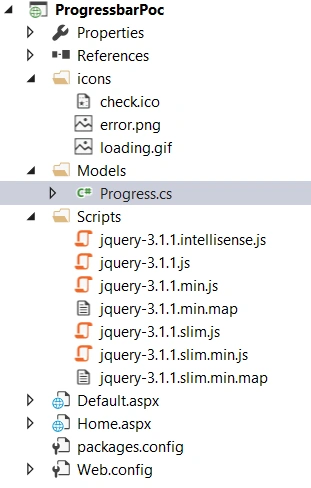
In brief about the components available in the above project:
- Icons Contains plain and simple image/ico files to make the visual representation better.
- Models Contains two classes and one enum.
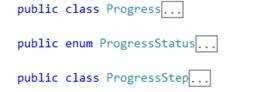
Progress class contains the list of progress steps. The ‘ProgressSteps’ are basically the various steps inside the long running process. The ‘ProgressStatus’ is nothing but the different flags that are used to mark the type of the step completed.
- aspx is our landing page which contains one plain and simple button ;after clicking on that it redirects to the Home.aspx. In the page load of Home.aspx, we have the long running process.
Design plan
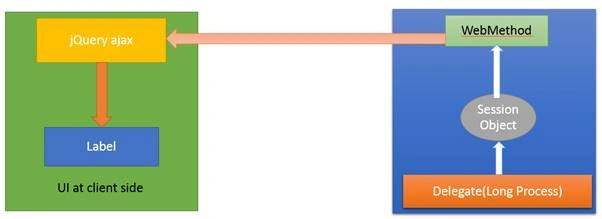
Working Principle
- The plan is to hold each step of the process in a Progress model object and keep it stored in session. So, just create a session property inside aspx.cs.
- private const string sessionKey = "progress";
- public Progress Progress
- {
- get
- {
- if (Session[sessionKey] == null)
- Session.Add(sessionKey, new Progress());
- return Session[sessionKey] as Progress;
- }
- set
- {
- Session[sessionKey] = value;
- }
- }
- Then write down your long running method in Home.aspx. In this demo, to have a feel of a long running process, I have used Thread.Sleep to make a delay of 2 seconds for each step. For each step, I have stored the step description in the session object.
- public void StartDownloadExecute()
- {
- for (int i = 0; i < 5; i++)
- {
- //if(i==7)
- // Progress.Add(new ProgressStep(string.Format("Step # {0}", i), ProgressStatus.Error));
- //else
- Progress.Add(new ProgressStep(string.Format("Step # {0}", i), ProgressStatus.InProgress));
- Thread.Sleep(2000);
- }
- // ------Write further code to mark the process completed
- }
- The heart of this code is a delegate. It resides in aspx.cs and used to execute the long running process asynchronously through a managed thread.
- public delegate void Run();
- In the page load, execute the long running process through the delegate and in the callback of the delegate, mark completion and pass a special flag to notify the monitoring logic as well.
- protected void Page_Load(object sender, EventArgs e)
- {
- StartDownload();
- }
- public void StartDownload()
- {
- Progress = null;
- Progress.Add(new ProgressStep("Download Started", ProgressStatus.InProgress));
- Run run = new Run(StartDownloadExecute);
- IAsyncResult res = run.BeginInvoke((IAsyncResult ar) =>
- {
- Progress.Add(new ProgressStep("Download Completed", ProgressStatus.Completed, "000ABORT_CHECK000"));
- }, null);
- }
- Now, the final step is to create a static asp.net webmethod inside aspx.cs. This webmethod, whenever called, will return the data stored in our session storage.
- [WebMethod(EnableSession = true)]
- public static string CheckDownload()
- {
- return HttpContext.Current.Session[sessionKey] == null ? string.Empty
- : ((Progress)HttpContext.Current.Session[sessionKey]).ToString();
- }
- Once the coding for aspx.cs is done, it’s the time to write up the monitoring logic in Home.aspx using plain jquery. The monitoring logic is just a simple ajax call which keeps on calling the above mentioned webmethod in every 2 seconds and writes up the returned data on a label.
The inbuilt javaScript interval listener has been used for our purpose. It stops checking further whenever the special flag (‘000ABORT_CHECK000’) is received.
- <script type="text/javascript">
- var _lblMsg = '<%=lblMsg.ClientID%>';
- $(document).ready(function () {
- var downloadComplete = false;
- var intervalListener = window.setInterval(function () {
- if (!downloadComplete)
- CallCheckDownload();
- }, 2000);
- function CallCheckDownload() {
- $.ajax({
- type: "POST",
- url: "Home.aspx/CheckDownload",
- contentType: "application/json; charset=utf-8",
- dataType: "json",
- success: function (r) {
- updateStatus('completed', r.d);
- if (r.d.indexOf('000ABORT_CHECK000') > -1) {
- downloadComplete = true;
- // Write further code per your requirement
- };
- },
- error: function (r) {
- console.log('Check error : ' + r.responseText);
- },
- failure: function (r) {
- console.log('Check failure : ' + r.responseText);
- }
- });
- if (downloadComplete)
- window.clearInterval(intervalListener);
- };
- function updateStatus(status, msg) {
- document.getElementById(_lblMsg).innerHTML = msg;
- };
- });
- </script>
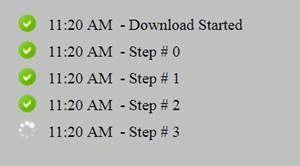
- Thus, the output becomes as given below.
Conclusion
This is the easiest way to track server side long running processes using very simple jQuery and C# code and the beauty of delegate. I hope you enjoyed the article. Keep on learning 😊


Diego MendozaPosted Jun 30, 2020, 2:50 AM EDT
Great job! Thank you. Do you have any idea how to stop this execution (by button for instance)?
Chris DesboroughPosted Nov 6, 2019, 2:28 PM EST
Instead of writing to a <table>, what changes would be necessary to just overwrite lblMsg continuously ?
James NoonePosted Nov 6, 2018, 7:35 AM EST
Fantastic! Easy to follow, clean solution with minimal overhead. Very nice. Saved me a lot of headache implementing more difficult solutions not well suited to a web forms project or implementing ajax controls where none previously existed. Really appreciate this!
h hPosted Oct 18, 2018, 9:14 AM EDT
The download link is broken
Swaraj Ketan SantraPosted Jul 27, 2017, 7:30 AM EDT
Tridip Bhattacharjee, Your question is not clear. I think if u run the solution attached herewith, the confusions will be cleared.
Tridip BhattacharjeePosted Jul 27, 2017, 1:00 AM EDT
All the steps will run at same time or one after one. if it is one after one then how could we run all steps at a same time asynchronously ? if possible please clarify it.
Manav PandyaPosted Jul 26, 2017, 4:52 AM EDT
Nice ........................
Andy AndyPosted Jul 26, 2017, 4:18 AM EDT
Great! Thanks for Sharing!