
Introduction
This article will teach us how to create form in the Next.js application using Axios. We also learn how to apply validation in the Next.js application.
Prerequisites
- JavaScript
- Basic knowledge of Next.js
- Node.js
- V.S. Code, Visual Studio
We cover the below things,
- Create Next.js application
- Create Form in Next.js
- Apply validation in Next.js
Step 1
Run the below code to create the Next.js application.
C#
npx create-next-app nextjsappfileuploadanddownload
cd nextjsappfileuploadanddownload
npm run dev
Step 2
Run the below command for installing React-bootstrap.
C#
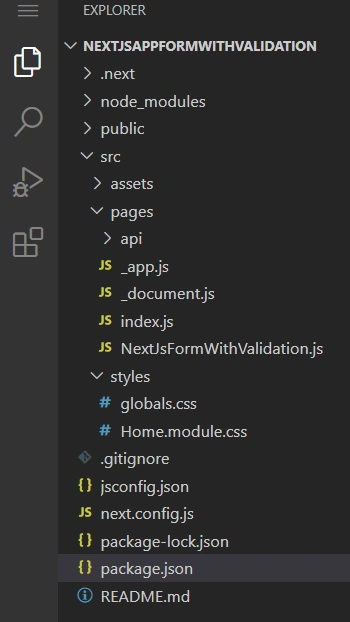
npm i react-bootstrapCreate the file structure according to the below image.
Step 3
Add the below code in the index.js.
JavaScript
import Head from 'next/head';
import Image from 'next/image';
import { Inter } from 'next/font/google';
import styles from '@/styles/Home.module.css';
import MyFormWithValidation from './MyFormWithValidation';

const inter = Inter({ subsets: ['latin'] });

export default function Home() {
  return (
    <>
      <Head>
        <title>Create Next App</title>
        <meta name="description" content="Generated by create next app" />
        <meta name="viewport" content="width=device-width, initial-scale=1" />
        <link rel="icon" href="/favicon.ico" />
        <link rel="stylesheet" href="https://unpkg.com/primeflex@^3/primeflex.css" />
        <link rel="stylesheet" href="https://unpkg.com/primeflex/themes/saga-blue.css" />
        <link rel="stylesheet" href="https://unpkg.com/primeflex/themes/arya-blue.css" />
        <link rel="stylesheet" href="https://unpkg.com/primeflex/themes/vela-blue.css" />
        <link
          rel="stylesheet"
          href="https://cdn.jsdelivr.net/npm/[email protected]/dist/css/bootstrap.min.css"
          integrity="sha384-rbsA2VBKQhggwzxH7pPCaAqO46MgnOM80zW1RWuH61DGLwZJEdK2Kadq2F9CUG65"
          crossorigin="anonymous"
        />
        <script src="https://cdn.jsdelivr.net/npm/react/umd/react.production.min.js" crossorigin></script>
        <script src="https://cdn.jsdelivr.net/npm/react-dom/umd/react-dom.production.min.js" crossorigin></script>
        <script src="https://cdn.jsdelivr.net/npm/react-bootstrap@next/dist/react-bootstrap.min.js" crossorigin></script>
      </Head>
      <main className={styles.main}>
        <div className={styles.center}>
          <Image
            className={styles.logo}
            src="/next.svg"
            alt="Next.js Logo"
            width={180}
            height={37}
            priority
          />
          <div className={styles.thirteen}>
            <Image
              src="/thirteen.svg"
              alt="13"
              width={40}
              height={31}
              priority
            />
          </div>
        </div>
        <div className={styles.grid}>
          <MyFormWithValidation />
        </div>
      </main>
    </>
  );
}
Step 4
Add the below code in the Home.module.css.
CSS
.main {
  display: flex;
  flex-direction: column;
  justify-content: space-between;
  align-items: center;
  padding: 6rem;
  min-height: 100vh;
}

.description {
  display: inherit;
  justify-content: inherit;
  align-items: inherit;
  font-size: 0.85rem;
  max-width: var(--max-width);
  width: 100%;
  z-index: 2;
  font-family: var(--font-mono);
}

.description a {
  display: flex;
  justify-content: center;
  align-items: center;
  gap: 0.5rem;
}

.description p {
  position: relative;
  margin: 0;
  padding: 1rem;
  background-color: rgba(var(--callout-rgb), 0.5);
  border: 1px solid rgba(var(--callout-border-rgb), 0.3);
  border-radius: var(--border-radius);
}

.code {
  font-weight: 700;
  font-family: var(--font-mono);
}

.grid {
  display: grid;
  grid-template-columns: repeat(1, minmax(100%, auto));
  width: var(--max-width);
  max-width: 100%;
}

.card {
  padding: 1rem 1.2rem;
  border-radius: var(--border-radius);
  background: rgba(var(--card-rgb), 0);
  border: 1px solid rgba(var(--card-border-rgb), 0);
  transition: background 200ms, border 200ms;
}

.card span {
  display: inline-block;
  transition: transform 200ms;
}

.card h2 {
  font-weight: 600;
  margin-bottom: 0.7rem;
}

.card p {
  margin: 0;
  opacity: 0.6;
  font-size: 0.9rem;
  line-height: 1.5;
  max-width: 30ch;
}

.center {
  display: flex;
  justify-content: center;
  align-items: center;
  position: relative;
  padding: 4rem 0;
}

.center::before {
  background: var(--secondary-glow);
  border-radius: 50%;
  width: 480px;
  height: 360px;
  margin-left: -400px;
}

.center::after {
  background: var(--primary-glow);
  width: 240px;
  height: 180px;
  z-index: -1;
}

.center::before,
.center::after {
  content: '';
  left: 50%;
  position: absolute;
  filter: blur(45px);
  transform: translateZ(0);
}

.logo,
.thirteen {
  position: relative;
}

.thirteen {
  display: flex;
  justify-content: center;
  align-items: center;
  width: 75px;
  height: 75px;
  padding: 25px 10px;
  margin-left: 16px;
  transform: translateZ(0);
  border-radius: var(--border-radius);
  overflow: hidden;
  box-shadow: 0px 2px 8px -1px #0000001a;
}

.thirteen::before,
.thirteen::after {
  content: '';
  position: absolute;
  z-index: -1;
}

/* Conic Gradient Animation */
.thirteen::before {
  animation: 6s rotate linear infinite;
  width: 200%;
  height: 200%;
  background: var(--tile-border);
}

/* Inner Square */
.thirteen::after {
  inset: 0;
  padding: 1px;
  border-radius: var(--border-radius);
  background: linear-gradient(to bottom right, rgba(var(--tile-start-rgb), 1), rgba(var(--tile-end-rgb), 1));
  background-clip: content-box;
}

/* Enable hover only on non-touch devices */
@media (hover: hover) and (pointer: fine) {
  .card:hover {
    background: rgba(var(--card-rgb), 0.1);
    border: 1px solid rgba(var(--card-border-rgb), 0.15);
  }

  .card:hover span {
    transform: translateX(4px);
  }
}

@media (prefers-reduced-motion) {
  .thirteen::before {
    animation: none;
  }

  .card:hover span {
    transform: none;
  }
}

/* Mobile */
@media (max-width: 700px) {
  .content {
    padding: 4rem;
  }

  .grid {
    grid-template-columns: 1fr;
    margin-bottom: 120px;
    max-width: 320px;
    text-align: center;
  }

  .card {
    padding: 1rem 2.5rem;
  }

  .card h2 {
    margin-bottom: 0.5rem;
  }

  .center {
    padding: 8rem 0 6rem;
  }

  .center::before {
    transform: none;
    height: 300px;
  }

  .description {
    font-size: 0.8rem;
  }

  .description a {
    padding: 1rem;
  }

  .description p,
  .description div {
    display: flex;
    justify-content: center;
    position: fixed;
    width: 100%;
  }

  .description p {
    align-items: center;
    inset: 0 0 auto;
    padding: 2rem 1rem 1.4rem;
    border-radius: 0;
    border: none;
    border-bottom: 1px solid rgba(var(--callout-border-rgb), 0.25);
    background: linear-gradient(to bottom, rgba(var(--background-start-rgb), 1), rgba(var(--callout-rgb), 0.5));
    background-clip: padding-box;
    backdrop-filter: blur(24px);
  }

  .description div {
    align-items: flex-end;
    pointer-events: none;
    inset: auto 0 0;
    padding: 2rem;
    height: 200px;
    background: linear-gradient(to bottom, transparent 0%, rgb(var(--background-end-rgb)) 40%);
    z-index: 1;
  }
}

/* Tablet and Smaller Desktop */
@media (min-width: 701px) and (max-width: 1120px) {
  .grid {
    grid-template-columns: repeat(2, 50%);
  }
}

@media (prefers-color-scheme: dark) {
  .vercelLogo {
    filter: invert(1);
  }

  .logo,
  .thirteen img {
    filter: invert(1) drop-shadow(0 0 0.3rem #ffffff70);
  }
}

@keyframes rotate {
  from {
    transform: rotate(360deg);
  }

  to {
    transform: rotate(0deg);
  }
}
Step 5
Add the below code in the NextJsFormWithValidation.js.
JavaScript
import { useState } from "react";
import Image from "next/image";
import { useRouter } from "next/router";
import styles from "@/styles/Home.module.css";
import Link from "next/link";
import Button from "react-bootstrap/Button";
import Form from "react-bootstrap/Form";
import { Card, Col, Row } from "react-bootstrap";
import InputGroup from "react-bootstrap/InputGroup";

const MyFormWithValidation = () => {
  const router = useRouter();

  const [Data, setData] = useState({
    FirstName: "",
    LastName: "",
    UserName: "",
    MobileNo: "",
    Address: "",
    PinCode: "",
  });
  const [validated, setValidated] = useState(false);

  const shorcutMenuList = [
    {
      icon: "i-Home",
      link: "#",
      text: "Home",
    },
    {
      icon: "i-Drop",
      link: "#",
      text: "Ui Kits",
    },
    {
      icon: "i-Drop",
      link: "#",
      text: "Apps",
    },
    {
      icon: "i-File-Clipboard-File--Text",
      link: "#",
      text: "Form",
    },
    {
      icon: "i-Checked-User",
      link: "#",
      text: "Sessions",
    },
    {
      icon: "i-Ambulance",
      link: "#",
      text: "Support",
    },
  ];

  const HandleSubmit = (event) => {
    debugger;
    event.preventDefault();
    console.log(Data);

    const form = event.currentTarget;
    if (form.checkValidity() === false) {
      event.preventDefault();
      event.stopPropagation();
    }

    setValidated(true);
    if (form.checkValidity() === true) {
      alert("Your form submitted succefully");
    }
  };

  const handleInputChange = (event) => {
    debugger;
    event.preventDefault();

    const { name, value } = event.target;
    setData((Data) => ({
      ...Data,
      [name]: value,
    }));
  };

  return (
    <>
      <h3>
        <b>Please fill all the details</b>
      </h3>
      <Form noValidate validated={validated} onSubmit={HandleSubmit}>
        <Row className="mb-3">
          <Form.Group as={Col} md="6" controlId="validationCustom01">
            <Form.Label>First name</Form.Label>
            <Form.Control
              required
              type="text"
              placeholder="First name"
              name="FirstName"
              value={Data.FirstName}
              onChange={handleInputChange}
            />
            <Form.Control.Feedback type="invalid">
              Please choose a First Name.
            </Form.Control.Feedback>
          </Form.Group>
          <Form.Group as={Col} md="6" controlId="validationCustom02">
            <Form.Label>Last name</Form.Label>
            <Form.Control
              required
              type="text"
              placeholder="Last name"
              name="LastName"
              value={Data.LastName}
              onChange={handleInputChange}
            />
            <Form.Control.Feedback type="invalid">
              Please choose a Last Name.
            </Form.Control.Feedback>
          </Form.Group>
          <Form.Group as={Col} md="6" controlId="validationCustomUsername">
            <Form.Label>User Name</Form.Label>
            <InputGroup hasValidation>
              <InputGroup.Text id="inputGroupPrepend">@</InputGroup.Text>
              <Form.Control
                type="text"
                placeholder="Username"
                aria-describedby="inputGroupPrepend"
                name="UserName"
                value={Data.UserName}
                onChange={handleInputChange}
                required
              />
              <Form.Control.Feedback type="invalid">
                Please choose a user Name.
              </Form.Control.Feedback>
            </InputGroup>
          </Form.Group>
          <Form.Group as={Col} md="6" controlId="validationCustomUsername">
            <Form.Label>Mobile No.</Form.Label>
            <InputGroup hasValidation>
              <Form.Control
                type="text"
                placeholder="Username"
                aria-describedby="inputGroupPrepend"
                name="MobileNo"
                value={Data.MobileNo}
                onChange={handleInputChange}
                required
              />
              <Form.Control.Feedback type="invalid">
                Please choose a Mobile No.
              </Form.Control.Feedback>
            </InputGroup>
          </Form.Group>
          <Form.Group as={Col} md="6" controlId="validationCustomUsername">
            <Form.Label>Address</Form.Label>
            <InputGroup hasValidation>
              <Form.Control
                type="text"
                placeholder="Address"
                aria-describedby="inputGroupPrepend"
                name="Address"
                value={Data.Address}
                onChange={handleInputChange}
                required
              />
              <Form.Control.Feedback type="invalid">
                Please fill the Address.
              </Form.Control.Feedback>
            </InputGroup>
          </Form.Group>
          <Form.Group as={Col} md="6" controlId="validationCustomUsername">
            <Form.Label>PinCode</Form.Label>
            <InputGroup hasValidation>
              <Form.Control
                type="text"
                placeholder="Pin Code"
                aria-describedby="inputGroupPrepend"
                name="PinCode"
                value={Data.PinCode}
                onChange={handleInputChange}
                required
              />
              <Form.Control.Feedback type="invalid">
                Please enter the Pin Code.
              </Form.Control.Feedback>
            </InputGroup>
          </Form.Group>
        </Row>
        <Form.Group className="mb-3">
          <Form.Check
            required
            label="Agree to terms and conditions"
            feedback="You must agree before submitting."
            feedbackType="invalid"
          />
        </Form.Group>
        <Button type="submit">Submit</Button>
      </Form>
    </>
  );
};

export default MyFormWithValidation;
Step 6
Add the below code in the globals.css.
CSS
:root {
  --max-width: 1100px;
  --border-radius: 12px;
  --font-mono: ui-monospace, Menlo, Monaco, "Cascadia Mono", "Segoe UI Mono",
    "Roboto Mono", "Oxygen Mono", "Ubuntu Monospace", "Source Code Pro",
    "Fira Mono", "Droid Sans Mono", "Courier New", monospace;

  --foreground-rgb: 0, 0, 0;
  --background-start-rgb: 214, 219, 220;
  --background-end-rgb: 255, 255, 255;

  --primary-glow: conic-gradient(
    from 180deg at 50% 50%,
    #16abff33 0deg,
    #0885ff33 55deg,
    #54d6ff33 120deg,
    #0071ff33 160deg,
    transparent 360deg
  );
  --secondary-glow: radial-gradient(
    rgba(255, 255, 255, 1),
    rgba(255, 255, 255, 0)
  );

  --tile-start-rgb: 239, 245, 249;
  --tile-end-rgb: 228, 232, 233;
  --tile-border: conic-gradient(
    #00000080,
    #00000040,
    #00000030,
    #00000020,
    #00000010,
    #00000010,
    #00000080
  );

  --callout-rgb: 238, 240, 241;
  --callout-border-rgb: 172, 175, 176;
  --card-rgb: 180, 185, 188;
  --card-border-rgb: 131, 134, 135;
}

@media (prefers-color-scheme: dark) {
  :root {
    --foreground-rgb: 255, 255, 255;
    --background-start-rgb: 0, 0, 0;
    --background-end-rgb: 0, 0, 0;

    --primary-glow: radial-gradient(rgba(1, 65, 255, 0.4), rgba(1, 65, 255, 0));
    --secondary-glow: linear-gradient(
      to bottom right,
      rgba(1, 65, 255, 0),
      rgba(1, 65, 255, 0),
      rgba(1, 65, 255, 0.3)
    );

    --tile-start-rgb: 2, 13, 46;
    --tile-end-rgb: 2, 5, 19;
    --tile-border: conic-gradient(
      #ffffff80,
      #ffffff40,
      #ffffff30,
      #ffffff20,
      #ffffff10,
      #ffffff10,
      #ffffff80
    );

    --callout-rgb: 20, 20, 20;
    --callout-border-rgb: 108, 108, 108;
    --card-rgb: 100, 100, 100;
    --card-border-rgb: 200, 200, 200;
  }
}

* {
  box-sizing: border-box;
  padding: 0;
  margin: 0;
}

html,
body {
  max-width: 100vw;
  overflow-x: hidden;
}

body {
  color: rgb(var(--foreground-rgb));
  background: linear-gradient(
      to bottom,
      #13b9cf,
      rgb(var(--background-end-rgb))
    )
    rgb(var(--background-start-rgb));
}

a {
  color: inherit;
  text-decoration: none;
}

@media (prefers-color-scheme: dark) {
  html {
    color-scheme: dark;
  }
}
Step 7
Add the below code in the package.json.
C#
{
  "name": "nextjsappformwithvalidation",
  "version": "0.1.0",
  "private": true,
  "scripts": {
    "dev": "next dev",
    "build": "next build",
    "start": "next start",
    "lint": "next lint"
  },
  "dependencies": {
    "bootstrap": "^5.2.3",
    "next": "13.2.4",
    "react": "18.2.0",
    "react-bootstrap": "^2.7.2",
    "react-dom": "18.2.0"
  }
}
Step 8
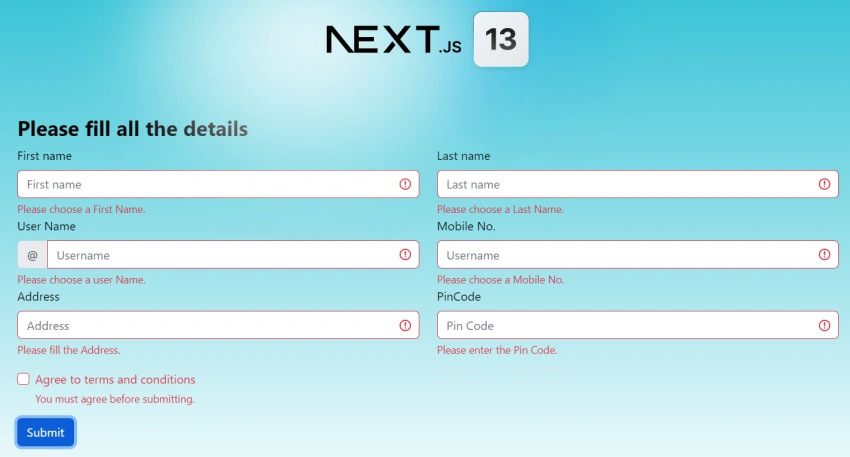
Run the following commands
C#
npm i
npm run dev
Summary
In this article, we learned how to create Next.js project and create a Form with Validation using react-bootstrap.

Join the conversation! Your thoughts help the community grow.