
Step 1. Open your Visual Studio and click File=> New=>Project, as shown below.

Step 2. Now, select the ASP.NET Web Application template and give a name to your project. Here, our project name is “MultiLanMVC” and click the OK button.

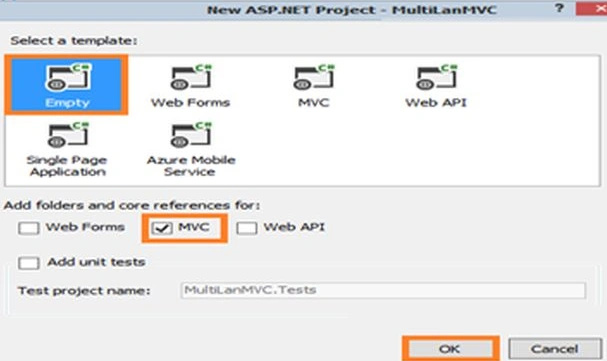
Step 3. Select “Empty MVC template” and click the OK button.
Step 4. You have to go to Solution Explorer and right-click on your Project name=> Add=>New item.
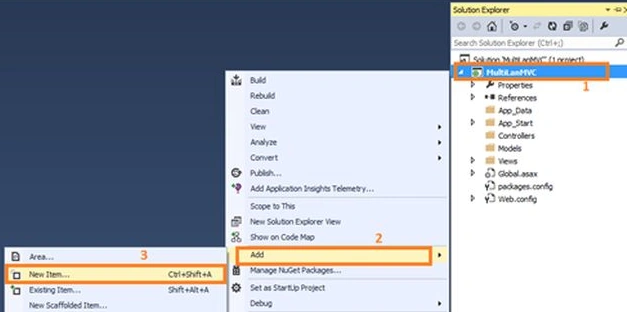
Step 5. In this section, you have to add “Resources File”.

Step 6. In this section, I have used the Field name and its value declaration. You can click Access Modifier then select Public Access Modifier. Don’t forget to change all the resource files from Access Modifier to Public.
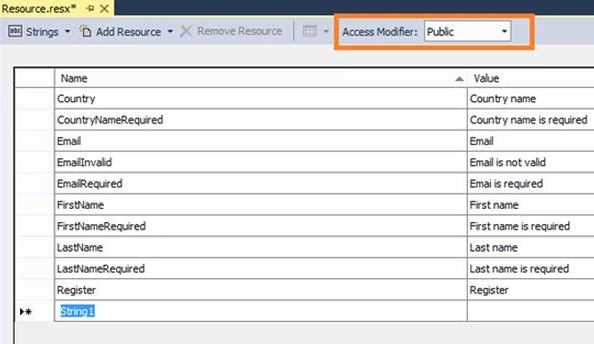
Step 7. Here, I have added four resource files for four different languages. I’m discussing here four resource files, which are.
- Resource.resx: It is used for the default resource file associated with English. Here “.resx” is an extension file name in the Resource file.
- Resource.Hi.resx: This resource file is used for the Hindi language.
- Resource.Ja.resx: This resource file is used for the Japanese language.
- Resource.Ar.resx: This resource file is used for the Arabic language.

Step 8. Go to Solution Explorer and right-click on Models=>Add=>Class.

Step 9. In the following figure, give a name to your model class. Here, our class name is “Registration”.

Our coding is given below.
using System;
using System.Collections.Generic;
using System.ComponentModel.DataAnnotations;
using System.Linq;
using System.Web;
namespace MultiLanMVC.Models
{
    public class Registration
    {
        [Display(Name = "FirstName", ResourceType = typeof(Resource))]
        [Required(ErrorMessageResourceType = typeof(Resource), ErrorMessageResourceName = "FirstNameRequired")]
        public string FirstName { get; set; }
        [Display(Name = "LastName", ResourceType = typeof(Resource))]
        [Required(ErrorMessageResourceType = typeof(Resource), ErrorMessageResourceName = "LastNameRequired")]
        public string LastName { get; set; }
        [Display(Name = "Email", ResourceType = typeof(Resource))]
        [Required(ErrorMessageResourceType = typeof(Resource), ErrorMessageResourceName = "EmailRequired")]
        [RegularExpression(@"^([0-9a-zA-Z]([\+\-_\.][0-9a-zA-Z]+)*)+@(([0-9a-zA-Z][-\w]*[0-9a-zA-Z]*\.)+[a-zA-Z0-9]{2,3})$", ErrorMessageResourceType = typeof(Resource), ErrorMessageResourceName = "EmailInvalid")]
        public string Email { get; set; }
        [Display(Name = "Country", ResourceType = typeof(Resource))]
        [Required(ErrorMessageResourceType = typeof(Resource), ErrorMessageResourceName = "CountryNameRequired")]
        public string Country { get; set; }
    }
}
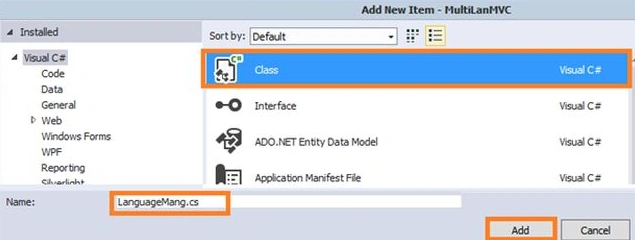
Step 10. Go to Solution Explorer= > Right click on Project name= > Add= > Class => Enter Class name= > Add.
Coding
using System;
using System.Collections.Generic;
using System.Globalization;
using System.Linq;
using System.Threading;
using System.Web;
namespace MultiLanMVC
{
    public class LanguageMang
    {
        public static List<Languages> AvailableLanguages = new List<Languages>
        {
            new Languages { LanguageFullName = "English", LanguageCultureName = "en" },
            new Languages { LanguageFullName = "Hindi", LanguageCultureName = "Hi" },
            new Languages { LanguageFullName = "japanese", LanguageCultureName = "Ja" },
            new Languages { LanguageFullName = "arabic", LanguageCultureName = "Ar" },
        };
        public static bool IsLanguageAvailable(string lang)
        {
            return AvailableLanguages.Any(a => a.LanguageCultureName.Equals(lang));
        }
        public static string GetDefaultLanguage()
        {
            return AvailableLanguages[0].LanguageCultureName;
        }
        public void SetLanguage(string lang)
        {
            try
            {
                if (!IsLanguageAvailable(lang))
                    lang = GetDefaultLanguage();
                var cultureInfo = new CultureInfo(lang);
                Thread.CurrentThread.CurrentUICulture = cultureInfo;
                Thread.CurrentThread.CurrentCulture = CultureInfo.CreateSpecificCulture(cultureInfo.Name);
                HttpCookie langCookie = new HttpCookie("culture", lang);
                langCookie.Expires = DateTime.Now.AddYears(1);
                HttpContext.Current.Response.Cookies.Add(langCookie);
            }
            catch (Exception) { }
        }
    }
    public class Languages
    {
        public string LanguageFullName { get; set; }
        public string LanguageCultureName { get; set; }
    }
}
Step 11. Here, add another class. Go to Solution Explorer= > Right-click on Project name= > Add= > Class => Enter class name= > Add. Here, our Class name is “MyController”.

Our coding is given below.
using System;
using System.Collections.Generic;
using System.Linq;
using System.Web;
using System.Web.Mvc;
namespace MultiLanMVC
{
    public class MyController : Controller
    {
        protected override IAsyncResult BeginExecuteCore(AsyncCallback callback, object state)
        {
            string lang = null;
            HttpCookie langCookie = Request.Cookies["culture"];

            if (langCookie != null)
            {
                lang = langCookie.Value;
            }
            else
            {
                var userLanguage = Request.UserLanguages;
                var userLang = userLanguage != null ? userLanguage[0] : "";
                if (userLang != "")
                {
                    lang = userLang;
                }
                else
                {
                    lang = LanguageMang.GetDefaultLanguage();
                }
            }
            new LanguageMang().SetLanguage(lang);
            return base.BeginExecuteCore(callback, state);
        }
    }
}
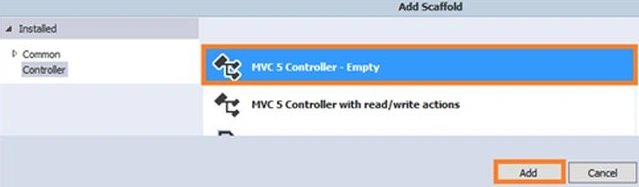
Step 12. Now, right-click on your Controller folder and add=>Controller=>Empty Controller and add Controller name. I have a controller named “HomeController”.
Code
using MultiLanMVC.Models;
using System;
using System.Collections.Generic;
using System.Linq;
using System.Web;
using System.Web.Mvc;
namespace MultiLanMVC.Controllers
{
    public class HomeController : MyController
    {
        // GET: Home
        public ActionResult Index()
        {
            return View();
        }
        [HttpPost]
        public ActionResult Index(Registration r)
        {
            return View(r);
        }
        public ActionResult ChangeLanguage(string lang)
        {
            new LanguageMang().SetLanguage(lang);
            return RedirectToAction("Index", "Home");
        }
    }
}
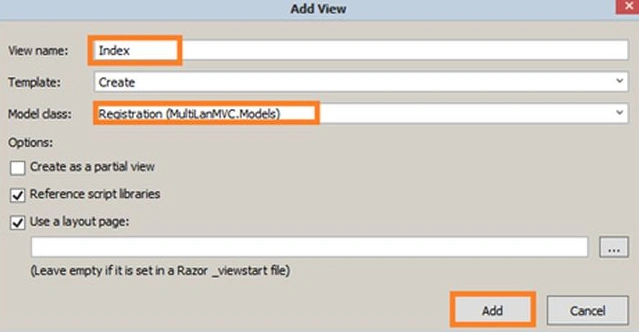
Step 13. Now, right-click on ActionResult and add a new View. Click to add button.
@model MultiLanMVC.Models.Registration
@{
    ViewBag.Title = MultiLanMVC.Resource.Register;
}
<h2>@MultiLanMVC.Resource.Register</h2>
@using (Html.BeginForm())
{
    @Html.AntiForgeryToken()
    <div class="form-horizontal">
        <h4>Registration</h4>
        <hr />
        @Html.ValidationSummary(true, "", new { @class = "text-danger" })
        <div class="form-group">
            @Html.LabelFor(model => model.FirstName, htmlAttributes: new { @class = "control-label col-md-2" })
            <div class="col-md-10">
                @Html.EditorFor(model => model.FirstName, new { htmlAttributes = new { @class = "form-control" } })
                @Html.ValidationMessageFor(model => model.FirstName, "", new { @class = "text-danger" })
            </div>
        </div>
        <div class="form-group">
            @Html.LabelFor(model => model.LastName, htmlAttributes: new { @class = "control-label col-md-2" })
            <div class="col-md-10">
                @Html.EditorFor(model => model.LastName, new { htmlAttributes = new { @class = "form-control" } })
                @Html.ValidationMessageFor(model => model.LastName, "", new { @class = "text-danger" })
            </div>
        </div>
        <div class="form-group">
            @Html.LabelFor(model => model.Email, htmlAttributes: new { @class = "control-label col-md-2" })
            <div class="col-md-10">
                @Html.EditorFor(model => model.Email, new { htmlAttributes = new { @class = "form-control" } })
                @Html.ValidationMessageFor(model => model.Email, "", new { @class = "text-danger" })
            </div>
        </div>
        <div class="form-group">
            @Html.LabelFor(model => model.Country, htmlAttributes: new { @class = "control-label col-md-2" })
            <div class="col-md-10">
                @Html.EditorFor(model => model.Country, new { htmlAttributes = new { @class = "form-control" } })
                @Html.ValidationMessageFor(model => model.Country, "", new { @class = "text-danger" })
            </div>
        </div>
        <div class="form-group">
            <div class="col-md-offset-2 col-md-10">
                <input type="submit" value="@MultiLanMVC.Resource.Register" class="btn btn-default" />
            </div>
        </div>
    </div>
}
<div>
    @Html.ActionLink("Back to List", "Index")
</div>
<script src="~/Scripts/jquery-1.10.2.min.js"></script>
<script src="~/Scripts/jquery.validate.min.js"></script>
<script src="~/Scripts/jquery.validate.unobtrusive.min.js"></script>
Step 14. Add the given code to the Complete Layout page. (_Layout .cshtml).
<div style="padding:5px">
    @{
        foreach (var i in MultiLanMVC.LanguageMang.AvailableLanguages)
        {
            @Html.ActionLink(i.LanguageFullName, "ChangeLanguage", "Home", new { lang = i.LanguageCultureName }, null)
            <text> </text>
        }
    }
</div>
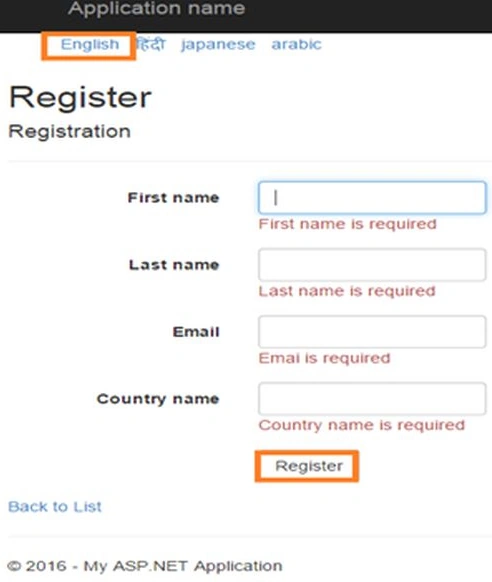
Here, the default output is given blow.

Click the English tab at the top of the page and you will see all the required validations are in the Spanish language.
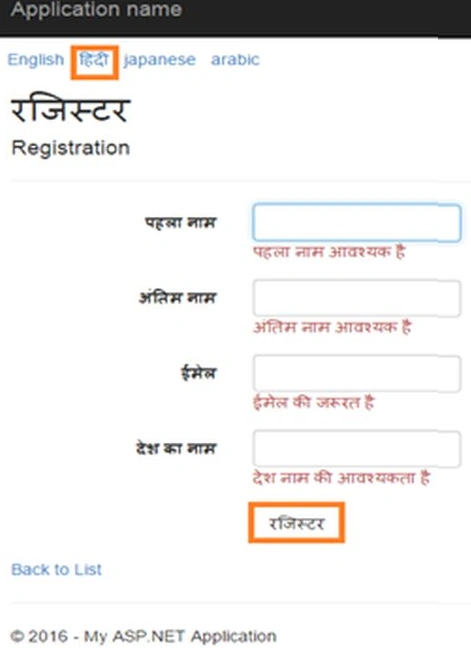
Click the Hindi tab at the top of the page and then you will see all the required validations are in Hindi language.
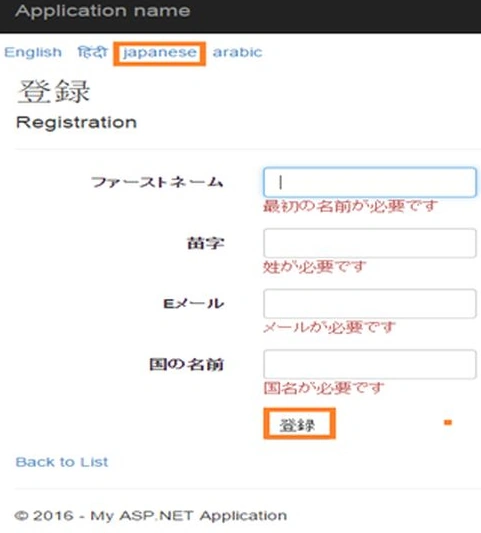
Click the Japanese tab at the top of the page and you will see all the required validations are in Japanese language.
Click the Arabic tab at the top of the page and then you will see all the required validations are in Arabic language.

I hope you enjoyed this multi-language tutorial. Follow C# Corner to learn new things about ASP.NET MVC. Thanks for reading this article.


wiss wissPosted Oct 25, 2022, 5:52 AM EDT
Please share project's files
wiss wissPosted Oct 25, 2022, 5:52 AM EDT
This Is not working !
George BensonPosted Apr 29, 2022, 9:56 AM EDT
Also it appears that when one changes pages the language selection does not persist... how would one accomplish that?
George BensonPosted Apr 28, 2022, 1:58 PM EDT
Nicely Done it removes the link display issues i was having using a different method. However, the code always goes to the home/index page. I believe it's doing so here... foreach (var i in WeldingTracker.LanguageMang.AvailableLanguages) { @Html.ActionLink(i.LanguageFullName, "ChangeLanguage", "Home", new { lang = i.LanguageCultureName }, null) <text> </text> } how do we make the link go to the current page??
ss duqPosted Jun 7, 2021, 7:41 PM EDT
Please share project's files.
pushpa AcharyaPosted Feb 2, 2021, 5:30 PM EST
How to add error to resource file which we validate inside the controller. For eg: if drop down selected or not we add a validation then how to add that error message to resource file?
Imtiaj AhammadPosted Dec 29, 2020, 1:43 AM EST
In Registration class, typeof(Resource) shows error[Display(Name = "FirstName", ResourceType = typeof(Resource))]
Nk kanniyanPosted Dec 8, 2020, 1:31 AM EST
Only change my Datetime
Mahamod GodaPosted Oct 29, 2020, 12:21 PM EDT
Thanks for this tutorial, why i debug SetLanguage it goes to debug 2 times ?
suraj balwaniPosted Feb 11, 2020, 12:57 AM EST
Can you give me code for in .net core 2.1
Aravind KumarPosted Jan 21, 2020, 7:57 AM EST
It is not working for me when i am going to click on other lang it is displaying only english.
Ibrahim YassinPosted Oct 22, 2019, 12:20 AM EDT
If the code didn't work for you, it's probably because you didn't enable the cookies in your Web.config.
Shidhu (SP)Posted Aug 15, 2019, 11:49 PM EDT
Is there any need to add some code in global.cs
abir attiaPosted Jul 30, 2019, 2:23 AM EDT
It works for me, to make the tutorial work you need to make sure that for example in LanguageMang.cs : new Languages { LanguageFullName = "French", LanguageCultureName = "Fr"} your resource file is named : Resource.Fr.resx
Seema SharmaPosted Jul 29, 2019, 12:56 AM EDT
Tried same steps but fail to conversion of language on click of other languages only English displaying
Arjun DhilodPosted Jul 14, 2019, 10:17 PM EDT
We try your article but it is not working pls check something is wrong
mayur naktodePosted Jul 11, 2019, 8:44 AM EDT
Please provide the source code
Priyanka NangiPosted Dec 25, 2018, 11:29 PM EST
How can i change my website whole contain not only form all contain i want to change
Priyanka NangiPosted Dec 25, 2018, 11:27 PM EST
I try this demo but when i click hindi at that time does'nt work provide code multilanguage website using dropdown list
pavan patelPosted Dec 13, 2018, 8:03 PM EST
Hello Avinash, you have taken different resource file for different language, but from where you are assigning particular language resource file when language change from english to other? or if possible than will you please provide me the code?
Mohammad QasimPosted May 18, 2018, 12:03 PM EDT
Hi, How can i download code. ?
Abhay PatilPosted Apr 5, 2018, 3:24 AM EDT
Please send source code link.
krishna pandeyPosted Apr 3, 2018, 10:44 PM EDT
Avinash Thakur how can download this code
Pavithra SubramaniamPosted Mar 17, 2018, 12:23 AM EDT
I'm getting everything in English only, even the menu. please help me out
andres diazPosted Feb 3, 2018, 2:51 AM EST
Excellent Post Avinash, Thank you
Rahul KumarPosted Sep 19, 2017, 2:25 AM EDT
Bro I have to change entire application with dropdown in case user has selected any language in drop-down that language have to apply all the Application can u please help me on that
Avinash ThakurPosted Sep 13, 2016, 4:11 AM EDT
Thanks
Vignesh ManiTOP 100Posted Sep 12, 2016, 4:40 AM EDT
Nice
Shubham SharmaPosted Sep 12, 2016, 2:13 AM EDT
Nice one
Avinash ThakurPosted Sep 11, 2016, 9:39 PM EDT
Thanks
Saillesh PawarPosted Sep 11, 2016, 9:08 PM EDT
Great post
Nimit JoshiTOP 100Posted Sep 11, 2016, 9:07 PM EDT
Nice Article.
Atul RawatPosted Sep 11, 2016, 9:06 PM EDT
Nice Article dost
Debendra DashPosted Sep 11, 2016, 7:50 PM EDT
Good one.....