
<table align="center">
<tr>
<td colspan="2">
<asp:Label ID="lblusername"
runat="server"
ForeColor="Red"></asp:Label>
</td>
</tr>
<tr>
<td>
UserName:
</td>
<td>
<asp:TextBox ID="txtusername"
runat="server"></asp:TextBox><asp:RequiredFieldValidator
ID="RequiredFieldValidator1"
runat="server"
ControlToValidate="txtusername">*</asp:RequiredFieldValidator>
</td>
</tr>
<tr>
<td>
</td>
<td>
<asp:Button ID="btnSaveName"
runat="server"
Text="Save"
OnClick="btnSaveName_Click"
style="height: 26px" />
</td>
</tr>
</table>
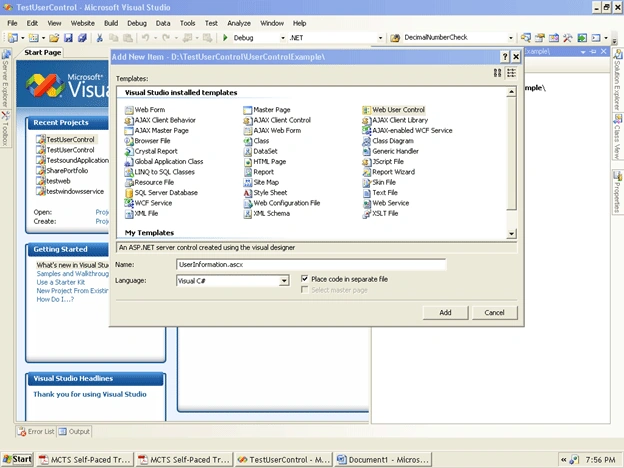
In Userinformation.ascx.cs file add the code like this.
using System;
using System.Collections;
using System.Configuration;
using System.Data;
using System.Web;
using System.Web.Security;
using System.Web.UI;
using System.Web.UI.HtmlControls;
using System.Web.UI.WebControls;
using System.Web.UI.WebControls.WebParts;
using System.Linq;
public partial class UserControl_UserInformation
: System.Web.UI.UserControl
{
protected void
Page_Load(object sender, EventArgs e)
{
if (!IsPostBack)
{
}
}
protected void
btnSaveName_Click(object sender, EventArgs e)
{
InsertData();
Response.Redirect("~/Default.aspx");
}
private void
InsertData()
{
Userinfo info = new
Userinfo();
info.UserName =
txtusername.Text.Trim();
using (UserInformationDataContext
db = new UserInformationDataContext())
{
try
{
db.Userinfos.InsertOnSubmit(info);
db.SubmitChanges();
}
catch (Exception
ex)
{
Response.Write("Error:" +
ex.Message);
}
}
}
}
Step 3: Add the code in UserInformationGrid.ascx.
<%@ Control Language="C#"
AutoEventWireup="true"
CodeFile="UserInformationGrid.ascx.cs"
Inherits="UserControl_UserInformationGrid"
%>
<asp:GridView ID="GridView1"
runat="server"
AllowPaging="True"
AutoGenerateColumns="False">
<Columns>
<asp:BoundField DataField="ID"
HeaderText="ID"
/>
<asp:BoundField DataField="UserName"
HeaderText="UserName"
/>
</Columns>


SubashPosted Mar 16, 2017, 4:49 PM EDT
Thank you sir nice one
Rakesh reddyPosted Jan 30, 2017, 4:42 PM EST
Very helpful article, Thank you sir
Muhammad Aqib ShehzadPosted Jul 20, 2016, 4:59 AM EDT
Very nice
kalu singh raoPosted Jul 20, 2016, 4:53 AM EDT
Nice one...
Gowtham RajamanickamTOP 100Posted Apr 6, 2016, 11:01 PM EDT
good one..good one..
Ajay KadamPosted Jan 16, 2016, 2:44 AM EST
Thanks sir
Manoj KallaPosted Dec 12, 2015, 1:57 AM EST
Nice
Jaipal ReddyPosted May 25, 2015, 2:38 AM EDT
Nice and needful article. thnak you
priya gokulaPosted Jan 3, 2015, 2:54 AM EST
sir, .ascx file support nested repeater button
Ritesh SinghPosted Jul 10, 2014, 12:44 AM EDT
thankuuu
anjali dPosted Apr 21, 2014, 1:57 AM EDT
very helpful artical thanks
sunil guptaPosted Sep 22, 2013, 10:32 AM EDT
hi sir how to include UserInfo and UserInformationDataContext
Atiullah SiddiquePosted Aug 25, 2013, 12:59 AM EDT
hi sir user control working in local host but not in server
Amruta UdgiriPosted May 8, 2013, 11:06 PM EDT
thank u sir..
dipika sharmaPosted Jun 21, 2012, 11:19 PM EDT
thank u sir...........
dipika sharmaPosted Jun 21, 2012, 11:19 PM EDT
thank u sir...........
Praveen SinhaPosted Feb 7, 2012, 8:40 PM EST
Hi sir can we make .ddl file of that user control so that we can use anywhere and any application. If it is possible then what is the process.kindly inform me. thanx praveen [email protected]
Ramu KondaruPosted Aug 6, 2011, 4:42 AM EDT
Thank You Sir