
In this article we will be seeing how to create webpart custom properties in
SharePoint 2010.
Steps Involved:
- Open Visual Studio 2010.
- Create an "Empty SharePoint Project".
- Right click on the solution and click on Add => New Item.
- Select "Webpart" template from SharePoint 2010 installed templates.
- Entire solution looks like the following
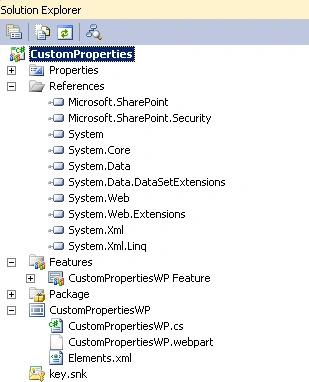
- Replace CustomProperties.cs file with the following code.
using
System;
using
System.ComponentModel;
using
System.Web;
using
System.Web.UI;
using
System.Web.UI.WebControls;
using
System.Web.UI.WebControls.WebParts;
using
Microsoft.SharePoint;
using
Microsoft.SharePoint.WebControls;
namespace
CustomProperties.CustomPropertiesWP
{
[ToolboxItemAttribute(false)]
public class
CustomPropertiesWP :
WebPart
{
private string
_value;
Label lblResult;
Button btnClick;
[System.Web.UI.WebControls.WebParts.WebBrowsable(true),
System.Web.UI.WebControls.WebParts.WebDisplayName("Enter
the Value"),
System.Web.UI.WebControls.WebParts.WebDescription(""),
System.Web.UI.WebControls.WebParts.Personalizable(
System.Web.UI.WebControls.WebParts.PersonalizationScope.Shared),
System.ComponentModel.Category("anavijai
Custom Properties"),
System.ComponentModel.DefaultValue("")]
public string
_Value
{
get {
return _value; }
set { _value =
value; }
}
protected
override void CreateChildControls()
{
lblResult = new
Label();
btnClick = new
Button();
btnClick.Text = "Click";
btnClick.Click += new
EventHandler(btnClick_Click);
this.Controls.Add(lblResult);
this.Controls.Add(btnClick);
}
protected void
btnClick_Click(object sender,
EventArgs e)
{
lblResult.Text = _Value.ToString();
}
}
}
-
Build and deploy the solution.
-
Go to the SharePoint Site =>Site Actions =>Edit Page =>Editing Tools => Insert =>Web Part =>Categories => Custom =>CustomPropertiesWP.
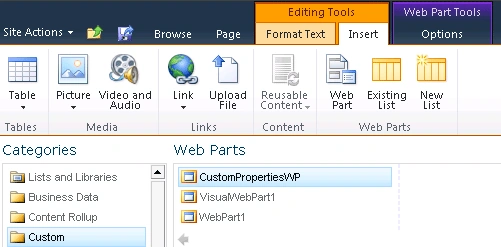
-
Click on Add.
-
The web part looks like the following with a button.
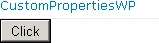
-
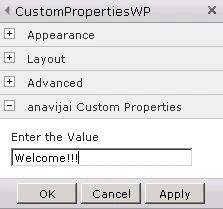
Edit the webpart you could see a new custom category in the webpart properties.
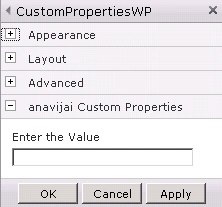
-
Enter the value and click on Ok.
-
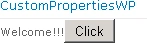
In the CustomPropertiesWP click on the button.


Kumaresh RajalingamPosted Mar 24, 2016, 5:59 AM EDT
Nice one sir
Supreeth JPosted Oct 28, 2015, 9:07 PM EDT
Thank you..
Tawanda VakisaiPosted Jan 13, 2012, 4:08 AM EST
Thank you, great post. Do you know how I could add a label to the web part properties? I need to place a URL on the web part properties which will point the users to a page with configuration informationf or the web part.