
In this article you will know how to display records in a textboxes as
First,Next,Previous and Last records.
For doing this we have to add textboxes and 4 buttons on a Windows form.see
below design of windows form containing buttons and textboxes.
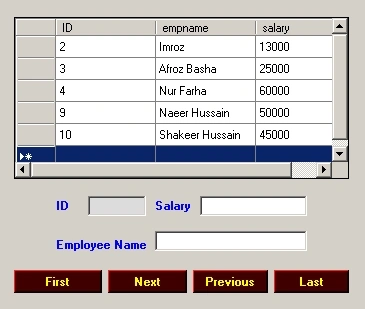
Here I am using DataGridvew to show you records present in atable.Bind a Data to
the DataGridview.Here i am using MsAccess DataProvider as Odbc client.You can
use your own DataProvider in the same way.
Explanation: When the users clicks on 'First Button' ,the first record of
a table have to display in a corresponding column textboxe.
Coding for 'First Button':- Double click on 'First Button' and write the
below code.
private void
btnfirst_Click(object sender,
EventArgs e)
{
if (ds.Tables[0].Rows.Count > 0)
{
i = 0;
textBox1.Text = ds.Tables[0].Rows[i]["ID"].ToString();
textBox2.Text = ds.Tables[0].Rows[i]["empname"].ToString();
textBox3.Text = ds.Tables[0].Rows[i]["salary"].ToString();
}
}
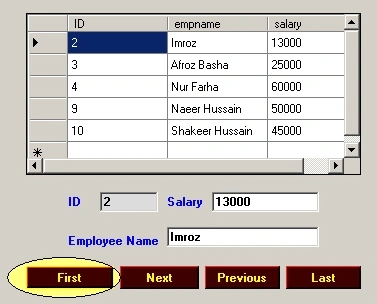
First Button Image
Coding for 'Last Button':- Double click on'Last Button' and write the
below code.
private void
btnlast_Click(object sender,
EventArgs e)
{
i = ds.Tables[0].Rows.Count - 1;
textBox1.Text = ds.Tables[0].Rows[i]["ID"].ToString();
textBox2.Text = ds.Tables[0].Rows[i]["empname"].ToString();
textBox3.Text = ds.Tables[0].Rows[i]["salary"].ToString();
}
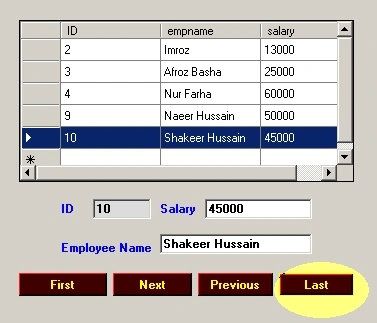
Last Button Image
Coding for 'Next Button':- Double click on'Next Button' and write the
below code.
private void
btnnext_Click(object sender,
EventArgs e)
{
if (i < ds.Tables[0].Rows.Count - 1)
{
i++;
textBox1.Text = ds.Tables[0].Rows[i]["ID"].ToString();
textBox2.Text = ds.Tables[0].Rows[i]["empname"].ToString();
textBox3.Text = ds.Tables[0].Rows[i]["salary"].ToString();
}
else
{
//no records to see more.
}
}
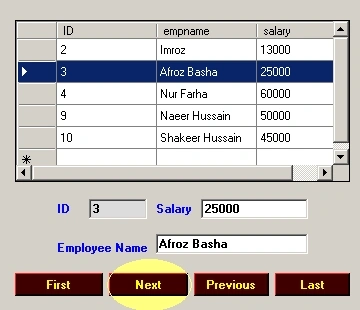
Next Button Image
Coding for 'Previous Button':- Double click on'Previous Button' and write
the below code.
private void
btnprevious_Click(object sender,
EventArgs e)
{
if (i == ds.Tables[0].Rows.Count - 1
|| i != 0)
{
i--;
textBox1.Text = ds.Tables[0].Rows[i]["ID"].ToString();
textBox2.Text = ds.Tables[0].Rows[i]["empname"].ToString();
textBox3.Text = ds.Tables[0].Rows[i]["salary"].ToString();
}
else
{
//No records to see more
}
}
Above ds.Tables[0].Rows.Count means it counts
number of records presnt in a table.
The Complete coding in Form1.cs as follows:-
using
System;
using
System.Collections.Generic;
using
System.ComponentModel;
using
System.Data;
using
System.Drawing;
using
System.Text;
using
System.Windows.Forms;
using
System.Data.Odbc;
using
System.IO;
namespace
WindowsApplication1
{
public partial
class Form1 :
Form
{
public Form1()
{
InitializeComponent();
}
OdbcDataAdapter da;
DataSet ds;
int i = 0;
int j;
OdbcConnection conn;
int last;
private void
Form1_Load(object sender,
EventArgs e)
{
conn = new
OdbcConnection("dsn=t1");
conn.Open();
da = new
OdbcDataAdapter("select * from emp",
conn);
OdbcCommandBuilder builder =
new OdbcCommandBuilder(da);
ds = new
DataSet();
da.Fill(ds, "emp");
dataGridView1.DataSource = ds.Tables["emp"];
}
private void
btnfirst_Click(object sender,
EventArgs e)
{
if (ds.Tables[0].Rows.Count > 0)
{
i = 0;
textBox1.Text = ds.Tables[0].Rows[i]["ID"].ToString();
textBox2.Text = ds.Tables[0].Rows[i]["empname"].ToString();
textBox3.Text = ds.Tables[0].Rows[i]["salary"].ToString();
}
}
private void
btnlast_Click(object sender,
EventArgs e)
{
i = ds.Tables[0].Rows.Count - 1;
textBox1.Text = ds.Tables[0].Rows[i]["ID"].ToString();
textBox2.Text = ds.Tables[0].Rows[i]["empname"].ToString();
textBox3.Text = ds.Tables[0].Rows[i]["salary"].ToString();
}
private void
btnnext_Click(object sender,
EventArgs e)
{
if (i < ds.Tables[0].Rows.Count - 1)
{
i++;
textBox1.Text = ds.Tables[0].Rows[i]["ID"].ToString();
textBox2.Text = ds.Tables[0].Rows[i]["empname"].ToString();
textBox3.Text = ds.Tables[0].Rows[i]["salary"].ToString();
}
else
{
}
}
private void
btnprevious_Click(object sender,
EventArgs e)
{
if (i == ds.Tables[0].Rows.Count - 1
|| i != 0)
{
i--;
textBox1.Text = ds.Tables[0].Rows[i]["ID"].ToString();
textBox2.Text = ds.Tables[0].Rows[i]["empname"].ToString();
textBox3.Text = ds.Tables[0].Rows[i]["salary"].ToString();
}
else
{
}
}
}
}
Thanks for reading my article!
Syed Shakeer Hussain


ethemPosted Aug 28, 2023, 9:24 AM EDT
can be updated like this -> Private void btnprevious_Click(object sender, EventArgs e) { if ((i == ds.Tables[0].Rows.Count - 1 || i != 0 ) && ds.Tables[0].Rows.Count !=1) { i--; textBox1.Text = ds.Tables[0].Rows[i]["ID"].ToString(); textBox2.Text = ds.Tables[0].Rows[i]["empname"].ToString(); textBox3.Text = ds.Tables[0].Rows[i]["salary"].ToString(); } else { //No records to see more } }
ethemPosted Aug 28, 2023, 9:06 AM EDT
It gives an error when there is only one record.
Jyoti JindalPosted Aug 4, 2020, 4:06 AM EDT
Hi Syed, I've similar problem where I have to to go to next or previous record but I have more than 6700K data in my table, hence fetching all data at once is eating up the memory. Can you please help me with some thoughts on this.
Bahaa FarhatPosted Feb 14, 2018, 9:25 PM EST
Dear, i got the error: Object reference not set to an instance of an object.
Kashif AsifPosted Feb 23, 2016, 3:20 AM EST
nice
Maamun MuhammedPosted Jan 23, 2016, 11:11 PM EST
It really work! But, doesn't work with comboBox. as hown here: comboSex.SelectedItem = (string)dt.Rows[0]["Sex"].ToString();
Salwa AbdrabuPosted Jun 6, 2014, 1:56 AM EDT
great
tunde MattieuPosted Jul 6, 2013, 6:32 AM EDT
int J was not used...
Preethi Joshika PPosted Jul 20, 2012, 2:51 AM EDT
For WebApplication, use : http://www.codeproject.com/Articles/12161/Record-Navigation-using-Events-in-c
sraves panduPosted Apr 3, 2012, 7:16 AM EDT
i have gridview in one form when i click cell the clicked row data goes to next page of textboxes and then im clicking next burron it not counting next one its coming from first record so please send me the solution to my mail id [email protected]
omkar panchalPosted Mar 28, 2012, 8:52 PM EDT
Hello Sir, i want to display four lines form text file by using next button in c# sir can you make a demo for it
amit pandeyPosted Mar 10, 2012, 5:45 PM EST
dear sir i use c1flexgrid in vb.net2009 and i want show first,last,next record from sql server database2005 on c1flexgrid. please help me.
khalid MehmoodPosted Feb 9, 2012, 4:17 AM EST
This not work in aspx page.Next record can not displayed?
Avinash YoganandPosted Feb 16, 2011, 7:55 PM EST
hi I have used the same code but i have used for aspx page. in that it doesnt show after the second record in the textbox. I want help in resolving that and also i want to update and edit the data showing the textbox in the aspx page. am not using gridview. so please guide me in full steps. am still learing coding so it wud be very helpful. Thanks in advance, Avinash
abhi abhiPosted Oct 9, 2010, 12:41 AM EDT
i like your article its good
joseph reddyPosted Jul 18, 2010, 9:53 PM EDT
excellent work..keep it up
MeshaPosted Jun 1, 2010, 9:29 AM EDT
thank you very much
DanPosted Jun 1, 2010, 2:37 AM EDT
You can using ADO.net 2.0 it's very easy to navigate on datagrid