
Introduction
This article shows how to generate a barcode in Windows Forms using C# using an IDAutomationCode39 file to generate the barcode.
Initial Chamber
Open Visual Studio 2010, go to File, New, then Projects. Under Visual C#, click Windows. Select Windows Forms Application.
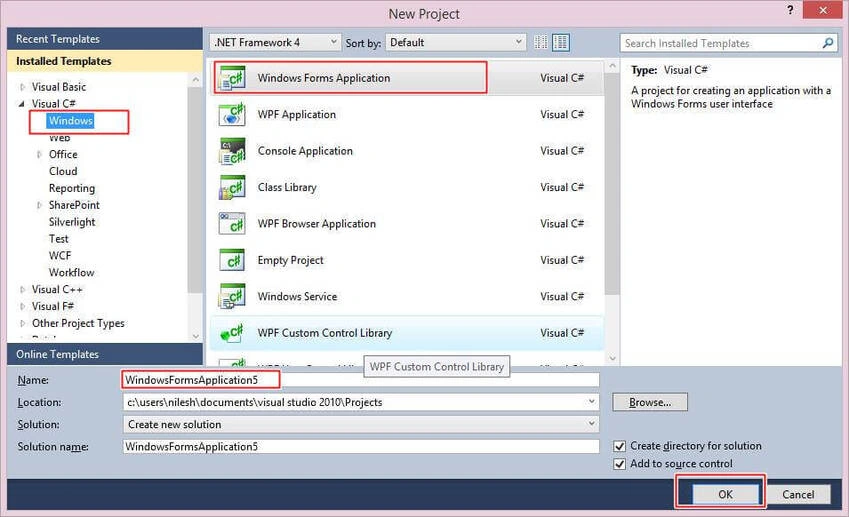
You can change the name of the project and put your project in a different location too. And then press OK.
Design Chamber
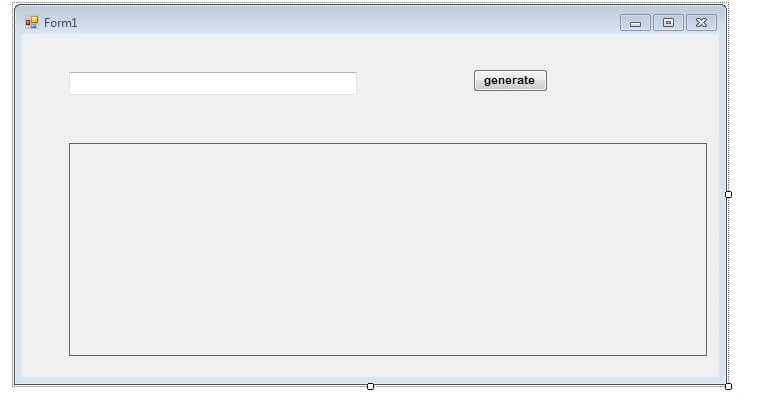
In this chamber you need to drag and drop some controls from the toolbox, drag one TextBox, a button and a picture box.
Once you make it out with this control, set the control in the form so that it looks good. Your design will look as in the following screenshot.
Code Chamber
In the code chamber, you need to write the code, like whatever the TextBox contains is printed in the form of the bardcode on a button click. To make this application you first need to install the IDAutomationCode39.exe file. You can get this file from this article as I am attaching that .exe with my source code or you can get this file from the link IDAutomationCode.
Open your code section and start writing the following code so that you can get to the solution.
using System;
using System.Collections.Generic;
using System.ComponentModel;
using System.Data;
using System.Drawing;
using System.Linq;
using System.Text;
using System.Windows.Forms;
using System.IO;
using System.Drawing.Imaging;

namespace Barcode_demo {
    public partial class Form1: Form {
        public Form1() {
            InitializeComponent();
        }

        private void button1_Click(object sender, EventArgs e) {
            string barcode = textBox1.Text;

            Bitmap bitm = new Bitmap(barcode.Length * 45, 160);
            using(Graphics graphic = Graphics.FromImage(bitm)) {


                Font newfont = new Font("IDAutomationHC39M", 20);
                PointF point = new PointF(2f, 2f);
                SolidBrush black = new SolidBrush(Color.Black);
                SolidBrush white = new SolidBrush(Color.White);
                graphic.FillRectangle(white, 0, 0, bitm.Width, bitm.Height);
                graphic.DrawString("*" + barcode + "*", newfont, black, point);


            }

            using(MemoryStream Mmst = new MemoryStream()) {


                bitm.Save("ms", ImageFormat.Jpeg);
                pictureBox1.Image = bitm;
                pictureBox1.Width = bitm.Width;
                pictureBox1.Height = bitm.Height;


            }

        }
    }
}
Once you install the IDAutomationCode39 file, just ensure you restart your system, otherwise Visual Studio will throw an error message. You may get stuck with the following error message.
“Only TrueType fonts are supported and this is not a TrueType font”
Resolve the error by the following two methods
- After Installing restart your system or Visual Studio.
- Or you need to embed this code.
C#
private void Form1_Load(object sender, System.EventArgs e)
{

    label1.Font = new Font("IDAutomationHC39M", 12, FontStyle.Regular);

}
OUTPUT

I hope you like this. Have a good day. Thank you for reading.


faaizan ahmadPosted Jan 10, 2020, 7:30 AM EST
Only text is displaying
faaizan ahmadPosted Jan 10, 2020, 7:30 AM EST
Only text displaying
Laxmidhar SahooPosted Dec 23, 2019, 5:52 PM EST
Thanks for a good article
charan cherryPosted Oct 18, 2019, 12:35 AM EDT
How can I display a list of barcodes?
prabhu gPosted Jan 7, 2019, 10:10 PM EST
Nice its wonderfully working
shyam kumarPosted Mar 2, 2018, 11:10 PM EST
HOW TO CREATE BARCODE IN PURCHASE FORM PLZ HELM ME
Sagar Pandurang KapPosted Dec 14, 2017, 10:38 PM EST
Working fine and thanks a lott
Ponlawoot DueanjamPosted Aug 1, 2017, 7:45 PM EDT
Just only text showing not barcode , please advise me.
Abdul Amin KhanPosted Mar 17, 2017, 9:17 PM EDT
Only Written Text Showing not Barcode
Arul RPosted Oct 28, 2015, 1:34 AM EDT
Good one !!!
Shakti SaxenaPosted Sep 16, 2015, 5:31 AM EDT
awesome
Santhakumar MunuswamyPosted Aug 15, 2015, 10:36 PM EDT
Nice Article. Thanks for sharing
Yashwanth MuthineniPosted Aug 13, 2015, 8:47 PM EDT
useful one...thanks for sharing
Humayun Kabir MamunPosted Aug 13, 2015, 8:42 PM EDT
Nice...
RakeshPosted Aug 13, 2015, 8:00 PM EDT
Good one
Karthikeyan KPosted Aug 13, 2015, 3:53 AM EDT
Thanks for sharing...
Ankit BansalPosted Aug 13, 2015, 3:41 AM EDT
good one..
Vaikesh K PPosted Aug 13, 2015, 2:42 AM EDT
Nice one
Rajeesh MenothPosted Aug 13, 2015, 2:18 AM EDT
Cool..good one
Pankaj Kumar ChoudharyTOP 100Posted Aug 13, 2015, 2:07 AM EDT
Nice Explain Sir..........