
Many times as a developer we have to move data from development server to staging server and staging server to production server. This article will help developers to generate database scripts in SQL Server with data.
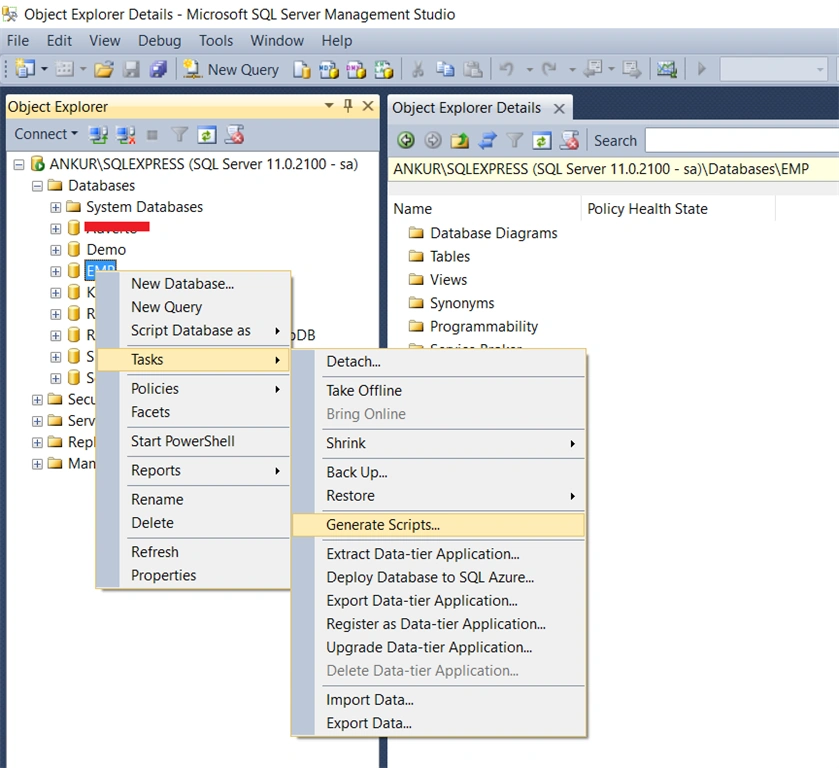
Step 1: Right click on the database you want to generate script and go to Tasks, then click Generate Scripts.
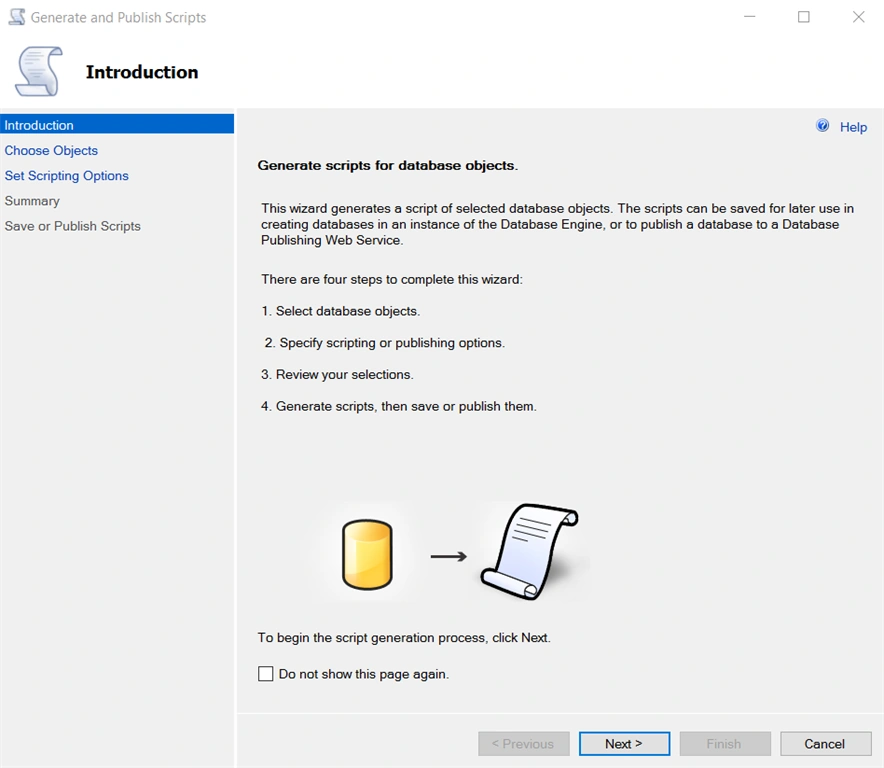
Step 2 : In the next screen, it's nothing but an Introduction screen that explains the following four steps,
- Select Database Object
- Specifying scripting or publishing options
- Review your selection
- Generate Scripts and save or publish
Click on 'Next' button.
Step 3:
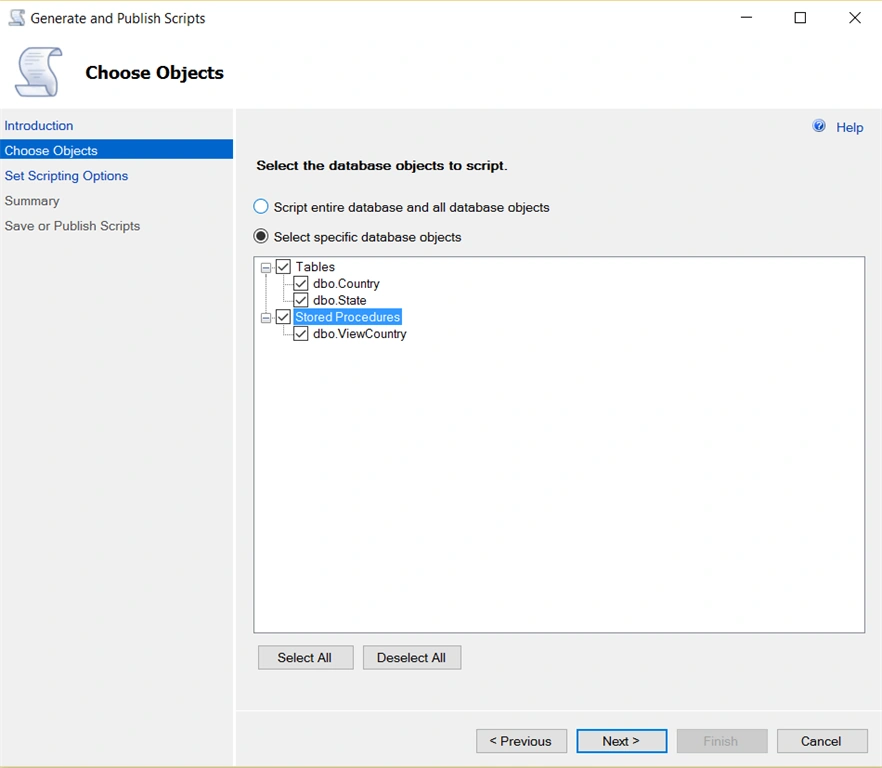
Choose Objects; here either you can select all tables and stored procedures, etc. or you can select specific tables or stored procedures. Click on 'Next' button.
Choose Objects; here either you can select all tables and stored procedures, etc. or you can select specific tables or stored procedures. Click on 'Next' button.
Step 4:
Set Scripting Options, You can select Output Type like "Save scripts to a specific location" or "Publish to web service," here we will select first option. Give a file name and location where you want to save the script.
Set Scripting Options, You can select Output Type like "Save scripts to a specific location" or "Publish to web service," here we will select first option. Give a file name and location where you want to save the script.
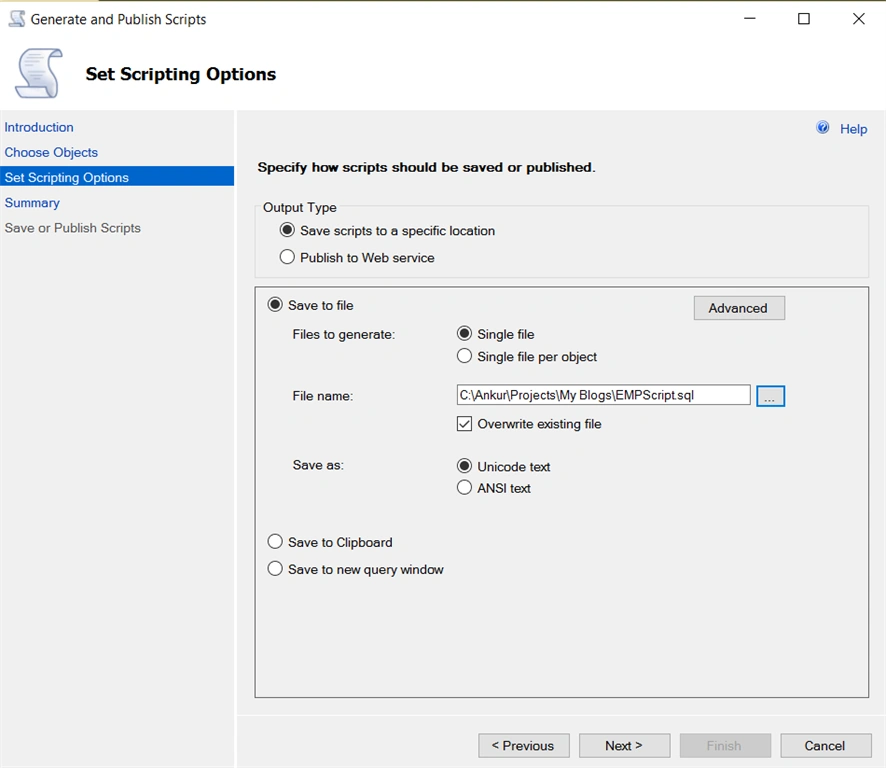
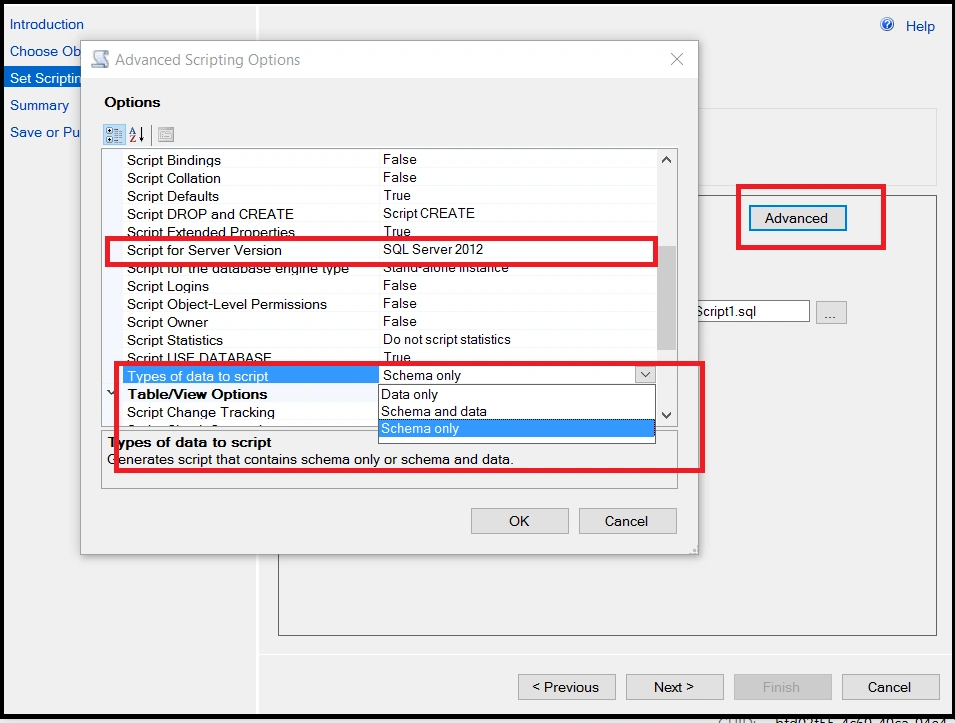
Now, Click on 'Advanced' Button.
From the option tab you can set the property like "Script for Server Version." Choose Server version on which you want to run the script, here I have selected SQL Server 2012.
From the "Type of data to script," select "Schema and data," if you want to move only data you can select "Data only."
Schema Only option will create objects scripts only.
Click 'OK' and then 'Next' to proceed further.
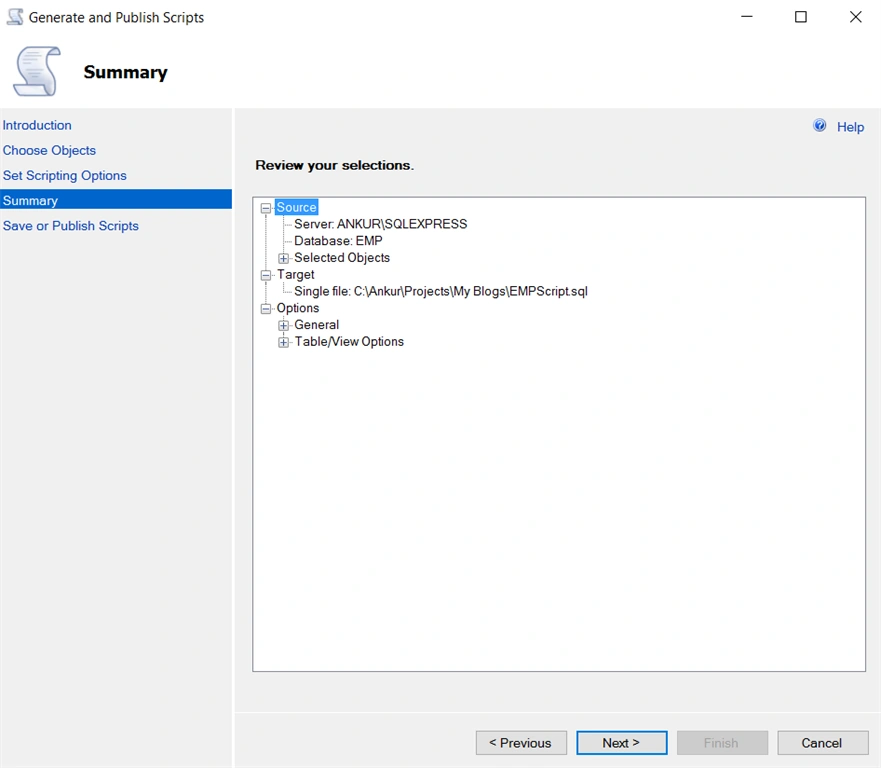
Step 5: In the Summary, Just check path and click on 'Next'.
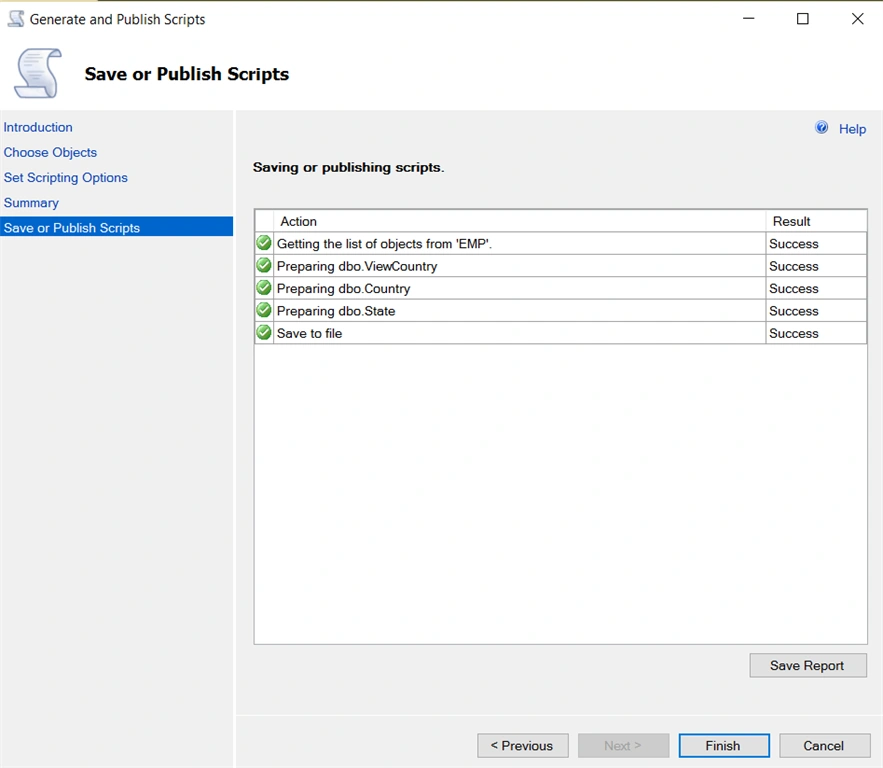
Step 6 : Save or Publish Scripts, Check if all the Action succeeds or not and click on 'Finish'.
Step 7: Open your Script file and run in SQL Server Query Window. For understanding below is the script which we have created.
- USE [EMP]
- GO
- /****** Object: StoredProcedure [dbo].[ViewCountry] Script Date: 28-02-2016 17:39:44 ******/
- SET ANSI_NULLS ON
- GO
- SET QUOTED_IDENTIFIER ON
- GO
- -- =============================================
- -- Author: <Author,,Name>
- -- Create date: <Create Date,,>
- -- Description: <Description,,>
- -- =============================================
- CREATE PROCEDURE [dbo].[ViewCountry]
- AS
- BEGIN
- -- SET NOCOUNT ON added to prevent extra result sets from
- -- interfering with SELECT statements.
- SET NOCOUNT ON;
- SELECT [CountryId]
- ,[CountryName]
- FROM [EMP].[dbo].[Country]
- END
- GO
- /****** Object: Table [dbo].[Country] Script Date: 28-02-2016 17:39:44 ******/
- SET ANSI_NULLS ON
- GO
- SET QUOTED_IDENTIFIER ON
- GO
- CREATE TABLE [dbo].[Country](
- [CountryId] [int] IDENTITY(1,1) NOT NULL,
- [CountryName] [nvarchar](50) NULL,
- CONSTRAINT [PK_Country] PRIMARY KEY CLUSTERED
- (
- [CountryId] ASC
- )WITH (PAD_INDEX = OFF, STATISTICS_NORECOMPUTE = OFF, IGNORE_DUP_KEY = OFF, ALLOW_ROW_LOCKS = ON, ALLOW_PAGE_LOCKS = ON) ON [PRIMARY]
- ) ON [PRIMARY]
- GO
- /****** Object: Table [dbo].[State] Script Date: 28-02-2016 17:39:44 ******/
- SET ANSI_NULLS ON
- GO
- SET QUOTED_IDENTIFIER ON
- GO
- CREATE TABLE [dbo].[State](
- [StateId] [int] IDENTITY(1,1) NOT NULL,
- [CountryId] [int] NULL,
- [StateName] [nvarchar](100) NULL,
- CONSTRAINT [PK_State] PRIMARY KEY CLUSTERED
- (
- [StateId] ASC
- )WITH (PAD_INDEX = OFF, STATISTICS_NORECOMPUTE = OFF, IGNORE_DUP_KEY = OFF, ALLOW_ROW_LOCKS = ON, ALLOW_PAGE_LOCKS = ON) ON [PRIMARY]
- ) ON [PRIMARY]
- GO
- SET IDENTITY_INSERT [dbo].[Country] ON
- INSERT [dbo].[Country] ([CountryId], [CountryName]) VALUES (1, N'INDIA ')
- INSERT [dbo].[Country] ([CountryId], [CountryName]) VALUES (2, N'USA ')
- INSERT [dbo].[Country] ([CountryId], [CountryName]) VALUES (3, N'UK ')
- INSERT [dbo].[Country] ([CountryId], [CountryName]) VALUES (4, N'NEW ZEALAND')
- INSERT [dbo].[Country] ([CountryId], [CountryName]) VALUES (5, N'AUSTRALIA')
- INSERT [dbo].[Country] ([CountryId], [CountryName]) VALUES (6, N'SA')
- INSERT [dbo].[Country] ([CountryId], [CountryName]) VALUES (7, N'SRI LANKA')
- INSERT [dbo].[Country] ([CountryId], [CountryName]) VALUES (8, N'test')
- SET IDENTITY_INSERT [dbo].[Country] OFF
- SET IDENTITY_INSERT [dbo].[State] ON
- INSERT [dbo].[State] ([StateId], [CountryId], [StateName]) VALUES (1, 1, N'GUJARAT')
- INSERT [dbo].[State] ([StateId], [CountryId], [StateName]) VALUES (2, 1, N'MAHARASHTRA')
- INSERT [dbo].[State] ([StateId], [CountryId], [StateName]) VALUES (3, 4, N'AUCKLAND')
- SET IDENTITY_INSERT [dbo].[State] OFF
- ALTER TABLE [dbo].[State] WITH CHECK ADD CONSTRAINT [FK_State_Country] FOREIGN KEY([CountryId])
- REFERENCES [dbo].[Country] ([CountryId])
- GO
- ALTER TABLE [dbo].[State] CHECK CONSTRAINT [FK_State_Country]
- GO
I hope you liked this article.
Read more articles on SQL Server:


Rajeev PunhaniPosted Mar 1, 2016, 7:01 PM EST
Nice Share.
Ammar ShaukatPosted Mar 1, 2016, 7:54 AM EST
Great.
Amit Kumar SinghPosted Feb 29, 2016, 6:49 PM EST
Thanks
Thiru RPosted Feb 29, 2016, 6:23 PM EST
So far i missed "Script for Server Version" and messed-up many times. Thank you so much.
Abdulmannan BahelimPosted Feb 29, 2016, 6:17 PM EST
nice share
Ankur MistryTOP 100Posted Feb 29, 2016, 9:29 AM EST
Thank you all
Gowtham KTOP 100Posted Feb 29, 2016, 6:16 AM EST
Good one, Thanks for sharing
Asfend YarPosted Feb 29, 2016, 5:24 AM EST
nice share
csharp programmerPosted Feb 29, 2016, 12:52 AM EST
Is there any way to do the same in Schedules fashion using SQL Jobs ?.
Raja TPosted Feb 28, 2016, 8:58 PM EST
Nice, Thanks for sharing
Sibeesh VenuTOP 100Posted Feb 28, 2016, 7:17 PM EST
Nice Share
Kirtan ParmarPosted Feb 28, 2016, 7:44 AM EST
thanks for sharing, and what do you suggest for fastest way to take backup from live sql database ?
Pankaj Kumar ChoudharyTOP 100Posted Feb 28, 2016, 7:21 AM EST
Nice Explain Sir.........