
Let us see how to programmatically list all the appointments from the calendar app in Windows Phone 8. Open the Visual Studio 2013 IDE or 2012 IDE and create a new project with a valid name. Here I use “ListAllAppointments Demo” as my project name as shown in the screen below.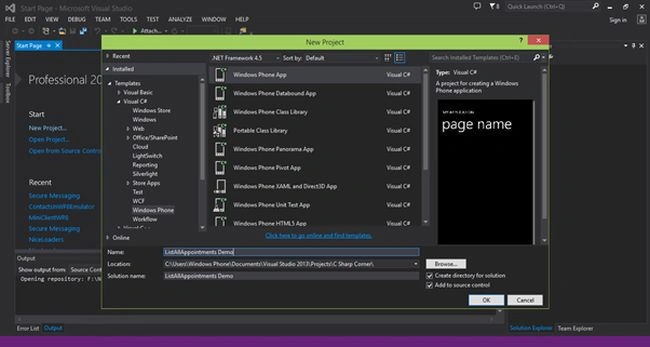
Once everything is ready our project looks as in the following screen.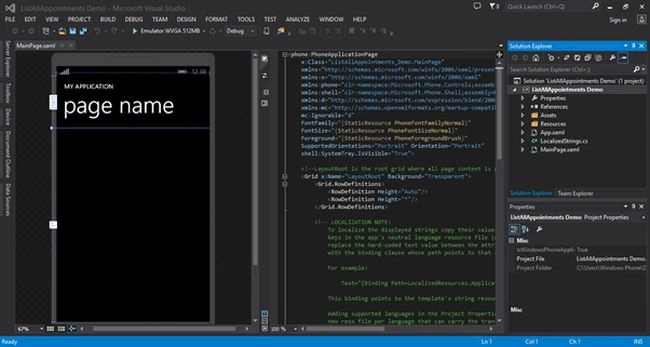
Now add one Button control to trigger the calendar to get the appointments, change the button name to “Get appointments”.
XAML Code
- <phone:PhoneApplicationPage
- x:Class="ListAllAppointments_Demo.MainPage"
- xmlns="http://schemas.microsoft.com/winfx/2006/xaml/presentation"
- xmlns:x="http://schemas.microsoft.com/winfx/2006/xaml"
- xmlns:phone="clr-namespace:Microsoft.Phone.Controls;assembly=Microsoft.Phone"
- xmlns:shell="clr-namespace:Microsoft.Phone.Shell;assembly=Microsoft.Phone"
- xmlns:d="http://schemas.microsoft.com/expression/blend/2008"
- xmlns:mc="http://schemas.openxmlformats.org/markup-compatibility/2006"
- mc:Ignorable="d"
- FontFamily="{StaticResource PhoneFontFamilyNormal}"
- FontSize="{StaticResource PhoneFontSizeNormal}"
- Foreground="{StaticResource PhoneForegroundBrush}"
- SupportedOrientations="Portrait" Orientation="Portrait"
- shell:SystemTray.IsVisible="True">
- <Grid x:Name="LayoutRoot" Background="Transparent">
- <Grid.RowDefinitions>
- <RowDefinition Height="Auto"/>
- <RowDefinition Height="*"/>
- </Grid.RowDefinitions>
- <StackPanel x:Name="TitlePanel" Grid.Row="0" Margin="12,17,0,28">
- <TextBlock Text="MY APPLICATION" Style="{StaticResource PhoneTextNormalStyle}" Margin="12,0"/>
- <TextBlock Text="page name" Margin="9,-7,0,0" Style="{StaticResource PhoneTextTitle1Style}"/>
- </StackPanel>
- <Grid x:Name="ContentPanel" Grid.Row="1" Margin="12,0,12,0"></Grid>
- <Button Content="Get appointments" HorizontalAlignment="Left" VerticalAlignment="Top" Margin="122,66,0,0" Grid.Row="1" Width="286"/>
- </Grid>
- </phone:PhoneApplicationPage>
- using Microsoft.Phone.Data;
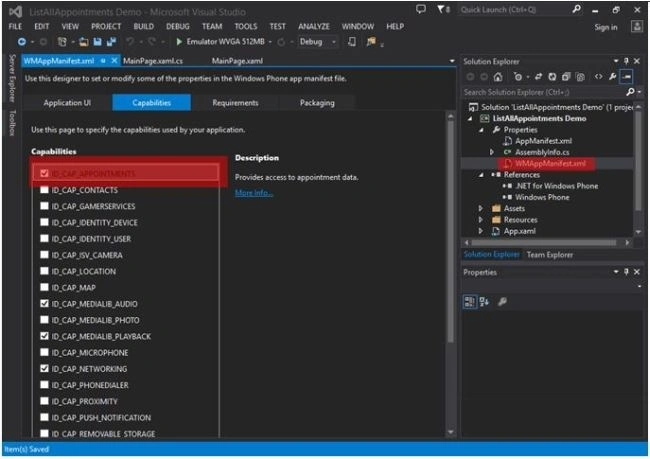
Write the following code to get the appointments.
C# Code
- List<Appointment> listofappoinment;
- private void Button_Click(object sender, RoutedEventArgs e)
- {
- Appointments objAppoinment = new Appointments();
- objAppoinment.SearchCompleted+=new EventHandler<AppointmentsSearchEventArgs>(objAppoinment_SearchCompleted);
- DateTime startDate = DateTime.Now;
- DateTime endDate = startDate.AddDays(20);
- objAppoinment.SearchAsync(startDate, endDate, null);
- }
- void objAppoinment_SearchCompleted(object sender, AppointmentsSearchEventArgs e)
- {
- listofappoinment = new List<Appointment>(e.Results);
- StringBuilder appoinment = new StringBuilder();
- foreach(Appointment list in listofappoinment)
- {
- appoinment.Append("Subject:" + list.Subject +"--"+"Location:" + list.Location);
- appoinment.Append("|");
- }
- MessageBox.Show(appoinment.ToString());
- }
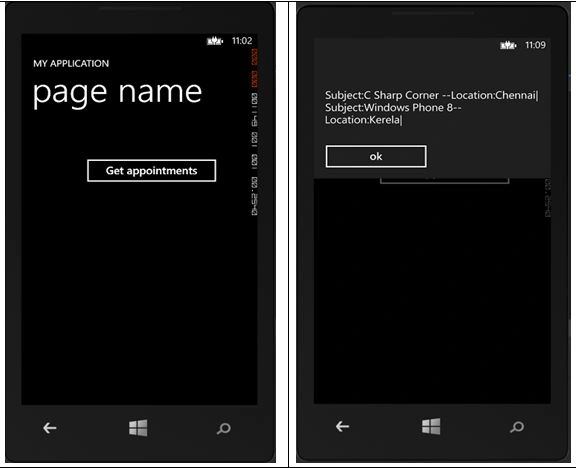
Note: Before checking the output create an appointment in the emulator. I created two appointments in this demo.


Santhakumar MunuswamyPosted Apr 25, 2015, 3:55 AM EDT
Thanks for good work
Suresh MPosted Feb 24, 2015, 6:19 PM EST
Thank you rahul....
Rahul Kumar SaxenaTOP 100Posted Feb 24, 2015, 2:19 AM EST
Nice One bro...
Sibeesh VenuTOP 100Posted Feb 23, 2015, 6:44 PM EST
Suresh M you are welcome
Suresh MPosted Feb 23, 2015, 6:08 PM EST
thanks
Sibeesh VenuTOP 100Posted Feb 23, 2015, 2:25 AM EST
Good One.