
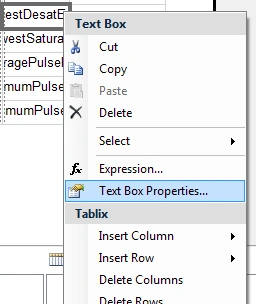
Right-click on the TextBox and select TextBox Properties.
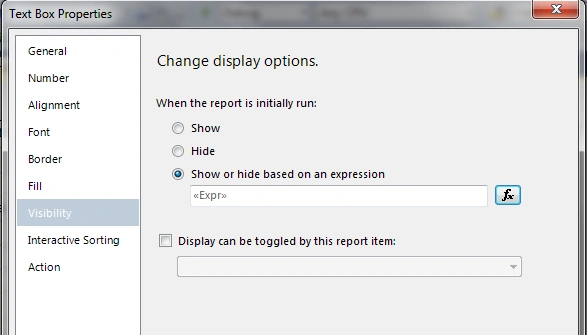
From the Properties window select Visibility and click on "Show or hide based on an expression".
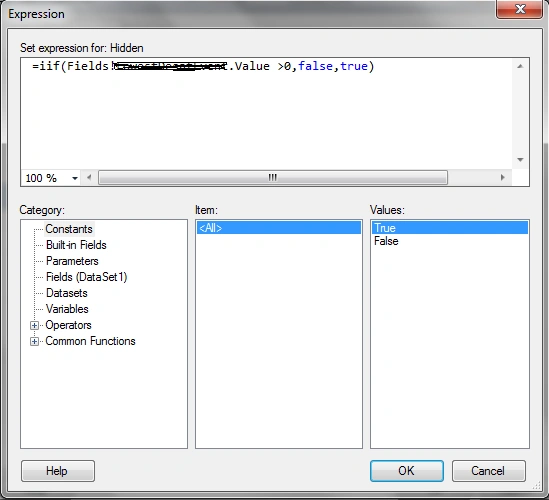
In the Expression window enter the Expression as you like ( iif(Fields!YouField.Value>0,false,true) )


balasubrahmanyam dolaPosted Jan 7, 2021, 9:33 AM EST
Hi I need to show the group with continue... text if the group goes to the next page in rdlc report. Any help?
Tapan PatelPosted Dec 8, 2017, 4:26 AM EST
May be it is too late to ask but I came across something like this in footer of RDLC. Is there a way to show/hide footer based on some expression (let's say based on page breaks)? I am naive to RDLC.
Boominathan RathinavelPosted Feb 18, 2015, 9:16 PM EST
how to skip the null dates values please help me
Boominathan RathinavelPosted Feb 18, 2015, 9:14 PM EST
how to skip the null values
developernader .Posted Jan 12, 2015, 10:27 PM EST
Thank you it's helpful
Gopal KrishPosted Sep 30, 2013, 8:53 PM EDT
thanks Nipun Tomar...
Blocked AccountPosted Sep 18, 2012, 2:56 AM EDT
Thanks for this.