
Introduction
In this article, I will explain to you how to host your website to GoDaddy Server. I will also explain how you can create a database server on GoDaddy. But the process we would follow will not be only for GoDaddy, it can be followed for all other hosting services.
Note
To host your ASP.NET MVC website on GoDaddy, you must have Windows plan.
To host your ASP.NET MVC website on GoDaddy, you must have Windows plan.
Let's start step by step.
Step 1
Step 1
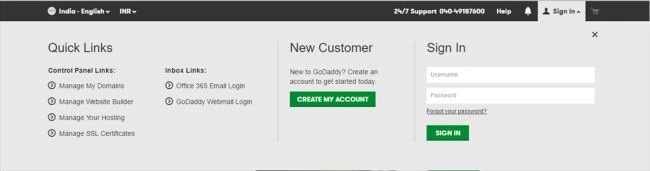
Step 2
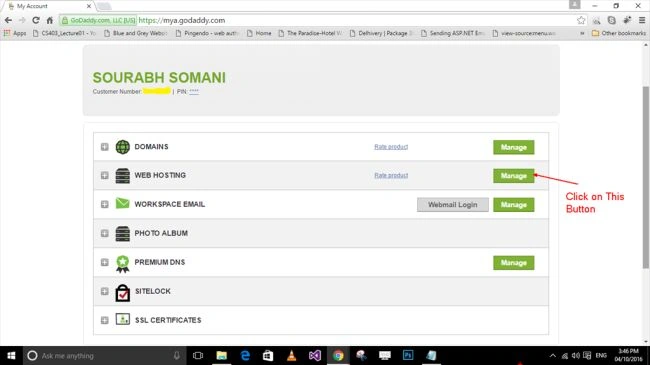
Now, your Account page will open where you will get WEB HOSTING. Click on Manage button.
Step 3
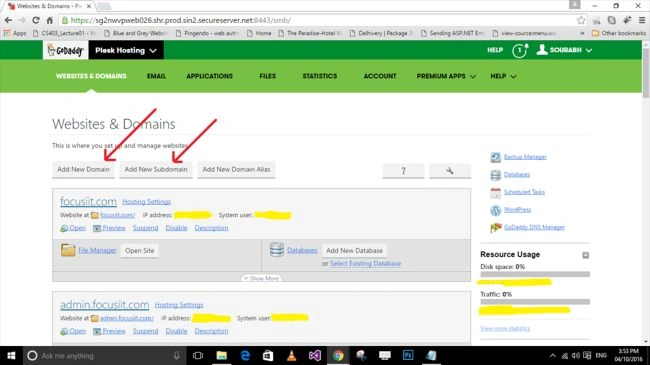
After that, you will get your hosting server page. From there you can add new domain for a new website or you can also add new sub domain for a new website.
Step 4
After that, you will get your hosting server page. From there you can add new domain for a new website or you can also add new sub domain for a new website.
Step 4
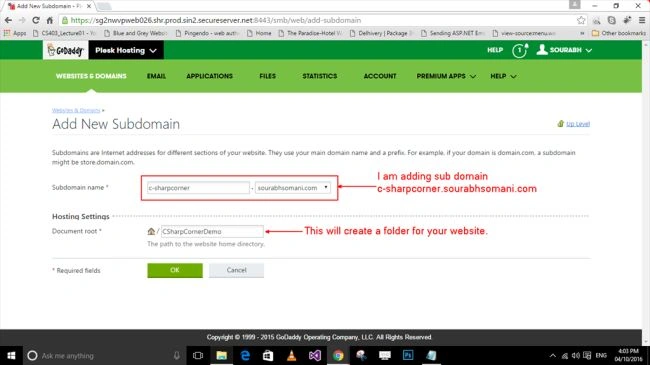
Now either Add New Domain or Add Sub Domain. I am going to add new sub domain. When you will add new sub domain you will get the following page.
Step 5
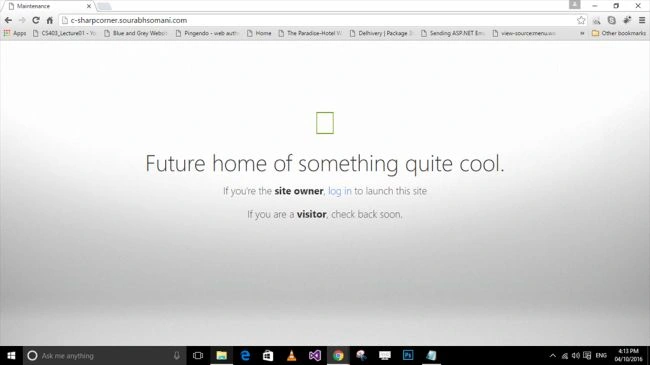
After adding sub domain, your website will be live and that will look like as follows,
Step 6
After giving the name of the website and folder name click on OK button. So it will create a folder for your website which is given in Document Root textbox. Your folder will be like as follows.
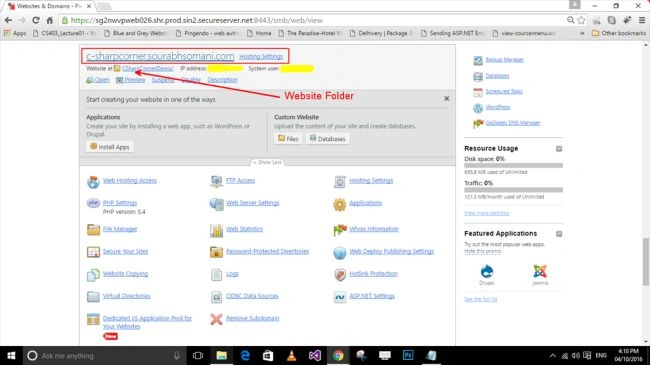
After giving the name of the website and folder name click on OK button. So it will create a folder for your website which is given in Document Root textbox. Your folder will be like as follows.
Step 7
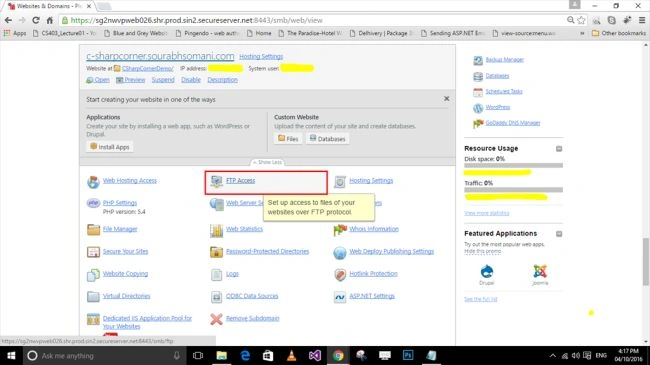
Now create an FTP user for your account by clicking on FTP Access.
Step 8
Now click on Add FTP Account.
Now create an FTP user for your account by clicking on FTP Access.
Step 8
Now click on Add FTP Account.

Step 9
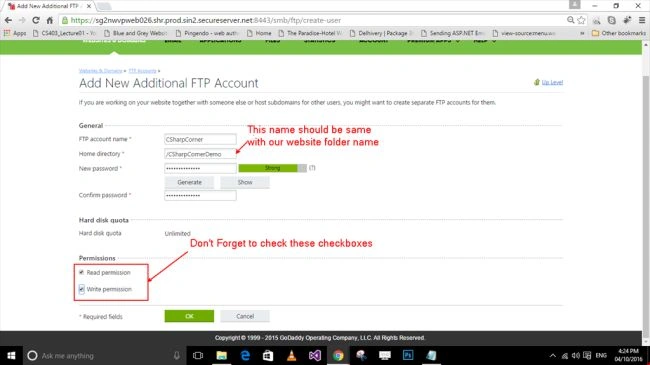
Now, fill the following form after clicking "Add New FTP Account" button.
Step 10
After completing this process, go back to your Server home page and create database on the server if you have in your project.
Now, fill the following form after clicking "Add New FTP Account" button.
Step 10
After completing this process, go back to your Server home page and create database on the server if you have in your project.
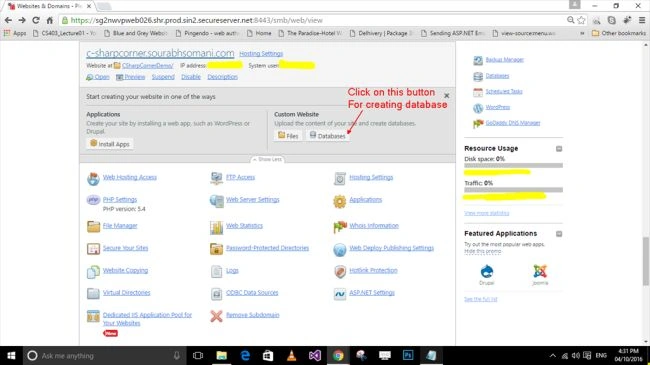
Step 11
Now, click on Add New Database Button.

Step 12
Fill the following form to create the database on the Server.
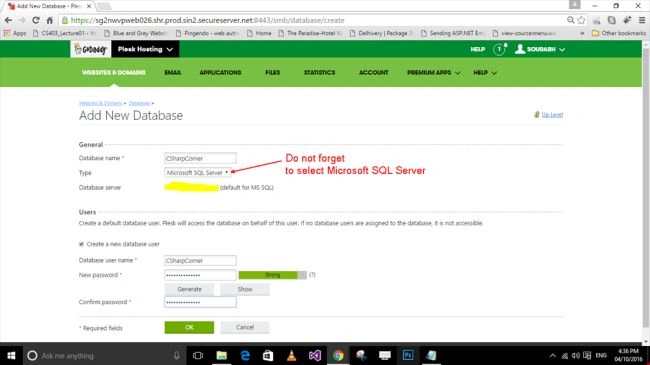
Fill the following form to create the database on the Server.
Step 13
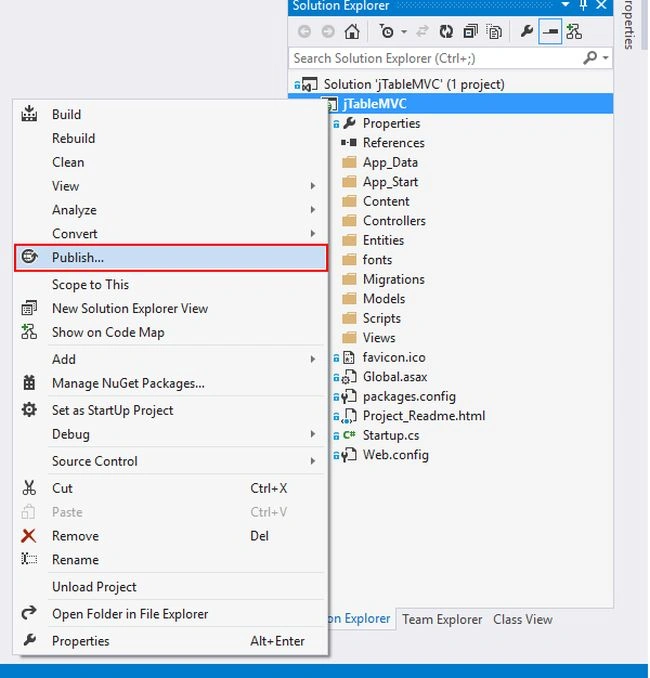
After completing this process, let's flip to Visual Studio and open the web application which you want to host. In this article I am hosting my old article "jTable CRUD Operation using MVC". To host your web application, first of all right click on the project and click on the Publish.
Step 14
After clicking on publish button, one dialog box will open for web publishing. First of all, you have to create new profile.
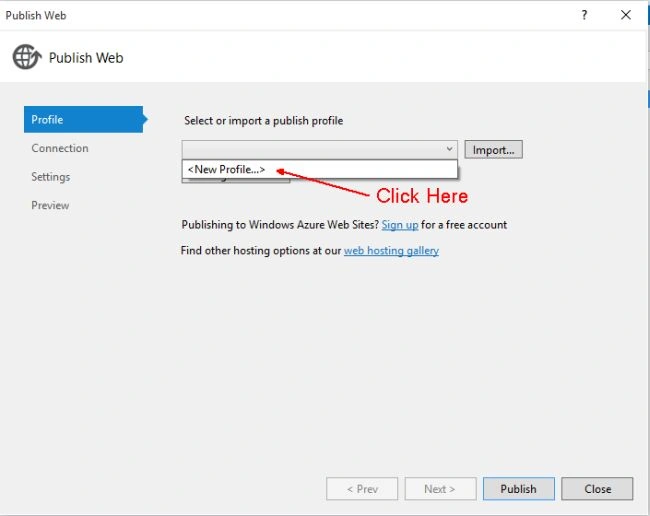
Give any name for your profile and click on Next button.
After completing this process, let's flip to Visual Studio and open the web application which you want to host. In this article I am hosting my old article "jTable CRUD Operation using MVC". To host your web application, first of all right click on the project and click on the Publish.
Step 14
After clicking on publish button, one dialog box will open for web publishing. First of all, you have to create new profile.
Give any name for your profile and click on Next button.
Step 15
Now, make the connection with your FTP server, provide user name password for your FTP server and Validate Connection.
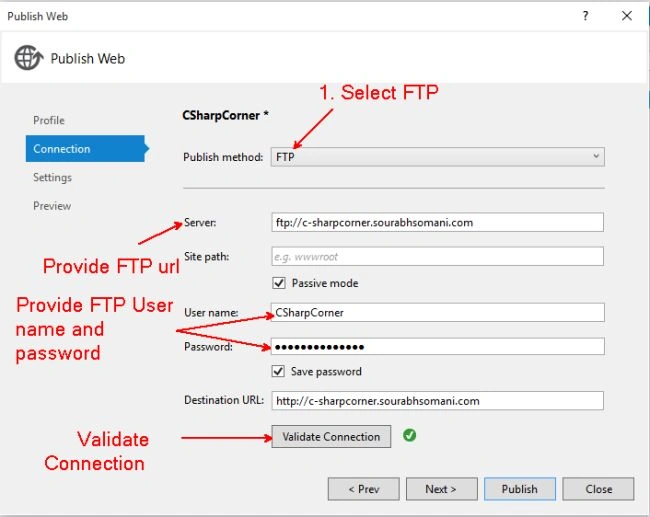
Now, make the connection with your FTP server, provide user name password for your FTP server and Validate Connection.
Step 16
After validation, click on Next button and apply the following settings.
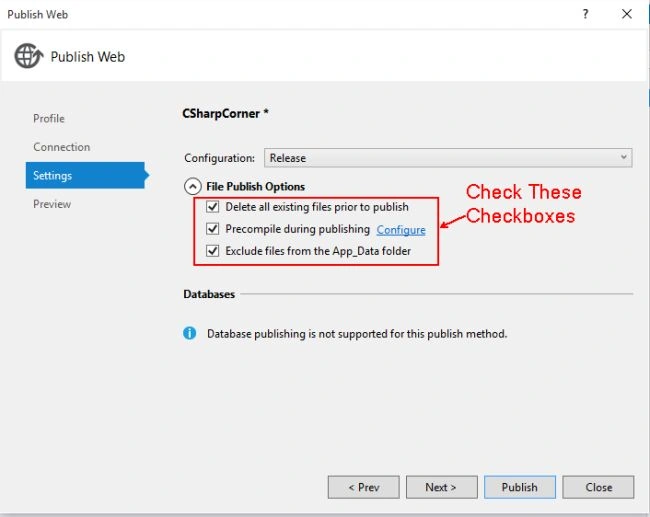
Step 17
Now, click on Publish button and wait for publishing.
After validation, click on Next button and apply the following settings.
Step 17
Now, click on Publish button and wait for publishing.
Step 18
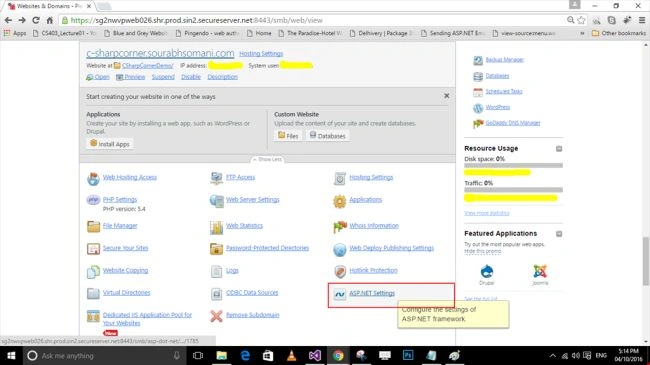
After publishing the website, flip to GoDaddy server page again and click on ASP.NET Settings.
Step 19
Write Connection String for your server side database.
After publishing the website, flip to GoDaddy server page again and click on ASP.NET Settings.
Step 19
Write Connection String for your server side database.
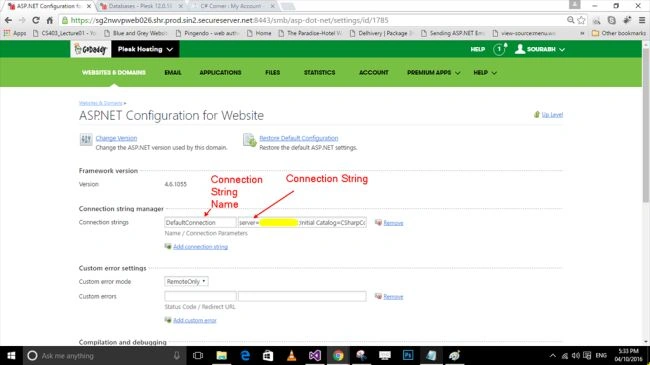
Step 20
Open Visual Studio again and update database from package manager, again writing same connection string in web.config of your project in Visual Studio. Open package manager console and type the following command,
Open Visual Studio again and update database from package manager, again writing same connection string in web.config of your project in Visual Studio. Open package manager console and type the following command,
- pm>update-database

Step 21
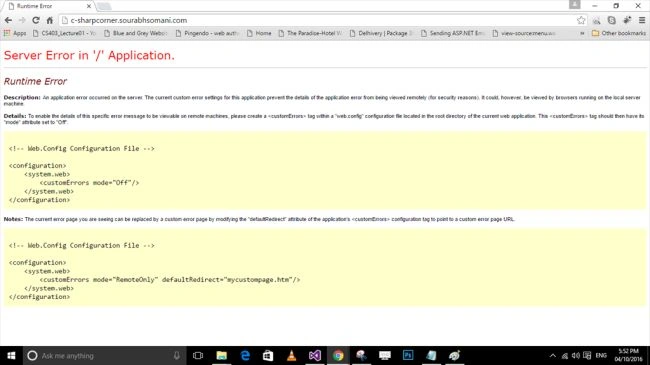
Now, quickly open your website by my website URL that is "http://c-sharpcorner.sourabhsomani.com/". When you will run website you will get the following error,
Note
This is the normal error which will come every time when you will host your website. To fix this error you have to modify your web.config on server side.
Step 22
To fix above error open your website directory on server. To open that click on File Manager.
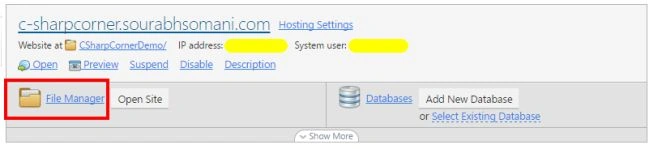
To fix above error open your website directory on server. To open that click on File Manager.
Step 23
Click on Web.Config,
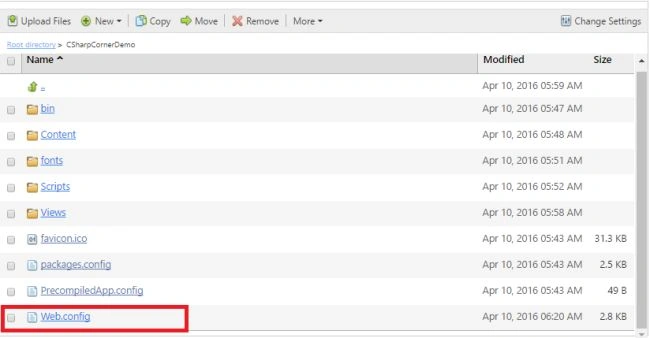
Click on Web.Config,
Step 24
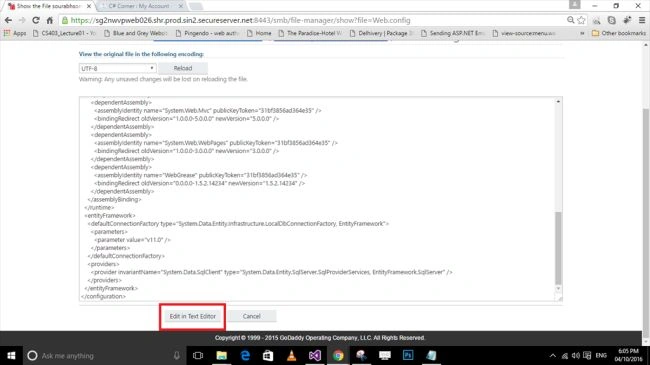
Now click on Edit in Text Editor button which will be bottom of the Text Area.
Step 25
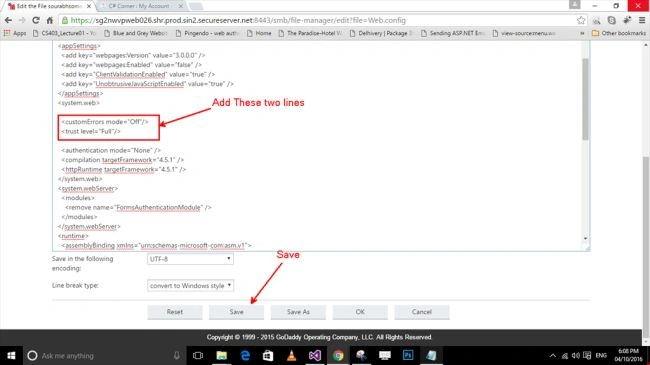
Now add two lines in web.config. That is as follows:
Now click on Edit in Text Editor button which will be bottom of the Text Area.
Step 25
Now add two lines in web.config. That is as follows:
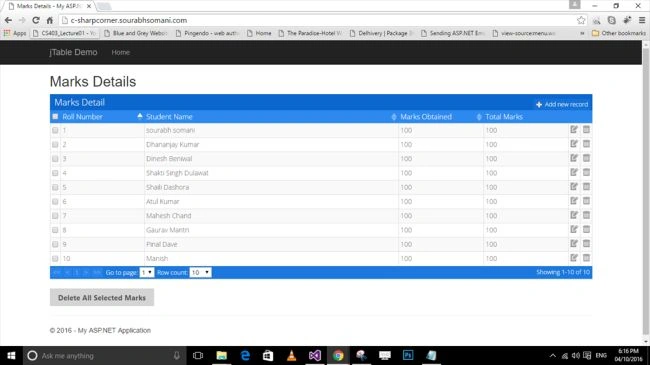
Output
Conclusion
In this article, we have learned the following.
- Hosting our ASP.NET and ASP.NET MVC website.
- Creating FTP Client on the Server.
- Creating database on the Server.
- Fixing Errors when publishing our website.
- Updating database which is located on server side using Package Manager Console.
Important Link
Read more articles on ASP.NET


ParthaPosted Oct 8, 2021, 8:04 AM EDT
How to publish using Web deploy option from Visual Studio?
sundari balajiPosted May 27, 2021, 11:05 AM EDT
Hi, Thanks for your article. Will the same procedure applicable for Blazor Server Hosting Model App's too?
Furqan AzizPosted Feb 10, 2021, 3:46 PM EST
Hi, i have one issue, my website hosted on godaddy and its in MVC C# , it was working fine since 2017 but today its showing error . please guide. HTTP Error 403.14 - ForbiddenThe Web server is configured to not list the contents of this directory.
Soumik MahajanPosted Dec 30, 2020, 6:08 AM EST
Can not find database type , i want to import a microsoft sql server database but only MySql db available , any solutions?
Madan RoutPosted Aug 26, 2020, 7:41 AM EDT
[email protected]
Madan RoutPosted Aug 26, 2020, 7:41 AM EDT
Do anybody know how to publish asp.net web api into GoDaddy so I can acccess through mobile app or postman .please share the valuable thought.
Charan SinghPosted Jun 24, 2020, 1:16 AM EDT
This configuration section cannot be used at this path. This happens when the site administrator has locked access to this section using <location allowOverride="false"> from an inherited configuration file. Getting this error when trying to host asp.net web api on plesk shared hosting by creating a virtual directory. Please help
Atta KumahPosted Jun 10, 2020, 2:38 AM EDT
Thanks Very Much Boss. I really enjoy it.
Pankaj PawarPosted May 30, 2020, 10:26 AM EDT
As we All Know Asp.net Core is Platform Independent and Open Source, Web Applications Built on Asp.net core run on any operating System, So Can We host Asp.net Core Web application on Linux Server (shared Hosting) Or (VPS) , BeCoz Linux Hosting Plans are Cheaper than Windows Hosting..
Dev SinharoyPosted May 17, 2020, 3:33 PM EDT
Hi tried to follow and but I made it with an asp.net core and now when I run update-database I get this error CREATE DATABASE permission denied in database 'master'. I would appreciate it If you could make a tutorial doing the same thing in asp. net core and put the link in the reply You give me Thanks
toni mcneelyPosted May 8, 2020, 3:28 AM EDT
Thank you for your reply. I have one other question, it seems that plesk on godaddy only looks for the web.config for the application configuration, but my application is using appsettings.json for my configuration variables. I believe this is why I am getting a 500 server error and the webpage is not coming up. Any thoughts on this topic? I really woud appreciate your input. thank you.
toni mcneelyPosted May 5, 2020, 2:43 AM EDT
I am very new to this technology. I am working on hosting an asp.net core website to godaddy. I followed your instructions but ran into difficulty when dealing with the database connection strings. you briefly speak of server side connection string. can you further explain.
Dev SinharoyPosted May 4, 2020, 4:47 PM EDT
Can u make a tutorial doing the same thing but asp.net core
Al MondalePosted Apr 20, 2020, 8:12 AM EDT
I believe GD now will host ASP.net CORE apps. Is there any different process, compared with "basic" MVC precompiled app?
prince tomyPosted Jul 24, 2019, 11:36 PM EDT
Thanks for the help.Nice explanation..Nice articles..you are a great...
Berend OttenPosted May 26, 2019, 11:52 PM EDT
Please, can you tell what kind of Windows hosting you bought at Godaddy? Or did you use a virtual private server?
Reid CorcoranPosted Mar 21, 2019, 6:24 PM EDT
Hi, I deployed to GoDaddy hosting but didn't use VS publish. I just chose files and folders and transferred using FileZilla. I may be missing some functionality. My issue is that I did a minor edit to one of my MVC controllers (specifically, added "[Authorize]" to a few of my views) but now several hours later, the change I made is not implemented. I am a relative novice, so if I need to deploy MVC another way like in your step-by-step, I can do that but would like to know what if anything I left out. Or, do I need the GoDaddy server to recompile/rebuild the website? Can their server do that? Thanks.
Deep ApsingekarPosted Mar 7, 2019, 6:23 AM EST
Hi, I have a question, so if your site has both MVC and Web API (Web services). Do you have to host both of them separately. Or Can I use the same hosting to host both of them
Surya NPosted Oct 28, 2018, 6:31 PM EDT
Error: PM> update-database Introducing FOREIGN KEY constraint 'FK_dbo.Questions_dbo.Users_UserID' on table 'Questions' may cause cycles or multiple cascade paths. Specify ON DELETE NO ACTION or ON UPDATE NO ACTION, or modify other FOREIGN KEY constraints.Could not create constraint or index. See previous errors.
Muhammad Ashikuzzaman AshikPosted Sep 7, 2018, 5:55 PM EDT
Thanks. It helped me.
Jason StathamPosted Jul 31, 2018, 7:19 AM EDT
Is it possible to work with entity framework [ connection string ] especially the data first approch..!
Azhar KalamPosted Jun 3, 2018, 11:07 AM EDT
I cant see ASP.NET settings under Godaddy server page?
amigo wispPosted Apr 13, 2018, 10:58 AM EDT
Parser Error Message: It is an error to use a section registered as allowDefinition='MachineToApplication' beyond application level. This error can be caused by a virtual directory not being configured as an application in IIS.
amigo wispPosted Apr 13, 2018, 10:57 AM EDT
Is an error to use a section registered as allowDefinition='MachineToApplication' beyond application level. This error can be caused by a virtual directory not being configured as an application in IIS.
Tridip BhattacharjeePosted Mar 8, 2018, 10:26 PM EST
Is there any hosting provider where i can create my account freely and upload my asp.net mvc4/ and 5 web application freely with sql server database support. share some site names if you aware of. thanks
Tridip BhattacharjeePosted Mar 8, 2018, 10:24 PM EST
Why you add sub-domain instead of domain? what is the difference between domain and sub-domain. if possible please discuss it in details here. thanks
bolo boloPosted Jan 21, 2018, 11:03 PM EST
Nice Article Explained Thoroughly and step by step but images are not clear
ankit agrawalPosted Nov 12, 2017, 8:23 AM EST
Hey..did you create table in the godaddy database again?? I mean how actually your data from local database is getting into hosted website. Please explain
Kashyap KakiPosted Oct 23, 2017, 1:37 AM EDT
Thanks for your article. Its really helpful. Keep posting!
JMPosted Oct 17, 2017, 12:45 PM EDT
Can i have another question, i have carefully followed your instructions here, when i run my site with www.domain.com i still get the Error in '/' message BUT when i put www.domain.com/default.aspx it works fine. I'm not sure where the error is coming from tho i already set the document root to httpdocs and the default.aspx page is inside it.
JMPosted Oct 17, 2017, 2:43 AM EDT
How do you update individual files? do you re-publish the whole project again?
Stephanie HallbergPosted Oct 12, 2017, 12:45 PM EDT
Where can we find the Connection String mentioned in step 19 and 20.. "Write Connection String for your server side database. ?"
Ahmed AbdiPosted Aug 24, 2017, 1:24 AM EDT
Awesome article thanks for share
dotnet guyPosted Aug 3, 2017, 6:18 AM EDT
Hi there, The above steps can be used for ASP.NET WebApI too? for some reason i am getting 404 error after hosting my website to SHARED hosting server i.e; brinkster.com. Not sure if we need something else for deploying web api.
Navneet Singh RajputPosted Jun 28, 2017, 8:46 AM EDT
I faced some issue. please help me out.. Code generated using the T4 templates for Database First and Model First development may not work correctly if used in Code First mode. To continue using Database First or Model First ensure that the Entity Framework connection string is specified in the config file of executing application. To use these classes, that were generated from Database First or Model First, with Code First add any additional configuration using attributes or the DbModelBuilder API and then remove the code that throws this exception.
Devendra kumarPosted Jun 8, 2017, 1:29 AM EDT
My domain name is http://moviecollection.in/
Devendra kumarPosted Jun 8, 2017, 1:28 AM EDT
Could not load file or assembly 'WebGrease, Version=1.5.1.25624, Culture=neutral, PublicKeyToken=31bf3856ad364e35' or one of its dependencies. The located assembly's manifest definition does not match the assembly reference. (Exception from HRESULT: 0x80131040)
Armaan LabibPosted Jun 1, 2017, 8:42 AM EDT
I am having problem with connection string. Its saying parameter is missing.
Mohamed ElqassasPosted May 25, 2017, 9:21 AM EDT
Great, Thanks for sharing!
Former memberPosted May 25, 2017, 12:37 AM EDT
Go daddy is not good choice because they some time charge money with wrong info to customer. has no good reputation. better approach ORCSWEB. it has solid reputation but could be costly compared with go daddy.
Muhammad Aqib ShehzadPosted May 24, 2017, 9:39 PM EDT
Very nice share and nicely elaborated
Satyaprakash SamantarayPosted May 24, 2017, 8:26 PM EDT
Nice ...................................
ryan pascalPosted May 24, 2017, 4:33 PM EDT
Hello, I am receiving this error: Configuration ErrorDescription: An error occurred during the processing of a configuration file required to service this request. Please review the specific error details below and modify your configuration file appropriately. Parser Error Message: This configuration section cannot be used at this path. This happens when the site administrator has locked access to this section using <location allowOverride="false"> from an inherited configuration file. Source Error: An application error occurred on the server. The current custom error settings for this application prevent the details of the application error from being viewed remotely (for security reasons). It could, however, be viewed by browsers running on the local server machine. The error is on this line of the web config <trust level="Full"/>
Muhammad AhmedPosted May 23, 2017, 5:41 AM EDT
Thanks for your clear explanation. I followed your steps and uploaded successfully!.
Bellezze AppsPosted Apr 3, 2017, 10:32 AM EDT
I am getting the "path too long" error, which is preventing me from uploading altogether. Any ideas as to how to fix this?
Nilesh SawardekarPosted Mar 5, 2017, 6:58 PM EST
Getting error,Secure Connection Failed
Nilesh SawardekarPosted Mar 5, 2017, 6:34 PM EST
Very helpful..In vs2015, your step of creating new profile is not there.. there is option 'Custom' for that.
satish kumar donthuPosted Dec 20, 2016, 3:10 AM EST
Hi how to restore our database backup file after creating a database...can you please replay
siddu patilPosted Nov 24, 2016, 9:04 PM EST
Hi Sourabh what is cost to buy domain...??????
KamPosted Nov 13, 2016, 9:29 PM EST
Hi Sourabh, can you show us what to do if you include obfuscation of controller and model code when deploying? Thanks.
Muhammad shahidPosted Oct 24, 2016, 3:21 AM EDT
Solved
Muhammad shahidPosted Oct 19, 2016, 2:09 AM EDT
Server Error in '/' Application. Security Exception Description: The application attempted to perform an operation not allowed by the security policy. To grant this application the required permission please contact your system administrator or change the application's trust level in the configuration file. Exception Details: System.Security.SecurityException: Request failed.
Muhammad shahidPosted Oct 19, 2016, 2:09 AM EDT
Also this 1.
Muhammad shahidPosted Oct 19, 2016, 2:05 AM EDT
The same error as show in Step-21.
Muhammad shahidPosted Oct 17, 2016, 2:39 AM EDT
I follow all steps but its still the same error as i before.Server Error in '/' Application.
Ritesh SinghPosted Aug 3, 2016, 6:03 AM EDT
Very nice explanations
Ajeet MishraPosted Apr 28, 2016, 5:15 AM EDT
Nice
Khawar IslamPosted Apr 12, 2016, 9:32 AM EDT
Wow
Sam HobbsPosted Apr 12, 2016, 8:25 AM EDT
Does it matter whether it is a Visual Studio Web Project or a Visual Studio Web Site?
Shaili DashoraPosted Apr 12, 2016, 6:43 AM EDT
Nice Article,good job Sourabh Somani..
Mohammed IbrahimPosted Apr 11, 2016, 9:48 AM EDT
nice
Kuppurasu NagarajTOP 100Posted Apr 11, 2016, 9:18 AM EDT
Nice Sharing
NitinPosted Apr 11, 2016, 7:25 AM EDT
Good one. Thanks for sharing.
Debasis SahaTOP 100Posted Apr 11, 2016, 6:35 AM EDT
Nice One...
Amit KumarPosted Apr 11, 2016, 3:36 AM EDT
when we update site its chargeable or not?
Amit KumarPosted Apr 11, 2016, 3:35 AM EDT
how to update and edit in my site?
Vignesh ManiTOP 100Posted Apr 11, 2016, 2:54 AM EDT
Nice
Humayun Kabir MamunPosted Apr 11, 2016, 12:00 AM EDT
Nice...
Anupam SinghPosted Apr 10, 2016, 11:29 PM EDT
Good share Sourabh Somani , very helpful steps to host a website/web applciation.
Jaipal ReddyPosted Apr 10, 2016, 11:20 PM EDT
Nice. .
Manish Kumar ChoudharyPosted Apr 10, 2016, 9:43 PM EDT
Nice one.
Sthitaprajnya Debasis NayakPosted Apr 10, 2016, 9:23 PM EDT
Thanks...
Manoj KulkarniPosted Apr 10, 2016, 9:21 PM EDT
Nice article. Thank you for sharing
MannanPosted Apr 10, 2016, 9:13 PM EDT
Nice..
Rahul Kumar SaxenaTOP 100Posted Apr 10, 2016, 8:57 PM EDT
Good Hosting Show :)
Ravi PatelPosted Apr 10, 2016, 8:49 PM EDT
nice share