
Introduction
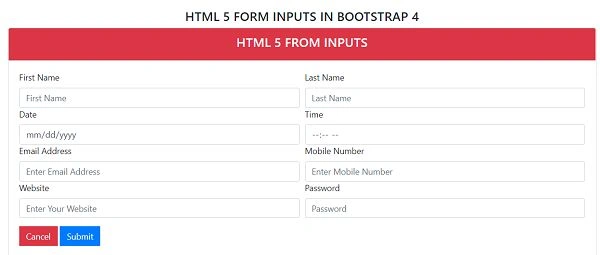
This article will demonstrate how you can use Bootstrap 4 classes for designing HTML 5 Form inputs. Bootstrap supports all the HTML5 input types: text, password, datetime, datetime-local, date, month, time, week, number, email, URL, search, tel, and color. Be sure to use an appropriate type attribute on all inputs (e.g.,
email for the email address or number for numerical information) to take advantage of newer input controls like email verification, number selection, and more.To use Bootstrap 4 popover in your project, you need to have the following downloaded or cdn link scripts.
- <link rel="stylesheet" href="https://maxcdn.bootstrapcdn.com/bootstrap/4.1.3/css/bootstrap.min.css">
- <script src="https://ajax.googleapis.com/ajax/libs/jquery/3.3.1/jquery.min.js"></script>
- <script src="https://maxcdn.bootstrapcdn.com/bootstrap/4.1.3/js/bootstrap.min.js"></script>
Example for HTML5 inputs in Bootstrap 4
- <!DOCTYPE html>
- <html>
- <head>
- <title>Form</title>
- <meta charset="utf-8" />
- <link rel="stylesheet" href="https://maxcdn.bootstrapcdn.com/bootstrap/4.1.3/css/bootstrap.min.css">
- <script src="https://ajax.googleapis.com/ajax/libs/jquery/3.3.1/jquery.min.js"></script>
- <script src="https://maxcdn.bootstrapcdn.com/bootstrap/4.1.3/js/bootstrap.min.js"></script>
- </head>
- <body>
- <div class="container py-5">
- <h4 class="text-uppercase text-center">HTML 5 form inputs in bootstrap 4</h4>
- <div class="card">
- <div class="card-header bg-danger text-white">
- <h4 class="text-uppercase text-center">HTML 5 from inputs</h4>
- </div>
- <div class="card-body">
- <form>
- <div class="form-row">
- <div class="col-md-6">
- <label>First Name</label>
- <input type="text" placeholder="First Name" class="form-control" />
- </div>
- <div class="col-md-6">
- <label>Last Name</label>
- <input type="text" placeholder="Last Name" class="form-control" />
- </div>
- </div>
- <div class="form-row">
- <div class="col-md-6">
- <label>Date</label>
- <input type="date" class="form-control" />
- </div>
- <div class="col-md-6">
- <label>Time</label>
- <input type="time" class="form-control" />
- </div>
- </div>
- <div class="form-row">
- <div class="col-md-6">
- <label>Email Address</label>
- <input type="email" class="form-control" placeholder="Enter Email Address" />
- </div>
- <div class="col-md-6">
- <label>Mobile Number</label>
- <input type="tel" pattern="^\d{10}$" placeholder="Enter Mobile Number" class="form-control" />
- </div>
- </div>
- <div class="form-row">
- <div class="col-md-6">
- <label>Website</label>
- <input type="url" placeholder="Enter Your Website" class="form-control" />
- </div>
- <div class="col-md-6">
- <label>Password</label>
- <input type="password" placeholder="Password" class="form-control" />
- </div>
- </div>
- <div style="margin-top:15px;">
- <button type="submit" class="btn btn-danger rounded-0">Cancel</button>
- <button type="submit" class="btn btn-primary rounded-0">Submit</button>
- </div>
- </form>
- </div>
- </div>
- </div>
- </body>
- </html>
Output
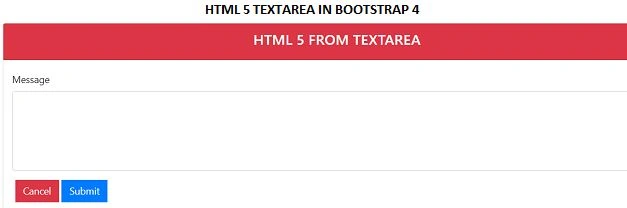
Example for textarea in Bootstrap 4
- <!DOCTYPE html>
- <html>
- <head>
- <title>HTML Form</title>
- <meta charset="utf-8" />
- <link rel="stylesheet" href="https://maxcdn.bootstrapcdn.com/bootstrap/4.1.3/css/bootstrap.min.css">
- <script src="https://ajax.googleapis.com/ajax/libs/jquery/3.3.1/jquery.min.js"></script>
- <script src="https://maxcdn.bootstrapcdn.com/bootstrap/4.1.3/js/bootstrap.min.js"></script>
- </head>
- <body>
- <div class="container py-5">
- <h4 class="text-uppercase text-center">HTML 5 textarea in bootstrap 4</h4>
- <div class="card">
- <div class="card-header bg-danger text-white">
- <h4 class="text-uppercase text-center">HTML 5 from textarea</h4>
- </div>
- <div class="card-body">
- <form>
- <div class="form-row">
- <label>Message</label>
- <textarea rows="5" class="form-control"></textarea>
- </div>
- <div style="margin-top:15px;">
- <button type="submit" class="btn btn-danger rounded-0">Cancel</button>
- <button type="submit" class="btn btn-primary rounded-0">Submit</button>
- </div>
- </form>
- </div>
- </div>
- </div>
- </body>
- </html>
Output
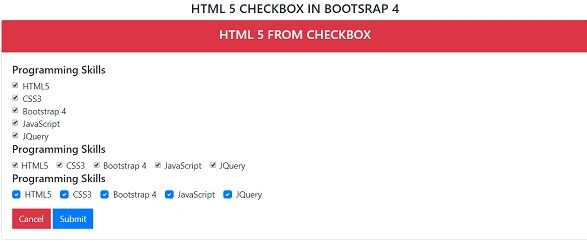
Example for checkbox in Bootstrap 4
- <!DOCTYPE html>
- <html>
- <head>
- <title>HTML Form</title>
- <meta charset="utf-8" />
- <link rel="stylesheet" href="https://maxcdn.bootstrapcdn.com/bootstrap/4.1.3/css/bootstrap.min.css">
- <script src="https://ajax.googleapis.com/ajax/libs/jquery/3.3.1/jquery.min.js"></script>
- <script src="https://maxcdn.bootstrapcdn.com/bootstrap/4.1.3/js/bootstrap.min.js"></script>
- </head>
- <body>
- <div class="container py-5">
- <h4 class="text-uppercase text-center">HTML 5 Checkbox in bootsrap 4</h4>
- <div class="card">
- <div class="card-header bg-danger text-white">
- <h4 class="text-uppercase text-center">HTML 5 from Checkbox</h4>
- </div>
- <div class="card-body">
- <form>
- <h5>Programming Skills</h5>
- <div class="form-check">
- <label class="form-check-label" for="check1">
- <input type="checkbox" class="form-check-input" id="check1" name="HTML5" value="1" checked>HTML5
- </label>
- </div>
- <div class="form-check">
- <label class="form-check-label" for="check2">
- <input type="checkbox" class="form-check-input" id="check2" name="CSS3" value="2" checked>CSS3
- </label>
- </div>
- <div class="form-check">
- <label class="form-check-label" for="check3">
- <input type="checkbox" class="form-check-input" id="check3" name="Bootstrap4" value="3" checked>Bootstrap 4
- </label>
- </div>
- <div class="form-check">
- <label class="form-check-label" for="check4">
- <input type="checkbox" class="form-check-input" id="check4" name="JavaScript" value="4" checked>JavaScript
- </label>
- </div>
- <div class="form-check">
- <label class="form-check-label" for="check5">
- <input type="checkbox" class="form-check-input" id="check5" name="JQuery" value="5" checked>JQuery
- </label>
- </div>
- <h5>Programming Skills</h5>
- <div class="form-check-inline">
- <label class="form-check-label" for="check1">
- <input type="checkbox" class="form-check-input" id="check1" name="HTML5" value="1" checked>HTML5
- </label>
- </div>
- <div class="form-check-inline">
- <label class="form-check-label" for="check2">
- <input type="checkbox" class="form-check-input" id="check2" name="CSS3" value="2" checked>CSS3
- </label>
- </div>
- <div class="form-check-inline">
- <label class="form-check-label" for="check3">
- <input type="checkbox" class="form-check-input" id="check3" name="Bootstrap4" value="3" checked>Bootstrap 4
- </label>
- </div>
- <div class="form-check-inline">
- <label class="form-check-label" for="check4">
- <input type="checkbox" class="form-check-input" id="check4" name="JavaScript" value="4" checked>JavaScript
- </label>
- </div>
- <div class="form-check-inline">
- <label class="form-check-label" for="check5">
- <input type="checkbox" class="form-check-input" id="check5" name="JQuery" value="5" checked>JQuery
- </label>
- </div>
- <h5>Programming Skills</h5>
- <div class="form-check-inline">
- <div class="custom-control custom-checkbox">
- <input type="checkbox" class="custom-control-input" id="customCheck1">
- <label class="custom-control-label" for="customCheck1">HTML5</label>
- </div>
- </div>
- <div class="form-check-inline">
- <div class="custom-control custom-checkbox">
- <input type="checkbox" class="custom-control-input" id="customCheck2">
- <label class="custom-control-label" for="customCheck2">CSS3</label>
- </div>
- </div>
- <div class="form-check-inline">
- <div class="custom-control custom-checkbox">
- <input type="checkbox" class="custom-control-input" id="customCheck3">
- <label class="custom-control-label" for="customCheck3">Bootstrap 4</label>
- </div>
- </div>
- <div class="form-check-inline">
- <div class="custom-control custom-checkbox">
- <input type="checkbox" class="custom-control-input" id="customCheck4">
- <label class="custom-control-label" for="customCheck4">JavaScript</label>
- </div>
- </div>
- <div class="form-check-inline">
- <div class="custom-control custom-checkbox">
- <input type="checkbox" class="custom-control-input" id="customCheck5">
- <label class="custom-control-label" for="customCheck5">JQuery</label>
- </div>
- </div>
- <div style="margin-top:15px;">
- <button type="submit" class="btn btn-danger rounded-0">Cancel</button>
- <button type="submit" class="btn btn-primary rounded-0">Submit</button>
- </div>
- </form>
- </div>
- </div>
- </div>
- </body>
- </html>
Output
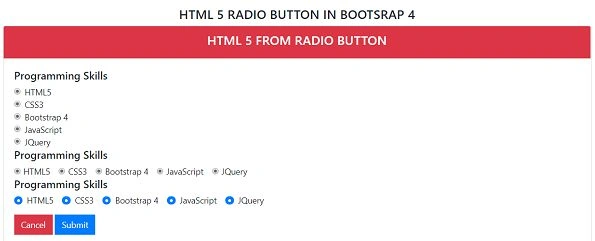
Example for Radio Button in Bootstrap 4
- <!DOCTYPE html>
- <html>
- <head>
- <title>Radio Button</title>
- <meta charset="utf-8" />
- <link rel="stylesheet" href="https://maxcdn.bootstrapcdn.com/bootstrap/4.1.3/css/bootstrap.min.css">
- <script src="https://ajax.googleapis.com/ajax/libs/jquery/3.3.1/jquery.min.js"></script>
- <script src="https://maxcdn.bootstrapcdn.com/bootstrap/4.1.3/js/bootstrap.min.js"></script>
- </head>
- <body>
- <div class="container py-5">
- <h4 class="text-uppercase text-center">HTML 5 Radio Button in bootsrap 4</h4>
- <div class="card">
- <div class="card-header bg-danger text-white">
- <h4 class="text-uppercase text-center">HTML 5 from Radio Button</h4>
- </div>
- <div class="card-body">
- <form>
- <h5>Programming Skills</h5>
- <div class="form-check">
- <label class="form-check-label">
- <input type="radio" id="radio1" class="form-check-input" name="radio1">HTML5
- </label>
- </div>
- <div class="form-check">
- <label class="form-check-label">
- <input type="radio" id="radio2" class="form-check-input" name="radio2">CSS3
- </label>
- </div>
- <div class="form-check">
- <label class="form-check-label">
- <input type="radio" id="radio3" class="form-check-input" name="radio3">Bootstrap 4
- </label>
- </div>
- <div class="form-check">
- <label class="form-check-label">
- <input type="radio" id="radio4" class="form-check-input" name="radio4">JavaScript
- </label>
- </div>
- <div class="form-check">
- <label class="form-check-label">
- <input type="radio" id="radio5" class="form-check-input" name="radio5">JQuery
- </label>
- </div>
- <h5>Programming Skills</h5>
- <div class="form-check-inline">
- <label class="form-check-label">
- <input type="radio" id="radio6" class="form-check-input" name="radio6">HTML5
- </label>
- </div>
- <div class="form-check-inline">
- <label class="form-check-label">
- <input type="radio" id="radio7" class="form-check-input" name="radio7">CSS3
- </label>
- </div>
- <div class="form-check-inline">
- <label class="form-check-label">
- <input type="radio" id="radio8" class="form-check-input" name="radio8">Bootstrap 4
- </label>
- </div>
- <div class="form-check-inline">
- <label class="form-check-label">
- <input type="radio" id="radio9" class="form-check-input" name="radio9">JavaScript
- </label>
- </div>
- <div class="form-check-inline">
- <label class="form-check-label">
- <input type="radio" id="radio10" class="form-check-input" name="radio10">JQuery
- </label>
- </div>
- <h5>Programming Skills</h5>
- <div class="form-check-inline">
- <div class="custom-control custom-radio">
- <input type="radio" id="customRadio1" name="customRadio1" class="custom-control-input">
- <label class="custom-control-label" for="customRadio1">HTML5</label>
- </div>
- </div>
- <div class="form-check-inline">
- <div class="custom-control custom-radio">
- <input type="radio" id="customRadio2" name="customRadio2" class="custom-control-input">
- <label class="custom-control-label" for="customRadio2">CSS3</label>
- </div>
- </div>
- <div class="form-check-inline">
- <div class="custom-control custom-radio">
- <input type="radio" id="customRadio3" name="customRadio3" class="custom-control-input">
- <label class="custom-control-label" for="customRadio3">Bootstrap 4</label>
- </div>
- </div>
- <div class="form-check-inline">
- <div class="custom-control custom-radio">
- <input type="radio" id="customRadio4" name="customRadio4" class="custom-control-input">
- <label class="custom-control-label" for="customRadio4">JavaScript</label>
- </div>
- </div>
- <div class="form-check-inline">
- <div class="custom-control custom-radio">
- <input type="radio" id="customRadio5" name="customRadio5" class="custom-control-input">
- <label class="custom-control-label" for="customRadio5">JQuery</label>
- </div>
- </div>
- <div style="margin-top:15px;">
- <button type="submit" class="btn btn-danger rounded-0">Cancel</button>
- <button type="submit" class="btn btn-primary rounded-0">Submit</button>
- </div>
- </form>
- </div>
- </div>
- </div>
- </body>
- </html>
Output
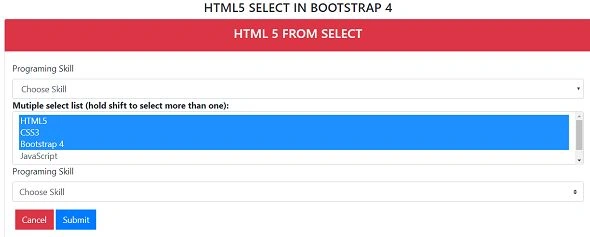
Example for Select List in Bootstrap 4
- <!DOCTYPE html>
- <html>
- <head>
- <title></title>
- <meta charset="utf-8" />
- <link rel="stylesheet" href="https://maxcdn.bootstrapcdn.com/bootstrap/4.1.3/css/bootstrap.min.css">
- <script src="https://ajax.googleapis.com/ajax/libs/jquery/3.3.1/jquery.min.js"></script>
- <script src="https://maxcdn.bootstrapcdn.com/bootstrap/4.1.3/js/bootstrap.min.js"></script>
- </head>
- <body>
- <div class="container py-5">
- <h4 class="text-uppercase text-center">HTML5 Select in bootstrap 4</h4>
- <div class="card">
- <div class="card-header bg-danger text-white">
- <h4 class="text-uppercase text-center">HTML 5 from Select</h4>
- </div>
- <div class="card-body">
- <form>
- <div class="form-row">
- <label>Programing Skill</label>
- <select class="form-control" id="dropdownlist1" name="dropdownlist1">
- <option value="-1">Choose Skill</option>
- <option value="1">HTML5</option>
- <option value="2">CSS3</option>
- <option value="3">Bootstrap 4</option>
- <option value="4">JavaScript</option>
- <option value="5">JQuery</option>
- </select>
- </div>
- <div class="form-row">
- <strong>Mutiple select list (hold shift to select more than one):</strong>
- <select multiple class="form-control" id="dropdownlist2" name="dropdownlist1">
- <option value="1">HTML5</option>
- <option value="2">CSS3</option>
- <option value="3">Bootstrap 4</option>
- <option value="4">JavaScript</option>
- <option value="5">JQuery</option>
- </select>
- </div>
- <div class="form-row">
- <label>Programing Skill</label>
- <select class="custom-select" id="dropdownlist3" name="dropdownlist3">
- <option value="-1">Choose Skill</option>
- <option value="1">HTML5</option>
- <option value="2">CSS3</option>
- <option value="3">Bootstrap 4</option>
- <option value="4">JavaScript</option>
- <option value="5">JQuery</option>
- </select>
- </div>
- <div style="margin-top:15px;">
- <button type="submit" class="btn btn-danger rounded-0">Cancel</button>
- <button type="submit" class="btn btn-primary rounded-0">Submit</button>
- </div>
- </form>
- </div>
- </div>
- </div>
- </body>
- </html>
Output
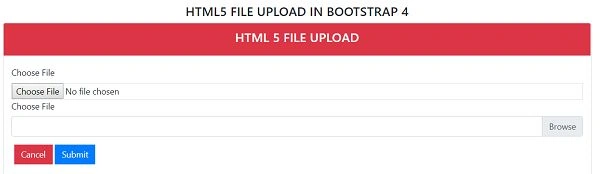
Example for File Upload in Bootstrap 4
- <!DOCTYPE html>
- <html>
- <head>
- <title>FileUpload</title>
- <meta charset="utf-8" />
- <link rel="stylesheet" href="https://maxcdn.bootstrapcdn.com/bootstrap/4.1.3/css/bootstrap.min.css">
- <script src="https://ajax.googleapis.com/ajax/libs/jquery/3.3.1/jquery.min.js"></script>
- <script src="https://maxcdn.bootstrapcdn.com/bootstrap/4.1.3/js/bootstrap.min.js"></script>
- </head>
- <body>
- <div class="container py-5">
- <h4 class="text-uppercase text-center">HTML5 File Upload in bootstrap 4</h4>
- <div class="card">
- <div class="card-header bg-danger text-white">
- <h4 class="text-uppercase text-center">HTML 5 File Upload</h4>
- </div>
- <div class="card-body">
- <form>
- <div class="form-row">
- <label for="file">Choose File</label>
- <input type="file" class="form-control-file border" />
- </div>
- <div class="form-row">
- <label>Choose File</label>
- <div class="custom-file">
- <input type="file" class="custom-file-input" />
- <label class="custom-file-label" for="customFile"></label>
- </div>
- </div>
- <div style="margin-top:15px;">
- <button type="submit" class="btn btn-danger rounded-0">Cancel</button>
- <button type="submit" class="btn btn-primary rounded-0">Submit</button>
- </div>
- </form>
- </div>
- </div>
- </div>
- </body>
- </html>
Output
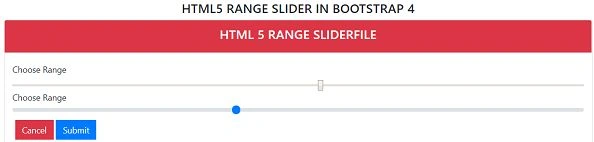
Example for Range Slider in Bootstrap 4
- <!DOCTYPE html>
- <html>
- <head>
- <title>RangeSlider</title>
- <meta charset="utf-8" />
- <link rel="stylesheet" href="https://maxcdn.bootstrapcdn.com/bootstrap/4.1.3/css/bootstrap.min.css">
- <script src="https://ajax.googleapis.com/ajax/libs/jquery/3.3.1/jquery.min.js"></script>
- <script src="https://maxcdn.bootstrapcdn.com/bootstrap/4.1.3/js/bootstrap.min.js"></script>
- </head>
- <body>
- <div class="container py-5">
- <h4 class="text-uppercase text-center">HTML5 Range Slider in bootstrap 4</h4>
- <div class="card">
- <div class="card-header bg-danger text-white">
- <h4 class="text-uppercase text-center">HTML 5 Range SliderFile</h4>
- </div>
- <div class="card-body">
- <form>
- <div class="form-row">
- <label for="range">Choose Range</label>
- <input type="range" name="range" class="form-control-range">
- </div>
- <div class="form-row">
- <label for="customRange">Choose Range</label>
- <input type="range" class="custom-range" id="customRange" name="customRange">
- </div>
- <div style="margin-top:15px;">
- <button type="submit" class="btn btn-danger rounded-0">Cancel</button>
- <button type="submit" class="btn btn-primary rounded-0">Submit</button>
- </div>
- </form>
- </div>
- </div>
- </div>
- </body>
- </html>
Output


kalai romiPosted Dec 30, 2019, 5:22 PM EST
Nice article sir..
Gerson MachadoPosted Sep 17, 2018, 11:13 AM EDT
Where is source code to download ?
Sarathlal SaseendranPosted Sep 17, 2018, 10:06 AM EDT
Good article. Please keep sharing more articles.