
Introduction
In this article, we will learn how to create a circular progress bar using Vue.js.
Create VueJS Project
Create a Vue.js project by using the following command,
Code
vue create progressappNow open the newly created project in Visual Studio Code.
Installation
Now install the following library into this project by using the following npm command.
Code
npm install --save vue3-circle-progressNow install Bootstrap in this project by using the following command.
Code
npm install bootstrapNow open the main.js file and add following code.
JavaScript
import { createApp } from 'vue'
import App from './App.vue'
import 'bootstrap/dist/css/bootstrap.css';
createApp(App).mount('#app')
Now right click on the components folder and add a new component named 'progress.vue'. Now open progress.vue component and add the following code.
JavaScript
<template>
    <CircleProgress
    :percent="80"
    :viewport="true"
    :show-percent="true"
    :is-gradient="true"
  />
    <circle-progress
        :is-gradient="true"
        :gradient="{
          angle: 90,
          startColor: '#ff0000',
          stopColor: '#ffff00'
      }"
    />
    <circle-progress
        :is-bg-shadow="true"
        :bg-shadow="{
          inset: true,
          vertical: 2,
          horizontal: 2,
          blur: 4,
          opacity: .4,
          color: '#000000'
      }"
        empty-color="#f7f7f7"
        :border-width="6"
        :border-bg-width="30"
    />
  </template>
  <script>
  import "vue3-circle-progress/dist/circle-progress.css";
  import CircleProgress from "vue3-circle-progress";
    export default {
     components: {CircleProgress}
    }
</script>
Now open App.vue and add following code.
JavaScript
<template>
  <div class="container">
    <div style="margin: 20px;" class="col-sm-12 btn btn-info">How To Implement  Circular Progress Bar In Vue.js </div>
    <div class="large-12 medium-12 row">
      <CircleProgress />
    </div>
  </div>
</template>

<script>
import CircleProgress from './components/progress.vue'

export default {
  name: 'App',
  components: {
    CircleProgress
  }
}
</script>

<style>
#app {
  font-family: Avenir, Helvetica, Arial, sans-serif;
  -webkit-font-smoothing: antialiased;
  -moz-osx-font-smoothing: grayscale;
  text-align: center;
  color: #2c3e50;
  /* margin-top: 60px; */
}
</style>
Now, run the project by using following command.
Code
npm run serve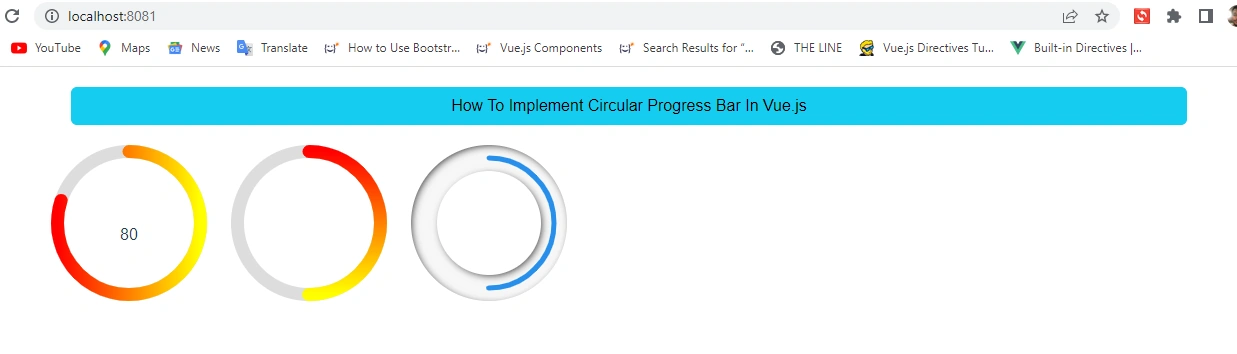
Summary
In this article, we learned how we can create a circular progress bar using Vue.js.

Join the conversation! Your thoughts help the community grow.