
In this article you will learn to make rounded corner using CSS in asp.net.
<%@ Page Language="C#" AutoEventWireup="true" CodeFile="TwoRoundedCorner.aspx.cs" Inherits="TwoRoundedCorner" %>
<!DOCTYPE html PUBLIC "-//W3C//DTD XHTML 1.0 Transitional//EN" "http://www.w3.org/TR/xhtml1/DTD/xhtml1-transitional.dtd">
<html xmlns="http://www.w3.org/1999/xhtml">
<head runat="server">
<title>Rounded Corner</title>
<style type="text/css">
.RoundedBgYellow{background: transparent;width: 100%;margin: 0 auto;}
.RoundedBgYellow .top, .RoundedBgYellow .bottom{display: block;background: transparent; font-size: 1px;}
.RoundedBgYellow .b1, .RoundedBgYellow .b2, .RoundedBgYellow .b3, .RoundedBgYellow .b4, .RoundedBgYellow .b1b, .RoundedBgYellow .b2b, .RoundedBgYellow .b3b, .RoundedBgYellow .b4b{display: block;overflow: hidden; background: #F7D923;}
.RoundedBgYellow .b1, .RoundedBgYellow .b2, .RoundedBgYellow .b3, .RoundedBgYellow .b1b, .RoundedBgYellow .b2b, .RoundedBgYellow .b3b{height: 1px; background: #F7D923;}
.RoundedBgYellow .b2, .RoundedBgYellow .b3, .RoundedBgYellow .b4, .RoundedBgYellow .b4b, .RoundedBgYellow .b3b, .RoundedBgYellow .b2b{border-left: 1px solid #F7D923;border-right: 1px solid #F7D923;}
.RoundedBgYellow .b1{margin: 0 5px; background: #F7D923;}
.RoundedBgYellow .b2, .RoundedBgYellow .b2b{margin: 0 3px; border-width: 0 2px;}
.RoundedBgYellow .b3, .RoundedBgYellow .b3b{margin: 0 2px;}
.RoundedBgYellow .b4, .RoundedBgYellow .b4b{height: 2px;margin: 0 1px;}
.RoundedBgYellow .b1b{margin: 0 5px; background: #F7D923;}
.RoundedBgYellow .boxcontent{display: block; background: #F7D923; border-left: 1px solid #F7D923; border-right: 1px solid #F7D923;}
.RoundedBgGray{ background: transparent; width: 100%; margin: 0 auto;}
.RoundedBgGray .top, .RoundedBgGray .bottom{display: block; background: transparent;font-size: 1px;}
.RoundedBgGray .b1, .RoundedBgGray .b2, .RoundedBgGray .b3, .RoundedBgGray .b4, .RoundedBgGray .b1b, .RoundedBgGray .b2b, .RoundedBgGray .b3b, .RoundedBgGray .b4b{display: block;overflow: hidden; background: #646464;}
.RoundedBgGray .b1, .RoundedBgGray .b2, .RoundedBgGray .b3, .RoundedBgGray .b1b, .RoundedBgGray .b2b, .RoundedBgGray .b3b{height: 1px; background: #646464;}
.RoundedBgGray .b2, .RoundedBgGray .b3, .RoundedBgGray .b4, .RoundedBgGray .b4b, .RoundedBgGray .b3b, .RoundedBgGray .b2b{border-left: 1px solid #646464; border-right: 1px solid #646464;}
.RoundedBgGray .b1{ margin: 0 5px; background: #646464;}
.RoundedBgGray .b2, .RoundedBgGray .b2b{margin: 0 3px; border-width: 0 2px;}
.RoundedBgGray .b3, .RoundedBgGray .b3b{margin: 0 2px;}
.RoundedBgGray .b4, .RoundedBgGray .b4b{height: 2px;margin: 0 1px;}
.RoundedBgGray .b1b{margin: 0 5px; background: #646464;}
.RoundedBgGray .boxcontent{display: block; background: #646464; border-left: 1px solid #646464; border-right: 1px solid #646464;}
</style>
</head>
<body>
<form id="form1" runat="server">
<table width="300" align="center" cellpadding="4" cellspacing="4">
<tr>
<td>
<%--For Rounded corner--%>
<div class="RoundedBgGray" style="width: 300px;">
<b class="top"><b class="b1"></b><b class="b2"></b><b class="b3"></b><b class="b4"></b></b>
<div class="boxcontent" align="left" style="padding-left: 5px; padding-bottom: 10px; padding-top: 5px;">
<b>Rounded corner</b><br />
The components of a settlement or verdict often include the following: reimbursement for medical expenses and treatment; compensation for emotional harm or distress; an award for past or future pain
</div>
<b class="bottom"><b class="b4b"></b><b class="b3b"></b><b class="b2b"></b><b class="b1b"></b></b>
</div>
</td>
</tr>
<tr>
<td>
<%-- For Top (Left and right)rounded corner--%>
<div class="RoundedBgGray" style="width: 300px;">
<b class="top"><b class="b1"></b><b class="b2"></b><b class="b3"></b><b class="b4"></b> </b>
<div class="boxcontent" align="left" style="padding-left: 5px; padding-bottom: 10px; padding-top: 5px;">
<b>Top (Left and right)rounded corner</b><br />
<asp:Label ID="Label7" runat="server" Text="Purushottam rathore" Font-Size="12pt"></asp:Label>
</div>
</div>
</td>
</tr>
<tr>
<td>
<%-- For Bottom (left and right) rounded corner--%>
<div class="RoundedBgYellow" style="height: 400; width: 300px;">
<div class="boxcontent" style="padding-left: 10px; padding-right: 10px;">
<b>Bottom (left and right) rounded corner</b><br />
The components of a settlement or verdict often include the following: reimbursement for medical expenses and treatment; compensation for emotional harm or distress;
</div>
<b class="bottom"><b class="b4b"></b><b class="b3b"></b><b class="b2b"></b><b class="b1b"> </b></b>
</div>
</td>
</tr>
<tr>
<td>
<%-- <b></b>--%>
<div class="RoundedBgGray" style="width: 300px;">
<b class="top"><b class="b1"></b><b class="b2"></b><b class="b3"></b><b class="b4"></b> </b>
<div class="boxcontent" align="left" style="padding-left: 5px; padding-bottom: 10px; padding-top: 5px;">
<asp:Label ID="Label1" runat="server" Text="ContactUs" Font-Bold="true" Font-Size="12pt"></asp:Label>
</div>
</div>
<div class="RoundedBgYellow" style="height: 400; width: 300px;">
<div class="boxcontent" style="padding-left: 10px; padding-right: 10px;"> <br />
<asp:Label ID="Label2" runat="server" Text="Name:" Width="100" Font-Size="12pt"></asp:Label>
<asp:TextBox ID="textbox1" runat="server" Width="170px"></asp:TextBox><br /> <br />
<asp:Label ID="Label3" runat="server" Text="Address:" Width="100" Font-Size="12pt"></asp:Label>
<asp:TextBox ID="textbox2" runat="server" Width="170px"></asp:TextBox><br /> <br />
<asp:Label ID="Label5" runat="server" Text="Email:" Width="100" Font-Size="12pt"></asp:Label>
<asp:TextBox ID="textbox4" runat="server" Width="170px"></asp:TextBox><br /> <br />
<asp:Button ID="btn1" runat="server" Text="OK" Width="50px" />
</div>
<b class="bottom"><b class="b4b"></b><b class="b3b"></b><b class="b2b"></b><b class="b1b"> </b></b>
</div>
</td>
</tr>
</table>
</form>
</body>
</html>
Output: 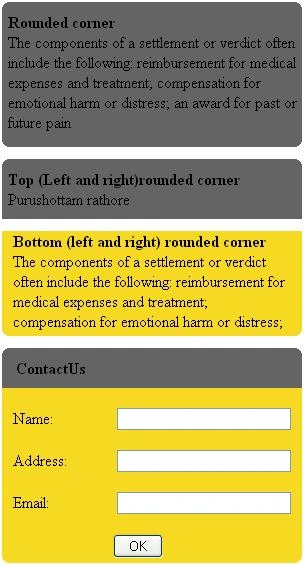
How to make Rounded Corner Using CSS
In this article you will learn how to make rounded corner using CSS in asp.net.

Join the conversation! Your thoughts help the community grow.