
Introduction
In this article, I will show you a very interesting feature of Visual Studio. which is we can paste our JSON and XML as a class after copying that JSON or XML. In simple terms, if we have some JSON data or XML data and we want to generate classes for that data then Visual Studio has a feature for that. In that we will just copy the JSON data and when we paste the classes for JSON or XML it will be automatically generated.
In this article, I will show you a very interesting feature of Visual Studio. which is we can paste our JSON and XML as a class after copying that JSON or XML. In simple terms, if we have some JSON data or XML data and we want to generate classes for that data then Visual Studio has a feature for that. In that we will just copy the JSON data and when we paste the classes for JSON or XML it will be automatically generated.
Let us see how it is possible:
Pasting JSON as Classes
Suppose I have the following JSON data:
- {
- "Employees": [
- {
- "userId": "rirani",
- "jobTitleName": "Developer",
- "firstName": "Romin",
- "lastName": "Irani",
- "preferredFullName": "Romin Irani",
- "employeeCode": "E1",
- "region": "CA",
- "phoneNumber": "408-1234567",
- "emailAddress": "[email protected]"
- },
- {
- "userId": "nirani",
- "jobTitleName": "Developer",
- "firstName": "Neil",
- "lastName": "Irani",
- "preferredFullName": "Neil Irani",
- "employeeCode": "E2",
- "region": "CA",
- "phoneNumber": "408-1111111",
- "emailAddress": "[email protected]"
- },
- {
- "userId": "thanks",
- "jobTitleName": "Program Directory",
- "firstName": "Tom",
- "lastName": "Hanks",
- "preferredFullName": "Tom Hanks",
- "employeeCode": "E3",
- "region": "CA",
- "phoneNumber": "408-2222222",
- "emailAddress": "[email protected]"
- }]
- }
How to generate classes for that in Visual Studio
Step 1: Firstly, copy above JSON Code and create a class file.
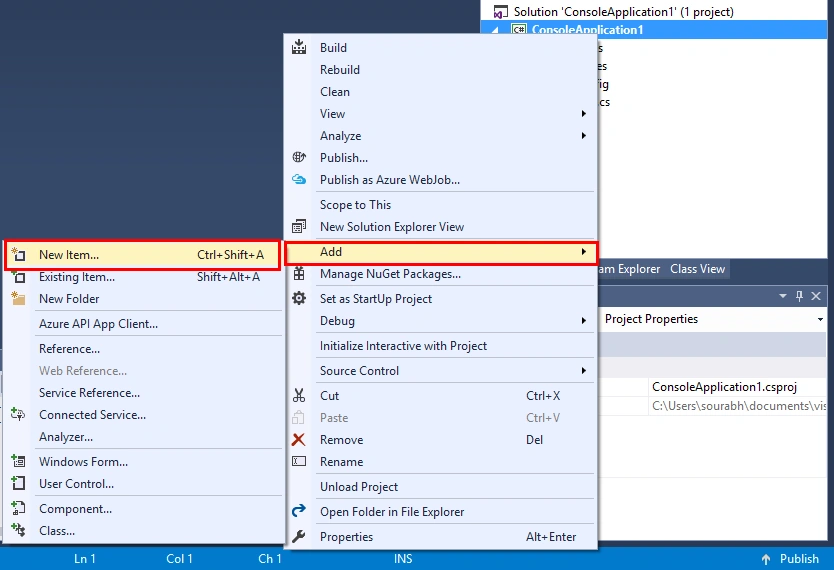
Step 1: Firstly, copy above JSON Code and create a class file.
Step 2: Now select Code > Class. and give the name of the file. Then click on Add Button.
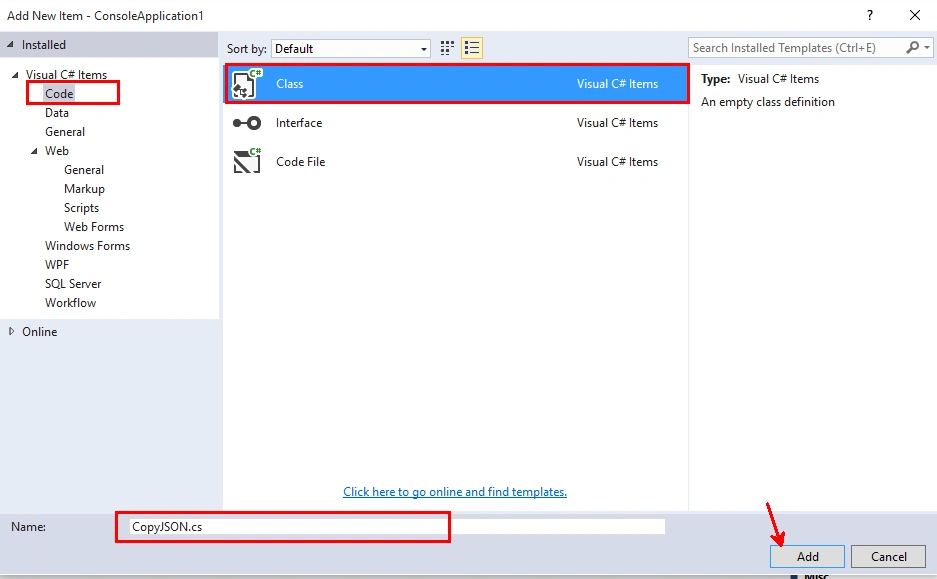
Step 3: Now remove your class code which is by default created by Visual Studio. Here's the screenshot,
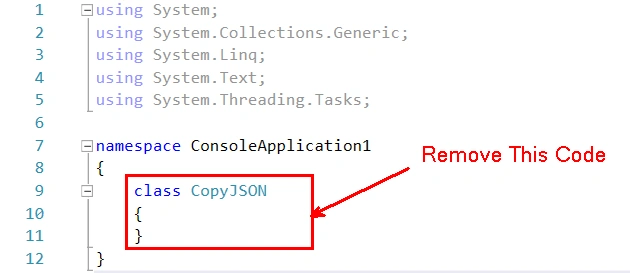
Step 4:
Now copy your JSON code. I am copying what I have written above. And click inside the namespace and Go to Edit > Paste Special and click on Paste JSON as Classes. Here's the figure:
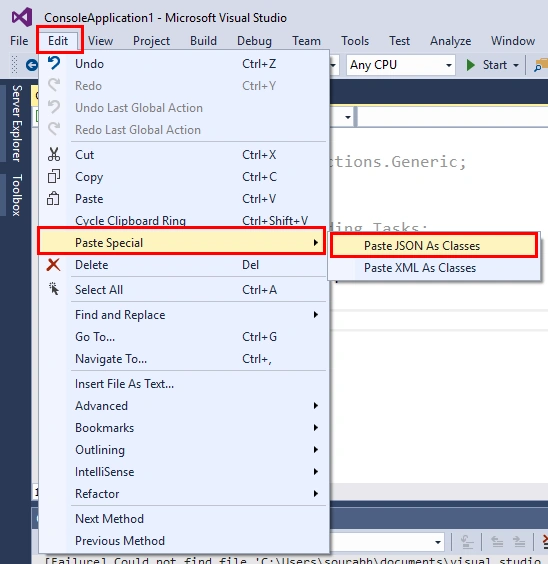
Now copy your JSON code. I am copying what I have written above. And click inside the namespace and Go to Edit > Paste Special and click on Paste JSON as Classes. Here's the figure:
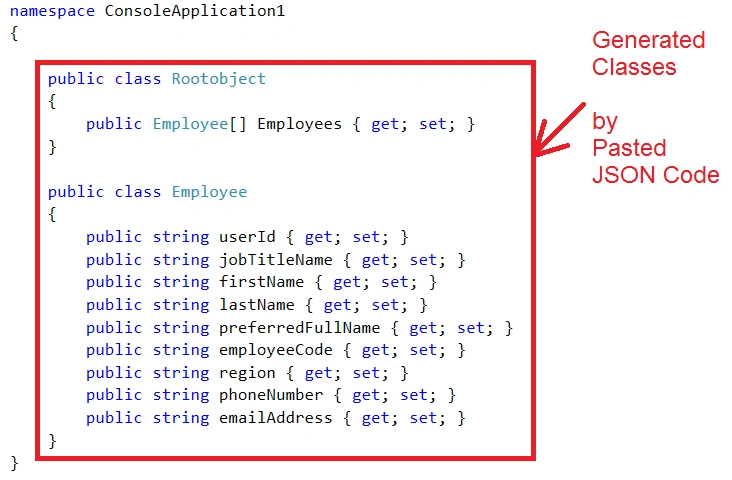
Step 5: After clicking on that you will find your code is generated.
Pasting XML as Classes
Same likethe above steps you can also paste XML as classes. To paste XML as classes go to Edit > Paste Special and click on Paste XML as Classes. Here's the figure,
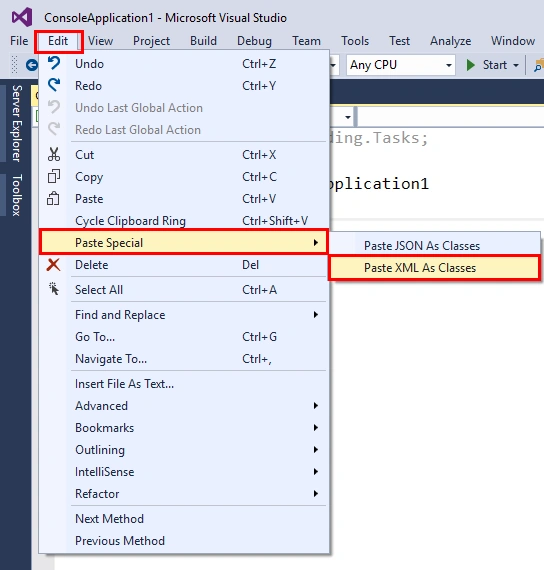
Same likethe above steps you can also paste XML as classes. To paste XML as classes go to Edit > Paste Special and click on Paste XML as Classes. Here's the figure,
Conclusion
In this article we have seen a new feature of Visual Studio and learned it, which is how we can generate classes for our JSON or XML code by copying and pasting in Visual Studio.
In this article we have seen a new feature of Visual Studio and learned it, which is how we can generate classes for our JSON or XML code by copying and pasting in Visual Studio.
Read more articles on Visual Studio:


Deepak SelvarajPosted Aug 14, 2018, 12:28 AM EDT
Hello i followed your steps.. but it says "login event received from localhost but no credentials provided"
Bhuvanesh MohankumarPosted May 3, 2016, 8:53 AM EDT
Good one..
Humayun Kabir MamunPosted Apr 16, 2016, 10:22 PM EDT
Nice...
Kuppurasu NagarajTOP 100Posted Apr 14, 2016, 5:26 AM EDT
Nice Sharing..
Vignesh ManiTOP 100Posted Apr 14, 2016, 4:14 AM EDT
Good
Rahul Kumar SaxenaTOP 100Posted Apr 14, 2016, 2:26 AM EDT
Good Sourabh Somani
Debasis SahaTOP 100Posted Apr 13, 2016, 9:44 AM EDT
Nice one..
Mohammed IbrahimPosted Apr 13, 2016, 9:13 AM EDT
nice
Ravi PatelPosted Apr 13, 2016, 4:55 AM EDT
useful thanks for nice article
Ramchand RepallePosted Apr 13, 2016, 4:48 AM EDT
Good one..
Ranjan DailataPosted Apr 13, 2016, 3:27 AM EDT
Alternatively, one can use free JSON to C# Converter - http://json2csharp.com/
Gowtham RajamanickamTOP 100Posted Apr 13, 2016, 3:23 AM EDT
congrats on your 100+ articles
Gowtham RajamanickamTOP 100Posted Apr 13, 2016, 3:22 AM EDT
nice one...
jasmin patelPosted Apr 13, 2016, 2:38 AM EDT
Nice example
Shakti Singh DulawatPosted Apr 13, 2016, 2:08 AM EDT
Congratulations to you on your 101 articles Journey
Shaili DashoraPosted Apr 13, 2016, 12:32 AM EDT
Nice one..