
Introduction
In Windows 10 we have OpenFileDialog which opens a dialog to pick the files. Here we are going to pick the text file in Windows 10.
Create a new Windows 10 project and create a button and image control to perform File Picker operation.
Firstly, create a new instance for FileOpenPicker as in the following code snippet:
- FileOpenPicker openPicker = new FileOpenPicker();
Next, we have to set file picker ViewMode, you could ignore this, but if you would like to add, there are two options, such as List and Thumbnail. Here I will set thumbnail.
- openPicker.ViewMode = PickerViewMode.Thumbnail;
Then set the suggested location as you wish. I am going to set the default location as a document library.
- openPicker.SuggestedStartLocation = PickerLocationId.DocumentsLibrary;
We need to add FileTypeFilter; it is a mandatory field that you should add. It requires at least one type.
Here I am setting filter type for .txt files.
- openPicker.FileTypeFilter.Add(".txt");
Finally, we are going to show the file picker dialog as in the following code snippet and we have the option to select single or multiple file selection.
- StorageFile file = await openPicker.PickSingleFileAsync();
Finally, we are going to read the selected file using a stream and assign it to the text block.
- var stream = await file.OpenAsync(Windows.Storage.FileAccessMode.Read);
- using (StreamReader reader = new StreamReader(stream.AsStream()))
- {
- textBlockShow.Text = reader.ReadToEnd();
- }
The whole code looks like the following code:
- private async void buttonPick_Click(object sender, RoutedEventArgs e)
- {
- FileOpenPicker openPicker = new FileOpenPicker();
- openPicker.ViewMode = PickerViewMode.Thumbnail;
- openPicker.SuggestedStartLocation = PickerLocationId.DocumentsLibrary;
- openPicker.FileTypeFilter.Add(".txt");
- StorageFile file = await openPicker.PickSingleFileAsync();
- if(file != null)
- {
- var stream = await file.OpenAsync(Windows.Storage.FileAccessMode.Read);
- using(StreamReader reader = new StreamReader(stream.AsStream()))
- {
- textBlockShow.Text = reader.ReadToEnd();
- }
- }
- else
- {}
- }
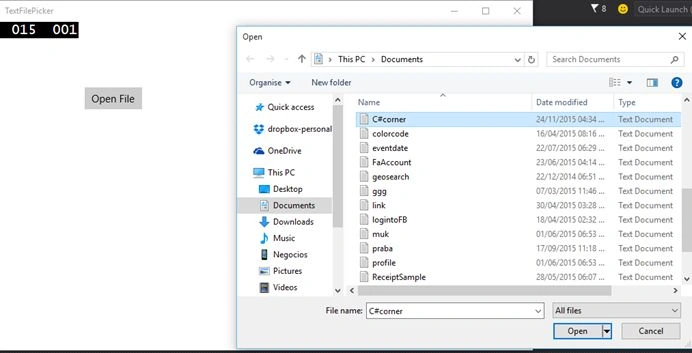
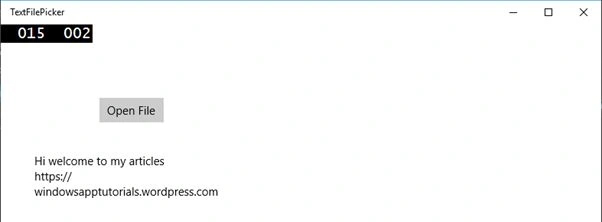
Summary
In this article, we learned about how to pick the text files in Windows 10.


Kuppurasu NagarajTOP 100Posted Feb 11, 2016, 7:32 AM EST
Nice Share
Ajay GandhiPosted Nov 25, 2015, 3:20 AM EST
Nice One
Raja TPosted Nov 25, 2015, 2:54 AM EST
Nice sharing
Suresh MPosted Nov 25, 2015, 2:16 AM EST
Thank you Jeetendra
Jeetendra GundTOP 100Posted Nov 25, 2015, 2:14 AM EST
Welcome back @Suresh M