This article explains how to send GridView row values to another page and update the record values and return to the original GridView page using ASP.NET.
1. Go to Start, then All Programs and open Microsoft Visual Studio 2013.
2. Now, click "File" -> "New" -> "Project..." then click on Visual C#. Then select ASP.NET Web Application, Empty and click on OK.
3. Provide the web application name and location as you wish. I named my web application UpdateGridviewRowValuesInSecondPage.
4. Now the project will be opened. Right-click on the web application name, add a New Item and select Web Form. Then click on Add.
5. Add the following code between the <form> tags of the WebForm1.aspx page as in the following:
- <div>
- <asp:GridView ID="GridView1" HeaderStyle-BackColor="#3AC0F2" HeaderStyle-ForeColor="White" runat="server" AutoGenerateColumns="false" OnRowCommand="GridView1_RowCommand">
- <Columns>
- <asp:BoundField DataField="EmpNo" HeaderText="EmpId" />
- <asp:BoundField DataField="EmpName" HeaderText="EmpName" />
- <asp:BoundField DataField="Job" HeaderText="Job" />
- <asp:BoundField DataField="Sal" HeaderText="EmpSalary" />
- <asp:BoundField DataField="Dept" HeaderText="Department" />
- <asp:TemplateField>
- <ItemTemplate>
- <asp:Button ID="btnEdit" runat="server" Width="60" Text="Edit" CommandName="EditButton" CommandArgument="<%# ((GridViewRow) Container).RowIndex %>" />
- </ItemTemplate>
- </asp:TemplateField>
- </Columns>
- </asp:GridView>
- </div>
6. Add the following code to the page load event of the WebForm1.aspx.cs page.
- protected void Page_Load(object sender, EventArgs e)
- {
- if (!this.IsPostBack)
- {
- BindGridView();
- }
- }
- private void BindGridView()
- {
- string constr = ConfigurationManager.ConnectionStrings["con"].ConnectionString;
- SqlConnection con = new SqlConnection(constr);
- SqlCommand cmd = new SqlCommand("select * from Emp",con);
- DataTable dt = new DataTable();
- SqlDataAdapter da = new SqlDataAdapter(cmd);
- da.Fill(dt);
- GridView1.DataSource = dt;
- GridView1.DataBind();
- }
7. The following is the GridView1_RowCommand event method of the WebForm1.aspx.cs page.
- protected void GridView1_RowCommand(object sender, GridViewCommandEventArgs e)
- {
- if (e.CommandName == "EditButton")
- {
- int index = Convert.ToInt32(e.CommandArgument);
- GridViewRow row = GridView1.Rows[index];
- Response.Redirect("~/UpdateGridView.aspx?EmpNo=" + row.Cells[0].Text);
- }
- }
8. Add another webform to the project and name it as you wish. I named it UpdateGridView.aspx.
9. Add the following code between the <form> tags of the UpdateGridView.aspx page.
10. The following is the page load event of the UpdateGridView.aspx.cs page.- <div>
- <table>
- <tr>
- <td>EmpId</td>
- <td>
- <asp:TextBox ID="txtEmpId" runat="server" ReadOnly="true" />
- </td>
- </tr>
- <tr>
- <td>EmpName</td>
- <td>
- <asp:TextBox ID="txtEmpName" runat="server" />
- </td>
- </tr>
- <tr>
- <td>Job</td>
- <td>
- <asp:TextBox ID="txtJob" runat="server" />
- </td>
- </tr>
- <tr>
- <td>EmpSalary</td>
- <td>
- <asp:TextBox ID="txtEmpSalary" runat="server" />
- </td>
- </tr>
- <tr>
- <td>Department</td>
- <td>
- <asp:TextBox ID="txtDept" runat="server" />
- </td>
- </tr>
- <tr>
- <td align="center">
- <asp:Button ID="btnUpdate" runat="server" Text="Update" OnClick="btnUpdate_Click" />
- </td>
- <td align="center">
- <asp:Button ID="btnCancel" runat="server" Text="Cancel" OnClick="btnCancel_Click" />
- </td>
- </tr>
- </table>
- lt;/div>
- int empno = 0;
- protected void Page_Load(object sender, EventArgs e)
- {
- empno = Convert.ToInt32(Request.QueryString["EmpNo"].ToString());
- if (!IsPostBack)
- {
- BindTextBoxvalues();
- }
- }
- private void BindTextBoxvalues()
- {
- string constr = ConfigurationManager.ConnectionStrings["con"].ConnectionString;
- SqlConnection con = new SqlConnection(constr);
- SqlCommand cmd = new SqlCommand("select * from Emp where EmpNo=" + empno, con);
- DataTable dt = new DataTable();
- SqlDataAdapter da = new SqlDataAdapter(cmd);
- da.Fill(dt);
- txtEmpId.Text = dt.Rows[0][0].ToString();
- txtEmpName.Text = dt.Rows[0][1].ToString();
- txtJob.Text = dt.Rows[0][2].ToString();
- txtEmpSalary.Text = dt.Rows[0][3].ToString();
- txtDept.Text = dt.Rows[0][4].ToString();
- }
11. The following is the btnUpdate_Click event method of the UpdateGridView.aspx page.
- protected void btnUpdate_Click(object sender, EventArgs e)
- {
- string constr = ConfigurationManager.ConnectionStrings["con"].ConnectionString;
- SqlConnection con = new SqlConnection(constr);
- SqlCommand cmd = new SqlCommand("update Emp set EmpName='" + txtEmpName.Text + "',Job='" + txtJob.Text + "',Sal=" + txtEmpSalary.Text + ",Dept='" + txtDept.Text + "' where EmpNo=" + empno, con);
- con.Open();
- int result = cmd.ExecuteNonQuery();
- con.Close();
- if (result == 1)
- {
- ScriptManager.RegisterStartupScript(this, this.GetType(), "ShowSuccess", "javascript:alert('Record Updated Successfully');", true);
- }
- Response.Redirect("~/WebForm1.aspx");
- }
12. The following is the btnCancel_Click event method of the UpdateGridView.aspx page.
- protected void btnCancel_Click(object sender, EventArgs e)
- {
- Response.Redirect("~/WebForm1.aspx");
- }
13. Now run the application and you can see it in your browser.
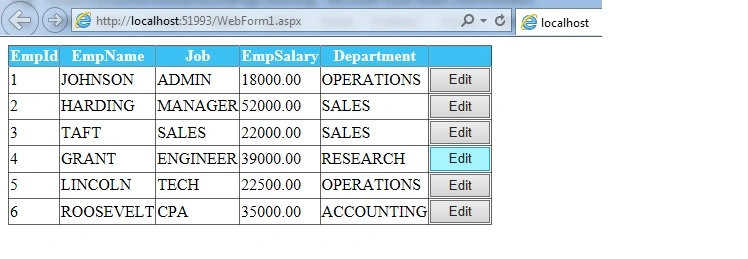
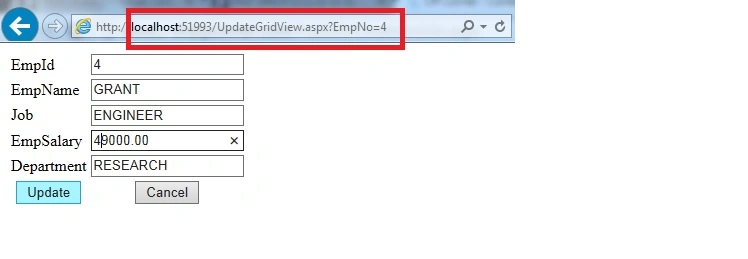
14. The following shows updating the employee salary of the EmpId 4 record from 39000 to 49000.
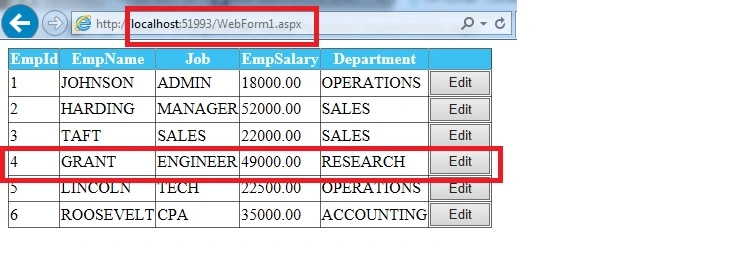
15. After the update, check the GridView page for whether the update is done or not.


Rajaa KhalifehPosted Apr 10, 2020, 6:07 AM EDT
Hello it works for me when i choose the first id and update, but when iam choosing another id an error occur :"Input string was not in a correct format." for this line empno = Convert.ToInt32(Request.QueryString["EmpNo"].ToString()); any help please
KYLE CHUAPosted Feb 26, 2019, 10:12 PM EST
Object reference not set to an instance of an object.Pretty sure the error is in "int empno = 0;"
Deepak VermaPosted Aug 26, 2018, 3:27 AM EDT
Can you add insert and delete code in this. my email is [email protected]
aamir aliPosted Mar 30, 2018, 11:25 AM EDT
It is a very good article it fits in my requirement. keep contributing.
Isaac HatilimaPosted Mar 1, 2018, 4:57 AM EST
It is saying Object reference not set to an instance of an object. I don't know what am missing but the value is showing in the URL bar. Someone help.
Annabel LimPosted Jul 23, 2017, 3:33 AM EDT
Does Anyone know how I can use for instance "CustID" from a Gridview of page 'A' to the gridview of Page 'B'?
nirmala biradarPosted Jul 13, 2017, 11:07 PM EDT
I got this exception "Input string was not in a correct format." for this line empno = Convert.ToInt32(Request.QueryString["EmpNo"].ToString());
ABHIJIT POOJARIPosted Apr 13, 2017, 7:26 AM EDT
I try this but i am only getting row1 gridview values geting displayedeven when i am selecting the 2nd row.
محمد يونسPosted Apr 6, 2017, 5:28 AM EDT
Hey bro good job hw can we do for dropdownlist
Lipun PradhanPosted Nov 23, 2016, 3:34 AM EST
How this will be done using checkbox in place of edit button and the edit button should be outside the gridview
Lipun PradhanPosted Nov 23, 2016, 3:33 AM EST
How this will be done using checkbox in place of edit button,abd the edit button should be outside the grid
AbedElHamid AlWahidyPosted Nov 16, 2015, 3:21 AM EST
good job
Govinda Rajulu YemineniPosted Aug 31, 2015, 11:54 PM EDT
Thank you all
Gopi ChandPosted Aug 23, 2015, 9:33 AM EDT
Well done
Santhakumar MunuswamyPosted Aug 23, 2015, 7:34 AM EDT
Thanks for Nice article
Sibeesh VenuTOP 100Posted Aug 22, 2015, 11:49 PM EDT
Nice Share
Rajeesh MenothPosted Aug 22, 2015, 10:55 PM EDT
Good One
RakeshPosted Aug 22, 2015, 8:58 PM EDT
Good one
Saineshwar BageriPosted Aug 22, 2015, 8:52 PM EDT
Nice Start
Gowtham KTOP 100Posted Aug 22, 2015, 6:05 PM EDT
Thanks for sharing
Karthikeyan KPosted Aug 22, 2015, 5:31 PM EDT
Good one...