
In
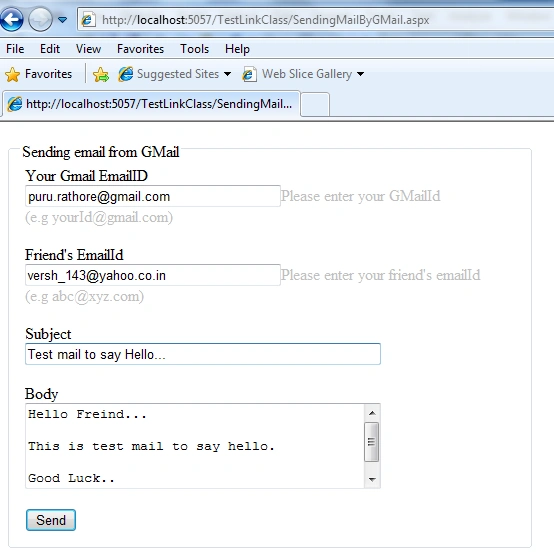
this article I am going to discuss how to send mail from Gmail using Asp.net
3.5 without login your Gmail account.
Write
the small line of code as follows:
Sample:
<html>
<body>
<form id="form1" runat="server">
<fieldset style="width: 500px; padding: 10px;">
<legend>Sending
email from GMail</legend>
<div align="left" style="padding: 5px;">
Your Gmail EmailID<br />
<asp:TextBox ID="TextBoxSenderEmailId" runat="server"
Width="250px"></asp:TextBox><font color=silver>Please enter your GMailId <br />(e.g [email protected])</font><br /><br />
Friend's EmailId<br />
<asp:TextBox ID="TextBoxReceiverEmailId" runat="server"
Width="250px"></asp:TextBox><font color=silver>Please enter your friend's emailId<br />(e.g [email protected])</font><br />
<br />
Subject<br />
<asp:TextBox ID="TextBoxSubject" runat="server" Width="350px"></asp:TextBox><br />
<br />
Body<br />
<asp:TextBox ID="TextBoxBody" Width="350px" TextMode="MultiLine" Rows="5" runat="server"></asp:TextBox><br /><br />
<asp:Button ID="btnSendEmail" runat="server" OnClick="btnSendEmail_Click" Text="Send" />
</div>
</fieldset>
</form>
</body>
</html>
using System;
using
System.Collections.Generic;
using
System.Linq;
using
System.Web;
using
System.Web.UI;
using
System.Web.UI.WebControls;
public partial class SendingMailByGMail : System.Web.UI.Page
{
protected void Page_Load(object
sender, EventArgs e)
{
}
protected void btnSendEmail_Click(object
sender, EventArgs e)
{
System.Net.Mail.MailMessage MyMailMessage = new
System.Net.Mail.MailMessage(TextBoxSenderEmailId.Text,
TextBoxReceiverEmailId.Text, TextBoxSubject.Text, "");
MyMailMessage.IsBodyHtml = false;
MyMailMessage.Body = TextBoxBody.Text;
//provide
Authentication Details need to be passed when sending email from gmail
System.Net.NetworkCredential
mailAuthentication = new System.Net.NetworkCredential(TextBoxSenderEmailId.Text, "password");//Sender
password
//Smtp Mail
server of Gmail is "smpt.gmail.com" and it uses port no. 587
System.Net.Mail.SmtpClient mailClient = new
System.Net.Mail.SmtpClient("smtp.gmail.com", 587);
//Enable SSL
mailClient.EnableSsl = true;
mailClient.UseDefaultCredentials = false;
mailClient.Credentials =
mailAuthentication;
mailClient.Send(MyMailMessage);
}
}


Shaili DashoraPosted Mar 16, 2015, 9:10 AM EDT
nice one
ayyappa gPosted Oct 31, 2013, 3:39 AM EDT
thanks ...
Pranay PatelPosted Feb 12, 2013, 7:49 PM EST
thnxxxxx bro
imran khanPosted Dec 18, 2012, 10:46 PM EST
is it possible to find how many emails are in gmail from asp.net c#
saranya SPosted Dec 12, 2012, 8:56 PM EST
Hi i got this error: The specified string is not in the form required for an e-mail address. plz help me.... :)
siddu lakkarsuPosted Jul 5, 2012, 10:40 PM EDT
very Nice Article Brother
Maharaja McaPosted Jan 6, 2012, 6:41 AM EST
very useful and nice coding for me....
SujithaPosted Jul 26, 2011, 8:00 PM EDT
thank u so much for post this article.. but i got some error that is smptException was unhandled by user code( The SMTP server requires a secure connection or the client was not authenticated. The server response was: 5.5.1 Authentication Required. Learn more at) help me sir..
ishan singhPosted May 17, 2011, 7:45 PM EDT
nice article sir, i m big fan of u. ishan...
somnath deyPosted May 12, 2011, 11:16 AM EDT
I am somnath dey. please give me ur email ID. My email Id is [email protected]
Mayur GujrathiPosted Apr 13, 2011, 4:46 AM EDT
I am using this code in 3.5 but getting error on this line please help its urgent for me mailClient.Send(MyMailMessage);
Shashank GuptaPosted Mar 14, 2011, 9:19 PM EDT
thanks for ur code it is working very well. sir i am MCA last yr student plz help me 2 learn .Net
Shashank GuptaPosted Mar 14, 2011, 12:43 AM EDT
sir the code u mailed me giving the exception.- ------------ The SMTP server requires a secure connection or the client was not authenticated. The server response was: 5.5.1 Authentication Required
Shashank GuptaPosted Mar 13, 2011, 9:54 PM EDT
Make sure that the class defined in this code file matches the 'inherits' attribute, and that it extends the correct base class (e.g. Page or UserControl).
HOANG TUYENPosted Feb 17, 2011, 9:37 PM EST
Thanks
Krishna GaradPosted Dec 21, 2010, 1:37 AM EST
how u r saying that u r not logged in defenatly u r not logged in but you are providing u r credencials is nothing but login to gmail
Avinash JhaPosted Dec 13, 2010, 11:54 PM EST
it's amazing!!!
VEERA sekharPosted Nov 19, 2010, 2:35 AM EST
Hai...sir.... first of all thanks for posting this article ... it's a grate thing! and its works fine, can i send attaching files ..through this functionality???? please help me sir !!!!!!!!!!!!
Natarajamani VenugopalPosted Sep 20, 2010, 9:51 PM EDT
hi sir, Finally... it worked... Nice Application sir...
Natarajamani VenugopaleditedPosted Sep 20, 2010, 9:21 PM EDTEdited Aug 7, 2011, 9:20 PM EDT
I am getting the following error when i click the send button.. Server Error in 'Gmail' Application. The SMTP server requires a secure connection or the client was not authenticated. The server response was: 5.5.1 Authentication Required. Learn more at PLS Help..
Natarajamani VenugopalPosted Sep 20, 2010, 8:45 PM EDT
I am getting an error message while compiling the code... " Make sure that the class defined in this code file matches the 'inherits' attribute, and that it extends the correct base class (e.g. Page or UserControl). " What could be the reason? Why it is not working in my machine? PLS Help
anamika singhPosted Sep 17, 2010, 11:59 PM EDT
thanks to provide this code,its working but its not a secure way to use in a project.one can see your password when code is running.can u plz. provide such type of code in which mail can be send through any server without asking for password.
srinivas reddyPosted Sep 2, 2010, 11:18 AM EDT
The SMTP server requires a secure connection or the client was not authenticated. The server response was: 5.5.1 Authentication Required
Chetan NavalePosted Aug 31, 2010, 10:18 AM EDT
Hello, I Have Tried This Code But I Am Getting An Error Saying: The SMTP server requires a secure connection or the client was not authenticated. The server response was: 5.5.1 Authentication Required. Need The Assistance.
Shivani GoudPosted Aug 19, 2010, 4:01 AM EDT
Hi, When i tried to send mail with the baove code, i am facing the below error. A connection attempt failed because the connected party did not properly respond after a period of time, or established connection failed because connected host has failed to respond 209.85.229.109:587 Please help me out
Prashant BhambarPosted Aug 11, 2010, 4:13 AM EDT
Hello Sir, This code is really great; Even i never thought about it;
Uday GaikwadPosted Aug 8, 2010, 10:11 PM EDT
nice article...
peyman najiPosted Aug 7, 2010, 10:52 PM EDT
Dose not work === > {"The remote name could not be resolved: 'smtp.gmail.com'"}
vaibhav bhargavPosted Aug 6, 2010, 9:56 PM EDT
i am mca passout 2010 i am working on 2.0, sir can u guid me how to learn 3.5
vaibhav bhargavPosted Aug 6, 2010, 9:51 PM EDT
thx buddy i never think of it before
Satyapriya NayakTOP 100Posted Aug 6, 2010, 10:14 AM EDT
Dear sir, It is working fine. Cheers Keep on posting .......... Thanks