
I am going to create a new ASP.NET application called “ImageDemo.” Open Visual Studio 2015 and click New Project and from the New Project window, you need to choose “ASP.NET Application” and give a name to the application.
It will open new windows for “New ASP.NET Project,” here you can choose from different type of templates. For example, you can choose Web Forms or MVC or Web API, etc. But we just need to choose the Web Forms as in the following:

In this web application, I will create a front end UI from where I can upload the image with some other details. For example, for this demo, I have taken the “WebSite” example where I will add the details like name, where it is, and profile image.
So, first I have just created the GUI from where I can upload the image as well as displaying the uploaded image in GridView. Yes, you are right, for displaying the image I am using the gridview with image control as in the following:
- <%@ Page Language="C#" AutoEventWireup="true" CodeBehind="Employee.aspx.cs" Inherits="ImageDemo.Employee" %>
- <!DOCTYPE html>
- <html xmlns="http://www.w3.org/1999/xhtml">
- <head runat="server">
- <title></title>
- </head>
- <body>
- <form id="form1" runat="server">
- <div style="border:2px solid black;">
- <table>
- <tr>
- <td colspan="2">
- <b>Enter WebSite Details</b>
- <br /><br /><br />
- </td>
- </tr>
- <tr>
- <td>Name
- </td>
- <td>
- <asp:TextBox runat="server" ID="txtName"></asp:TextBox>
- </td>
- </tr>
- <tr>
- <td>Address
- </td>
- <td>
- <asp:TextBox runat="server" ID="txtAddress"></asp:TextBox>
- </td>
- </tr>
- <tr>
- <td>Profile Image
- </td>
- <td>
- <asp:FileUpload runat="server" ID="fupProfileimage" />
- </td>
- </tr>
- <tr>
- <td>
- </td>
- <td>
- <asp:Button runat="server" ID="btnSubmit" Text="Submit" OnClick="btnSubmit_Click" />
- </td>
- </tr>
- <tr>
- <td colspan="2">
- <asp:Label runat="server" ID="lblMessage" ForeColor="Red"></asp:Label>
- </td>
- </tr>
- </table>
- <br />
- <br />
- <asp:GridView runat="server" ID="grvEmployee" AutoGenerateColumns="false">
- <Columns>
- <asp:BoundField DataField="Name" HeaderText="Name" />
- <asp:BoundField DataField="Address" HeaderText="Address" />
- <asp:TemplateField HeaderText="Profile Image">
- <ItemTemplate>
- <asp:Image runat="server" ID="imgProfile" ImageUrl='<%# Eval("Image") %>' Width="400px" Height="150px" />
- </ItemTemplate>
- </asp:TemplateField>
- </Columns>
- </asp:GridView>
- </div>
- </form>
- </body>
- </html>
I have just made database connectivity to upload the image path inthe database rather than directly uploading the image in the database as binary format.
What I will do is, I will upload the image in the “Upload” folder and save the relevant path into the database. So at the time of displaying the data I will use the same path from database. This technique makes your site faster as compared to uploading the image as binary format in database.
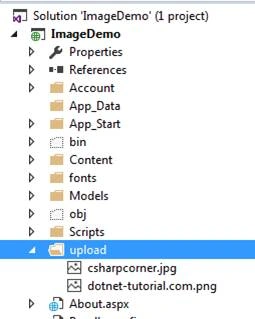
So, I am going to first create the connection string for database connectivity.
- <connectionStrings>
- <add name="MyConnection" connectionString="Data Source=my-computer;Initial Catalog=TestEmployee; user id=mukesh; password=adminadmin;" providerName="System.Data.SqlClient" />
- </connectionStrings>
- using System;
- using System.Collections.Generic;
- using System.Linq;
- using System.Web;
- using System.Web.UI;
- using System.Web.UI.WebControls;
- using System.Data;
- using System.Data.SqlClient;
- using System.Configuration;
- using System.IO;
- namespace ImageDemo
- {
- public partial class Employee: System.Web.UI.Page
- {
- string connectionstring = ConfigurationManager.ConnectionStrings["MyConnection"].ConnectionString;
- protected void Page_Load(object sender, EventArgs e)
- {
- if (!IsPostBack)
- {
- BindEmployeeData();
- }
- }
- public void BindEmployeeData()
- {
- using(var con = new SqlConnection(connectionstring))
- {
- string commandText = "select * from employees";
- var com = new SqlCommand(commandText, con);
- con.Open();
- var adapter = new SqlDataAdapter(com);
- DataSet ds = new DataSet();
- adapter.Fill(ds);
- grvEmployee.DataSource = ds;
- grvEmployee.DataBind();
- }
- }
- protected void btnSubmit_Click(object sender, EventArgs e)
- {
- string empName = Convert.ToString(txtName.Text);
- string address = Convert.ToString(txtAddress.Text);
- if (fupProfileimage.HasFile)
- {
- string profileImageName = fupProfileimage.PostedFile.FileName;
- string filePath = Server.MapPath(@ "~/upload/" + profileImageName);
- fupProfileimage.SaveAs(filePath);
- using(var con = new SqlConnection(connectionstring))
- {
- try
- {
- string commandText = "insert into employees (Name, address, image) values ('" + empName + "','" + address + "','~/upload/" + profileImageName + "')";
- var com = new SqlCommand(commandText, con);
- con.Open();
- int result = com.ExecuteNonQuery();
- if (result > 0)
- {
- BindEmployeeData();
- } else
- {
- lblMessage.Text = "Failed to Add Employee Data !";
- }
- } catch (Exception ex)
- {
- }
- }
- } else
- {
- lblMessage.Text = "choose any image first !";
- }
- }
- }
- }
When you run the project and upload some images with other details then your application will look the same as below.



Reza RezaPosted Jan 3, 2020, 11:25 PM EST
But download code is not written here, the problem is how to download the concerned image?
Thiru RPosted Feb 29, 2016, 12:23 AM EST
good
Ehsan SajjadPosted Feb 28, 2016, 6:32 AM EST
cool.
Humayun Kabir MamunPosted Feb 28, 2016, 3:06 AM EST
Nice...
Shubham KumarPosted Feb 26, 2016, 12:45 AM EST
nice
Vignesh ManiTOP 100Posted Feb 25, 2016, 10:55 PM EST
Nice
Raja TPosted Feb 25, 2016, 6:05 PM EST
Nice, Thanks for sharing
Gowtham KTOP 100Posted Feb 25, 2016, 7:41 AM EST
Good One
Sonu ChaudharyPosted Feb 25, 2016, 1:09 AM EST
good artical
Amit Kumar SinghPosted Feb 24, 2016, 11:26 PM EST
Good Article
Asfend YarPosted Feb 24, 2016, 8:55 PM EST
Can you provide me the link for asp.net where I can easily access to your articles ..
Sibeesh VenuTOP 100Posted Feb 24, 2016, 7:38 PM EST
Nice Share