
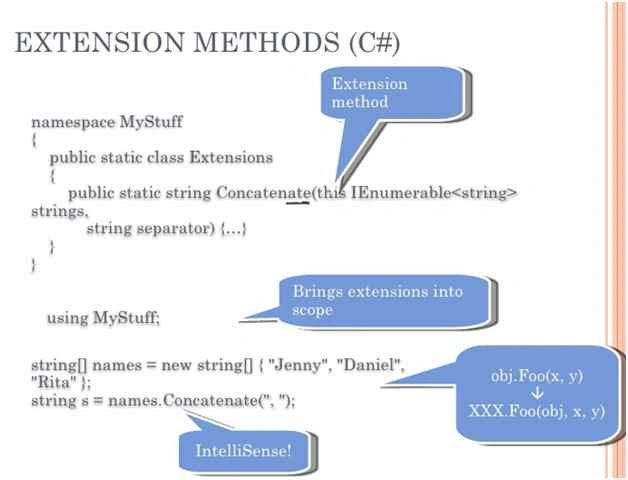
Extension method is a new feature added in C# 3.0. An Extension method is used to add new behaviors to base type without changing the base feature. Extension methods can be attached to any other existing class without changing that particular class. Using extension method you can add a method of existing type or modify the original. Basically, Extension methods are static methods.
Key Points of Extension Method
- Extension method is a static method that must exist in static class.
- It always use “this” keyword with first parameter in the parameter list. Basically this keyword tells to the compiler that what class you have to extend. You can also include other parameter proceeding with it.
- You cannot override base method of existing type using an extension method. If you do this, the compiler will not give you an error but it will not work.
- If you create an extension method with same name as base method but different parameters then the extension method will call first not base method.
- If you create an extension method with same name and same signature as an instance method has then extension method will never be called because compiler take this as low priority method.
- You cannot use an extension method with properties, events or fields.
- If an extension method with same name and signature exist in two or more than two different namespace and these namespaces are included with a class where you want to use extension method, then compiler do not give any error. But it will give an error when you will try to call one of the extension method from them.
- Extension method’s namespace should be included when you use. You can import namespace of the class to use “Using” statement.
Example 1
- public static class StringHelpers
- {
- public static string[] GetUserFirstAndLastName(this string name)
- {
- var firstName = string.Empty;
- var lastName = string.Empty;
- var len = name.Split(' ').Length;
- string[] names = name.ToString().Trim().Split(new char[] { ' ' }, len);
- if (names.Length == 1)
- {
- firstName = names[0];
- lastName = "";
- }
- else if (names.Length == 2)
- {
- firstName = names[0];
- lastName = names[1];
- }
- else
- {
- firstName = names[0];
- lastName = names[names.Length - 1];
- }
- string[] firstlastName={(firstName),(lastName)};
- return firstlastName;
- }
- }
- var name="Mukesh Kumar Singh";
- //GetUserFirstAndLastName is an extension method.
- string[] firstlastName = name.GetUserFirstAndLastName();
- var FirstName = firstlastName[0].ToString();
- var LastName = firstlastName[1].ToString();
- public static class StringExtensionMethod
- {
- public static string[] SplitByComma(this String s)
- {
- return s.Split(',');
- }
- }
- class Program
- {
- static void Main(string[] args)
- {
- string input = "string1,string2,string3";
- var result = input.SplitByComma();
- Console.WriteLine(result[1]);
- }
- }
Thanks for reading this article, hope you enjoyed it.


niharika srivastavaPosted May 8, 2018, 9:20 AM EDT
Very good in-depth knowledge on this topic.
Suman VermaPosted Nov 30, 2015, 12:45 AM EST
nice one
Yaduveer SainiPosted Nov 29, 2015, 11:13 PM EST
Very Nice Article Mukesh
Amandeep singhPosted Nov 29, 2015, 11:12 PM EST
good one
Aishwarya DPosted Nov 29, 2015, 8:43 PM EST
nice one
Santhakumar MunuswamyPosted Nov 29, 2015, 6:53 PM EST
Nice share
Vijay KumarPosted Nov 27, 2015, 9:13 PM EST
nice one
Harshad PansuriyaPosted Nov 27, 2015, 6:08 PM EST
Nice one
Pradeep SahooPosted Nov 27, 2015, 4:59 AM EST
Nice Information, Thanks for sharing
Pawan ChandPosted Nov 27, 2015, 3:05 AM EST
Thank You
Muhammad Aqib ShehzadPosted Nov 26, 2015, 10:50 PM EST
nice sharing
Anu VPosted Nov 26, 2015, 9:43 PM EST
good one, thx
Mukesh KumarPosted Nov 26, 2015, 6:51 PM EST
Thanks Raja and Deena
Deena ThiyalanPosted Nov 26, 2015, 6:20 PM EST
Nice MuKESH KUMAR
Raja TPosted Nov 26, 2015, 6:15 PM EST
Nice, Thanks for sharing