
Introduction
API Methods
- getCurrentPosition
The getCurrentPosition method is used for a one time query on the location.
- watchPosition
The watchPosition method is used when location updates are also needed. When you want to stop the continued updates for the position, you need to call the clear watch method, using the same watchID value. This is very useful
when you want to track changes such as direction mapping applications.
Both methods are asynchronous. The methods specify a mandatory successCallback argument and can optionally specify an errorCallback function and options for the location query. The various options that can be customized for the location query are:
enableHighAccuracy (precise location but may cause slower response and higher
power usage), timeout (default of zero which indicates no timeout) and
maximumAge (expiration for cached location).
In case there was an error, the error callback is invoked if it was specified in the getCurrentPosition/watchPosition method call. Typical error situations
are if the user has denied permission to access the location information, or the
position is unavailable, timeouts, etc.
If the location was successfully retrieved, the success callback method is
invoked. Once you get the location, you can utilize it in your application.
The result location information is returned in a Position object. The Position object has properties which can include expanded location information. Latitude,
longitude, altitude, accuracy, altitude accuracy, heading, speed, and timestamp.
The Latitude, longitude and accuracy properties are populated whereas the
remaining properties may be populated if supported or may be null.
In this code sample, we will run a very basic script to get the user's location and display the latitude and longitude in a text box. When the "Get my
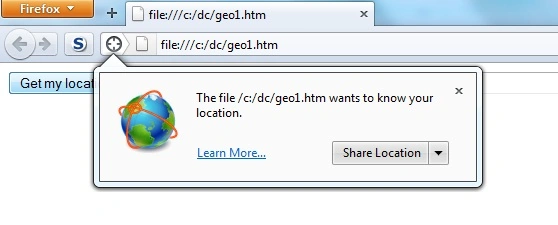
Location" button is clicked, we check if the geolocation API is supported and if it is supported, a call is made to the getCurrentPosition method of the navigator object. The success callback method (displayResult) displays the latitude and longitude retrieved for the user or in case an error occurred, the error callback gets executed and the error message is displayed to the user.
Sample in Action: Here
are some screenshots of the application running in Mozilla Firefox 6.0.2

Code Sample
Figure: browser prompt for user's permission
Figure: Success - got the location!

Figure: Error
- <!DOCTYPE HTML>
- <html>
- <body>
- <script language="javascript">
- function getUserLoc() {
- if (navigator.geolocation) {
- navigator.geolocation.getCurrentPosition(
- displayResult,
- displayError);
- }
- else {
- setMessage("Geolocation is not supported by this browser");
- }
- }
- function displayResult(position) {
- setMessage("Latitude: " + position.coords.latitude + ", Longitude: " + position.coords.longitude);
- }
- function setMessage(msg) {
- document.forms[0].myLoc.value = msg;
- }
- function displayError(error) {
- var errors = { 1: 'Permission denied', 2: 'Position unavailable', 3: 'Request timeout' };
- setMessage("Error occured: " + errors[error.code]);
- }
- </script>
- <form>
- <input type="button" onClick="getUserLoc( );" value="Get my location"/>
- <input type="label" name="myLoc" size="200"/>
- </form>
- </body>
- </html>


Reynier Lester Claro EscalonaPosted Jun 12, 2018, 1:13 PM EDT
Excellent article, thanks for sharing, in a mobile background does not work, any idea or solution.
Prasanna MuraliPosted May 20, 2016, 7:23 AM EDT
Nice one....
Bhuvanesh MohankumarPosted Apr 30, 2016, 11:11 AM EDT
Good one...
Nithya MohanrajhPosted Mar 25, 2016, 9:15 AM EDT
Nice Article.
Asfend YarPosted Feb 29, 2016, 8:59 AM EST
good
Santhakumar MunuswamyPosted Jan 5, 2016, 6:13 PM EST
Thanks for nice sharing
Joe WilsonPosted Jan 5, 2016, 8:09 AM EST
Thank you for sharing.
Pankaj Kumar ChoudharyTOP 100Posted Jan 5, 2016, 5:42 AM EST
Thanks Yashwant Vishwakarma Sir...........
Yashwant VishwakarmaPosted Jan 5, 2016, 2:25 AM EST
Nice article dude , thanks for sharing !!
Pankaj Kumar ChoudharyTOP 100Posted Jan 4, 2016, 6:29 PM EST
Thanks Humayun Kabir Mamun Sir...........
Pankaj Kumar ChoudharyTOP 100Posted Jan 4, 2016, 6:29 PM EST
Thanks Arul R Sir.....
Pankaj Kumar ChoudharyTOP 100Posted Jan 4, 2016, 6:29 PM EST
Thanks Debendra Dash Sir.........
Humayun Kabir MamunPosted Jan 4, 2016, 5:55 PM EST
Nice...
Arul RPosted Jan 4, 2016, 5:47 PM EST
Nice share
Debendra DashPosted Jan 4, 2016, 5:07 PM EST
nice one pankaj.............
Pankaj Kumar ChoudharyTOP 100Posted Jan 4, 2016, 3:38 PM EST
Thanks Sandeep Mittal Sir.......
Pankaj Kumar ChoudharyTOP 100Posted Jan 4, 2016, 3:37 PM EST
Thanks Karthikeyan K Sir...........
Pankaj Kumar ChoudharyTOP 100Posted Jan 4, 2016, 3:37 PM EST
Thanks P K Yadav Sir......
Pankaj Kumar ChoudharyTOP 100Posted Jan 4, 2016, 3:37 PM EST
Thanks Kumaresh Rajalingam Sir.........
Sandeep MittalPosted Jan 4, 2016, 2:26 PM EST
Nice article...
Karthikeyan KPosted Jan 4, 2016, 8:25 AM EST
5 Star
Praveen KumarPosted Jan 4, 2016, 7:55 AM EST
So impressive
Kumaresh RajalingamPosted Jan 4, 2016, 7:51 AM EST
Cool