
In this post, we will see how we can implement the radio button selection feature in jQWidgets jQXGrid. In JQXGrid, we don’t have this functionality yet, but we can do it ourselves by using the check box selection which is already available. We will load the grid with the sample data and implement the radio button selection. If you are new to JQX Grid, you can see some tips here. I hope you will like this.
You can always download the source code from here: Radio button selection in JQXGrid
Background
I am using JQXGrid in one of my projects where I want to implement the radio button. When I talked with the JQXGrid development team, I was told that the functionality is not yet available but they have given an option as a selection mode: ‘checkbox’, with the help of which we can implement the requirement. As you know, to load a jQWidget JQX Grid, you need the following mandatory things:
- Datafields
- Columns
- Local data or Server side data
Using the code
First of all, load the needed references. You can download the needed files from here.
- <link rel="stylesheet" href="jqwidgets/styles/jqx.base.css" type="text/css" />
- <script src="jquery-2.2.3.min.js"></script>
- <script type="text/javascript" src="jqwidgets/jqxcore.js"></script>
- <script type="text/javascript" src="jqwidgets/jqxdata.js"></script>
- <script type="text/javascript" src="jqwidgets/jqxbuttons.js"></script>
- <script type="text/javascript" src="jqwidgets/jqxscrollbar.js"></script>
- <script type="text/javascript" src="jqwidgets/jqxmenu.js"></script>
- <script type="text/javascript" src="jqwidgets/jqxgrid.js"></script>
- <script type="text/javascript" src="jqwidgets/jqxgrid.edit.js"></script>
- <script type="text/javascript" src="jqwidgets/jqxgrid.selection.js"></script>
- <script type="text/javascript" src="jqwidgets/jqxgrid.pager.js"></script>
- <script type="text/javascript" src="jqwidgets/jqxlistbox.js"></script>
- <script type="text/javascript" src="jqwidgets/jqxdropdownlist.js"></script>
- <script type="text/javascript" src="jqwidgets/jqxgrid.sort.js"></script>
- <script type="text/javascript" src="jqwidgets/jqxcheckbox.js"></script>
- <script type="text/javascript" src="jqwidgets/jqxgrid.columnsresize.js"></script>
- <?xml version="1.0" encoding="iso-8859-1" standalone="yes"?>
- <feed xml:base="http://services.odata.org/Northwind/Northwind.svc/" xmlns:d="http://schemas.microsoft.com/ado/2007/08/dataservices" xmlns:m="http://schemas.microsoft.com/ado/2007/08/dataservices/metadata" xmlns="http://www.w3.org/2005/Atom">
- <title type="text">Orders</title>
- <id>http://services.odata.org/Northwind/Northwind.svc/Orders</id>
- <updated>2011-12-01T11:55:06Z</updated>
- <link rel="self" title="Orders" href="Orders" />
- <entry>
- <id>http://services.odata.org/Northwind/Northwind.svc/Orders(10248)</id>
- <title type="text"></title>
- <updated>2011-12-01T11:55:06Z</updated>
- <author>
- <name />
- </author>
- <link rel="edit" title="Order" href="Orders(10248)" />
- <link rel="http://schemas.microsoft.com/ado/2007/08/dataservices/related/Customer" type="application/atom+xml;type=entry" title="Customer" href="Orders(10248)/Customer" />
- <link rel="http://schemas.microsoft.com/ado/2007/08/dataservices/related/Employee" type="application/atom+xml;type=entry" title="Employee" href="Orders(10248)/Employee" />
- <link rel="http://schemas.microsoft.com/ado/2007/08/dataservices/related/Order_Details" type="application/atom+xml;type=feed" title="Order_Details" href="Orders(10248)/Order_Details" />
- <link rel="http://schemas.microsoft.com/ado/2007/08/dataservices/related/Shipper" type="application/atom+xml;type=entry" title="Shipper" href="Orders(10248)/Shipper" />
- <category term="NorthwindModel.Order" scheme="http://schemas.microsoft.com/ado/2007/08/dataservices/scheme" />
- <content type="application/xml">
- <m:properties>
- <d:OrderID m:type="Edm.Int32">10248</d:OrderID>
- <d:CustomerID>VINET</d:CustomerID>
- <d:EmployeeID m:type="Edm.Int32">5</d:EmployeeID>
- <d:OrderDate m:type="Edm.DateTime">1996-07-04T00:00:00</d:OrderDate>
- <d:RequiredDate m:type="Edm.DateTime">1996-08-01T00:00:00</d:RequiredDate>
- <d:ShippedDate m:type="Edm.DateTime">1996-07-16T00:00:00</d:ShippedDate>
- <d:ShipVia m:type="Edm.Int32">3</d:ShipVia>
- <d:Freight m:type="Edm.Decimal">32.3800</d:Freight>
- <d:ShipName>Vins et alcools Chevalier</d:ShipName>
- <d:ShipAddress>59 rue de l'Abbaye</d:ShipAddress>
- <d:ShipCity>Reims</d:ShipCity>
- <d:ShipRegion m:null="true" />
- <d:ShipPostalCode>51100</d:ShipPostalCode>
- <d:ShipCountry>France</d:ShipCountry>
- </m:properties>
- </content>
- </entry>
- <entry>
- <id>http://services.odata.org/Northwind/Northwind.svc/Orders(10249)</id>
- <title type="text"></title>
- <updated>2011-12-01T11:55:06Z</updated>
- <author>
- <name />
- </author>
- <link rel="edit" title="Order" href="Orders(10249)" />
- <link rel="http://schemas.microsoft.com/ado/2007/08/dataservices/related/Customer" type="application/atom+xml;type=entry" title="Customer" href="Orders(10249)/Customer" />
- <link rel="http://schemas.microsoft.com/ado/2007/08/dataservices/related/Employee" type="application/atom+xml;type=entry" title="Employee" href="Orders(10249)/Employee" />
- <link rel="http://schemas.microsoft.com/ado/2007/08/dataservices/related/Order_Details" type="application/atom+xml;type=feed" title="Order_Details" href="Orders(10249)/Order_Details" />
- <link rel="http://schemas.microsoft.com/ado/2007/08/dataservices/related/Shipper" type="application/atom+xml;type=entry" title="Shipper" href="Orders(10249)/Shipper" />
- <category term="NorthwindModel.Order" scheme="http://schemas.microsoft.com/ado/2007/08/dataservices/scheme" />
- <content type="application/xml">
- <m:properties>
- <d:OrderID m:type="Edm.Int32">10249</d:OrderID>
- <d:CustomerID>TOMSP</d:CustomerID>
- <d:EmployeeID m:type="Edm.Int32">6</d:EmployeeID>
- <d:OrderDate m:type="Edm.DateTime">1996-07-05T00:00:00</d:OrderDate>
- <d:RequiredDate m:type="Edm.DateTime">1996-08-16T00:00:00</d:RequiredDate>
- <d:ShippedDate m:type="Edm.DateTime">1996-07-10T00:00:00</d:ShippedDate>
- <d:ShipVia m:type="Edm.Int32">1</d:ShipVia>
- <d:Freight m:type="Edm.Decimal">11.6100</d:Freight>
- <d:ShipName>Toms Spezialitäten</d:ShipName>
- <d:ShipAddress>Luisenstr. 48</d:ShipAddress>
- <d:ShipCity>Münster</d:ShipCity>
- <d:ShipRegion m:null="true" />
- <d:ShipPostalCode>44087</d:ShipPostalCode>
- <d:ShipCountry>Germany</d:ShipCountry>
- </m:properties>
- </content>
- </entry>
- <link rel="next" href="http://services.odata.org/Northwind/Northwind.svc/Orders?$skiptoken=10447" />
- </feed>
Now, create a div element where we can bind the grid.
- <div id='jqxWidget' style="font-size: 13px; font-family: Verdana; float: left;">
- <div id="jqxgrid">
- </div>
- </div>
- $("#jqxgrid").jqxGrid
- ({
- width: 850,
- height: 450,
- source: dataAdapter,
- sortable: true,
- selectionmode: 'checkbox',
- altrows: true,
- ready: function()
- {
- $('#columntablejqxgrid .jqx-checkbox-default').hide();
- },
- columns: [
- {
- text: 'Ship Name',
- datafield: 'ShipName',
- width: 250
- }, {
- text: 'Shipped Date',
- datafield: 'ShippedDate',
- width: 100,
- cellsformat: 'yyyy-MM-dd'
- }, {
- text: 'Freight',
- datafield: 'Freight',
- width: 150,
- cellsformat: 'F2',
- cellsalign: 'right'
- }, {
- text: 'Ship City',
- datafield: 'ShipCity',
- width: 150
- }, {
- text: 'Ship Country',
- datafield: 'ShipCountry'
- }]
- });
- var dataAdapter = new $.jqx.dataAdapter(source);
- var source =
- {
- datatype: "xml",
- datafields: [{
- name: 'ShippedDate',
- map: 'm\\:properties>d\\:ShippedDate',
- type: 'date'
- }, {
- name: 'Freight',
- map: 'm\\:properties>d\\:Freight',
- type: 'float'
- }, {
- name: 'ShipName',
- map: 'm\\:properties>d\\:ShipName',
- type: 'string'
- }, {
- name: 'ShipAddress',
- map: 'm\\:properties>d\\:ShipAddress',
- type: 'string'
- }, {
- name: 'ShipCity',
- map: 'm\\:properties>d\\:ShipCity',
- type: 'string'
- }, {
- name: 'ShipCountry',
- map: 'm\\:properties>d\\:ShipCountry',
- type: 'string'
- }],
- root: "entry",
- record: "content",
- id: 'm\\:properties>d\\:OrderID',
- url: url
- };
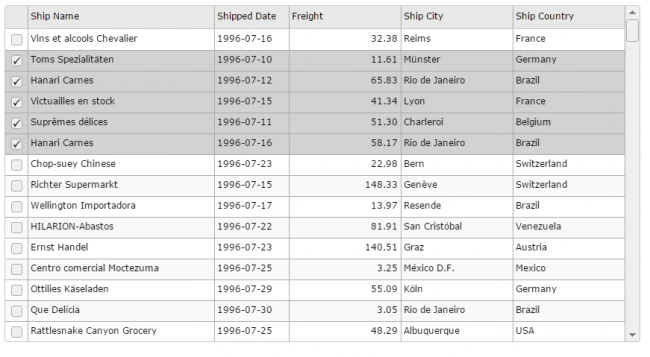
Grid with check box selection:
What have you noticed? You are able to do the multiple selection, right? But what do we need? A radio button selection, isn’t it? Hence, we are supposed to select only one row, right? This is why,we haven’t done the needed implementation yet. Let us add some script then, as follows:
- $('#jqxgrid').on('rowselect', function(event)
- {
- // event arguments.
- var args = event.args;
- // row's bound index.
- var rowBoundIndex = args.rowindex;
- var selectedIndexes = $('#jqxgrid').jqxGrid('selectedrowindexes');
- for (var i = 0; i < selectedIndexes.length; i++)
- {
- if (rowBoundIndex !== selectedIndexes[i])
- {
- $('#jqxgrid').jqxGrid('unselectrow', selectedIndexes[i]);
- }
- }
- });
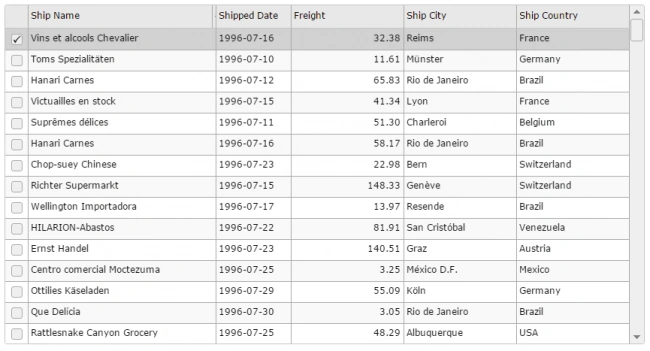
Grid with radio button selection
Now, we can see the complete code.
Complete code
- <!DOCTYPE html>
- <html lang="en">
- <head>
- <link rel="stylesheet" href="jqwidgets/styles/jqx.base.css" type="text/css" />
- <script src="jquery-2.2.3.min.js"></script>
- <script type="text/javascript" src="jqwidgets/jqxcore.js"></script>
- <script type="text/javascript" src="jqwidgets/jqxdata.js"></script>
- <script type="text/javascript" src="jqwidgets/jqxbuttons.js"></script>
- <script type="text/javascript" src="jqwidgets/jqxscrollbar.js"></script>
- <script type="text/javascript" src="jqwidgets/jqxmenu.js"></script>
- <script type="text/javascript" src="jqwidgets/jqxgrid.js"></script>
- <script type="text/javascript" src="jqwidgets/jqxgrid.edit.js"></script>
- <script type="text/javascript" src="jqwidgets/jqxgrid.selection.js"></script>
- <script type="text/javascript" src="jqwidgets/jqxgrid.pager.js"></script>
- <script type="text/javascript" src="jqwidgets/jqxlistbox.js"></script>
- <script type="text/javascript" src="jqwidgets/jqxdropdownlist.js"></script>
- <script type="text/javascript" src="jqwidgets/jqxgrid.sort.js"></script>
- <script type="text/javascript" src="jqwidgets/jqxcheckbox.js"></script>
- <script type="text/javascript" src="jqwidgets/jqxgrid.columnsresize.js"></script>
- <script type="text/javascript">
- $(document).ready(function() {
- var url = "orders.xml";
- // prepare the data
- var source = {
- datatype: "xml",
- datafields: [{
- name: 'ShippedDate',
- map: 'm\\:properties>d\\:ShippedDate',
- type: 'date'
- }, {
- name: 'Freight',
- map: 'm\\:properties>d\\:Freight',
- type: 'float'
- }, {
- name: 'ShipName',
- map: 'm\\:properties>d\\:ShipName',
- type: 'string'
- }, {
- name: 'ShipAddress',
- map: 'm\\:properties>d\\:ShipAddress',
- type: 'string'
- }, {
- name: 'ShipCity',
- map: 'm\\:properties>d\\:ShipCity',
- type: 'string'
- }, {
- name: 'ShipCountry',
- map: 'm\\:properties>d\\:ShipCountry',
- type: 'string'
- }],
- root: "entry",
- record: "content",
- id: 'm\\:properties>d\\:OrderID',
- url: url
- };
- var dataAdapter = new $.jqx.dataAdapter(source);
- // create jqxgrid.
- $("#jqxgrid").jqxGrid({
- width: 850,
- height: 450,
- source: dataAdapter,
- sortable: true,
- selectionmode: 'checkbox',
- altrows: true,
- ready: function() {
- $('#columntablejqxgrid .jqx-checkbox-default').hide();
- },
- columns: [{
- text: 'Ship Name',
- datafield: 'ShipName',
- width: 250
- }, {
- text: 'Shipped Date',
- datafield: 'ShippedDate',
- width: 100,
- cellsformat: 'yyyy-MM-dd'
- }, {
- text: 'Freight',
- datafield: 'Freight',
- width: 150,
- cellsformat: 'F2',
- cellsalign: 'right'
- }, {
- text: 'Ship City',
- datafield: 'ShipCity',
- width: 150
- }, {
- text: 'Ship Country',
- datafield: 'ShipCountry'
- }]
- });
- $('#jqxgrid').on('rowselect', function(event) {
- // event arguments.
- var args = event.args;
- // row's bound index.
- var rowBoundIndex = args.rowindex;
- var selectedIndexes = $('#jqxgrid').jqxGrid('selectedrowindexes');
- for (var i = 0; i < selectedIndexes.length; i++) {
- if (rowBoundIndex !== selectedIndexes[i]) {
- $('#jqxgrid').jqxGrid('unselectrow', selectedIndexes[i]);
- }
- }
- });
- });
- </script>
- </head>
- <body class='default'>
- <div id='jqxWidget' style="font-size: 13px; font-family: Verdana; float: left;">
- <div id="jqxgrid">
- </div>
- </div>
- </body>
- </html>
Did I miss anything that you may think is required? Have you found this post useful? I hope you liked this article. Please share with me your valuable suggestions and feedback.
Your turn. What do you think?
A blog isn’t a blog without comments, but do try to stay on the topic. If you have a question unrelated to this post, you’re better off, posting it on C# Corner, Code Project, Stack Overflow, ASP.NET Forum, instead of commenting here. Tweet or Email me a link to your question there and I’ll definitely try to help, if I can.
Please see this article in my blog here.


Sibeesh VenuTOP 100Posted Jul 7, 2016, 8:30 AM EDT
Sr Karthiga Thanks
Sibeesh VenuTOP 100Posted Jul 7, 2016, 8:29 AM EDT
Saineshwar Bageri Thanks
Sr KarthigaPosted Jul 7, 2016, 4:07 AM EDT
Good one
Saineshwar BageriPosted Jul 4, 2016, 9:09 AM EDT
Nice one
Sibeesh VenuTOP 100Posted Jul 4, 2016, 7:22 AM EDT
Vignesh Mani Thanks
Vignesh ManiTOP 100Posted Jul 4, 2016, 7:10 AM EDT
Useful One
Sibeesh VenuTOP 100Posted Jul 3, 2016, 8:48 PM EDT
Raja Ganapathy Thanks
RajaPosted Jul 3, 2016, 8:37 PM EDT
Good One...
Sibeesh VenuTOP 100Posted Jul 3, 2016, 8:32 PM EDT
Karthik Sachin Thanks dude
Karthik ElumalaiPosted Jul 3, 2016, 6:30 PM EDT
Good one dude..:)
Sibeesh VenuTOP 100Posted Jul 3, 2016, 7:07 AM EDT
Prasanna M Thanks
Prasanna MuraliPosted Jul 3, 2016, 7:06 AM EDT
Nice one...
Sibeesh VenuTOP 100Posted Jul 3, 2016, 6:57 AM EDT
kalu singh rao Thanks
kalu singh raoPosted Jul 3, 2016, 12:23 AM EDT
Nice...
Sibeesh VenuTOP 100Posted Jul 2, 2016, 9:59 PM EDT
Ehsan Sajjad Yes, there is no radio button selection available in JQXGrid. So we can achieve it only by using check box. I have already mentioned it in the article.
Ehsan SajjadPosted Jul 2, 2016, 8:26 PM EDT
I think this is checkbox not radio button :)