First add a browser control, TextBox, Button and a DataGridView Control on form
Add the following code in Button Click Event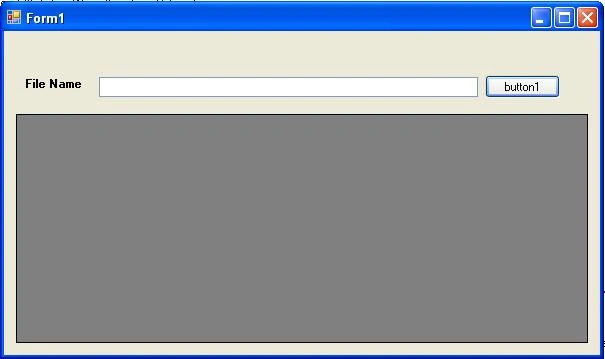
private void button1_Click_1(object sender, EventArgs e)
{
OpenFileDialog fdlg = new OpenFileDialog();
fdlg.Title = "Select file";
fdlg.InitialDirectory = @"c:\";
fdlg.FileName = txtFileName.Text;
fdlg.Filter = "Text and CSV Files(*.txt, *.csv)|*.txt;*.csv|Text Files(*.txt)|*.txt|CSV Files(*.csv)|*.csv|All Files(*.*)|*.*";
fdlg.FilterIndex = 1;
fdlg.RestoreDirectory = true;
if (fdlg.ShowDialog() == DialogResult.OK)
{
txtFileName.Text = fdlg.FileName;
Import();
Application.DoEvents();
}
}
When you select any Text or CSV file from Browser page then you get the full path of Text or CSV file.
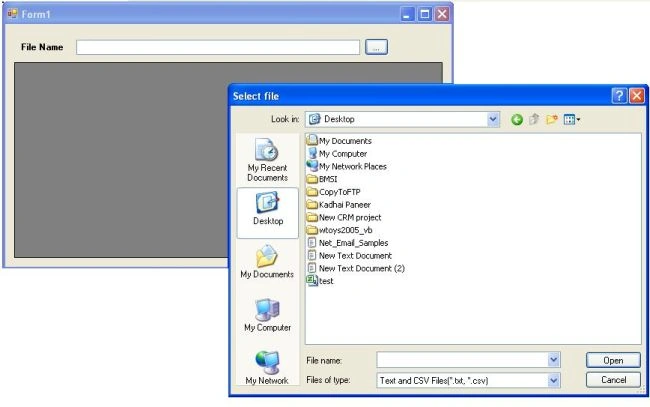
You will pass this path in the following function that will return the dbf file data in a dataset.
public static DataTable GetDataTable(string strFileName)
{
ADODB.Connection oConn = new ADODB.Connection();
oConn.Open("Provider=Microsoft.Jet.OleDb.4.0; Data Source = " + System.IO.Path.GetDirectoryName(strFileName) + "; Extended Properties = \"Text;HDR=YES;FMT=Delimited\";", "", "", 0);
string strQuery = "SELECT * FROM [" + System.IO.Path.GetFileName(strFileName) + "]";
ADODB.Recordset rs = new ADODB.Recordset();
System.Data.OleDb.OleDbDataAdapter adapter = new System.Data.OleDb.OleDbDataAdapter();
DataTable dt = new DataTable();
rs.Open(strQuery, "Provider=Microsoft.Jet.OleDb.4.0; Data Source = " + System.IO.Path.GetDirectoryName(strFileName) + "; Extended Properties = \"Text;HDR=YES;FMT=Delimited\";",
ADODB.CursorTypeEnum.adOpenForwardOnly, ADODB.LockTypeEnum.adLockReadOnly, 1);
adapter.Fill(dt, rs);
return dt;
}
You can easily show dataset data in Datagridview.
private void Import()
{
if (txtFileName.Text.Trim() != string.Empty)
{
try
{
DataTable dt = GetDataTable(txtFileName.Text);
dataGridView1.DataSource = dt.DefaultView;
}
catch (Exception ex)
{
MessageBox.Show(ex.Message.ToString());
}
}
}
Output:
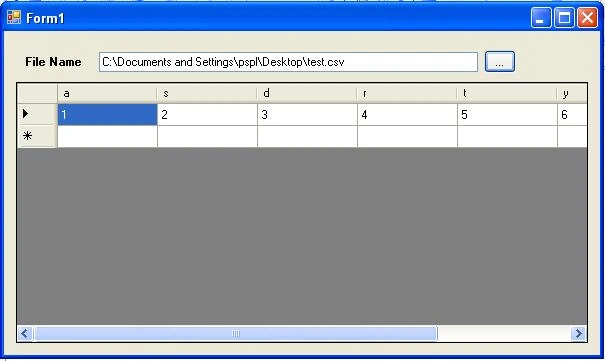


Ankur GuptaPosted Jan 23, 2017, 11:32 PM EST
This problem not code problem its only a project setting problem please go to project properties ->build-->Change your platform target to x86
Kamran LiaquatPosted Nov 25, 2015, 9:05 PM EST
i get this error when select csv file from dialog box "provider cannot be found it may not be properly work" anybody know hw to resolve this??
Ankur GuptaPosted Aug 30, 2014, 4:38 AM EDT
Correct
sathish pPosted Aug 26, 2014, 10:42 PM EDT
This problem not code problem its only a project setting problem please go to project properties ->build-->Change your platform target to x86
sathish pPosted Aug 26, 2014, 2:36 AM EDT
Provider cannot be found. it may not be properly installed how to solve the problem
Muhamad frindoPosted Mar 31, 2014, 7:53 PM EDT
i use vs 2008, i try with interop, but cannot work. can some body give example with library that used.
lbs yinPosted Feb 4, 2014, 2:52 AM EST
CSV is ok,but If Text only disply one column ,why not the same with CSV? please help me!
lbs yinPosted Feb 4, 2014, 2:50 AM EST
thank you!
Ankur GuptaeditedPosted Apr 11, 2013, 11:07 PM EDTEdited Apr 11, 2013, 11:07 PM EDT
You just set Target platform X86 of your application and us jet engine with VS10
alice oberfoellPosted Apr 6, 2013, 5:54 AM EDT
This project uses the jet engine, which is not available for VS10. Microsoft has no intention of continuing support for the jet engine. How would this be rewritten without the jet engine, using LINQ, perhaps?
Rob CPosted Mar 3, 2013, 11:47 PM EST
i just tried running this and i get the following error message, "Provider cannot be found. it may not be properly installed." any ideas?
Hirendra SisodiyaPosted Jan 4, 2013, 9:12 PM EST
hi Ankur correct url is: https://www.defercode.com/tools/csharp-to-vb.aspx
Ankur GuptaeditedPosted Dec 20, 2012, 1:45 AM ESTEdited Jan 4, 2013, 9:40 PM EST
Hi Toni Thanks.. you can easily convert above example in vb.net by sevral open source for ex. https://www.defercode.com/tools/csharp-to-vb.aspx
toni setiawanPosted Dec 13, 2012, 8:45 PM EST
it very good. do you have an example in vb.net?
Muhammad Kashif IqbalPosted Sep 14, 2012, 1:50 AM EDT
Thanks it works
Kedar PawgiPosted Mar 10, 2012, 4:40 AM EST
Hi ankur. your article is good for reading from file. But is it possible to let me know how can i send the datagrid data or an sql query data to a text file in formatted way like header and some line and their sum and then total sum...like printing a bill.i will be very thankful if u reply asap.
Karthiga MPosted Mar 15, 2011, 1:28 AM EDT
can you please help me to create a treeview in the datagrid what we made with csv file???
Karthiga MPosted Mar 14, 2011, 5:38 AM EDT
Thank you..this article helping us a lot..
Karthiga MPosted Mar 14, 2011, 3:31 AM EDT
what is the using directive for ADODB? its showing an error
Ali AlfarajPosted Mar 1, 2011, 10:12 PM EST
Thanks for the wonderful article. Just one question, how can I modify the code so I can read the data from an excel sheet? Thanks, Ali
vipul salwanPosted Dec 2, 2010, 10:24 PM EST
hi devloper I m write your code in my project and its working very good but a prolem is that my most csv file values are seprated by (;) and i m load delimiter in that but its cannot works i sending a code to you please read them and i request u please correct them public static DataTable ParseCSV(string path) { if (!File.Exists(path)) return null; string full = Path.GetFullPath(path); string file = Path.GetFileName(full); string dir = Path.GetDirectoryName(full); //create the "database" connection string string connString = string.Format("Provider=Microsoft.Jet.OLEDB.4.0;" + "Data Source=\"" + dir + "\\\";" + "Extended Properties=\"text;HDR=yes;FMT=Delimited\";"); //create the database query string query = "SELECT * FROM " + file; //create a DataTable to hold the query results DataTable dTable = new DataTable(); //create an OleDbDataAdapter to execute the query OleDbDataAdapter dAdapter = new OleDbDataAdapter(query, connString); try { //fill the DataTable dAdapter.Fill(dTable); } catch (System.Exception ex) { MessageBox.Show(ex.Message); } dAdapter.Dispose(); return dTable; } private void button1_Click(object sender, EventArgs e) { try { DialogResult result = this.openFileDialog1.ShowDialog(); if (result == DialogResult.OK) { string filename = openFileDialog1.FileName; textBox1.Text = filename; } else { MessageBox.Show("dear user please select path"); } DataTable dt = Form1.ParseCSV(textBox1.Text); dataGridView1.DataSource = dt.DefaultView; } catch (System.Exception ex) { MessageBox.Show(ex.Message); } }