
Initial Chamber
Step 1. Open Visual Studio 2010 and create an Empty Website, Give a suitable name [insert_demo].
Step 2. In Solution Explorer you get your empty website, add a web form, SQL Database. By going like this.
For Web Form
insert_demo (Your Empty Website) - Right-click, Add New Item, then Web Form. Name it insert_demo.aspx.
For SQL Server Database
insert_demo (Your Empty Website) - Right-click, Add New Item, SQL Server Database. [Add Database inside the App_Data_folder].
Database Chamber
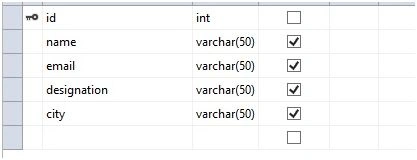
Step 3. Get to your Database [Database.mdf], we will create a table tbl_Data. Go to database.mdf, Table, then Add New table; design your table like the following.
Table - tbl_data [Don’t forget to make ID, then Identity Specification - Yes]
Design Chamber
Step 4. Now open your insert_demo.aspx file, where we create our design for inserting data into database.
insert_demo.aspx
<%@ Page Language="C#" AutoEventWireup="true" CodeFile="Default.aspx.cs" Inherits="_Default" %>

<!DOCTYPE html>
<html xmlns="http://www.w3.org/1999/xhtml">
<head runat="server">
    <script type="text/javascript" src="http://code.jquery.com/jquery-1.8.2.js"></script>
    <script type="text/javascript" src="http://ajax.googleapis.com/ajax/libs/jquery/1.4.2/jquery.min.js"></script>
    <script type="text/javascript" src="http://ajax.googleapis.com/ajax/libs/jqueryui/1.8.1/jquery-ui.min.js"></script>
    <title></title>

    <style type="text/css">
        .auto-style1 {
            width: 147px;
        }
    </style>
</head>

<body>
    <form id="form1" runat="server">
        <div>
            <table style="width:100%;">
                <tr>
                    <td class="auto-style1"></td>
                    <td></td>
                    <td></td>
                </tr>
                <tr>
                    <td class="auto-style1">Name</td>
                    <td>
                        <asp:TextBox ID="TextBox1" runat="server"></asp:TextBox>
                    </td>
                    <td></td>
                </tr>
                <tr>
                    <td class="auto-style1">Email</td>
                    <td>
                        <asp:TextBox ID="TextBox2" runat="server"></asp:TextBox>
                    </td>
                    <td></td>
                </tr>
                <tr>
                    <td class="auto-style1">Designation</td>
                    <td>
                        <asp:TextBox ID="TextBox3" runat="server"></asp:TextBox>
                    </td>
                    <td></td>
                </tr>
                <tr>
                    <td class="auto-style1">City</td>
                    <td>
                        <asp:TextBox ID="TextBox4" runat="server"></asp:TextBox>
                    </td>
                    <td></td>
                </tr>
                <tr>
                    <td class="auto-style1"></td>
                    <td></td>
                    <td></td>
                </tr>
                <tr>
                    <td class="auto-style1"></td>
                    <td>
                        <asp:Button ID="Button1" runat="server" Text="Submit" />
                    </td>
                    <td></td>
                </tr>
            </table>
        </div>
    </form>

    <script type="text/javascript">
        $(function () {
            $('#Button1').click(function () {
                var name = $('#TextBox1').val();
                var email = $('#TextBox2').val();
                var designation = $('#TextBox3').val();
                var city = $('#TextBox4').val();
                if (name !== '' && email !== '' && designation !== '' && city !== '') {
                    $.ajax({
                        type: 'POST',
                        url: 'Default.aspx/insertdata',
                        async: false,
                        data: "{'name':'" + name + "','email':'" + email + "','designation':'" + designation + "','city':'" + city + "'}",
                        contentType: 'application/json; charset=utf-8',
                        success: function (data) {
                            var obj = data.d;
                            if (obj === 'true') {
                                $('#TextBox1').val('');
                                $('#TextBox2').val('');
                                $('#TextBox3').val('');
                                $('#TextBox4').val('');
                                alert("Data Saved Successfully");
                            }
                        },
                        error: function (result) {
                            alert("Error Occurred, Try Again");
                        }
                    });
                } else {
                    alert("Please Fill all the Fields");
                    return false;
                }
            });
        });
    </script>
</body>
</html>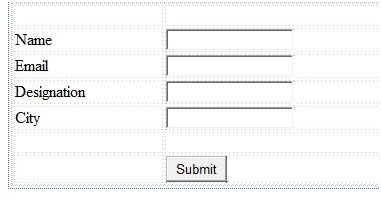
Code Chamber
Step 5. Open your insert_demo.aspx.cs and write some code so that our application starts working.
Insert_demo.aspx.cs
using System;
using System.Collections.Generic;
using System.Linq;
using System.Web;
using System.Web.UI;
using System.Web.UI.WebControls;
using System.Data;
using System.Data.SqlClient;
using System.Web.Services;

public partial class _Default: System.Web.UI.Page
{
    protected void Page_Load(object sender, EventArgs e)
    {

    }

    [WebMethod]
    public static string insertdata(string name, string email, string designation, string city)
    {
        string msg = "";
        SqlConnection con = new SqlConnection("Data Source=Nilu;Initial Catalog=mydb;Integrated Security=True");
        SqlCommand cmd = new SqlCommand("insert into tbl_data values(@name, @email,@designation,@city)", con);
        cmd.Parameters.AddWithValue("@name", name);
        cmd.Parameters.AddWithValue("@email", email);
        cmd.Parameters.AddWithValue("@designation", designation);
        cmd.Parameters.AddWithValue("@city", city);
        con.Open();
        int i = cmd.ExecuteNonQuery();
        if (i == 1)
        {
            msg = "true";
        } else
        {
            msg = "false";
        }

        return msg;

    }
}
Output
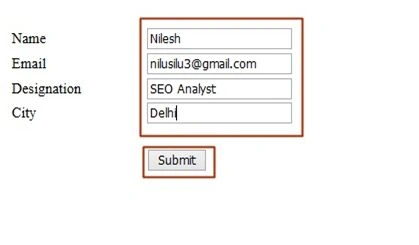
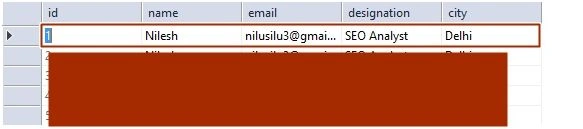
Now go back to the database, where we check that the same data is entered into the database or not, by going to database.mdf, Tables, tbl_data, then right click and show Table Data.
Hope you liked this. Thank you for reading. Have a good day.


samudraiah 19231Posted Mar 1, 2018, 12:16 AM EST
Thanq so much sir its better use
Abdul Amin KhanPosted Jul 24, 2017, 3:29 AM EDT
There is any way to hide or encrypt page name/path in script. url: 'Default.aspx/insertdata',
Abdul Amin KhanPosted Jul 24, 2017, 3:07 AM EDT
Thanks a Lot. I was seeking this from very long time. You make it very easy for me
Deepak RaiPosted Jun 14, 2017, 8:54 PM EDT
Its very helpful and worked for me Nilesh Jadav .....Good job. But in my form there is to buttons one is for Feedback and other is for subscribtion in where i can insert values in Feedback table using javascript but i can't save it for Subscribtion. Since i made a changes in static method and javascript. plz help me out.
Muhammad Aqib ShehzadPosted Jul 29, 2016, 6:42 AM EDT
Nice share
SubashPosted Jul 29, 2016, 12:53 AM EDT
Very useful
Sonu ChaudharyPosted Mar 17, 2016, 3:35 AM EDT
nice artical
Ujjval ShuklaPosted Jan 17, 2016, 12:00 AM EST
Good One.
Arul RPosted Jan 13, 2016, 9:35 PM EST
Nice
Santhakumar MunuswamyPosted Jan 5, 2016, 6:28 PM EST
Thanks for nice share
Muhammad Aqib ShehzadPosted Jan 5, 2016, 2:40 AM EST
Good Share
Raja TPosted Jan 3, 2016, 6:51 PM EST
Nice, Thanks for sharing
Vinodh NarayananPosted Jan 3, 2016, 8:06 AM EST
good one