
Introduction
This article shows how to insert, update, and delete records in a DataGridView in a C# Windows Forms application. In a previous article, we saw how to use a Chart Control in Windows Forms Application.
Let's Begin
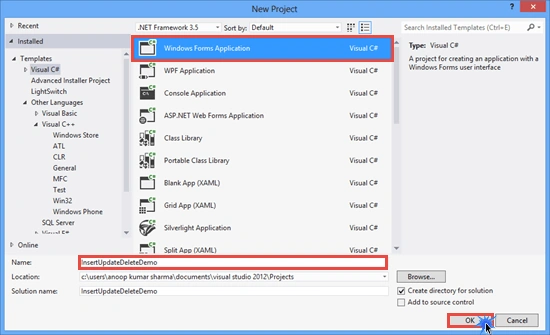
- Create a new Windows Forms application.
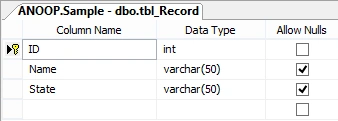
- Create a database (named Sample). Add a table tbl_Record. The following is the table schema for creating tbl_Record.
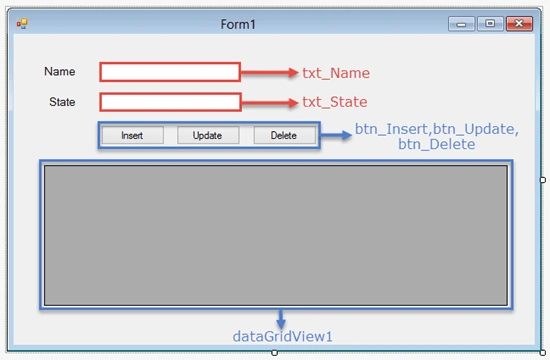
- Create a form (named frmMain) and drop a Label, TextBox, Button, and DataGridView control from the ToolBox.
Now, go to frmMain.cs code and add the System.Data and System.Data.SqlClient namespaces.
frmMain.cs Code
using System;
using System.Data;
using System.Windows.Forms;
using System.Data.SqlClient;

namespace InsertUpdateDeleteDemo
{
    public partial class frmMain : Form
    {
        SqlConnection con = new SqlConnection("Data Source=.;Initial Catalog=Sample;Integrated Security=true;");
        SqlCommand cmd;
        SqlDataAdapter adapt;

        // ID variable used in Updating and Deleting Record
        int ID = 0;

        public frmMain()
        {
            InitializeComponent();
            DisplayData();
        }

        // Insert Data
        private void btn_Insert_Click(object sender, EventArgs e)
        {
            if (txt_Name.Text != "" && txt_State.Text != "")
            {
                cmd = new SqlCommand("insert into tbl_Record(Name,State) values(@name,@state)", con);
                con.Open();
                cmd.Parameters.AddWithValue("@name", txt_Name.Text);
                cmd.Parameters.AddWithValue("@state", txt_State.Text);
                cmd.ExecuteNonQuery();
                con.Close();
                MessageBox.Show("Record Inserted Successfully");
                DisplayData();
                ClearData();
            }
            else
            {
                MessageBox.Show("Please Provide Details!");
            }
        }

        // Display Data in DataGridView
        private void DisplayData()
        {
            con.Open();
            DataTable dt = new DataTable();
            adapt = new SqlDataAdapter("select * from tbl_Record", con);
            adapt.Fill(dt);
            dataGridView1.DataSource = dt;
            con.Close();
        }

        // Clear Data
        private void ClearData()
        {
            txt_Name.Text = "";
            txt_State.Text = "";
            ID = 0;
        }

        // dataGridView1 RowHeaderMouseClick Event
        private void dataGridView1_RowHeaderMouseClick(object sender, DataGridViewCellMouseEventArgs e)
        {
            ID = Convert.ToInt32(dataGridView1.Rows[e.RowIndex].Cells[0].Value.ToString());
            txt_Name.Text = dataGridView1.Rows[e.RowIndex].Cells[1].Value.ToString();
            txt_State.Text = dataGridView1.Rows[e.RowIndex].Cells[2].Value.ToString();
        }

        // Update Record
        private void btn_Update_Click(object sender, EventArgs e)
        {
            if (txt_Name.Text != "" && txt_State.Text != "")
            {
                cmd = new SqlCommand("update tbl_Record set Name=@name,State=@state where ID=@id", con);
                con.Open();
                cmd.Parameters.AddWithValue("@id", ID);
                cmd.Parameters.AddWithValue("@name", txt_Name.Text);
                cmd.Parameters.AddWithValue("@state", txt_State.Text);
                cmd.ExecuteNonQuery();
                MessageBox.Show("Record Updated Successfully");
                con.Close();
                DisplayData();
                ClearData();
            }
            else
            {
                MessageBox.Show("Please Select Record to Update");
            }
        }

        // Delete Record
        private void btn_Delete_Click(object sender, EventArgs e)
        {
            if (ID != 0)
            {
                cmd = new SqlCommand("delete tbl_Record where ID=@id", con);
                con.Open();
                cmd.Parameters.AddWithValue("@id", ID);
                cmd.ExecuteNonQuery();
                con.Close();
                MessageBox.Show("Record Deleted Successfully!");
                DisplayData();
                ClearData();
            }
            else
            {
                MessageBox.Show("Please Select Record to Delete");
            }
        }
    }
}
In the preceding code, I created a dataGridView1_RowHeaderMouseClick Event for updating and deleting the selected record. When the user clicks on the Row Header of a row then the data present in the cell of the row is stored into the TextBoxes. The DisplayData() method fills in the data in the DataGridView.
The Clear() method clears the data present in the TextBox as well as in the ID(int) variable.
Final Preview
I hope you like it. Thanks.


Udochukwu John AnyanwuPosted Oct 9, 2024, 7:39 AM EDT
Please can you reach you via email..
JimanshPosted May 14, 2023, 7:05 AM EDT
Thanks alot
Mark Neil AbianPosted Feb 1, 2022, 9:48 PM EST
What about if there is a date time in my database and I want to update the data, but when I try to select that data to update, I get this error "String was not recognized as a valid date time"?
Hitori HitoriPosted May 12, 2021, 9:41 AM EDT
Hi, could you lead me to fix database engine services that failed for SQL 2019,please ? :(((
terter SantosPosted May 3, 2021, 2:19 AM EDT
Hi my code are showing message successfully updated but in datagridview and database are the same, nothing has changed. Thanks
Wilfred EghenedjiPosted Feb 23, 2021, 7:33 AM EST
Am working with Access as Database in C# (Visual Studio 15). I want to save form entries (add record) into the Access Database and would want the corresponding ID of the record to show upon successful saving.
Danson DansonPosted Apr 30, 2020, 9:59 AM EDT
Hi. My records are showing update successful but when I check the database, nothing is updated, what could be the reason?
akhil saiPosted Oct 28, 2019, 10:48 PM EDT
Hi. I am able to add records to the table but when I select the record in the datagridview to update the columns then it is showing "Please select to update". same problem with delete. Kindly give me a solution and problem?
Rosemary RoopnarinePosted Oct 27, 2019, 6:09 PM EDT
Hi, I am able to add records to the table but when I select the record in the datagridview to update the columns are empty. Not sure what I am missing, if you can assist it would be appreciated.
Chikits GarotsPosted Oct 6, 2019, 9:28 AM EDT
Hello, I've used Auto specification in ID, somehow the rowheader which i clicked from the datagridview isn't inserting in text boxes. Thanks for the help
Marcus SticherPosted Jun 6, 2019, 11:22 PM EDT
Good afternoon Anoop, my problem still the same: no automatic insertion of Id Number, error message same I listed. There is no identity added on that column. "Cannot insert the value NULL into column 'Id'(....).tbl_Record'; column does not allow nulls. INSERT fails.
Uy Long Nguyễn ĐôngPosted Jun 6, 2019, 12:50 AM EDT
I have an problem, my datatype in sql is smalldatetime, that was an Exception: System.Data.SqlClient.SqlException: 'Conversion failed when converting character string to smalldatetime data type.'
Marcus SticherPosted Jun 5, 2019, 8:38 PM EDT
Cannot insert the value NULL into column 'Id',....dbo.tbl_Record'; column does not allow nulls. INSERT fails.
Marcus SticherPosted Jun 5, 2019, 12:57 AM EDT
Why in my project the ID (PrKey) is not inserted in no way, only error message? thanks
Marcus SticherPosted Jun 5, 2019, 12:54 AM EDT
Thank you very much for this helpful sample, nothing superb like this in msd sites!
Lalrinchhana KhalthangPosted Apr 15, 2019, 6:26 AM EDT
How id ID number automatically counted
Lalrinchhana KhalthangPosted Apr 15, 2019, 6:26 AM EDT
Why ID number 1,2,3,4,6 come, why not 5
Mahnoor NaeemPosted Mar 30, 2019, 2:36 PM EDT
How to create dataGridView1_RowHeaderMouseClick Event??? I where I click in datagridView to create event please tell me??
Jim BrillantesPosted Mar 17, 2019, 1:14 AM EDT
Good day, I followed your tutorial and did everything on it. It does save on the datagridview, but if I stop the program and check the database, there are no records saved and the datagridview will be empty again after re-running the program.
Valmy TesmoingtPosted Jan 26, 2019, 5:49 AM EST
Hello,Although this does not persist in the table, can you still tell me how to prevent changing the content of the datagridview, so that the only manipulation that can be made is to select a line? Thank you in advance.
elnaz AmanollahyPosted Dec 26, 2018, 6:14 PM EST
When a I select a row ,that info doesn't appear in the boxes
Jet WellPosted Sep 27, 2018, 4:02 PM EDT
That's late reply but i appreciate you for this example
mp singhPosted May 28, 2018, 10:25 PM EDT
When I have changed in adding two more textbox thenover the insert button is properly working but the update and delete button is not working....pls send me the correct code for update and delete in gridview on [email protected] u
Philip BowserPosted Jan 25, 2018, 4:52 AM EST
Update and Delete does not work at all it skips the IF statement in the delete.. and in the update button does not change the database values. Both problems seem to be related to the fact that ID int value stays at 0 when selecting row.
sophea veteyPosted Jan 14, 2018, 8:35 PM EST
Why i use for in datagridview row not datatable show in textbox.
Avinaash MendaPosted Dec 31, 2017, 10:45 PM EST
There is nothing mentioned about ID - It wont allow to edit or update or insert if its null.
Muhammad SulamanPosted Nov 22, 2017, 8:41 PM EST
I really appreciate your work bro, thank you for your convince
Swasthika DamlePosted Nov 14, 2017, 4:30 AM EST
Thank you so much!!!!!
vk sonyPosted Aug 12, 2017, 10:48 PM EDT
Public void ExecStatement(String sql, List<SqlParameter> Parameters, SqlTransaction MyTrans) { using (SqlCommand cmd = SqlCmnd()) { cmd.CommandText = sql; cmd.Transaction = MyTrans; for (int i = 0; i < Parameters.Count; i++) cmd.Parameters.Add(Parameters[i]); cmd.ExecuteNonQuery(); } }
sathish kumarPosted Jul 27, 2017, 5:33 AM EDT
Delete operation,update operation on grid not working,any property should change for data grid..? please tell me..datagrid click event not work..
sathish kumarPosted Jul 27, 2017, 5:31 AM EDT
Data grid properties option change
Hammouzine MeddourPosted May 23, 2017, 5:21 AM EDT
Pls sir, how to create the database, we use SQL server?
Aditya KumarPosted Mar 28, 2017, 1:06 AM EDT
Sir you have written one airticle where you are showing datagrid view row on the condition based and changing the colur as well in windows application? Can you please post that airticle link here? Thanks.
Milo BeitiaPosted Mar 26, 2017, 8:05 PM EDT
'DataTable' does not contain a definition for 'datasource' and no extension........
Worshipful MasterPosted Mar 6, 2017, 9:42 AM EST
No work, error in sql conection. Can you help me, Please !!! Where is error???
Ahmet OzkurtPosted Feb 20, 2017, 9:10 AM EST
Hi, can you set up to access.
ali ashrafiPosted Feb 17, 2017, 12:09 PM EST
In wpf application I don't have a rowheadermouseclick an I use the mouse double click an in this method don't have rows.[e.RowIndex]
ali ashrafiPosted Feb 17, 2017, 12:07 PM EST
This code is not work on wpf application ineed the wpf code in this part ???private?void?dataGridView1_RowHeaderMouseClick(object?sender,?DataGridViewCellMouseEventArgs?e)?? ????????{?? ????????????ID?=?Convert.ToInt32(dataGridView1.Rows[e.RowIndex].Cells[0].Value.ToString());?? ????????????txt_Name.Text?=?dataGridView1.Rows[e.RowIndex].Cells[1].Value.ToString();?? ????????????txt_State.Text?=?dataGridView1.Rows[e.RowIndex].Cells[2].Value.ToString();?? ????????}
sunny sharmaPosted Feb 17, 2017, 2:06 AM EST
Nice oneIt keeps giving me connection error to the database by saying the following:
xinyu zhangPosted Jan 5, 2017, 10:41 AM EST
It keeps giving me connection error to the database by saying the following:
pooja sutharPosted Nov 29, 2016, 8:22 PM EST
Nice ..but how to show tinserted data into gridview which located at another webform
SHIVANI TRIPATHIPosted Nov 18, 2016, 5:47 AM EST
I'm having connection property has not been initialized error help....
Rajesh PawdePosted Oct 27, 2016, 3:13 AM EDT
Nice One Thanks !!!
Buntu SubsPosted Oct 15, 2016, 12:39 AM EDT
I Input Datasource path, but same error
Abhi SanghviPosted Sep 19, 2016, 6:05 PM EDT
Now datagridview error some time note display the data and how to increase the column width like in your program name width
Abhi SanghviPosted Sep 17, 2016, 3:21 AM EDT
Error in run time help me please
Harshit MehtaPosted Aug 23, 2016, 4:39 AM EDT
What if there was a combobox field instead of a textbox field? For example, if there was a combobox for 'State' field inside the datagridview as well as outside the datagridview.
Laura AlmaPosted May 31, 2016, 7:08 PM EDT
I'm beginning to learn c# by myself and this was really really helpful! i'm trying to figure out how to display the DataGridView and the Text Boxes in different forms right now, but this gave me a place where to start! Thank you so much!
kavita chavanPosted Mar 18, 2016, 12:36 AM EDT
nice
Shraddha ChavanPosted Feb 22, 2016, 10:29 PM EST
what is ID in this code????
Chandu KumawatPosted Dec 28, 2015, 9:33 PM EST
nice
Vijay KumarPosted Dec 15, 2015, 4:54 AM EST
its
Anoop Kumar SharmaPosted Nov 17, 2015, 5:21 AM EST
Thanks Divya..!
DivyaPosted Nov 15, 2015, 7:21 PM EST
great its helpful . thank you sir
zosangzuala sailoPosted Nov 5, 2015, 11:25 PM EST
I cannot access the private variable(i.e variable dat is assign da datagridview value from another private.how can i access.thank u..
Raj KumarPosted Oct 19, 2015, 8:45 PM EDT
What do I do if "DisplayData()" is considered an error. And there is an error message that reads: The name "DisplayData" does not exist in the current context. PLEASE HELP
bhushan raikwadPosted Oct 2, 2015, 1:51 AM EDT
When I m select the row nt show me data in txtname and txtstate.
bhushan raikwadPosted Oct 2, 2015, 1:50 AM EDT
Not use update and delete command
Shahbaz AhmadPosted Aug 31, 2015, 10:36 PM EDT
its great but i need all are operation are must be inside datagrid not use outside like textbox and buttons ..
Anoop Kumar SharmaPosted Aug 7, 2015, 6:08 AM EDT
Thanks Navnath Ugale..! :-)
Navnath UgalePosted Aug 7, 2015, 3:33 AM EDT
Good Very nice !!!!!!!!!!!!!!
Alexander ChromePosted Jul 21, 2015, 6:01 PM EDT
What do I do if "DisplayData()" is considered an error. And there is an error message that reads: The name "DisplayData" does not exist in the current context. PLEASE HELP
Anoop Kumar SharmaPosted Jul 5, 2015, 5:26 AM EDT
Thanks nassim louchani
nassim louchaniPosted Jul 4, 2015, 10:53 PM EDT
Good !
Anoop Kumar SharmaPosted May 24, 2015, 8:36 PM EDT
You're Welcome.. majedul islam..!! :-)
majedul islamPosted May 23, 2015, 9:25 AM EDT
thanks
Anoop Kumar SharmaPosted Apr 6, 2015, 8:22 AM EDT
Thanks Karthik K..!!
Karthik KPosted Apr 6, 2015, 8:11 AM EDT
Good one..
Anoop Kumar SharmaPosted Mar 22, 2015, 9:58 PM EDT
Thanks Khargesh Rajput
Khargesh RajputPosted Mar 22, 2015, 8:04 PM EDT
nice
Anoop Kumar SharmaPosted Mar 22, 2015, 3:00 AM EDT
Thanks RAK?SH Sir.!
RakeshPosted Mar 22, 2015, 1:44 AM EDT
good one :)
Sibeesh VenuTOP 100Posted Mar 21, 2015, 7:04 PM EDT
Anoop Kumar Sharma You are welcome.
Anoop Kumar SharmaPosted Mar 21, 2015, 6:18 PM EDT
Thanks Sibeesh Venu SIr..!
Sibeesh VenuTOP 100Posted Mar 21, 2015, 5:17 PM EDT
Nice one.
Anoop Kumar SharmaPosted Mar 21, 2015, 9:26 AM EDT
Thanks Gowtham Rajamanickam..!! :-)
Gowtham RajamanickamTOP 100Posted Mar 21, 2015, 7:47 AM EDT
good one...