
A Stored Procedure is the collection of logical groups of SQL Statements. Stored Procedures server an important purpose in performing a specific task. The main advantage of Stored Procedures is for increasing the performance of the database. In this article I will use a Stored Procedure and do the insert, update and delete operations using a Stored Procedure. In this article I will not use the front end, all the task I will do in the backend.
Step 1
Start the SQL Server and create a table.
- CREATE TABLE employee1
- (
- id INTEGER PRIMARY KEY,
- first_name VARCHAR(10),
- last_name VARCHAR(10),
- salary DECIMAL(10,2),
- country VARCHAR(20),
- )
Step 2
Now we need to insert the data in the table using the insert query.
- INSERT INTO emp
- VALUES
- (
- 1, 'Yaten', 'Sharma', 15000, 'India'
- );
- INSERT INTO emp
- VALUES
- (
- 2, 'Shiva', 'Sharma', 12000, 'Australia'
- );
- INSERT INTO emp
- VALUES
- (3, 'Reenna', 'Gupta', 18000, 'USA');
- INSERT INTO emp
- VALUES
- (
- 4, 'Priyanka', 'Updhayay', 16000, 'India'
- );
- INSERT INTO emp
- VALUES
- (
- 5, 'Rahul', 'Updhayay', 17000, 'India'
- );
We can check whether the data was inserted or not using the select query.
- select * from emp;
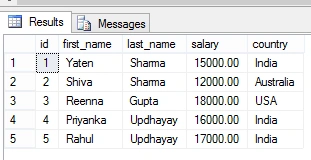
Figure 1: Select table
Step 2
After inserting the data, now we will create the Stored Procedure.
- create procedure InsertUpdate
- (
- @id INTEGER,
- @first_name VARCHAR(10),
- @last_name VARCHAR(10),
- @salary varchar(20),
- @country VARCHAR(20),
- @StatementType nvarchar(20) = ''
- )
- AS
- BEGIN
- IF @StatementType = 'Insert'
- BEGIN
- insert into emp(id,first_name,last_name,salary,country) values( @id, @first_name, @last_name, @salary, @country)
- END
- IF @StatementType = 'Select'
- BEGIN
- select * from emp
- END
- IF @StatementType = 'Update'
- BEGIN
- UPDATE emp SET
- First_name = @first_name, last_name = @last_name, salary = @salary,
- country = @country
- WHERE id = @id
- END
- end
For performing the delete operation we also need to create another procedure for performing the delete operation.
Delete Stored Procedure
- create procedure deleted
- (
- @id integer,
- @StatementType nvarchar(20) = ''
- ) as begin IF @StatementType = 'Delete' BEGIN
- DELETE FROM
- emp
- WHERE
- id = @id END end
Step 3
Now we will perform the insert operation using a Stored Procedure, for that we need to write the execute query.
Query for the insert using execute the Stored Procedure:
- exec InsertUpdateDelete @id = 6,
- @first_name = 'Shobit',
- @last_name = 'Pandey',
- @salary = 32000,
- @country = 'Canada',
- @StatementType = 'Insert'
Now we check whether the data was inserted.
- Select * from emp;
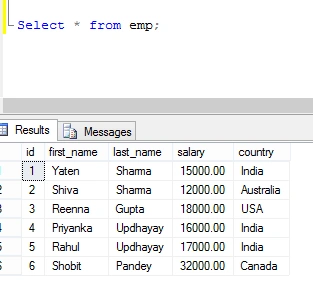
Figure 2: Insert procedure
Step 4
Now we will perform the update operation, for that we write the query to update the execute query.
The following is the Query to update using execute in a Stored Procedure:
- exec InsertUpdateDelete @id = 3,
- @first_name = 'Shobit',
- @last_name = 'Pandey',
- @salary = 32000,
- @country = 'Canada',
- @StatementType = 'Update'
Now we will check that the data is updated or not.
- Select * from emp;
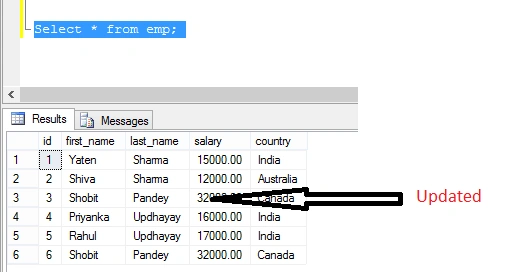
Figure 3: Updated table
Step 5
Now we need to perform the delete operation using a Stored Procedure.
- exec deleted @id = 5,
- @StatementType = 'Deleted'
Now we need to check that the data is deleted.
- Select * from emp;
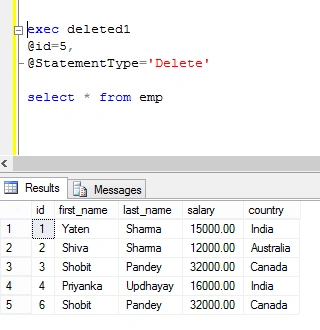
Figure 4: Delete rows
Summary
This article explained how to write a Stored Procedure for insert, update and delete operations and how to execute them using parameters.
I hope this article is helpful for beginners if they want to use Stored Procedures in SQL Server and perform the insert, update and delete operations.


Sangram PattanayakPosted Jul 11, 2019, 10:33 PM EDT
Very Nice Article
chandrakant agalavePosted Aug 9, 2018, 9:04 PM EDT
Nice....but more mistakess
Durgesh SinghPosted Jul 5, 2018, 11:54 PM EDT
Fruitful article
Nithish ReddyPosted Feb 22, 2018, 3:23 AM EST
Nice article ! can you explain joints ?
SubashPosted Sep 15, 2016, 1:05 AM EDT
Good one
Kartik VaghasiyaPosted Aug 5, 2015, 5:09 AM EDT
Nice one. really use full.
Yatendra SharmaPosted Jul 20, 2015, 8:26 PM EDT
Pankaj Kumar Choudhary thanx
Yatendra SharmaPosted Jul 20, 2015, 8:26 PM EDT
Santhakumar Munuswamy thanx
Yatendra SharmaPosted Jul 20, 2015, 8:26 PM EDT
Chervine Bhiwoo thanx
Pankaj Kumar ChoudharyTOP 100Posted Jul 17, 2015, 4:06 PM EDT
Nice Article Sir...........
Santhakumar MunuswamyPosted Jul 17, 2015, 12:39 PM EDT
Thanks for nice article:)
Chervine BhiwooPosted Jul 17, 2015, 11:03 AM EDT
Great tip!
Yatendra SharmaPosted Jul 17, 2015, 3:55 AM EDT
Yashwant Vishwakarma thanx
Yatendra SharmaPosted Jul 17, 2015, 3:54 AM EDT
Govinda Rajulu Yemineni thanx
Yashwant VishwakarmaPosted Jul 17, 2015, 3:44 AM EDT
Superb :-)
Govinda Rajulu YemineniPosted Jul 17, 2015, 3:15 AM EDT
Nice one
Yatendra SharmaPosted Jul 17, 2015, 2:09 AM EDT
Sibeesh Venu thanx
Yatendra SharmaPosted Jul 17, 2015, 2:08 AM EDT
Gopi Chand thanx
Sibeesh VenuTOP 100Posted Jul 17, 2015, 1:55 AM EDT
Thanks for the information
Gopi ChandPosted Jul 17, 2015, 1:46 AM EDT
Nice
Yatendra SharmaPosted Jul 17, 2015, 12:51 AM EDT
Rakesh Chavda thanx
RakeshPosted Jul 17, 2015, 12:17 AM EDT
Good one
Yatendra SharmaPosted Jul 17, 2015, 12:08 AM EDT
Debasis Saha thanx
Yatendra SharmaPosted Jul 17, 2015, 12:08 AM EDT
Nilesh Jadav thanx
SharadPosted Jul 16, 2015, 11:32 PM EDT
good one...
Abrar Ahmad AnsariPosted Jul 16, 2015, 11:01 PM EDT
https://technet.microsoft.com/en-us/library/bb522522%28v=sql.105%29.aspx
Abrar Ahmad AnsariPosted Jul 16, 2015, 11:01 PM EDT
Insert/Update/Delete operation we can do a single query in sql. learn about merge
Debasis SahaTOP 100Posted Jul 16, 2015, 10:59 PM EDT
Nice Once..
Nilesh JadavPosted Jul 16, 2015, 10:38 PM EDT
Nice article sir