
Background
In many MVC projects and other applications you might have noticed while inserting data into the database whole post back occurs which consumes the server resources unnecessarily and some time inserts the duplicate records when page is post back again. So to avoid it we will learn how to post the data using jQuery Ajax post method in MVC which will insert the data asynchronously into the database without whole page postback.
You might be interested in one of my ASP.NET article Inserting Form Data Into Database Using Stored Procedure In ASP.NET C# posted in December 2012 with 149 k+ views and based on the same I decided same functionality article using ASP.NET MVC.
- "Start", then "All Programs" and select "Microsoft Visual Studio 2015".
- "File", then "New" and click "Project" then select "ASP.NET Web Application Template", then provide the Project a name as you wish and click on OK.
- Choose MVC empty application option and click on OK
Right click on Model folder in the created MVC application, give the class name employee or as you wish and click OK.
EmpModel.cs
- public class EmpModel
- {
- public string Name { get; set; }
- public string City { get; set; }
- public string Address { get; set; }
- }
Step 3: Create Table and Stored procedures.
Now before creating the views let us create the table named Employee in the database according to our model fields to store the details:

Create stored procedure to insert records
Now before creating the views let us create the table named Employee in the database according to our model fields to store the details:
Create stored procedure to insert records
- Create procedure [dbo].[AddEmp]
- (
- @Name varchar (50),
- @City varchar (50),
- @Address varchar (50)
- )
- as
- begin
- Insert into Employee values(@Name,@City,@Address)
- End
Step 4: Add controller class.
Right click on Controller folder in the created MVC application; give the class name. I have given class name Home and clicked OK.
HomeControlle.cs
- public class HomeController : Controller
- {
- private SqlConnection con;
- // GET: AddEmployee
- public ActionResult AddEmployee()
- {
- return View();
- }
- //Post method to add details
- [HttpPost]
- public ActionResult AddEmployee(EmpModel obj)
- {
- AddDetails(obj);
- return View();
- }
- //To Handle connection related activities
- private void connection()
- {
- string constr = ConfigurationManager.ConnectionStrings["SqlConn"].ToString();
- con = new SqlConnection(constr);
- }
- //To add Records into database
- private void AddDetails(EmpModel obj)
- {
- connection();
- SqlCommand com = new SqlCommand("AddEmp", con);
- com.CommandType = CommandType.StoredProcedure;
- com.Parameters.AddWithValue("@Name", obj.Name);
- com.Parameters.AddWithValue("@City", obj.City);
- com.Parameters.AddWithValue("@Address", obj.Address);
- con.Open();
- com.ExecuteNonQuery();
- con.Close();
- }
- }
Step 5: Add View
Right click on View folder of created MVC application project and add empty view named AddEmployee.cshtml.
Step 6: Create jQuery Post method
Now open the AddEmployee.cshtml view and create the following jQuery Post method to call controller.
Right click on View folder of created MVC application project and add empty view named AddEmployee.cshtml.
Step 6: Create jQuery Post method
Now open the AddEmployee.cshtml view and create the following jQuery Post method to call controller.
- <script>
- $(document).ready(function () {
- //function will be called on button click having id btnsave
- $("#btnSave").click(function () {
- $.ajax(
- {
- type: "POST", //HTTP POST Method
- url: "Home/AddEmployee", // Controller/View
- data: { //Passing data
- Name: $("#txtName").val(), //Reading text box values using Jquery
- City: $("#txtAddress").val(),
- Address: $("#txtcity").val()
- }
- });
- });
- });
- </script>
- To work with jQuery we need to reference jQuery library. You can use the following CDN jQuery library from any provider such as Microsoft, Google or jQuery.
- https://ajax.googleapis.com/ajax/libs/jquery/1.11.3/jquery.min.js
To use above jQuery library you need an active internet connection, if you don't have then you can use the following offline jQuery library as well:
- <script src="~/Scripts/jquery-1.10.2.min.js"></script>
Now after adding the library and form controls, the AddEmployee.cshtml code will look like as:
- @{
- ViewBag.Title = "www.compilemode.com";
- }
- <script src="https://ajax.googleapis.com/ajax/libs/jquery/1.11.3/jquery.min.js"></script>
- <script>
- $(document).ready(function () {
- $("#btnSave").click(function () {
- $.ajax(
- {
- type: "POST", //HTTP POST Method
- url: "Home/AddEmployee", // Controller/View
- data: { //Passing data
- Name: $("#txtName").val(), //Reading text box values using Jquery
- City: $("#txtAddress").val(),
- Address: $("#txtcity").val()
- }
- });
- });
- });
- </script>
- <br /><br />
- <fieldset>
- <div class="form-horizontal">
- <div class="editor-label">
- Name
- </div>
- <div class="editor-label">
- <input type="text" id="txtName" />
- </div>
- <div class="editor-label">
- Address
- </div>
- <div class="editor-label">
- <input type="text" id="txtAddress" />
- </div>
- <div class="editor-label">
- City
- </div>
- <div class="editor-label">
- <input type="text" id="txtcity" />
- </div>
- <div class="editor-label">
- <br />
- <input class="btn-default" type="button" id="btnSave" value="Save" />
- </div>
- </div>
- </fieldset>
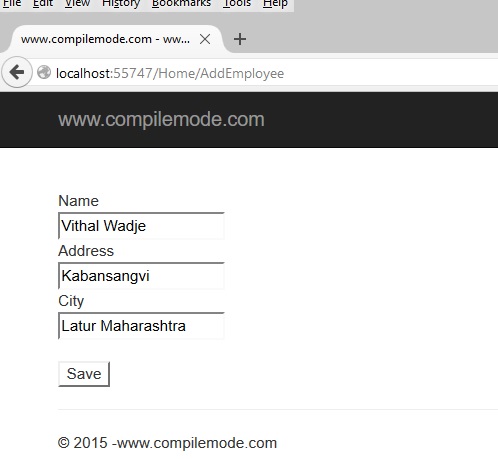
After entering the details click on save button. The details will get added into the database as in the following:

From all the above examples we learned how to insert data using jQuery post method without whole page postback.
Note
- Do a proper validation such as date input values when implementing.
- Download the Zip file of the sample application for a better understanding.
- Make the changes in the web.config file depending on your server details for the connection string.
Summary
From all the preceding examples you have learned how to insert data using jQuery post method. I hope this article is useful for all readers, if you have a suggestion then please contact me.
From all the preceding examples you have learned how to insert data using jQuery post method. I hope this article is useful for all readers, if you have a suggestion then please contact me.


Vikas RaoPosted Jan 8, 2020, 2:16 AM EST
Please add [ / ] in front of your controller name like :-- url: "/Home/AddEmployee",
narendrta yadavPosted Jul 8, 2019, 10:08 PM EDT
Thanks Nice
Amit MakhijaPosted Aug 8, 2018, 6:15 PM EDT
How to Insert Date Using jQuery Ajax POST Method In ASP.NET MVC 5??
Nithish ReddyPosted Mar 20, 2018, 4:46 AM EDT
How to insert a csv record in asp.net mvc5 using class library for model and data access layer ?
Nicholus MaropengPosted Jan 17, 2018, 12:15 AM EST
Nice.. Well explained
TaraPosted Nov 17, 2017, 6:49 AM EST
Nice.. Well explained
Kishan sahooPosted Jul 29, 2017, 3:43 AM EDT
Its nice for freshers..Bt please use entity framework rather than ado.net sql conn code ...
Fatima BhattiPosted Jul 20, 2017, 8:57 PM EDT
Thankyou!! helped me alot
ramkiran kotipalliPosted Jun 12, 2017, 10:56 PM EDT
How to bind data (from dataset or data table mulitple records like webgrid in mvc ) using ajax call with paging i.e client side paging and binding ,with ajax get in mvc
Vithal WadjeTOP 100Posted Aug 20, 2016, 6:38 PM EDT
Will attach soon , I have already uploaded but not reflecting here , will check and will upload new source code
asdas asdasPosted Aug 18, 2016, 6:28 AM EDT
Where can we download the sample code for the application?
Vithal WadjeTOP 100Posted Jul 25, 2016, 6:41 AM EDT
Thanks
kalu singh raoPosted Jul 25, 2016, 3:52 AM EDT
Nice share
siva balanPosted Jul 21, 2016, 10:10 PM EDT
Can you please send me this project in my mail id [email protected]
siva balanPosted Jul 19, 2016, 2:13 AM EDT
Model:using System;using System.Collections.Generic;using System.Linq;using System.Web; namespace Trial.Models { public class Employee { public string Name { get; set; } public string Location { get; set; } public string Email { get; set; } public string PhoneNumber { get; set; } } } Controller:using System; using System.Collections.Generic; using System.Linq; using System.Web; using System.Web.Mvc; using System.Data; using System.Data.SqlClient; using System.IO; using System.Configuration; using Trial.Models; namespace Trial.Controllers { public class StoreController : Controller { private SqlConnection con; // GET: Store public ActionResult AddEmployee() { return View(); } [HttpPost] public ActionResult AddEmployee(Employee obj) { AddDetails(obj); return View(); } private void connection() { string constr = ConfigurationManager.ConnectionStrings["MVCTtaining"].ToString(); con = new SqlConnection(constr); } private void AddDetails(Employee obj) { connection(); SqlCommand cmd = new SqlCommand("Insert into tbl_Training (Name,Location,Email,PhoneNumber) values (@name,@location,@mail,@phone)"); cmd.Connection = con; cmd.Parameters.AddWithValue("@name",obj.Name); cmd.Parameters.AddWithValue("@location",obj.Location); cmd.Parameters.AddWithValue("@mail", obj.Email); cmd.Parameters.AddWithValue("@phone", obj.PhoneNumber); con.Open(); cmd.ExecuteNonQuery(); con.Close(); } } } View: @{ ViewBag.Title = "AddEmployee"; } <script src="https://ajax.googleapis.com/ajax/libs/jquery/1.12.4/jquery.min.js"></script> <h2>@ViewBag.Title</h2> <script> $(document).ready(function () { $("#btnSave").click(function () { $.ajax( { type:"POST", url: "Store/AddEmployee", data: { Name: $("#txtName").val(), Location: $("#txtLocation").val(), Email: $("#txtMail").val(), PhoneNumber: $("#txtPhone").val() } }); }); }); </script> <br/><br/> <fieldset> <div class="form-horizontal"> <div class="editor-Label"> Name: </div> <div class="editor-Label"> <input type="text" id="txtName" /> </div> <div class="editor-Label"> Location: </div> <div class="editor-Label"> <input type="text" id="txtLocation" /> </div> <div class="editor-Label"> Email: </div> <div class="editor-Label"> <input type="text" id="txtMail" /> </div> <div class="editor-Label"> Phone Number: </div> <div class="editor-Label"> <input type="text" id="txtPhone" /> </div> <br/> <input type="button" id="btnSave" value="Submit" class="btn btn-default" /> </div> </fieldset>
Vithal WadjeTOP 100Posted Jul 18, 2016, 6:40 AM EDT
Share your sample code
siva balanPosted Jul 18, 2016, 3:11 AM EDT
Hai, Sir I am the fresher in mvc i tried to your example but textbox values didnt store in my database and didnt throw any error please help me
Vithal WadjeTOP 100Posted Apr 15, 2016, 11:58 PM EDT
Thanks Rahul Saxena sir
Rahul Kumar SaxenaTOP 100Posted Apr 15, 2016, 11:50 PM EDT
Congrats Article Of The Day
Anu VPosted Nov 4, 2015, 6:06 PM EST
good article
Vithal WadjeTOP 100Posted Oct 25, 2015, 10:25 AM EDT
Thanks
Santhakumar MunuswamyPosted Oct 25, 2015, 7:26 AM EDT
Good Article
Vithal WadjeTOP 100Posted Oct 24, 2015, 7:41 AM EDT
Thanks sir
Sibeesh VenuTOP 100Posted Oct 23, 2015, 11:33 PM EDT
Nice Share
Vithal WadjeTOP 100Posted Oct 23, 2015, 8:47 PM EDT
Thanks Mukesh Kumar sir
Vithal WadjeTOP 100Posted Oct 23, 2015, 8:47 PM EDT
Thanks Harshad Pansuriya sir
Vithal WadjeTOP 100Posted Oct 23, 2015, 8:46 PM EDT
Thanks Ankur Mistry
Mukesh KumarPosted Oct 23, 2015, 9:18 AM EDT
Nice share
Nilesh JadavPosted Oct 23, 2015, 4:14 AM EDT
Good Work !
Shridhar SharmaPosted Oct 23, 2015, 12:58 AM EDT
good one
Harshad PansuriyaPosted Oct 23, 2015, 12:18 AM EDT
Nice one
Ankur MistryTOP 100Posted Oct 23, 2015, 12:15 AM EDT
Good example thank you.
Lalit RaghavPosted Oct 22, 2015, 10:59 PM EDT
Nice Article Sir