
Background
I have decided to write this article by considering the requirements of students and beginners who often ask how to insert the form data using a Stored Procedure. Due to this, I have explained this requirement with basics so they can get an idea of how to submit form data using a Stored Procedure.
So let us start the walkthrough.
Create a table "Student" as in the following.
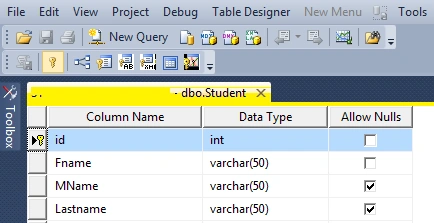
Create a Stored Procedure named "Studenentry" as
CREATE PROCEDURE StudentEntry
(
    @fname VARCHAR(50),
    @mname VARCHAR(50),
    @lname VARCHAR(50)
)
AS
BEGIN
    INSERT INTO Student (Fname, MName, Lastname)
    VALUES (@fname, @mname, @lname)
END
In the above Stored Procedure, I have declared three variables, they are @fname, @Mname, and @Lname to store Fname, MName, and, Lastname into the table.
Now create the one sample application "StudentEntry" as
- Start - All Programs - Microsoft Visual Studio 2010.
- File - New Website - C# - Empty website (to avoid adding a master page).
- Give the website a name such as "StudentEntry" or another as you wish and specify the location.
- Then right-click on Solution Explorer - Add New Item - Default.aspx page.
- Drag and drop one button, three textboxes, and one label on the <form> section of the Default aspx page.
Then switch to the design view; the <<form> section of the Default aspx page source will look as in the following.
<form id="form1" runat="server">
    <div>
        First Name:
        <asp:TextBox ID="TextBox1" runat="server"></asp:TextBox>
        <br />
        Middle Name:
        <asp:TextBox ID="TextBox2" runat="server"></asp:TextBox>
        <br />
        Last Name:
        <asp:TextBox ID="TextBox3" runat="server"></asp:TextBox>
        <br />
        <asp:Button ID="Button1" runat="server" Text="Add" OnClick="Button1_Click" />
    </div>
</form>
Now double-click on "Button" then write the following code.
protected void BtnSave_Click(object sender, EventArgs e)
{
    connection();
    query = "StudentEntry";  // Stored Procedure name
    SqlCommand com = new SqlCommand(query, con);  // Creating SqlCommand object
    com.CommandType = CommandType.StoredProcedure;  // Declaring command type as Stored Procedure

    // Adding parameters to SqlCommand
    com.Parameters.AddWithValue("@FName", TextBox1.Text.ToString());  // First Name
    com.Parameters.AddWithValue("@Mname", TextBox2.Text.ToString());  // Middle Name
    com.Parameters.AddWithValue("@LName", TextBox3.Text.ToString());  // Last Name

    com.ExecuteNonQuery();  // Executing the SqlCommand

    Label1.Visible = true;
    Label1.Text = "Records are Submitted Successfully";
}
In the above code, I have explained in detail in each line through comments what each line is used for what purpose, I hope you understand it.
Now run the application; the starting page should be as follows.

Now insert some data and click on the submit button, the following message will be shown after the successful submission of the data.

Note
- For detailed code please download the zip file attached above.
- Don't forget to Perform changes into the Web.config file according to your Server location.
Summary
Now we have learned how to submit the form data using a Stored Procedure in the database. I hope this article is useful for all students and beginners. If you have any suggestions related to this article please contact me.


sandeep lorayPosted Sep 18, 2020, 10:40 PM EDT
Please provide code of connection();
Chinna DuraiPosted Sep 21, 2017, 6:07 AM EDT
Thanks for the code.
Vithal WadjeTOP 100Posted Jul 25, 2016, 6:42 AM EDT
Thanks
kalu singh raoPosted Jul 25, 2016, 3:51 AM EDT
Nice
Nikhil KurkurePosted Jan 19, 2016, 7:41 PM EST
Edited Code..please dont edit..onclick="Button1_Click" and when we see Btnsave_Click(object sender, EventArgs e) and how is it possible to run..sure the code is not possible to run
Vithal WadjeTOP 100Posted Nov 15, 2015, 7:52 PM EST
ok sure'
daniel edunPosted Nov 11, 2015, 2:14 AM EST
thanks for the short example. its great. could you also make a complete example with dropdownlist, radio buttons, date, image with the stored procedure. thanks
Vithal WadjeTOP 100Posted Sep 25, 2014, 6:28 AM EDT
thanks Purvesh Sangani sir
Vithal WadjeTOP 100Posted Sep 25, 2014, 6:28 AM EDT
thanks sushant sir
SUSHANT ANANDPosted Sep 24, 2014, 8:15 PM EDT
Nice Example,Helpfull
Purvesh SanganiPosted Jun 2, 2014, 10:39 PM EDT
Thanks for help me....i am easily understand your Example......
Vithal WadjeTOP 100Posted Oct 7, 2013, 9:57 AM EDT
thanks david alimi sir,its for just understanding purpose ,you can downlaod whole code
david alimieditedPosted Apr 2, 2013, 8:49 PM EDTEdited Apr 2, 2013, 8:52 PM EDT
Example has minor bugs i.e. not ending the comments correctly. /* adding paramerters to SqlCommand below *\ *\ should be */