
📌 Introduction
Sending emails, processing files, creating reports, and syncing data are just a few of the background tasks that are frequently required in contemporary apps. Synchronous execution of these processes can cause your application to lag and negatively impact user experience.
Hangfire can help in this situation.
An open-source framework called Hangfire is used in .NET applications to manage background tasks. It enables you to persist tasks, run them consistently in the background, and monitor them through a dashboard.
🎯 Why Use Hangfire?
✅ Run background jobs without blocking the main thread
✅ Persistent jobs (stored in database)
✅ Automatic retries
✅ Built-in dashboard UI
✅ Supports delayed, recurring, and fire-and-forget jobs
✅ Works with ASP.NET Core / .NET 9
🧱 Prerequisites
Before starting, make sure you have:
.NET 9 SDK installed
ASP.NET Core Web API or MVC project
SQL Server (or any supported DB)
📦 Step 1: Install Required Packages
Run the following commands:
dotnet add package Hangfire
dotnet add package Hangfire.AspNetCore
dotnet add package Hangfire.SqlServer
⚙️ Step 2: Configure Hangfire in Program.cs
In .NET 9 (minimal hosting model), everything is configured inside Program.cs.
using Hangfire;
using Hangfire.SqlServer;

var builder = WebApplication.CreateBuilder(args);

// Add Hangfire services
builder.Services.AddHangfire(config =>
    config.UseSqlServerStorage(builder.Configuration.GetConnectionString("DefaultConnection")));

builder.Services.AddHangfireServer();

var app = builder.Build();
🖥️ Step 3: Enable Hangfire Dashboard
Add this middleware:
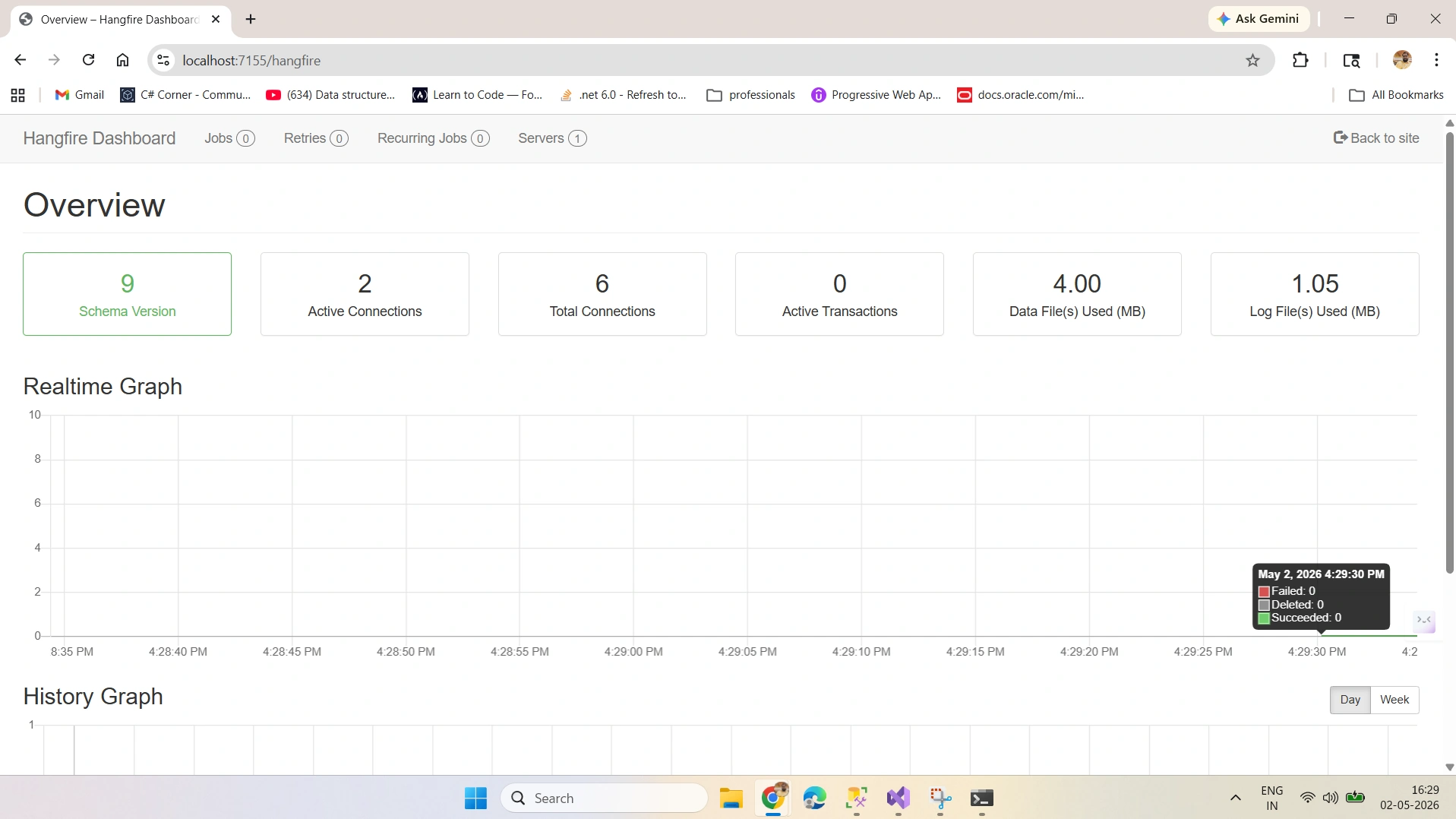
app.UseHangfireDashboard("/hangfire");Now run your application and open:
👉 https://localhost:xxxx/hangfire
You’ll see the Hangfire dashboard.
🗄️ Step 4: Configure Database
Add the connection string in appsettings.json:
"ConnectionStrings": {
  "DefaultConnection": "Server=(localdb)\\mssqllocaldb;Database=HangfireDb;Trusted_Connection=True;MultipleActiveResultSets=true"
},
When you run the app, Hangfire automatically creates the required tables.
🧑💻 Step 5: Create Background Jobs
1. Fire-and-Forget Job
Runs immediately in the background.
BackgroundJob.Enqueue(() => Console.WriteLine("Hello from Hangfire!"));2. Delayed Job
Runs after a delay.
BackgroundJob.Schedule(() => Console.WriteLine("Delayed job"), TimeSpan.FromMinutes(5));3. Recurring Job
Runs repeatedly (like CRON jobs).
RecurringJob.AddOrUpdate(
    "my-recurring-job",
    () => Console.WriteLine("Recurring job running"),
    Cron.Minutely);
4. Continuation Job
Runs after another job finishes.
var jobId = BackgroundJob.Enqueue(() => Console.WriteLine("First job"));

BackgroundJob.ContinueJobWith(jobId, () => Console.WriteLine("Second job"));
🧩 Step 6: Using Hangfire with Services (Best Practice)
Instead of calling methods directly, use dependency injection.
Create a service:
public class EmailService
{
    public void SendEmail(string to)
    {
        Console.WriteLine($"Email sent to {to}");
    }
}
Register service:
builder.Services.AddScoped<EmailService>();Use in Hangfire:
BackgroundJob.Enqueue<EmailService>(x => x.SendEmail("[email protected]"));🔐 Step 7: Secure Hangfire Dashboard (Important)
By default, the dashboard is public. Secure it:
app.UseHangfireDashboard("/hangfire", new DashboardOptions
{
    Authorization = new[] { new HangfireAuthorizationFilter() }
});
Create custom authorization:
using Hangfire.Dashboard;

public class HangfireAuthorizationFilter : IDashboardAuthorizationFilter
{
    public bool Authorize(DashboardContext context)
    {
        return true; // Replace with real auth logic
    }
}
⚡ Step 8: Handling Failures & Retries
Hangfire automatically retries failed jobs.
You can customize:
[AutomaticRetry(Attempts = 3)]
public void ProcessJob()
{
    throw new Exception("Error");
}
📊 Step 9: Monitoring Jobs
Hangfire dashboard provides:
Job status (Succeeded, Failed, Processing)
Retry count
Execution time
Exception logs
🧠 Best Practices
✅ Use Interfaces for Jobs
public interface IEmailService
{
    void SendEmail(string to);
}
✅ Keep Jobs Small & Focused
Avoid long-running monolithic tasks.
✅ Use Queues for Scaling
builder.Services.AddHangfire(config =>
    config.UseSqlServerStorage(connectionString));

builder.Services.AddHangfireServer(options =>
{
    options.Queues = new[] { "default", "critical" };
});
✅ Avoid Heavy Logic in Controllers
Move background logic to services.
🆕 What’s New in .NET 9 Context?
While Hangfire itself is framework-agnostic, .NET 9 improvements help:
⚡ Better performance for background services
⚡ Improved dependency injection
⚡ Native AOT compatibility (with limitations)
⚡ Minimal APIs integration
app.MapGet("/send-email", () =>
{
    BackgroundJob.Enqueue<EmailService>(x => x.SendEmail("[email protected]"));
    return "Job Scheduled!";
});
📌 Conclusion
Integrating Hangfire in .NET 9 is straightforward and extremely powerful. It allows you to:
Offload heavy work
Improve performance
Ensure reliability with retries
Monitor everything visually
For any real-world application (especially enterprise apps), Hangfire is almost a must-have for background processing.
💬 Interview Tip
If asked:
👉 “How do you handle background processing in .NET?”
You can say:
“I use Hangfire for background job processing because it provides persistent jobs, retry mechanisms, and a dashboard for monitoring. It integrates well with ASP.NET Core and supports recurring, delayed, and chained jobs.”

Join the conversation! Your thoughts help the community grow.