
In this 17th day of AngularJS article series, we are going to be learning the next key players/concept of AngularJS, understanding the concept of Built in Services of AngularJS. Before moving to key players/concepts of AngularJS, please read my previous articles:
- Introduction to AngularJS – Day 1
- Introduction to AngularJS – Day 2
- Introduction to AngularJS – Day 3
- Introduction to AngularJS – Day 4
- Introduction to AngularJS – Day 5
- Introduction to AngularJS – Day 6
- Introduction to AngularJS – Day 7
- Introduction to AngularJS – Day 8
- Introduction to AngularJS – Day 9
- Introduction to AngularJS – Day 10
- Introduction to AngularJS – Day 11
- Introduction to AngularJS – Day 12
- Introduction to AngularJS – Day 13
- Introduction To AngularJS – Day 14
- Introduction To AngularJS – Day 15
- Introduction To AngularJS – Day 16
AngularJS provides many built in services. For example: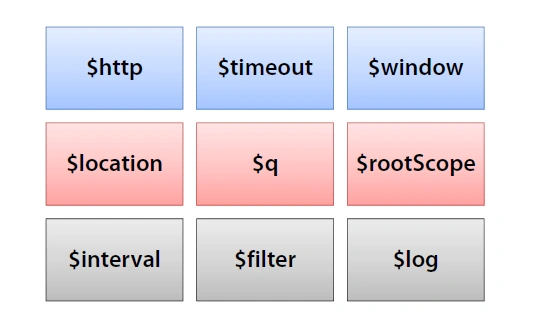
The $http is used to make an Ajax call to get the server data, the $route is used to define the routing information, and so on. The built-in services are always prefixed with ‘$’ symbol.
$location Service
The name defines the functionality of $location service. It does the same function as ‘window.location’. It parses the URL browser address bar and makes used of this in your application. It contains the set and get property. Mostly this ‘$location’ service is used in AngularJS routing to get current path and do action on that path like ‘$routeProvider’. In this ‘$routeProvider’, we used to match the current path and call particular view and controller. It contains URL object, set of the following methods:
- Protocol – get current URL protocol.
- Host – get current host name.
- Port – get current port number.
- Path – get current path.
- Search – get current search keywords.
- Hash – get hash fragment when called without any parameters.
Example:
Now, we are going to learn how to use ‘$location’ service by example and how to use set of methods.
app.js
- /// <reference path="angular.min.js" />
- var app = angular.module("myApp", []);
- //Creating controller & injecteing $location in controller
- app.controller("myController", function ($scope, $location) {
- //using $location service
- $scope._display = false;
- $scope.getData = function () {
- $scope.absUrl = $location.absUrl();
- $scope.proto = $location.protocol();
- $scope.host = $location.host();
- $scope.port = $location.port();
- $scope.search = $location.search();
- $scope.hash = $location.hash();
- $scope._display = true;
- };
- });
- <!DOCTYPE html>
- <html ng-app="myApp">
- <head>
- <title>C# Corner</title>
- <meta charset="utf-8" />
- <script src="app/angular.min.js"></script>
- <script src="app/app.js"></script>
- </head>
- <body ng-controller="myController">
- <h2>AngularJS $location Services</h2>
- <input type="button" ng-click="getData()" value="Get Data" /><br />
- <h3 ng-show="_display">Absolute URL is : {{absUrl}}</h3>
- <h3 ng-show="_display">Protocol is : {{proto}}</h3>
- <h3 ng-show="_display">Host is : {{host}}</h3>
- <h3 ng-show="_display">Port is : {{port}}</h3>
- <h3 ng-show="_display">Serach is : {{search}}</h3>
- <h3 ng-show="_display">Hash is : {{hash}}</h3>
- </body>
- </html>
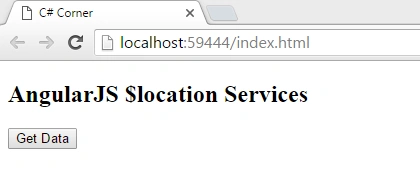
Now, our example is running; just click on ‘Get Data’ button to display the ‘$location’ service properties or methods:
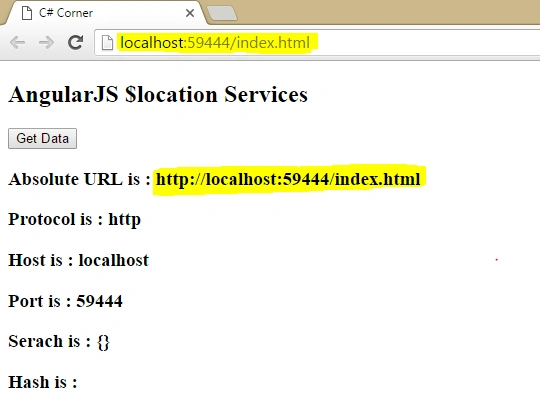
The above screen shot you can see highlighted, it’s nothing but how you can use current running address bar URL in your application.
Great, $location service in AngularJS with example created successfully!
Summary
I hope that beginners as well as students can understand the concept of $location service in AngularJS with example. If you have any suggestionsregarding this article, then please contact me. Stay tuned for other concepts of AngularJS coming soon!
Thanks for reading. Learn it! Share it!


JASPALPosted Apr 28, 2016, 12:28 AM EDT
"Introduction To AngularJS – Day 16" link is not working
Rahul Kumar SaxenaTOP 100Posted Apr 27, 2016, 9:27 AM EDT
Good Show
Debasis SahaTOP 100Posted Apr 27, 2016, 6:15 AM EDT
Good One..
Jeetendra GundTOP 100Posted Apr 27, 2016, 5:14 AM EDT
Thanks all...
Sonu ChaudharyPosted Apr 27, 2016, 4:04 AM EDT
good one
Saurabh RaiPosted Apr 26, 2016, 11:16 PM EDT
Nice
Bhuvanesh MohankumarPosted Apr 26, 2016, 10:59 PM EDT
Good one
Vivek KumarPosted Apr 26, 2016, 8:56 PM EDT
Nice one
Nishant MittalPosted Apr 26, 2016, 7:12 PM EDT
Good One ...
Kumaresh RajalingamPosted Apr 26, 2016, 5:55 PM EDT
Good one
Kuppurasu NagarajTOP 100Posted Apr 26, 2016, 10:43 AM EDT
Nice sharing..
Gowtham RajamanickamTOP 100Posted Apr 26, 2016, 10:24 AM EDT
good article