
What is Azure Function App?
Azure Functions is an event-driven, compute-on-demand experience that extends the existing Azure application platform with capabilities to implement code triggered by events occurring in other Azure services, SaaS products, and on-premises systems.
The following features are included with Azure Functions.
- Choice of language - C#, Node.js, Python, F#, PHP, batch, bash, Java, or any executable.
- Pay-per-use pricing model.
- Bring your own
- Integrated security
- Code-less integration
- Flexible development
Prerequisites
- Azure account
Now let's get started with the following steps.
Create a new Azure Function App
Step 1. Sign in to the online Microsoft Azure Portal.
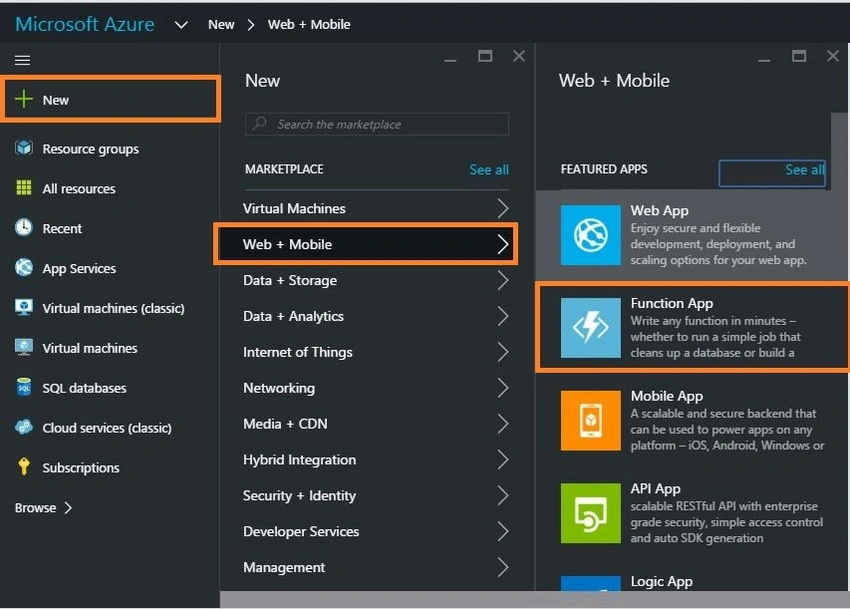
Step 2. In the Jumpbar, click New, then click Web + Mobile, and then Function App.
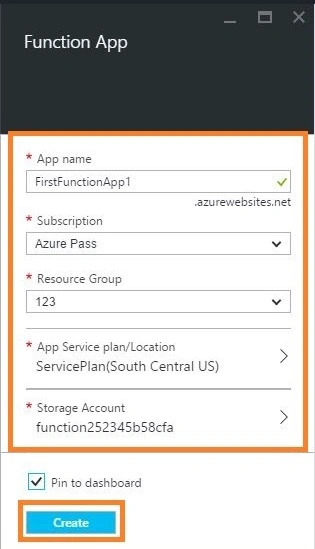
Step 3. In the Function App account blade, specify the desired configuration for the Function App account (Name, & Resource Group). Click the Create button at the bottom of the screen to create the Function App.
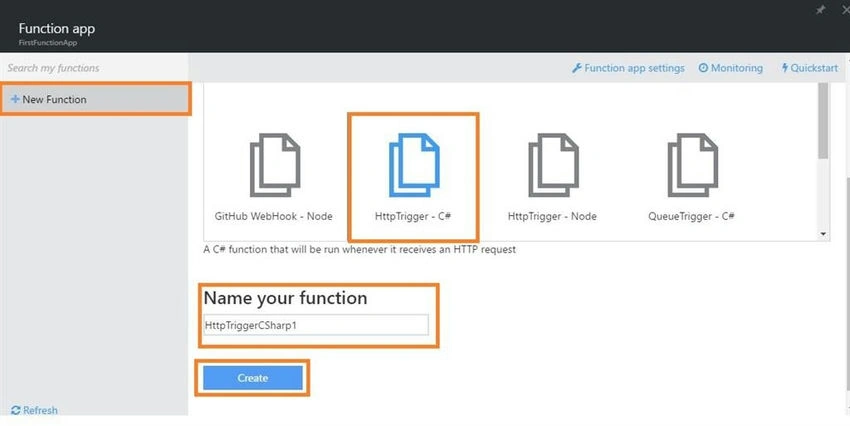
Step 4. In the Function app blade, Click New Function, choose your template (ex: HttpTrigger-c#) type the Function App Name then click the Create button at the bottom of the screen to create the Function App.
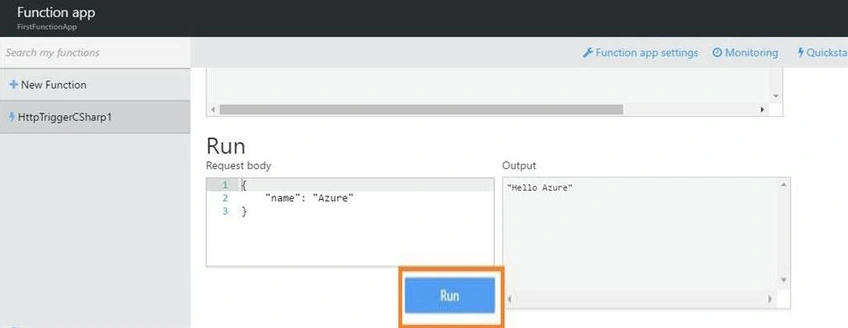
Run the Function app
After creating your function app click Run Button. Your Function app will execute.
Read more articles on Azure.


Onkar SharmaPosted Jul 7, 2020, 9:39 AM EDT
Basics, but good for beginners. Thanks for sharing with us...
Abhijit KakadePosted Apr 24, 2017, 4:49 AM EDT
Nice Article Nagaraj.. i suggest you would have add more details on same topic.
Bhuvanesh MohankumarPosted May 3, 2016, 9:54 PM EDT
Good share
Bhuvanesh MohankumarPosted May 3, 2016, 9:54 PM EDT
Good share
NitinPosted Apr 9, 2016, 9:13 PM EDT
good one
Ammar ShaukatPosted Apr 8, 2016, 11:34 PM EDT
wah
Debasis SahaTOP 100Posted Apr 8, 2016, 10:03 PM EDT
Good share..
Rahul Kumar SaxenaTOP 100Posted Apr 8, 2016, 6:30 PM EDT
Good show
Vignesh ManiTOP 100Posted Apr 8, 2016, 1:12 PM EDT
Good one sir.