
In this article, we will look intoa SQL Server feature, called CDC, used for tracking/auditing database changes at table level. This feature will help us to track database changes like INSERT, UPDATE and DELETE on tables.
It even tracks old and new values for an update operation. CDC uses SQL Server transaction logs for capturing all inserts, updates, and deletes on a table. This feature is available on 2008 or higher versions and part of enterprise editions. Let’s open management studio and enable CDC on EmployeeDB to track the changes by following the below steps:
Enable CDC on a database by running the following command, it needs sysadmin privileges.
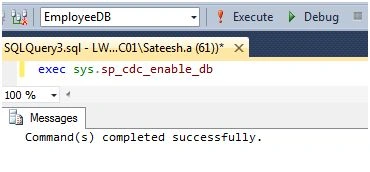
Create a role to which we will give access to CDC tables (which will hold all data changes) using the following command:
- CREATEROLEcdc_role
- EXECsys.sp_cdc_enable_table
- @source_schema='dbo',-- Schema name
- @source_name='employees',-- Table Name
- @role_name=N'cdc_role'-- Role having access on CDC tables [having data audit details]
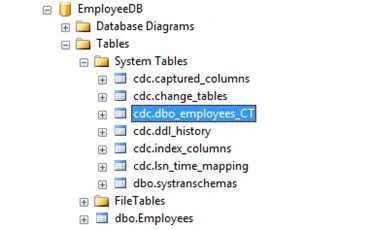
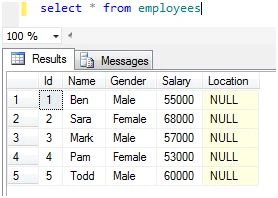
Let’s test CDC by doing some changes to employees table:
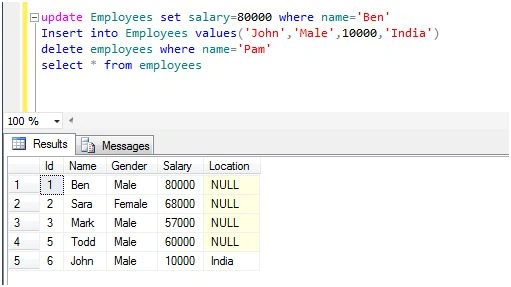
Let’s query our tracking table [dbo_employees_CT]:
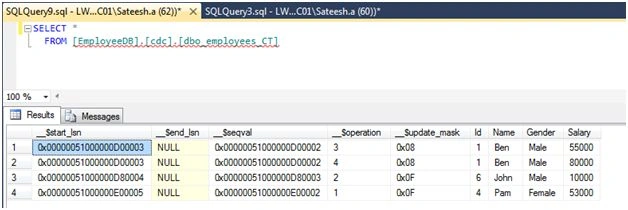
If column _$operation is 1 it means it’s a DELETE operation; 2 means INSERT; 3 means Value before UPDATE; and 4 means Values after UPDATE. We will write the following query to get results more meaningfully:
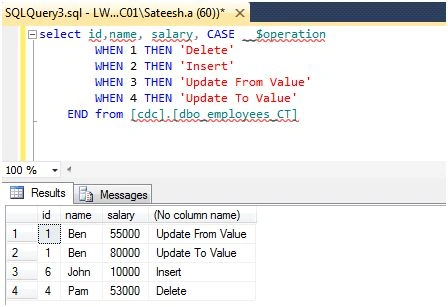
Apart from dbo_employees_CT table, we have other tables created by CDC under System Tables to store metadata for its tracking purpose. Let’s understand purpose of each:
Captured_columns: It has all column’s details on which CDC is enabled:
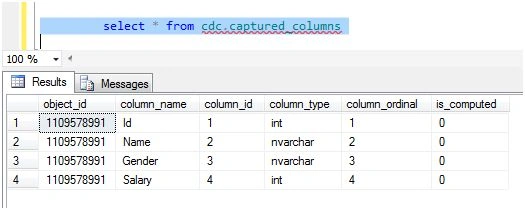
Change_tables: It contains capture details like table name, role name etc along start and end lsn. Any change on a table is uniquely identified by LSN (log sequence number).

ddl_history: It contains information on any schema changes on the tracking table [employees] like adding\removing a column. Here, I added a new column location.

index_columns: It contains index details of tables on which tracking is enabled.
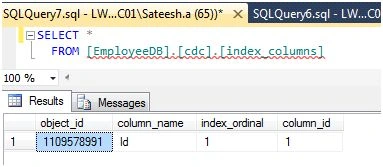
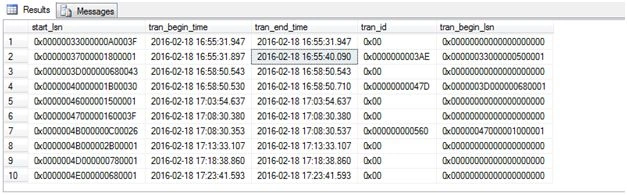
lsn_time_mapping: It contains mapping details of table change’s LSN and its time of occurrence:


Rajeev PunhaniPosted Mar 2, 2016, 5:23 PM EST
Nice feature thanks for sharing.
Ammar ShaukatPosted Mar 2, 2016, 5:05 AM EST
Can we enable this feature using C# code
Humayun Kabir MamunPosted Feb 21, 2016, 6:07 PM EST
Nice...
Saineshwar BageriPosted Feb 21, 2016, 6:06 PM EST
Nice one
Shubham KumarPosted Feb 19, 2016, 9:00 PM EST
nice to know
Sibeesh VenuTOP 100Posted Feb 19, 2016, 8:41 PM EST
Nice Share
Mohammed IbrahimPosted Feb 19, 2016, 9:48 AM EST
nice
Debasis SahaTOP 100Posted Feb 19, 2016, 8:00 AM EST
Thanks for nice article..
Gowtham KTOP 100Posted Feb 19, 2016, 7:40 AM EST
Good one, Informative
Yashwant VishwakarmaPosted Feb 18, 2016, 7:07 PM EST
Nice information, thanks for sharing !!
pankaj kumarPosted Feb 18, 2016, 7:00 PM EST
Good feature, I recently implemented it. Sql cdc cleanup job clears the captured data after three day so we need to extend its limit.
BinhPosted Feb 18, 2016, 3:53 PM EST
Good article. I don't know there is this feature in SQL Server. Thanks a lot!
Kumaresh RajalingamPosted Feb 18, 2016, 3:20 PM EST
Nice share
Pankaj Kumar ChoudharyTOP 100Posted Feb 18, 2016, 2:10 PM EST
Nice Information Sir.........