
Here, I am starting a series on Entity Framework (EF). In this article we focused on CODE FIRST approach but before tha we must first understand Entity Framework itself and different approaches available.
Entity Framework
EF is a tool to fetch and send to database and it's one kind of Object Relational Mapper (ORM). With EF you can work with relational databases.
Drastically reduce the manual code writing in the projects. It's very easy and simple to receive and send the data to database.
Object Relation Mapping (ORM) which take care of creation and updation of classes, database and its tables.
Its an open source project and you can also contribute your efforts in this, following is link:
Basically Entity Framework having following three approaches:
- Code First: On the basis of Class (POCO) your database will be created.
POCO : Plain Old CLR Object - Model First: On the basis of Entity Framework Designer to design the relation and entities then your Database is generated.
- Database First: On the basis of your Database Model and relation will be created.
Code First
- With code first your class(POCO) models become our database. We know the structures and designs and what generates the database. There are no additional files and there is no need to create a class extension when we want to add properties or whatever else that the database doesn't need to know about. We can just add them into the same class as long as you follow the proper syntax.
- When we go for Database first approach, we’re fully depended on what gets generated for our models for uses in our application. Occasionally the naming convention is undesirable and not as we want, sometimes the relationships and associations aren't quite what we want. Code first is better than Database first.
- While choosing CODE First we can control every aspect of both our class(POCO) code models and our database design from the comfort of business object. We can precisely specify relationships, constraints, and associations. We can set property Maximum limits of data types and database columns sizes.
Herewith, we start with Code First approach with Asp.Net MVC.
Do the followings steps,
- Create a new ASP.NET MVC4 application and select Basic template.
- Give your project name as EntiryFrameworkCodeFirst.
- Add new Class file named Friend.Cs.
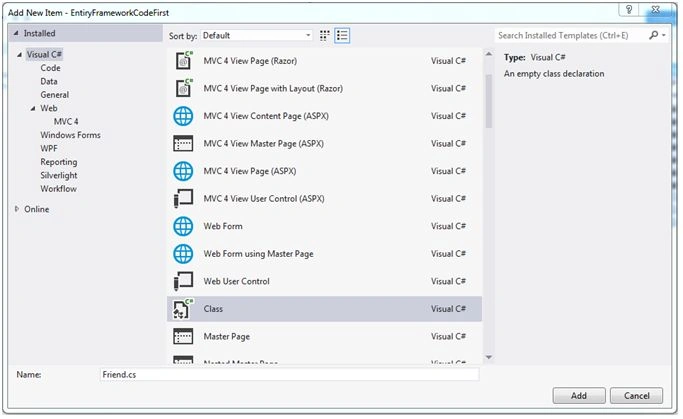
In FRIEND.CS file we are going to write our Class (POCO) definition.
FRIEND.CS code- using System;
- using System.Collections.Generic;
- using System.Linq;
- using System.Web;
- namespace EntiryFrameworkCodeFirst
- {
- public class Friend
- {
- public int Id
- {
- get;
- set;
- }
- public string FriendName
- {
- get;
- set;
- }
- public string Address
- {
- get;
- set;
- }
- public string City
- {
- get;
- set;
- }
- public string Phone
- {
- get;
- set;
- }
- }
- }
- Now add an another class file named FriendDBContext.cs,
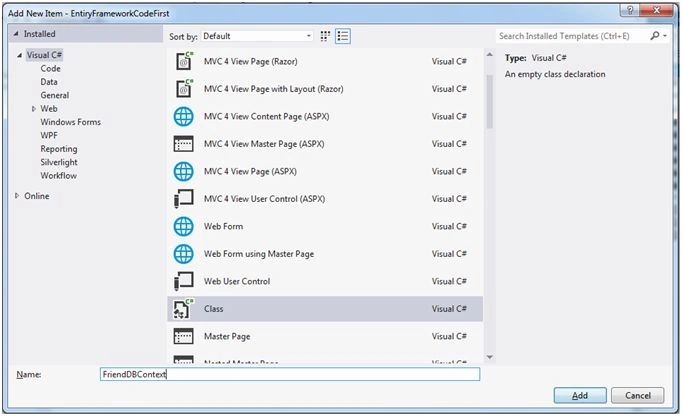
In FriendDBContext.cs file we are going to write DbSet property of Friend class with get and set.
FriendDBContext.cs code,Why this class named FriendDBContext?- using System;
- using System.Collections.Generic;
- using System.Data.Entity;
- using System.Linq;
- using System.Web;
- namespace EntiryFrameworkCodeFirst
- {
- public class FriendDBContext: DbContext
- {
- public DbSet < Friend > Friends
- {
- get;
- set;
- }
- }
- }
Because while we run the application our Web.Config file search connection strings with this name only.After reading above statement might be you think the about following questions:- <connectionStrings>
- <add name="FriendDBContext" connectionString="Data Source=SAIBABA-PC\SAIBABA;Initial Catalog=FriendDB;Integrated Security=True;" providerName="System.Data.SqlClient" />
- </connectionStrings>
- Global.Asax.cs file updation.This line very important,
- using System;
- using System.Collections.Generic;
- using System.Linq;
- using System.Web;
- using System.Web.Http;
- using System.Web.Mvc;
- using System.Web.Optimization;
- using System.Web.Routing;
- namespace EntiryFrameworkCodeFirst
- {
- // Note: For instructions on enabling IIS6 or IIS7 classic mode,
- // visit http://go.microsoft.com/?LinkId=9394801
- public class MvcApplication: System.Web.HttpApplication
- {
- protected void Application_Start()
- {
- AreaRegistration.RegisterAllAreas();
- WebApiConfig.Register(GlobalConfiguration.Configuration);
- FilterConfig.RegisterGlobalFilters(GlobalFilters.Filters);
- RouteConfig.RegisterRoutes(RouteTable.Routes);
- BundleConfig.RegisterBundles(BundleTable.Bundles);
- //Code First Initialize
- FriendDBContext _friendDBContext = new FriendDBContext();
- _friendDBContext.Database.Initialize(true);
- }
- }
- }
- //Code First Initialize
- FriendDBContext _friendDBContext = new FriendDBContext();
- _friendDBContext.Database.Initialize(true);
- Database List Before Running Application:
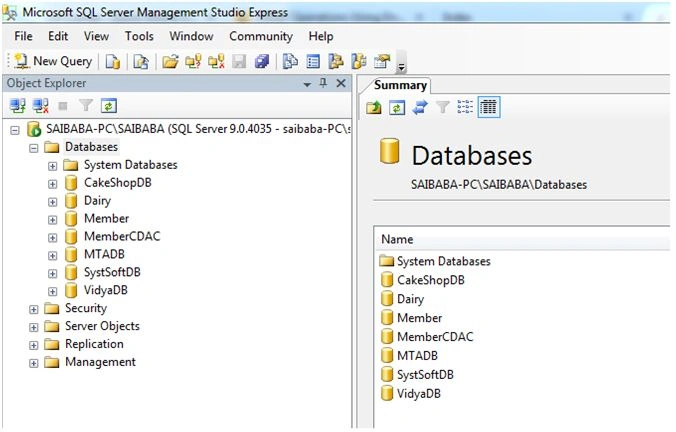
- Before going for this step first build your solution first.
Now add a new controller first by right click CONTROLLERS folder or by simply pressing Ctrl+M, Ctrl+C.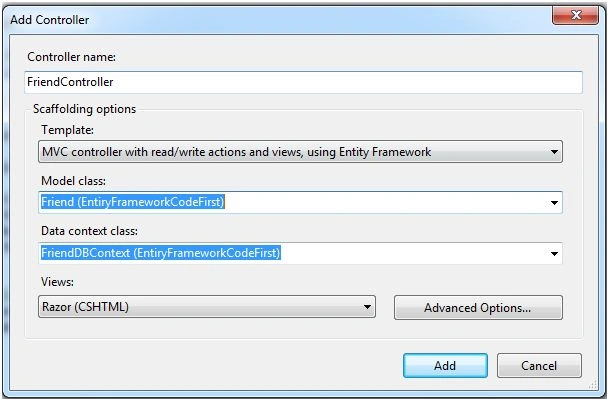
Solution Explorer before clicking Add button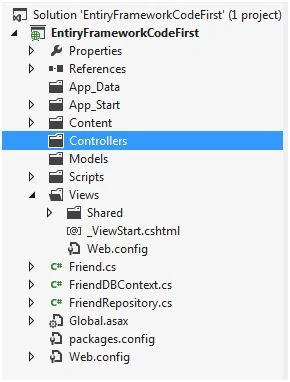
After clicking on Add button . Visual studio creates the Following things:
a. Controller
b. Views file for -> Create, Index and Edit, Delete.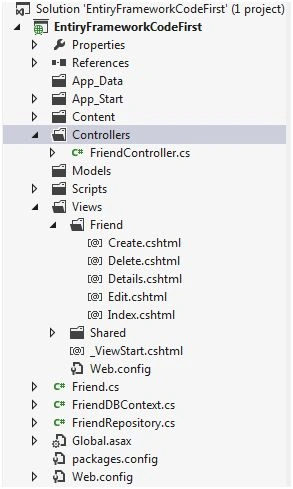
- Before pressing F5 or running application change RouteConfig.cs file.
RouteConfig.cs file exists under directory App_Start.
We had changed the Controller Name = Friend only, the rest of things keep as they are.
RouteConfig.cs codeNow Press F5 to run project.- using System;
- using System.Collections.Generic;
- using System.Linq;
- using System.Web;
- using System.Web.Mvc;
- using System.Web.Routing;
- namespace EntiryFrameworkCodeFirst
- {
- public class RouteConfig
- {
- public static void RegisterRoutes(RouteCollection routes)
- {
- routes.IgnoreRoute("{resource}.axd/{*pathInfo}");
- routes.MapRoute(name: "Default", url: "{controller}/{action}/{id}", defaults: new
- {
- controller = "Friend", action = "Index", id = UrlParameter.Optional
- });
- }
- }
- }
Check your FriendDB database will be created in your SQL Server.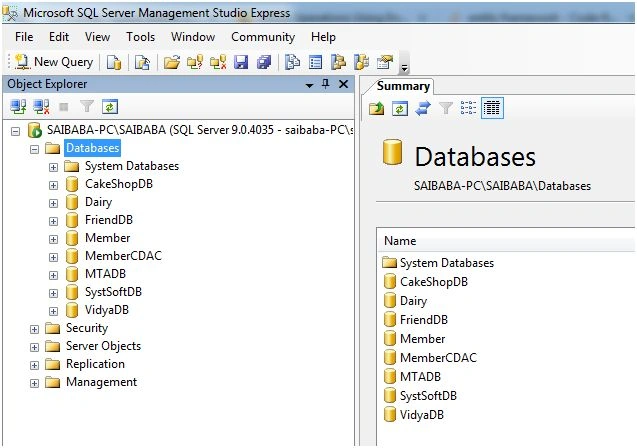
Because of there is no data in Friends table that's why it appearing like this way.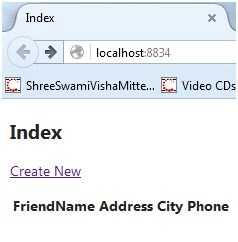
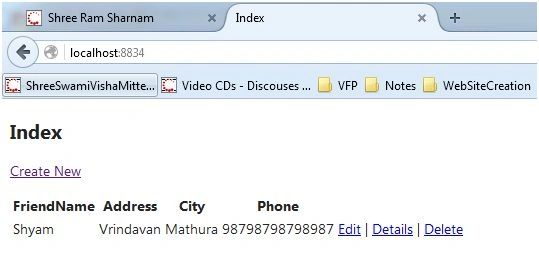
You can Add/Insert a new data/record by click on Create New.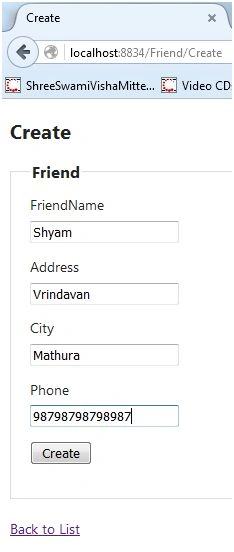
Read more articles on Entity Framework:


Shobana JPosted Jul 7, 2016, 2:55 AM EDT
Nice one
Manoj KallaPosted Apr 18, 2016, 11:51 PM EDT
Thank You, Vivek
Vivek KumarPosted Apr 17, 2016, 10:21 AM EDT
Nice sharing.
Michael GriffithsPosted Apr 10, 2016, 6:15 AM EDT
Thanks for the share
Rahul Kumar SaxenaTOP 100Posted Apr 4, 2016, 3:46 AM EDT
Good Show
Manoj KallaPosted Apr 3, 2016, 4:21 AM EDT
Thank You, Kuppurasu Nagaraj
Kuppurasu NagarajTOP 100Posted Apr 3, 2016, 12:33 AM EDT
Good
Manoj KallaPosted Mar 30, 2016, 5:25 AM EDT
Thank you, K P Singh Chundawat
K P Singh ChundawatPosted Mar 30, 2016, 3:49 AM EDT
Good Article. Very informative. Thanks for sharing .
Manoj KallaPosted Mar 29, 2016, 7:09 AM EDT
Thank you, Shailli
Shaili DashoraPosted Mar 29, 2016, 12:54 AM EDT
Nice one..
Mohammed IbrahimPosted Mar 28, 2016, 11:50 PM EDT
nice
Kashif SohailPosted Mar 28, 2016, 10:51 PM EDT
Very Nice
Manoj KallaPosted Mar 28, 2016, 10:29 PM EDT
Thank you, Rajeev
Rajeev PunhaniPosted Mar 28, 2016, 9:26 PM EDT
Nice.
Humayun Kabir MamunPosted Mar 28, 2016, 8:17 PM EDT
Nice...
Debasis SahaTOP 100Posted Mar 28, 2016, 8:13 PM EDT
Good One..
Manoj KallaPosted Mar 28, 2016, 6:59 PM EDT
Thank you, Kalu singh
kalu singh raoPosted Mar 28, 2016, 7:00 AM EDT
Nice...
Saillesh PawarPosted Mar 28, 2016, 6:54 AM EDT
Nice
Ammar ShaukatPosted Mar 28, 2016, 6:50 AM EDT
Good
Vignesh ManiTOP 100Posted Mar 28, 2016, 6:45 AM EDT
Nice