
Before reading this article, I highly recommend reading the previous part of the series on Knockout.js:
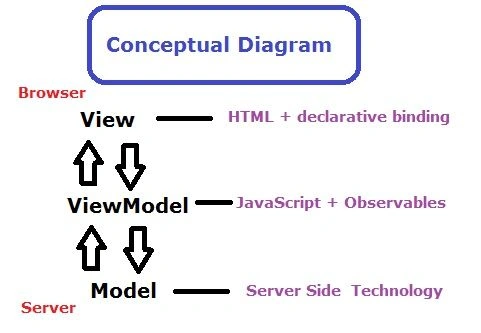
Conceptual Diagram
We have discussed MVVM pattern in previous article.
Types of Bindings
Controlling Text and Appearance:
- Text binding: Display text value passed to the binding.
- Value binding: Display any value passed to the binding.
- Visible binding: Element will become hidden on visible according to the value passed to the binding. also you can set it TRUE/FALS
- CSS binding: Adds or removes named css classes depending on the values passed to the binding.
- HTML binding: Display HTML value passed to the binding.
- Style binding: Add or remove style values to the DOM element.
What is KO in Knockout.js
KO stands for Knockout and it will be used whenever we use the KnockoutJS library.
How to Applying bindings in Knockout.js
To activate Knockout, add the following line to our <script> block as:
- ko.applyBindings(myViewModelName);
Mostly we use applyBindings with only one ViewModel name but you can also specify a DOM node as the second argument.
When passing a DOM node as the second argument, Knockout only binds your ViewModel to that node and its children. A separate ViewModel used for alerts, settings, and current user information.
Important: The ko.applyDataBindings() should come after the HTML content, otherwise it won’t know where to bind the data to.
Demo for text binding & html binding
Step 1: Create one project in Visual Studio 2013 and then create MVC empty application.
Add action method & view for same action method.
By right click on project add KnockOut.js & JavaScript files from Manage Nuget packages. Add knockout.js & JavaScript reference to our view.
Add the following code to our view:
- @{
- Layout = null;
- }
- <!DOCTYPE html>
- <html>
- <head>
- <meta name="viewport" content="width=device-width" />
- <title>Index</title>
- <script src="~/Scripts/jquery-2.2.0.js"></script>
- <script src="~/Scripts/knockout-3.4.0.js"></script>
- <script>
- $(document).ready(function () {
- var myViewModel = {
- myOutput: "welcome to KnockOut.js Part Three",
- myHtmlbinding: "
- <htm>
- <body>
- <h1 style='color:red'>welcome to C#Corner </h1>
- </body>
- </html> "
- };
- ko.applyBindings(myViewModel);
- })
- </script>
- </head>
- <body>
- <div> Text Binding
- <h2 data-bind="text:myOutput"></h2>
- </div>
- <br />
- <div>HTML Binding
- <h3 data-bind="html:myHtmlbinding"></h3>
- </div>
- </body>
- </html>
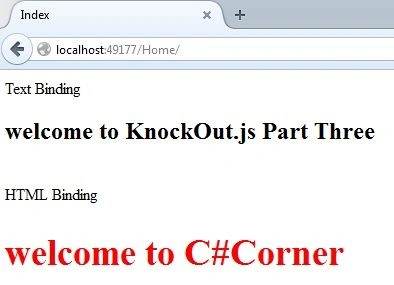
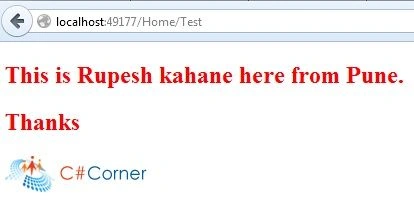
Demo for style binding
Step 1: Now create another action method in our controller.
Also create view for this same action method.
Now create one folder to add our own style sheet & write some CSS as below:
- .orange
- {
- color: orange;
- }.red
- {
- color: red;
- }.yellow
- {
- color: yellow;
- }.banner
- {
- display: block; - moz - box - sizing: border - box;
- box - sizing: border - box;
- background: url(http: //www.c-sharpcorner.com/App_themes/csharp/images/sitelogo.png)no-repeat;
- width: 150 px; height: 200 px; padding - left: 180 px;
- }
- @{
- Layout = null;
- }
- <!DOCTYPE html>
- <html>
- <head>
- <meta name="viewport" content="width=device-width" />
- <title>Test</title>
- <script src="~/Scripts/jquery-2.2.0.js"></script>
- <script src="~/Scripts/knockout-3.4.0.js"></script>
- <link href="~/css/style.css" rel="stylesheet" />
- <script>
- $(document).ready(function () {
- var ViewModel = {
- age: 20
- };
- ViewModel.ApplyColor = ko.computed(function () {
- if(this.age >10)
- {
- return 'red';
- }
- if(this.age==10)
- {
- return 'orange';
- }
- if(this.age <10)
- {
- return 'yellow';
- }
- }, ViewModel)
- ko.applyBindings(ViewModel);
- })
- </script>
- </head>
- <body>
- <div data-bind="css:ApplyColor">
- <h2> This is Rupesh kahane here from Pune.</h2>
- <h2>Thanks</h2>
- <div>
- <img class="banner">
- </div>
- </div>
- </body>
- </html>
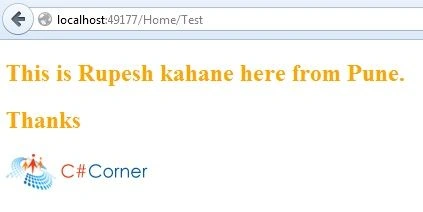
Now if we change the value of age as 10 then will see our output as.
Summary
This article will help fresher candidates to understand Knockout.js.
Read more articles on Knockout.js:


Bhuvanesh MohankumarPosted May 3, 2016, 8:39 AM EDT
Really Nice
Rupesh KahanePosted Feb 15, 2016, 7:53 AM EST
thanks Nanddeep Nachan
Nanddeep NachanTOP 100Posted Feb 14, 2016, 11:29 PM EST
Nice share
Rupesh KahanePosted Feb 9, 2016, 8:27 AM EST
thanks to Santhakumar Munuswamy & sreenivasa k also
sreenivasa kPosted Feb 9, 2016, 7:27 AM EST
good
Santhakumar MunuswamyPosted Feb 9, 2016, 6:42 AM EST
Thanks for nice article
Rupesh KahanePosted Feb 9, 2016, 5:28 AM EST
thanks to Shubham Kumar & Sibeesh Venu also
Shubham KumarPosted Feb 9, 2016, 2:19 AM EST
nice one
Sibeesh VenuTOP 100Posted Feb 9, 2016, 2:14 AM EST
Nice Share
Rupali ShindePosted Feb 9, 2016, 12:51 AM EST
thanks for this article sir, now it is little bit easy to understand the basic concepts of knockout.js