
We are going to discuss the Microsoft Band prerequisites and what are all the features available on Band SDK.
Microsoft Band:
Microsoft Band is a smart wearable device launched by Microsoft. It allows developers to access the sensor available on the Band, and you can creat own application to track your heart rate, calories burn, exercise and so on.
The list of features of Band SDK:
- Support multi-platform
- Sensor data subscriptions
- Tiles creation and management
- Tiles notification
- Haptic notification
- Custom layouts
- Band theme personalization
Requirements
- Microsoft Band
- Visual Studio 2013 and above
Prerequisite
- Microsoft Band
- Microsoft Band SDK
- Visual Studio 2015
We can develop apps using bank SDK with a different platform such as Windows, iOS, Android in the minimum requirements as in the following,
- Windows Phone 8.1 and above
- Windows 8.1 and above
- iOS 7 and above
- Android 4.2 and above
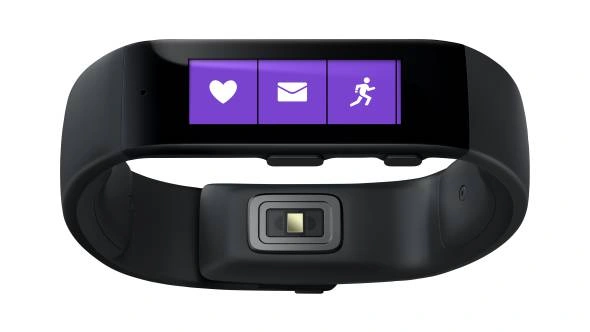
Image Source: Microsoft Store
Step 1:
Open Visual Studio 2015 and go to file menu and point new and then click new project, where you can see the section Visual C# Template. Click Windows 8, Universal, then select Blank App (Universal Windows 8.1) and type Project Name HelloWordBandDemo, Choose the project location path and then click OK button.
Go to Solution Explorer and right click the project name and then click Manage NuGet Packages,
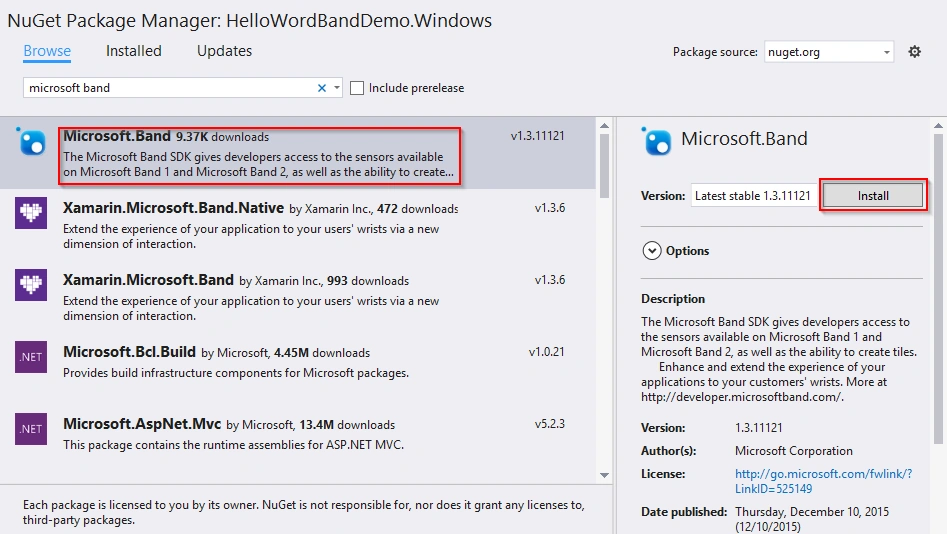
NuGet Package Manager window will open and you can type Microsoft Band and browse. Also select Microsoft.Band and click Install button.
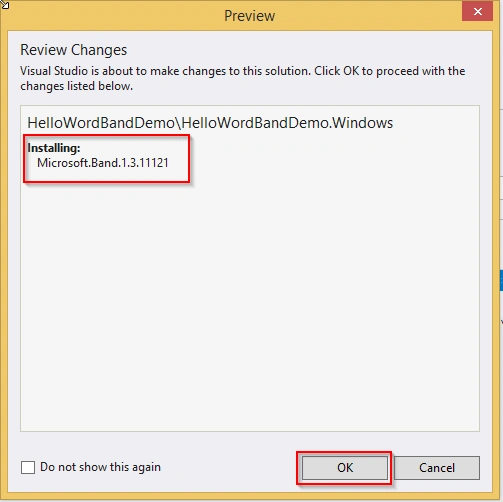
Preview window will open and you can see the Microsoft Band version installing details. Click OK button. License Acceptance will open and you can see the license terms and then click I Accept button.
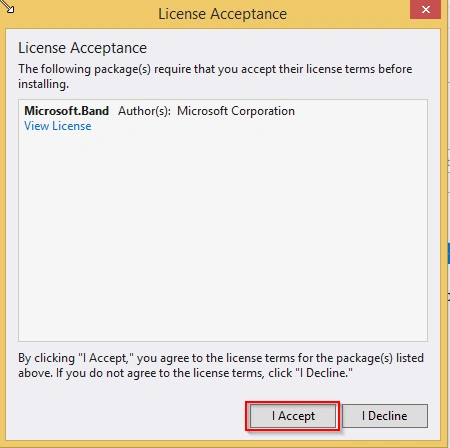
After it is successfully installed in Microsoft Band, you can see the following,
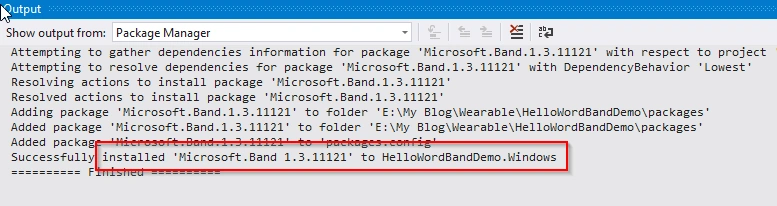
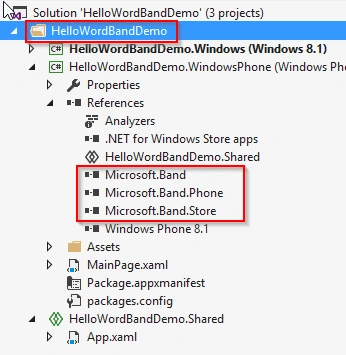
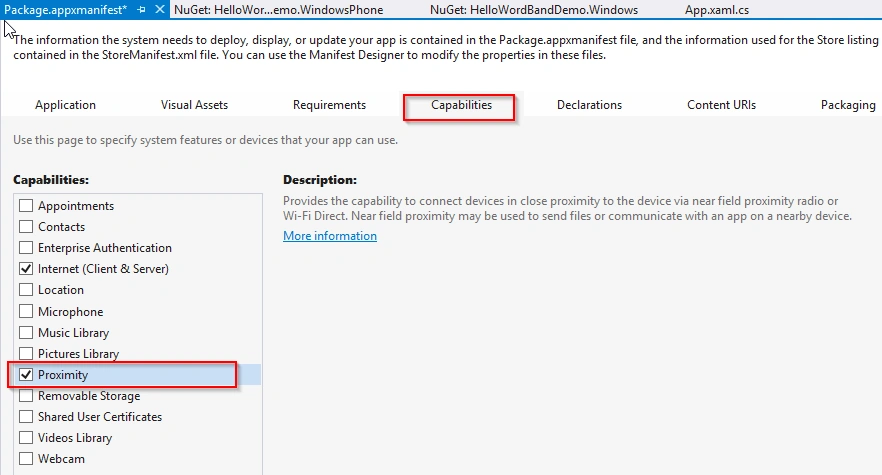
After successfully installing the Microsoft Band SDK, Double click the Package.appxmanifest file then you can seen the left side information in the apps. Select the Proximity checkbox and save the package changes as in the following,
- <?xml version="1.0" encoding="utf-8"?>
- <Package xmlns="http://schemas.microsoft.com/appx/2010/manifest" xmlns:m2="http://schemas.microsoft.com/appx/2013/manifest" xmlns:m3="http://schemas.microsoft.com/appx/2014/manifest" xmlns:mp="http://schemas.microsoft.com/appx/2014/phone/manifest">
- <Identity Name="20225b23-1ba4-4c87-a2a5-2fb2e85f8f02" Publisher="CN=Santhakumar" Version="1.0.0.0" />
- <mp:PhoneIdentity PhoneProductId="20225b23-1ba4-4c87-a2a5-2fb2e85f8f02" PhonePublisherId="00000000-0000-0000-0000-000000000000" />
- <Properties>
- <DisplayName>HelloWordBandDemo.WindowsPhone</DisplayName>
- <PublisherDisplayName>Santhakumar</PublisherDisplayName>
- <Logo>Assets\StoreLogo.png</Logo>
- </Properties>
- <Prerequisites>
- <OSMinVersion>6.3.1</OSMinVersion>
- <OSMaxVersionTested>6.3.1</OSMaxVersionTested>
- </Prerequisites>
- <Resources>
- <Resource Language="x-generate" />
- </Resources>
- <Applications>
- <Application Id="App" Executable="$targetnametoken$.exe" EntryPoint="HelloWordBandDemo.WindowsPhone.App">
- <m3:VisualElements DisplayName="HelloWordBandDemo.WindowsPhone" Square150x150Logo="Assets\Logo.png" Square44x44Logo="Assets\SmallLogo.png" Description="HelloWordBandDemo.WindowsPhone" ForegroundText="light" BackgroundColor="transparent">
- <m3:DefaultTile Wide310x150Logo="Assets\WideLogo.png" Square71x71Logo="Assets\Square71x71Logo.png">
- </m3:DefaultTile>
- <m3:SplashScreen Image="Assets\SplashScreen.png" />
- </m3:VisualElements>
- </Application>
- </Applications>
- <Capabilities>
- <Capability Name="internetClientServer" />
- <DeviceCapability Name="proximity" />
- <DeviceCapability Name="bluetooth.rfcomm" xmlns="http://schemas.microsoft.com/appx/2013/manifest">
- <Device Id="any">
- <!-- Used by the Microsoft Band SDK -->
- <Function Type="serviceId:A502CA9A-2BA5-413C-A4E0-13804E47B38F" />
- <!-- Used by the Microsoft Band SDK -->
- <Function Type="serviceId:C742E1A2-6320-5ABC-9643-D206C677E580" />
- </Device>
- </DeviceCapability>
- </Capabilities>
- </Package>
- using Microsoft.Band;
- IBandInfo[] bandPair = await BandClientManager.Instance.GetBandsAsync();
- try
- {
- using (IBandClient bandClient = await BandClientManager.Instance.ConnectAsync(bandPair[0]))
- {
- // implement band information retreiving logic code here
- }
- }
- catch (BandException ex)
- {
- // handle the band connection expection to here
- throw ex;
- }
This article helps you to understand Microsoft Band and how to connect band apps using Visual Studio 2015. Thank you for reading my articles. Kindly share your comments or suggestions.


Prasanna MuraliPosted May 7, 2016, 6:58 PM EDT
Nice one
Sr KarthigaPosted Mar 2, 2016, 5:46 PM EST
good one
Sr KarthigaPosted Mar 2, 2016, 5:46 PM EST
nice explanation
Anu VPosted Feb 4, 2016, 12:27 AM EST
nice information..
Vinodh NarayananPosted Jan 19, 2016, 8:47 AM EST
Good one
Vipul MalhotraPosted Jan 19, 2016, 3:47 AM EST
nice article.Thanks for sharing.
Pramod ThakurPosted Jan 17, 2016, 4:36 PM EST
thanks 4 sharing..
Ehsan SajjadPosted Jan 13, 2016, 5:33 AM EST
Informative
James CroftPosted Jan 6, 2016, 8:44 AM EST
Great to see another fan of the Microsoft Band posting articles!
Arul RPosted Jan 5, 2016, 5:30 PM EST
Nice Share
Joe WilsonPosted Jan 5, 2016, 8:08 AM EST
Thank you for sharing.
Kumaresh RajalingamPosted Jan 5, 2016, 5:54 AM EST
Good one Santhakumar Munuswamy sir pretty interesting
Praveen KumarPosted Jan 5, 2016, 3:48 AM EST
Very nice:)
Ankur MistryTOP 100Posted Jan 5, 2016, 3:46 AM EST
Nice share
Gowtham RajamanickamTOP 100Posted Jan 5, 2016, 2:22 AM EST
Good article
Nanddeep NachanTOP 100Posted Jan 5, 2016, 1:20 AM EST
Thanks for sharing valuable information
Yashwant VishwakarmaPosted Jan 4, 2016, 11:28 PM EST
Thanks for sharing !!