
I know you all are familiar with SQL. If not I strongly recommend you read some basic information here. As the name implies, Web SQL has so many similarities with SQL. So if you are good in SQL, you will love Web SQL too. Web SQL is an API which helps the developers to do some database operations in the client side, like creating a database, opening the transaction, creating tables, inserting values to tables, deleting values, and reading the data. If you need any other way to save some data in the client side, you can use storage mechanisms introduced in HTML5.
Now we will look some of the operations a developer can do with Web SQL. I hope you will like this.
Using the code
As you all know, to work with SQL queries, you must create a database. So the first step we are going to do is create the database.
Create/Open Web SQL Database
To create a Web SQL database, we can use a function called openDatabase which has four parameters as follows.
- Database name
- Version Number
- Description
- Size
- Creation callback.
- var myDBInstance = openDatabase('dbSibeeshPassion', '1.0', 'This is a client side database', 2 * 1024 * 1024);
Here I have given the size of my database as 2*1024*1024. In most browsers the size is flexible, but few maintain a limit of 5 MB. As from the above query we have created a Web SQL database. Now we will check whether the DB is created successfully or not.
- //check whether the database is created or not.
- if (!myDBInstance)
- {
- alert('Oops, your database was not created');
- } else
- {
- var version = myDBInstance.version;
- }
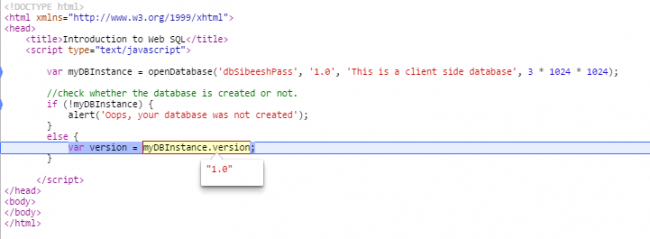
Getting_version_details_from_database_instance
Once the database is created, we can start using the transaction as we use in SQL.
Creating transaction
To create a transaction we can use the following syntax. We can use transaction method from our database instance.
- myDBInstance.transaction(function (tran)
- {
- });
Firstly, we will create a table in our database. To execute any queries in Web SQL, you must use the method executesql.
- tran.executeSql('CREATE TABLE IF NOT EXISTS Users (id unique, Name, MailID)');
Next thing is we need to insert some rows to our table.
- tran.executeSql('insert into Users (id, Name, MailID) values (1, "Sibi","[email protected]")');
- tran.executeSql('insert into Users (id, Name, MailID) values (2, "Aji","[email protected]")');
- tran.executeSql('insert into Users (id, Name, MailID) values (3, "Ansu","[email protected]")');
- var name = "Sibi";
- var id = "1";
- var MailID = "[email protected]";
- tran.executeSql('insert into Users (id, Name, MailID) values (?,?,?)', [id, name, MailID]);
- tran.executeSql('SELECT * FROM Users', [], function (tran, data) {
- });
- myDBInstance.transaction(function(tran)
- {
- var html = '<table><thead><th>Mail ID </th><th>ID</th><th>Name </th></thead><tbody>';
- tran.executeSql('SELECT * FROM Users', [], function(tran, data)
- {
- for (i = 0; i < data.rows.length; i++)
- {
- html += '<tr><td>' + '<a ' + 'href="mailto:' & lt;
- /code> <code style=" inherit; inherit; 0px !important; 0px !important; font-size: 1em !important; 1.1em !important; font-family: Consolas, 'Bitstream Vera Sans Mono', 'Courier New', Courier, monospace !important; vertical-align: baseline !important; border-radius: 0px !important; bottom: auto !important; float: none !important; auto !important; left: auto !important; outline: 0px !important; overflow: visible !important; static !important; right: auto !important; top: auto !important; auto !important; box-sizing: content-box !important; direction: ltr !important; box-shadow: none !important; display: inline !important; background: none !important;">+ data.rows[i].MailID + '">' + data.rows[0].MailID + '</a > ' +
- '</td><td>' + data.rows[i].id + '</td><td>' + data.rows[i].Name + '</td></tr>';
- };
- html += '</tbody></table>';
- $('#myTab').html(html);
- });
- });
- Please don’t forget to include jQuery reference.
- Do not forget to create a div with id myTab.
You can add a CSS for the table we are creating dynamically as follows.
- <style>
- table,
- tr,
- td,
- th
- {
- border: 1px solid #ccc;
- border-radius: 5px;
- padding: 10px;
- margin: 10px;
- }
- </style>
Complete code
Complete code for the implementation is given below.
- <!DOCTYPE html>
- <html xmlns="http://www.w3.org/1999/xhtml">
- <head>
- <title>Introduction to Web SQL</title>
- <script src="Scripts/jquery-1.11.1.min.js"></script>
- <script type="text/javascript">
- var myDBInstance = openDatabase('dbSibeeshPassion', '1.0', 'This is a client side database', 3 * 1024 * 1024);
- //check whether the database is created or not.
- if (!myDBInstance)
- {
- alert('Oops, your database was not created');
- } else
- {
- var version = myDBInstance.version;
- //var name = "Sibi";
- //var id = "1";
- //var MailID = "[email protected]";
- myDBInstance.transaction(function(tran)
- {
- tran.executeSql('CREATE TABLE IF NOT EXISTS Users (id unique, Name, MailID)');
- //tran.executeSql('insert into Users (id, Name, MailID) values (?,?,?)', [id, name, MailID]);
- tran.executeSql('insert into Users (id, Name, MailID) values (1, "Sibi","[email protected]")');
- tran.executeSql('insert into Users (id, Name, MailID) values (2, "Aji","[email protected]")');
- tran.executeSql('insert into Users (id, Name, MailID) values (3, "Ansu","[email protected]")');
- });
- myDBInstance.transaction(function(tran)
- {
- var html = '<table><thead><th>Mail ID </th><th>ID</th><th>Name </th></thead><tbody>';
- tran.executeSql('SELECT * FROM Users', [], function(tran, data)
- {
- for (i = 0; i < data.rows.length; i++)
- {
- html += '<tr><td>' + '<a ' + 'href="mailto:' + data.rows[i].MailID + '">' + data.rows[0].MailID + '</a>' +
- '</td><td>' + data.rows[i].id + '</td><td>' + data.rows[i].Name + '</td></tr>';
- };
- html += '</tbody></table>';
- $('#myTab').html(html);
- });
- });
- }
- </script>
- <style>
- table,
- tr,
- td,
- th {
- border: 1px solid #ccc;
- border-radius: 5px;
- padding: 10px;
- margin: 10px;
- }
- </style>
- </head>
- <body>
- <div id="myTab"></div>
- </body>
- </html>
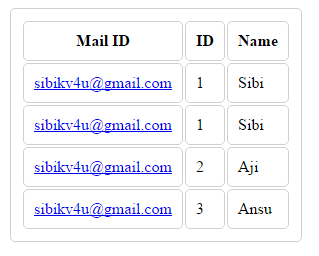
Web_SQL_Output
That is all. We did it. Have a happy coding.
Conclusion
Did I miss anything that you may think is needed? Did you try Web SQL yet? Have you ever wanted to do this requirement? Did you find this post useful? I hope you liked this article. Please share with me your valuable suggestions and feedback.
Your turn. What do you think?
A blog isn’t a blog without comments, but do try to stay on topic. If you have a question unrelated to this post, you’re better off posting it on C# Corner, Code Project, Stack Overflow, or Asp.Net Forum instead of commenting here. Tweet or email me a link to your question there and I’ll definitely try to help if I can.
Please read this article in my blog here.


Sibeesh VenuTOP 100Posted Aug 11, 2016, 6:20 AM EDT
Soumalya Das Please see my previous reply, I have already shared the link http://sibeeshpassion.com/introduction-to-indexeddb/
Soumalya DasPosted Aug 11, 2016, 12:00 AM EDT
Can u give me some link of indexDb??
Soumalya DasPosted Aug 10, 2016, 11:59 PM EDT
Thank u sir
Sibeesh VenuTOP 100Posted Aug 10, 2016, 11:43 PM EDT
Soumalya Das W3C has been announced that use of Web SQL is obsolete and deprecated, hence it is not recommended using Web SQL in your applications. Most of the modern web browsers like Mozilla does not support the use of Web SQL, this is also a great limitation of Web SQL. Now we have an alternative of Web SQL, IndexedDB which more efficient and faster than Web SQL. Below are some of the main advantages of IndexedDB. It stores the data as Key-Pair values It is Asynchronous It is non relational Can access the data from the same domain. See here http://sibeeshpassion.com/introduction-to-indexeddb/
Soumalya DasPosted Aug 10, 2016, 3:48 AM EDT
I use it but it can not support in firefox..how to use it in firefox
Sibeesh VenuTOP 100Posted Feb 1, 2016, 8:02 PM EST
Raja T Thank you so much.
Sibeesh VenuTOP 100Posted Feb 1, 2016, 8:02 PM EST
Mohammed Ibrahim Thank you so much.
Sibeesh VenuTOP 100Posted Feb 1, 2016, 8:02 PM EST
Santhakumar Munuswamy Thank you so much.
Sibeesh VenuTOP 100Posted Feb 1, 2016, 8:01 PM EST
Upendra Pratap Shahi Thank you so much.
Sibeesh VenuTOP 100Posted Feb 1, 2016, 8:01 PM EST
Pankaj Kumar Choudhary Thanks for the information
Sibeesh VenuTOP 100Posted Feb 1, 2016, 8:01 PM EST
Manas Mohapatra Thank you so much.
Raja TPosted Feb 1, 2016, 5:27 PM EST
Nice, Thanks for sharing
Mohammed IbrahimPosted Feb 1, 2016, 9:07 AM EST
nice
Santhakumar MunuswamyPosted Feb 1, 2016, 9:01 AM EST
Thanks for nice article
Upendra Pratap ShahiPosted Feb 1, 2016, 7:25 AM EST
nice share sir.....
Pankaj Kumar ChoudharyTOP 100Posted Feb 1, 2016, 6:36 AM EST
Nice Article Sir.... Web Sql is very Nice API. But it not supported by all modern browsers like Firefox and Opera Mini . I am using the latest version of firefox after that web sql is not supporting by firefox i required to install the plugin for this but unfortunately after installing the plugin web sql is not working so it is very big loss that web sql is not supported by many browser till now. Mozilla have said they will never implement it.........
Manas MohapatraPosted Feb 1, 2016, 4:12 AM EST
Good to know about Web SQL..
Mahesh ChandTOP 10Posted Feb 1, 2016, 3:42 AM EST
Thanks. Every day I find something new. To be frank, I didn't know about Web SQL until I read this.
Sibeesh VenuTOP 100Posted Feb 1, 2016, 2:55 AM EST
Ranjit Powar Thank you :)
Sibeesh VenuTOP 100Posted Feb 1, 2016, 2:55 AM EST
Shweta Lodha Thank you :)
Ranjit PowarPosted Feb 1, 2016, 1:20 AM EST
Nice one
Shweta LodhaTOP 100Posted Feb 1, 2016, 12:46 AM EST
Nice explanation
Sibeesh VenuTOP 100Posted Jan 31, 2016, 11:42 PM EST
Shubham Kumar Thank you.
Sibeesh VenuTOP 100Posted Jan 31, 2016, 11:42 PM EST
Aqib Shehzad Thank you
Shubham KumarPosted Jan 31, 2016, 11:41 PM EST
thnxs sir
Muhammad Aqib ShehzadPosted Jan 31, 2016, 11:36 PM EST
very nice article
Sibeesh VenuTOP 100Posted Jan 31, 2016, 11:26 PM EST
Yashwant Vishwakarma Thank you
Yashwant VishwakarmaPosted Jan 31, 2016, 11:26 PM EST
Nice share, thanks for sharing!!