
Introduction
This article explains the basic Java operators.
What is an Operator?
An operator is a method that manipulates values. Let's use the example of addition, in which we add two values (like 1+2) where the values are operands and the "+" sign is the operator, in other words, the operator is a method used to operate on operands.
Operators in Java
Java provides various types of operators to manipulate various values.
- Arithmetic Operators
- Relational Operators
- Bitwise Operators.
- Logical Operators.
- Assignment Operators.
- Miscellaneous Operators.
1. Arithmetic Operators
It is used in mathematical expressions in the same way it is used in algebra. It includes the following:
- Addition (+)
- Subtraction (-)
- Manipulation (*)
- Division (/)
- Modulus (%)
- Increment (++)
- Decrement (--)
Example
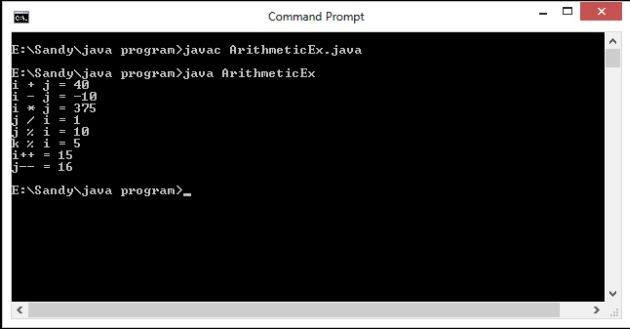
ArithmeticEx.java
- public class ArithmeticEx
- {
- public static void main(String args[])
- {
- int i = 15;
- int j = 25;
- int k = 35;
- int l = 10;
- System.out.println("i + j = " + (i + j));
- System.out.println("i - j = " + (i - j));
- System.out.println("i * j = " + (i * j));
- System.out.println("j / i = " + (j / i));
- System.out.println("j % i = " + (j % i));
- System.out.println("k % i = " + (k % i));
- System.out.println("i++ = " + (i++));
- System.out.println("j-- = " + (i--));
- }
- }
Output
2. Relational Operators
This operator is used to compare two values.
- > (Greater Than operator).
- < (Less Than operator).
- == (EqualTo operator)
- != (Not EqualsTo operator; Work same as EqualTo operator).
- >= (Greater than EuqalTo).
- <= (Less Than EqualTo).
Example
RelationalOperatorEx.java
- public class RelationalOperatorEx
- {
- public static void main(String args[])
- {
- int i = 10;
- int j = 20;
- System.out.println("i == j = " + (i == j));
- System.out.println("i != j = " + (i != j));
- System.out.println("i > j = " + (i > j));
- System.out.println("i < j = " + (i < j));
- System.out.println("j >= i = " + (j >= i));
- System.out.println("j <= i = " + (j <= i));
- }
- }
Output

3. Bitwise Operator
This operator works on bits to perform bit by bit operations.
- >>> (Shift right zero fill operaotr).
- << (Binary Left Shift Operator).
- >> (binary right shift operator)
- && (Binary and operator)
- || (Binary Or).
- ^ (Binary XOR).
- ~ (Binary Ones Complement; used to flipping bits).
Example
- BitwiseOperatorEx.java
- public class BitwiseOperatorEx
- {
- public static void main(String args[])
- {
- int i = 45;
- int l = 15;
- int k = 0;
- k = i & l;
- System.out.println("i & l = " + k);
- k = i | l;
- System.out.println("i | l = " + k);
- k = i ^ l;
- System.out.println("i ^ l = " + k);
- k = ~i;
- System.out.println("~i = " + k);
- k = i << 2;
- System.out.println("i << 2 = " + k);
- k = i >> 2;
- System.out.println("i >> 2 = " + k);
- k = i >>> 2;
- System.out.println("i >>> 2 = " + k);
- }
- }
Output

4. Logical Operators
This operator works on Boolean conditions (like true/false conditions).
- || (Logical Or)
True if any of the two operands are positive.
- && (Logical And operator)
True if both the operands are positive.
- ! ( Logical Not Operator)
If a condition is true then the logical Not operator will return false.
Example
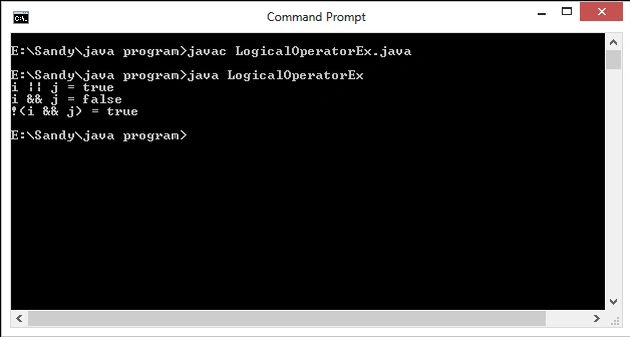
LogicalOperator.java
- public class LogicalOperatorEx
- {
- public static void main(String args[])
- {
- boolean i = true;
- boolean j = false;
- System.out.println("i || j = " + (i || j));
- System.out.println("i && j = " + (i && j));
- System.out.println("!(i && j) = " + !(i && j));
- }
- }
Output
5. Assignment Operator
The following are the assignment operators provided by Java.
-
*= (Multiply assignment operator)
-
/= (Divide assignment operator)
-
|= (bitwise inclusive OR assignment operator).
-
= ( Simple assignment operator)
-
>>= ( Right shift assignment operator)
-
+= ( Add assignment operator)
-
-= ( Subtract assignment operator)
-
%= (Modulus assignment operator)
-
<<= (Left shift assignment operator).
-
&= (Bitwise assignment operator).
-
^= ( bitwise exclusive OR assignment operator).
Example
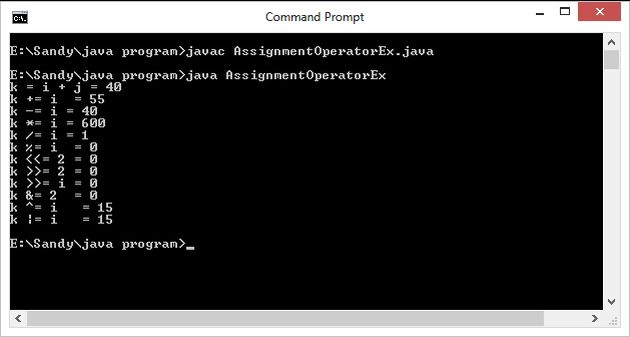
AssignmentOperatorEx.java
- public class AssignmentOperatorEx
- {
- public static void main(String args[])
- {
- int i = 15;
- int j = 25;
- int k = 0;
- k = i + j;
- System.out.println("k = i + j = " + k);
- k += i;
- System.out.println("k += i = " + k);
- k -= i;
- System.out.println("k -= i = " + k);
- k *= i;
- System.out.println("k *= i = " + k);
- i = 15;
- k = 15;
- k /= i;
- System.out.println("k /= i = " + k);
- i = 15;
- k = 15;
- k %= i;
- System.out.println("k %= i = " + k);
- k <<= 2;
- System.out.println("k <<= 2 = " + k);
- k >>= 2;
- System.out.println("k >>= 2 = " + k);
- k >>= 2;
- System.out.println("k >>= i = " + k);
- k &= i;
- System.out.println("k &= 2 = " + k);
- k ^= i;
- System.out.println("k ^= i = " + k);
- k |= i;
- System.out.println("k |= i = " + k);
- }
- }
Output

Join the conversation! Your thoughts help the community grow.