
In this article we are going to show different spinners available in Ionic. In our last article we learned to make a small application with Ionic and there we also learned to code and debug in Visual Studio Code. Here are the last two articles,
Nowadays, we have a lot of frameworks which provide a lot of predefined tools and libraries to make our application more attractive and fast. Here in ionic we have lots of predefined icons in the form of spinners. In this article we are going to make a web page on which we will use those different predefined icon spinners.
Directory – IONIC_Spinners
File – index.html
Directory - Style
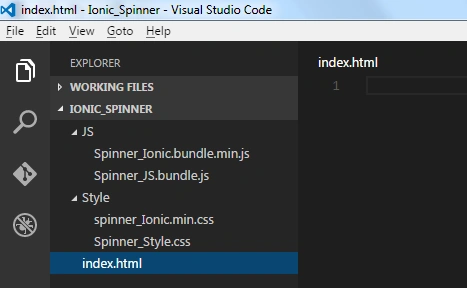
Step 2. Start code to the application
index.html
In this page we used ion-spinnerdirective that provides a variety of animated spinners. Spinners enable us to give feedback to our users that the app is processing/thinking/waiting, or whatever we’d like it to indicate.
Spinner_Style.css
spinner_Ionic.min.css
File from the url.
File from the url.
Step 3: Run the application,

File – index.html
Directory - Style
- File- Spinner_Style.css
- File- spinner_Ionic.min.css
- File- Spinner_JS.bundle.js
- File- Spinner_Ionic.bundle.min.js
Step 2. Start code to the application
index.html
In this page we used ion-spinnerdirective that provides a variety of animated spinners. Spinners enable us to give feedback to our users that the app is processing/thinking/waiting, or whatever we’d like it to indicate.
- <html ng-app="ionicApp">
- <head>
- <meta charset="utf-8">
- <meta name="viewport" content="initial-scale=1, maximum-scale=1, user-scalable=no, width=device-width">
- <title>Ionic Spinners</title>
- <link href="Style\spinner_Ionic.min.css" rel="stylesheet">
- <link href="Style\Spinner_Style.css" rel="stylesheet">
- <scriptsrc="JS\Spinner_Ionic.bundle.min.js">
- </script>
- <scriptsrc="JS\Spinner_JS.bundle.js">
- </script>
- </head>
- <body ng-controller="MyCtrl">
- <ion-content scroll="false" class="has-header">
- <table>
- <th>
- <caption>Spinner in Ionic</caption>
- </th>
- <tr>
- <td>
- <ion-spinner icon="android"></ion-spinner>
- </td>
- <td>
- <ion-spinner icon="ios"></ion-spinner>
- </td>
- <td>
- <ion-spinner icon="ios-small"></ion-spinner>
- </td>
- <td>
- <ion-spinner icon="bubbles" class="spinner-balanced"></ion-spinner>
- </td>
- <td>
- <ion-spinner icon="circles" class="spinner-energized"></ion-spinner>
- </td>
- </tr>
- <tr>
- <td>Spinner for Android</td>
- <td>Spinner forIOS</td>
- <td>Small Spinner for IOS </td>
- <td>Spinner in Bubbles</td>
- <td>Spinner With Circles</td>
- </tr>
- <tr>
- <td>
- <ion-spinner icon="crescent" class="spinner-royal"></ion-spinner>
- </td>
- <td>
- <ion-spinner icon="dots" class="spinner-dark"></ion-spinner>
- </td>
- <td>
- <ion-spinner icon="lines" class="spinner-calm"></ion-spinner>
- </td>
- <td>
- <ion-spinner icon="ripple" class="spinner-assertive"></ion-spinner>
- </td>
- <td>
- <ion-spinner icon="spiral"></ion-spinner>
- </td>
- </tr>
- <tr>
- <td>Royal Spinner</td>
- <td>Dark Spinner</td>
- <td>Spinner With Lines</td>
- <td>Ripple</td>
- <td>Spiral</td>
- </tr>
- </table>
- </ion-content>
- </body>
- </html>
- body
- {
- cursor: url('http://ionicframework.com/img/finger.png'),
- auto;
- position: relative;
- }
- table
- {
- position: absolute;
- top: 0;
- bottom: 0;
- left: 0;
- right: 0;
- margin: auto;
- width: 100 % ;
- height: 100 % ;
- }
- th
- {
- text - align: centre;
- }
- caption
- {
- font - size: xx - large;
- font - weight: bolder;
- color: blue;
- }
- td
- {
- text - align: center;
- margin - bottom: 40 px!important;
- }
- .spinner svg
- {
- width: 19 % !important;
- height: 85 px!important;
- }
File from the url.
- Spinner_JS.bundle.js
- angular.module('ionicApp', ['ionic'])
- .controller('MyCtrl', function($scope) {
- });
- Spinner_Ionic.bundle.min.js
Step 3: Run the application,


Bhuvanesh MohankumarPosted May 9, 2016, 10:25 PM EDT
Good one..
Shubham KumarPosted Apr 24, 2016, 8:33 PM EDT
Thank you all
Kuppurasu NagarajTOP 100Posted Apr 14, 2016, 5:37 AM EDT
Nice Sharing..
Vignesh ManiTOP 100Posted Apr 14, 2016, 4:19 AM EDT
Nice
Shubham KumarPosted Apr 13, 2016, 12:12 AM EDT
Thank you all
Mohammed IbrahimPosted Apr 12, 2016, 10:08 AM EDT
nice info
Debasis SahaTOP 100Posted Apr 12, 2016, 9:22 AM EDT
Good One..
Rahul Kumar SaxenaTOP 100Posted Apr 12, 2016, 1:56 AM EDT
Good Show
Gowtham RajamanickamTOP 100Posted Apr 11, 2016, 10:07 PM EDT
Good One, Thanks for sharing