
Introduction
This article explains how to implement an auto-complete text box in ASP.NET using jQuery.
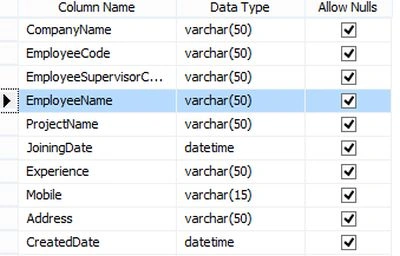
The following is my Data Table from which I am showing Employee Name:
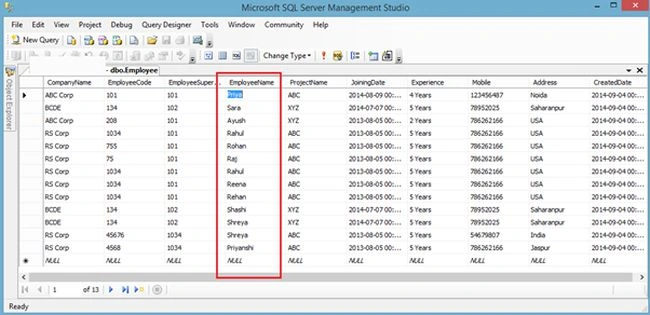
 The records in my Data Table are shown below.
Here I will show Employee Name in the autocomplete text box.
 Now my aspx code is:
Image 1
Image 2
- <%@ Page Language="C#" AutoEventWireup="true" CodeFile="Default.aspx.cs" Inherits="_Default" %>
- <!DOCTYPE html PUBLIC "-//W3C//DTD XHTML 1.0 Transitional//EN" "http://www.w3.org/TR/xhtml1/DTD/xhtml1-transitional.dtd">
- <html xmlns="http://www.w3.org/1999/xhtml">
- <head runat="server">
- <title>AutoComplete Text Box using jQuery in ASP.NET</title>
- <link href="jquery-ui.css" rel="stylesheet" type="text/css" />
- <script src="jquery.min.js" type="text/javascript"></script>
- <script src="jquery-ui.min.js" type="text/javascript"></script>
- <script type="text/javascript">
- $(document).ready(function() {
- SearchText();
- });
- function SearchText() {
- $("#txtEmpName").autocomplete({
- source: function(request, response) {
- $.ajax({
- type: "POST",
- contentType: "application/json; charset=utf-8",
- url: "Default.aspx/GetEmployeeName",
- data: "{'empName':'" + document.getElementById('txtEmpName').value + "'}",
- dataType: "json",
- success: function(data) {
- response(data.d);
- },
- error: function(result) {
- alert("No Match");
- }
- });
- }
- });
- }
- </script>
- </head>
- <body>
- <form id="form1" runat="server">
- <table cellpadding="10" cellspacing="10" style="border: solid 15px Green; background-color: SkyBlue;"
- width="50%" align="center">
- <tr>
- <td>
- <span style="color: Red; font-weight: bold; font-size: 18pt;">Enter Employee Name:</span>
- <asp:TextBox ID="txtEmpName" runat="server" Width="160px" />
- </td>
- </tr>
- </table>
- </form>
- </body>
- </html>
- using System;
- using System.Configuration;
- using System.Data;
- using System.Linq;
- using System.Web;
- using System.Web.Security;
- using System.Web.UI;
- using System.Web.UI.HtmlControls;
- using System.Web.UI.WebControls;
- using System.Web.UI.WebControls.WebParts;
- using System.Xml.Linq;
- using System.Web.Services;
- using System.Data.SqlClient;
- using System.Collections.Generic;
- public partial class _Default : System.Web.UI.Page
- {
- protected void Page_Load(object sender, EventArgs e)
- {
- }
- [WebMethod]
- public static List<string> GetEmployeeName(string empName)
- {
- List<string> empResult = new List<string>();
- using (SqlConnection con = new SqlConnection(@"Data Source=SARSHA\SqlServer2k8;Integrated Security=true;Initial Catalog=Test"))
- {
- using (SqlCommand cmd = new SqlCommand())
- {
- cmd.CommandText = "select Top 10 EmployeeName from Employee where EmployeeName LIKE ''+@SearchEmpName+'%'";
- cmd.Connection = con;
- con.Open();
- cmd.Parameters.AddWithValue("@SearchEmpName", empName);
- SqlDataReader dr = cmd.ExecuteReader();
- while (dr.Read())
- {
- empResult.Add(dr["EmployeeName"].ToString());
- }
- con.Close();
- return empResult;
- }
- }
- }
- }
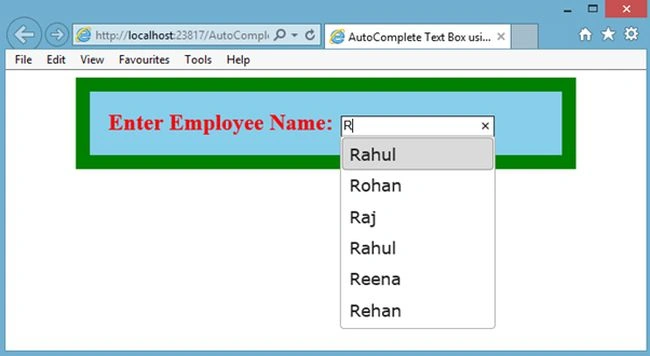
Image 3
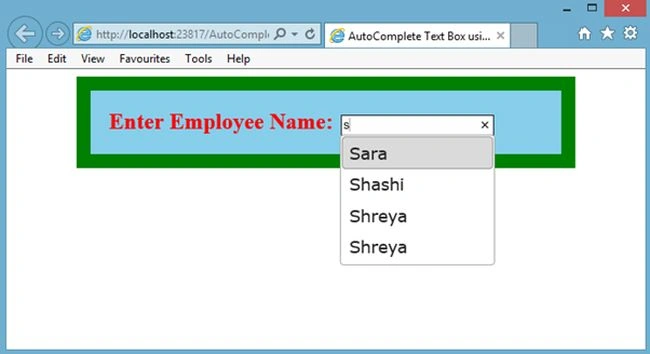
Image 4


Manoj SharmaPosted Feb 5, 2024, 5:23 AM EST
How to get Id value of the item selected in textbox?
MODE XLPosted Oct 5, 2022, 2:43 AM EDT
THANK YOUUUUU
Rob GerwingPosted Feb 27, 2021, 5:26 PM EST
Just an FYI, this is using a JQUERY library from 2010 1.4.2.. this has been reported vulnerable to attacks. I found this example seeing updated recently, but the example is really old and not working with new Jquery.
ahmed aledrisiPosted Feb 12, 2021, 5:45 PM EST
Thank you very match this code very nice
David EaglePosted May 31, 2020, 9:50 PM EDT
No longer works
praful bhojanePosted Feb 24, 2020, 8:29 PM EST
Nothing is happening
Kamal FuadPosted Oct 23, 2019, 12:38 AM EDT
Hi Sir, this script running well in the original copied file, but when i copy to my aspx file (using masterpage), it doesn't work. Do you have any idea?
Sameer PawarPosted May 29, 2019, 8:33 PM EDT
Yes sir it working but can we do it without static method because i need to populate that list in grid view.
Akshay GuptaPosted May 21, 2018, 11:22 PM EDT
Not working its very bad
Rajneesh ChaubeyPosted Apr 4, 2018, 9:29 PM EDT
Hi Rahul, Nice Article. I have one question that we can attach both employee name as well as Mobile. But on frontend when we write name, only name should be displayed and mobile number should not be displayed? How can do that?
Umm e UmmaraPosted Mar 18, 2018, 9:40 PM EDT
Code is not working
Ali Nalobi HarahapPosted Sep 17, 2017, 7:21 PM EDT
How to show full item table Employee. I mean, if I select employee name then value of address must be automatic show in Text box of address. Please Help me. Thank You
Pratik JadhavPosted Sep 8, 2017, 9:18 AM EDT
Not working.... for my database
patrick CFPosted Aug 21, 2017, 12:27 AM EDT
Thank you very much for posting such a useful code...but my question is can we show "no records found" as a list if no match found and it should be non selectable?
ArunPosted Apr 8, 2017, 11:18 PM EDT
Working fine. But It is not working when the controls are in master page
ArunPosted Apr 8, 2017, 11:17 PM EDT
Working fine. But It is not working when the controls are in master
محمد نادرPosted Nov 21, 2016, 9:29 AM EST
Good job bro but how can use two filter with stored procedure .
kalu singh raoPosted Jul 7, 2016, 9:25 PM EDT
Nice...
Mehul PatelPosted Jun 30, 2016, 1:28 AM EDT
How Can Master Page User ?
Moha NooraniPosted Dec 27, 2015, 8:35 PM EST
Perfect
Sudhindra KalePosted Nov 25, 2015, 2:49 AM EST
Thanks...........
Rahul Kumar SaxenaTOP 100Posted Nov 18, 2015, 8:10 PM EST
Thanks sanoop nair
sanoop nairPosted Nov 18, 2015, 3:20 AM EST
good job :)
Meharoof KorankandanPosted Oct 1, 2015, 10:16 PM EDT
Hi Rahul, Error is throwing like this " Uncaught TypeError: $(...).autocomplete is not a function" when i enter text in textbox. can u please replay ASP if possible . Thx in advance.
Rahul Kumar SaxenaTOP 100Posted Jun 28, 2015, 1:14 AM EDT
Check your text box ID here
Sami KhanPosted Jun 28, 2015, 12:13 AM EDT
It is working properly when asp:Textbox is in masterPage but it doesnt populate list when it is in contentPage and gives no error. Why ?
Sami KhanPosted Jun 27, 2015, 9:51 AM EDT
Thanks a lot ... your information was very clear and precise
Kalpesh BogharaPosted Jun 3, 2015, 6:26 PM EDT
i got error ...my LIst store data, but not display any list on textbox pls help me fast... Thank you,, My code...... [WebMethod] [ScriptMethod(ResponseFormat = ResponseFormat.Json)] public List<string> MyList(string pre) { List<string> organization = new List<string>(); organization = (from a in <db.Table> where a.Name.StartsWith(pre) select a.Name).ToList(); return organization; }
sanjeev singhPosted Apr 21, 2015, 7:55 PM EDT
nice work , but i have select any one to the mouse pointer , then not going any other page <a href='home.aspx'>home </a> not working ...
Rana SunnyPosted Apr 15, 2015, 1:33 AM EDT
Nice Work
enamul haquePosted Jan 25, 2015, 8:49 PM EST
not working..in firefox.
Abdul KaishPosted Jan 20, 2015, 7:45 PM EST
its not working..in firefox. it gives: Use of getPreventDefault() is deprecated. Use defaultPrevented instead. how to fix it?
Kent WilhelmPosted Jan 8, 2015, 2:11 PM EST
Works great! How would you suggest returning a label + value?
g sPosted Dec 4, 2014, 12:18 AM EST
how to Master page Autocomplete textbox in c#
Sharad GuptaPosted Nov 11, 2014, 8:36 PM EST
@ Rahul Kumar Saxena Good one, the things with j query is really easy to work for web based applications.
Gurunatha DogiPosted Nov 3, 2014, 9:03 PM EST
@Rahul..Thank you for sharing..I was really looking for this
Vipin TyagiPosted Nov 3, 2014, 6:38 PM EST
Awesome Article ..Very Useful
Saineshwar BageriPosted Nov 3, 2014, 5:54 PM EST
nice one