
Introduction
We will continue the second part of the jQuery Datepicker Dateformat. Before reading this article you must read my previous article JQuery Datepicker - Part 1 because I have explained some important part in my previous article. In this article I will teach you the remaining part of jQuery Datepicker Format! Let's start.
JQuery Reference
You must use the following jquery reference in your HTML Code, otherwise it will not work.
- <head>
- <link rel="stylesheet" href="//code.jquery.com/ui/1.11.4/themes/smoothness/jquery-ui.css">
- <script src="//code.jquery.com/jquery-1.10.2.js"></script>
- <script src="//code.jquery.com/ui/1.11.4/jquery-ui.js"></script>
- </head>
Display Month & Year Menus In JQuery Datepicker
HTML
- Date : <input id="Datepicker" type="text" />
The following code will show the Month & Year Menus In Jquery Datepicker. The "yearRange" will specify the range of the year you want.
- $(function () {
- $('#Datepicker').datepicker({
- dateFormat: 'dd/mm/yy',
- changeMonth: true,
- changeYear: true,
- yearRange: '1950:2100'
- });
- })
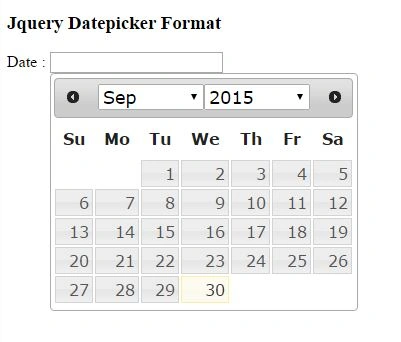
JS Fiddle Demo 1: http://jsfiddle.net/rajeeshmenoth/1juozmdn/.
Disable Weekends In JQuery Datepicker
HTML
- Date : <input id="Datepicker" type="text" />
The following code will disable all weekends in the JQuery Datepicker."noWeekends" will disable the weekends.
- $(function () {
- $('#Datepicker').datepicker({
- beforeShowDay: $.datepicker.noWeekends
- });
- })
Output
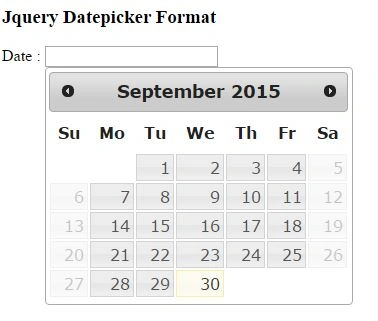
JS Fiddle Demo 2 :
Display Multiple Month In JQuery Datepicker
HTML
- Date : <input id="Datepicker" type="text" />
The following code will display the multiple month in jQuery Datepicker. The "numberOfMonths" will show the next months.
- $(function () {
- $('#Datepicker').datepicker({
- numberOfMonths:2
- });
- })
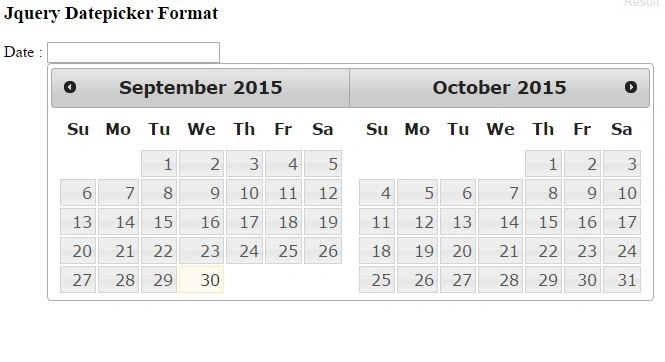
JS Fiddle Demo 3 : http://jsfiddle.net/rajeeshmenoth/tvc64dtg/
Reference
Summary
We learned various date format in jQuery Datepicker. I hope this article is useful for beginners.


Delpin Susai RajTOP 100Posted Aug 28, 2016, 3:05 AM EDT
Nice
Rajeesh MenothPosted Oct 4, 2015, 10:03 PM EDT
Thank You Abhay Shanker
Abhay ShankerPosted Oct 2, 2015, 12:15 AM EDT
Nice Share..
Karthikeyan KPosted Oct 1, 2015, 10:22 PM EDT
Good one sir...
Santhakumar MunuswamyPosted Oct 1, 2015, 12:00 PM EDT
Good One
Pankaj Kumar ChoudharyTOP 100Posted Oct 1, 2015, 1:45 AM EDT
Nice Explain Sir........
Rajeesh MenothPosted Oct 1, 2015, 1:33 AM EDT
Thanks Ankit Bansal
Ankit BansalPosted Oct 1, 2015, 1:08 AM EDT
nice..thanks for sharing..
Nilesh JadavPosted Oct 1, 2015, 12:24 AM EDT
Great Rajeesh Menoth