
Many times as developers we use a DatePicker to choose a date of birth or date of anniversary, and developers use a normal DatePicker, but for selecting previous date, like a date in 1982, users have to click the previous button.
We can use a DatePicker with Month and Year Dropdown to make this job easy in ASP.NET MVC.
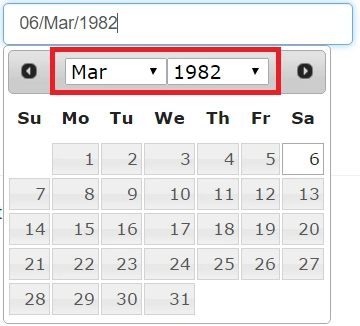
Let's implement this jQuery DatePicker in ASP.NET MVC.
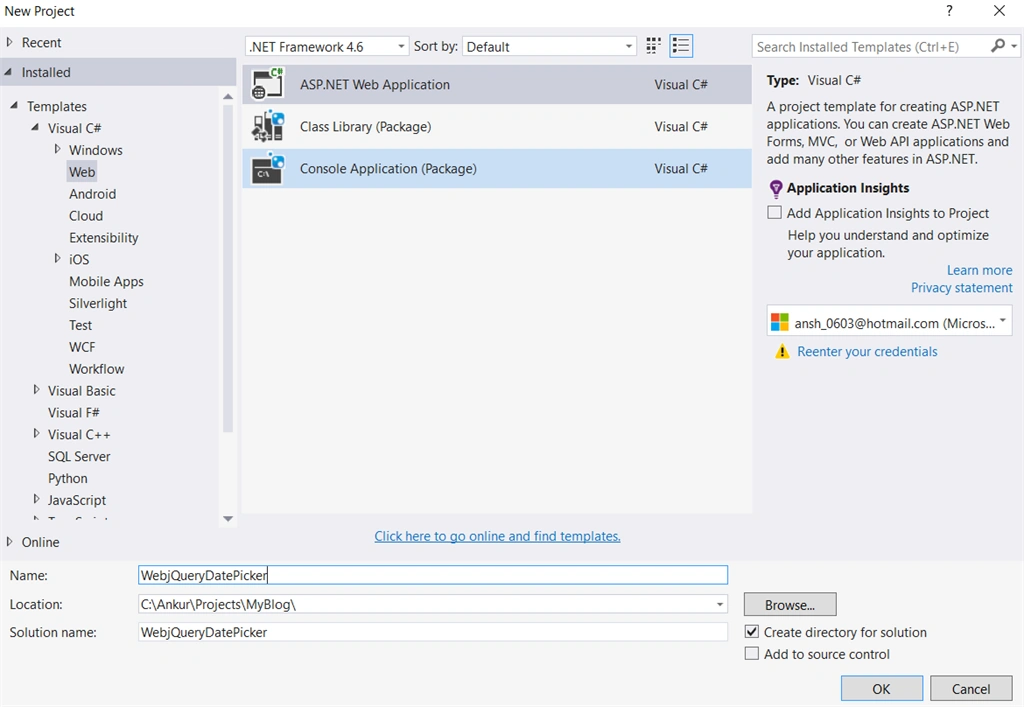
Step 1: Create new ASP.NET Web Application and give the name 'WebjQueryDatePicker'.
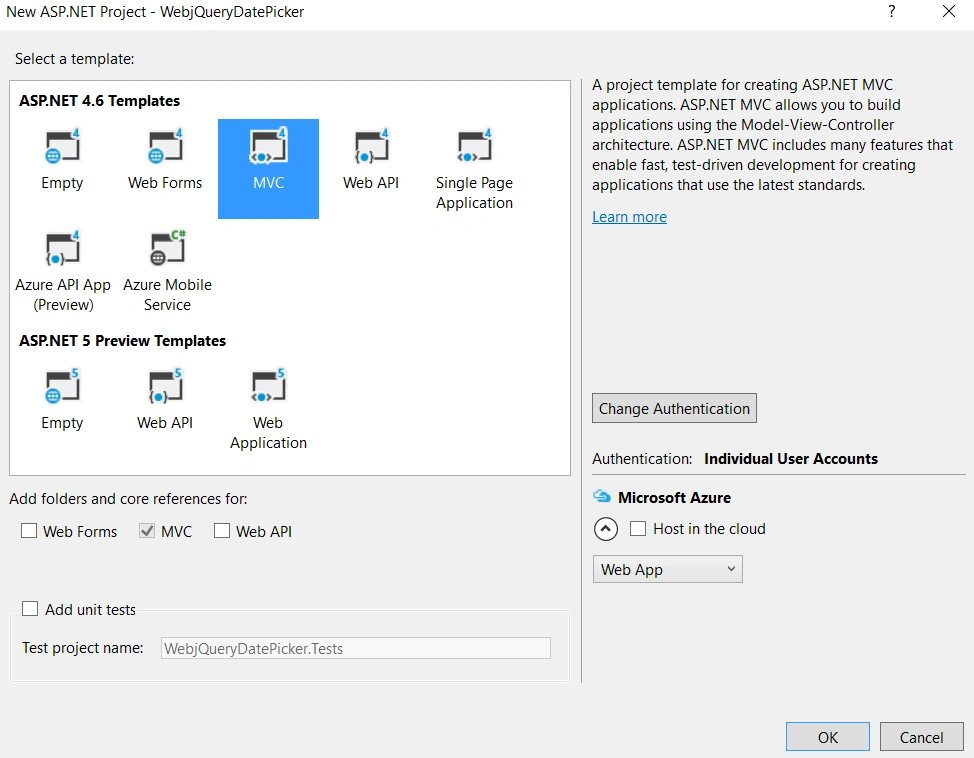
Step 2: From the Next Dialog, Select MVC Template and click on Ok.
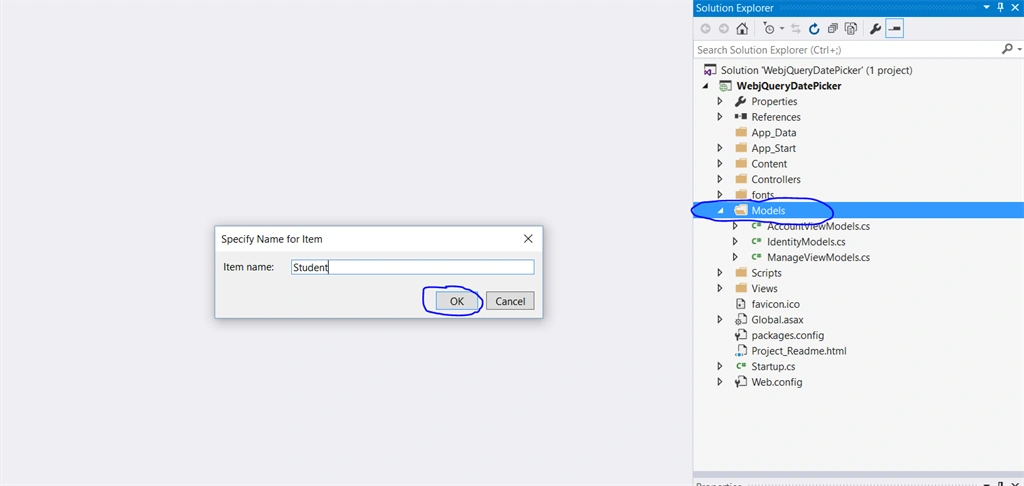
Step 3: Now first let's create a Model Class of Student, for that right click on Models folder and add new class named 'Student.cs'.
Step 4: Now add the following property in class. Here for Student DateOfBirth we will use datepicker; set the DataFormatString = "{0:dd/MMM/yyyy}").
- public class Student
- {
- [Display(Name = "Student Name")]
- [Required]
- public string StudName { get; set; }
- [Required]
- [Display(Name = "Date Of Birth")]
- [DisplayFormat(ApplyFormatInEditMode = true, DataFormatString = "{0:dd/MMM/yyyy}")]
- public DateTime StudDOB { get; set; }
- }
- using System.ComponentModel.DataAnnotations;
Step 5: Now right click on Controller Folder, add new Controller and give name 'StudentController'.
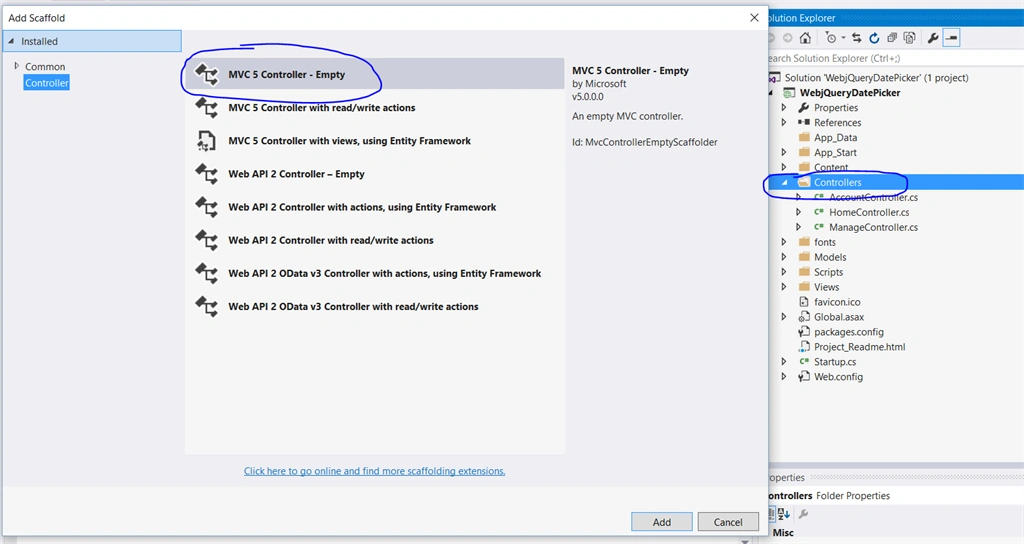

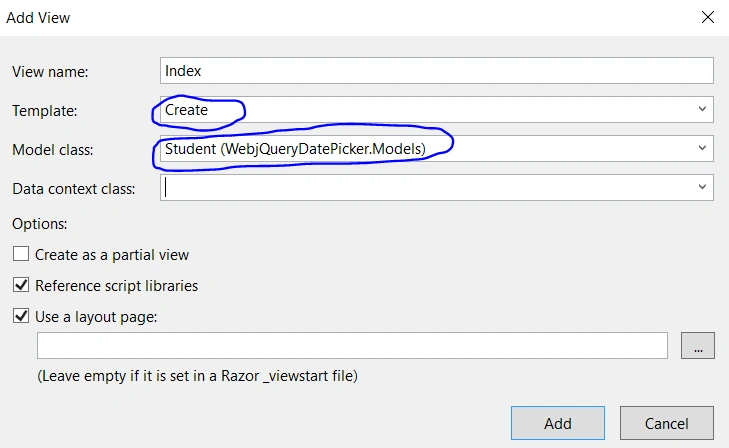
Step 6: Now let's create a view for the Student Class, for that right click on Index, then add View.
In the next dialog Select 'Create' Template, assign Model Class 'Student' and click on 'Ok' Button.
This will create a View as Below.
- @model WebjQueryDatePicker.Models.Student
- @{
- ViewBag.Title = "Index";
- }
- <h2>Index</h2>
- @using (Html.BeginForm())
- {
- @Html.AntiForgeryToken()
- <div class="form-horizontal">
- <h4>Student</h4>
- <hr />
- @Html.ValidationSummary(true, "", new { @class = "text-danger" })
- <div class="form-group">
- @Html.LabelFor(model => model.StudName, htmlAttributes: new { @class = "control-label col-md-2" })
- <div class="col-md-10">
- @Html.EditorFor(model => model.StudName, new { htmlAttributes = new { @class = "form-control" } })
- @Html.ValidationMessageFor(model => model.StudName, "", new { @class = "text-danger" })
- </div>
- </div>
- <div class="form-group">
- @Html.LabelFor(model => model.StudDOB, htmlAttributes: new { @class = "control-label col-md-2" })
- <div class="col-md-10">
- @Html.EditorFor(model => model.StudDOB, new { htmlAttributes = new { @class = "form-control" } })
- @Html.ValidationMessageFor(model => model.StudDOB, "", new { @class = "text-danger" })
- </div>
- </div>
- <div class="form-group">
- <div class="col-md-offset-2 col-md-10">
- <input type="submit" value="Create" class="btn btn-default" />
- </div>
- </div>
- </div>
- }
- <div>
- @Html.ActionLink("Back to List", "Index")
- </div>
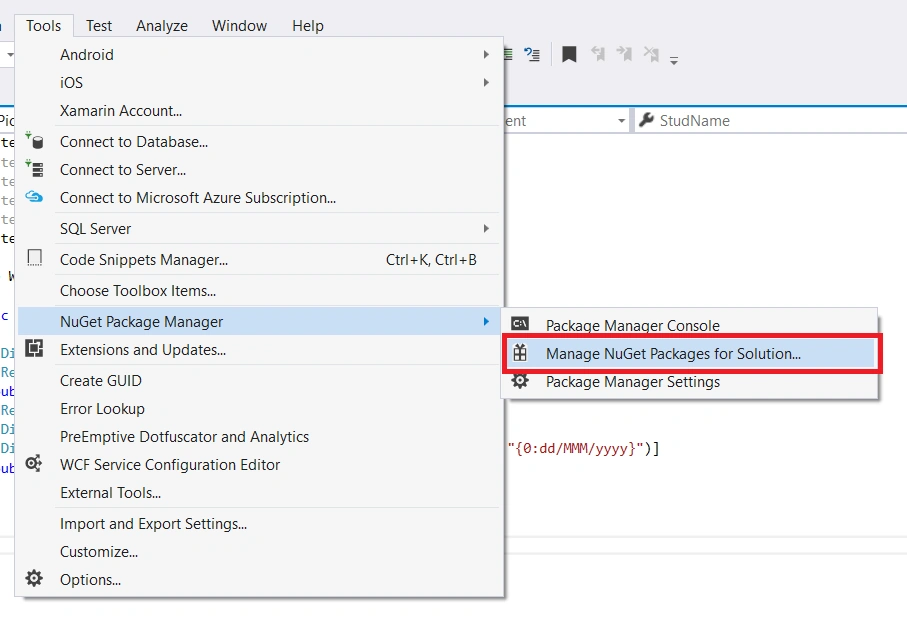
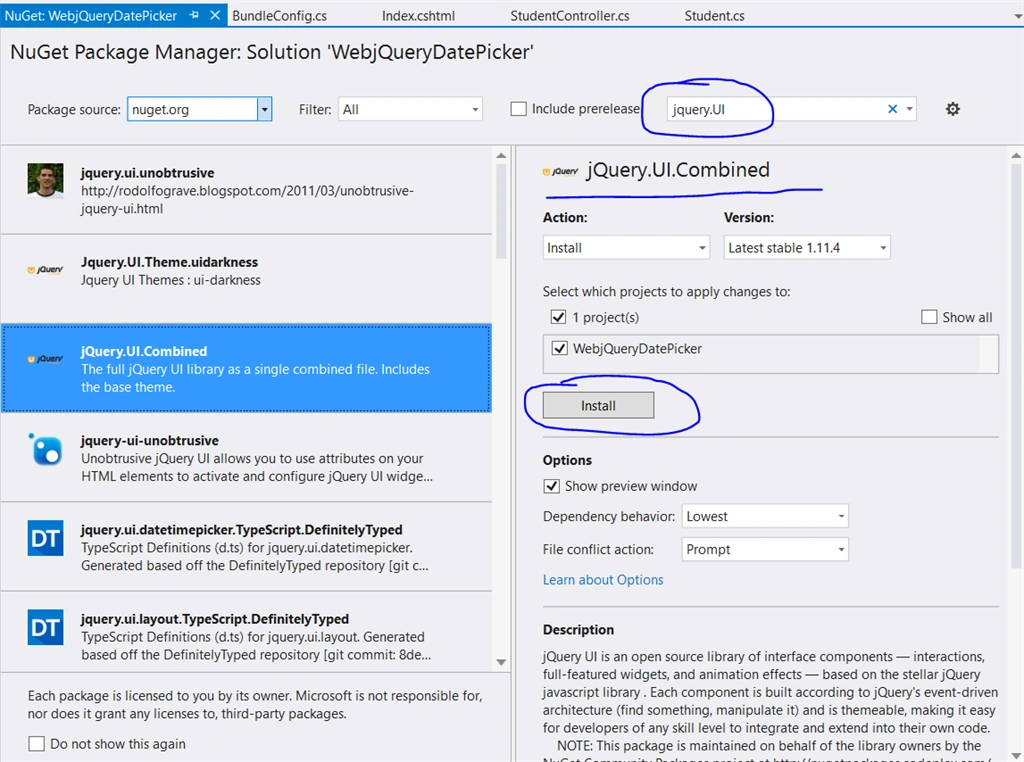
Select jQuery.UI.Combined and click on Install and complete the installation of jQuery.UI.
Step 8: Now open your View and add the following script in it.
- @section Scripts {
- @Scripts.Render("~/bundles/jqueryui")
- @Styles.Render("~/Content/cssjqryUi")
- <link rel="stylesheet" href="//code.jquery.com/ui/1.11.4/themes/smoothness/jquery-ui.css">
- <script type="text/javascript">
- $(document).ready(function () {
- $('input[type=datetime]').datepicker({
- dateFormat: "dd/M/yy",
- changeMonth: true,
- changeYear: true,
- yearRange: "-60:+0"
- });
- });
- </script>
- }
Important things here is:
- <link rel="stylesheet" href="//code.jquery.com/ui/1.11.4/themes/smoothness/jquery-ui.css">
That will apply a nice calendar UI to DatePicker. And input[type=datetime], This will match the Datatype and automatically identify where we have to place the DatePicker.
Step 9: Now open App_Start and Go to BundleConfig.cs and addthe below code.
- //js
- bundles.Add(new ScriptBundle("~/bundles/jqueryui").Include(
- "~/Scripts/jquery-ui-{version}.js"));
- //css
- bundles.Add(new StyleBundle("~/Content/cssjqryUi").Include(
- "~/Content/jquery-ui.css"));

Hope you like this article explaining jQuery DatePicker with Month and Year in ASP.NET MVC.
Read more articles on ASP.NET:


Pushpendra SinghPosted Mar 22, 2018, 2:16 AM EDT
Nice Helpful Article !!!
Sthitaprajnya Debasis NayakPosted Mar 18, 2016, 2:03 AM EDT
Helpful Article !!!
Sejal PatelPosted Mar 10, 2016, 12:46 AM EST
Nice Article Ankur.. Keep it up (y)
Atish DullabhPosted Mar 9, 2016, 7:26 PM EST
Nice article will definitely use it
Ankur MistryTOP 100Posted Mar 7, 2016, 7:06 AM EST
thank you all
Kumaresh RajalingamPosted Mar 6, 2016, 3:46 PM EST
Thanks for Nice article
Raja TPosted Mar 5, 2016, 9:17 PM EST
Nice, Thanks for sharing
Debendra DashPosted Mar 5, 2016, 9:09 PM EST
nice one ..........
Ankit BansalPosted Mar 5, 2016, 8:07 PM EST
Nice one..very helpful
Humayun Kabir MamunPosted Mar 5, 2016, 5:56 PM EST
Nice...
Sonu ChaudharyPosted Mar 5, 2016, 7:15 AM EST
Nice
Pankaj Kumar ChoudharyTOP 100Posted Mar 4, 2016, 4:40 PM EST
Good Efforts Sir.......
PEDRO RENE GONZALEZPosted Mar 4, 2016, 7:36 AM EST
nice
Asfend YarPosted Mar 4, 2016, 5:18 AM EST
nice
Saillesh PawarPosted Mar 4, 2016, 5:16 AM EST
Nice Ankur sir
Sibeesh VenuTOP 100Posted Mar 4, 2016, 1:41 AM EST
Nice Share
Vignesh ManiTOP 100Posted Mar 4, 2016, 12:29 AM EST
Good
Mohammed IbrahimPosted Mar 3, 2016, 11:36 PM EST
nice
Pramod ThakurPosted Mar 3, 2016, 10:39 PM EST
tnx for sharing...
Former memberPosted Mar 3, 2016, 10:37 PM EST
Nice article sir.........
Nikhil RajputPosted Mar 3, 2016, 10:29 PM EST
nice
Gowtham RajamanickamTOP 100Posted Mar 3, 2016, 8:37 PM EST
Good one..
Shridhar SharmaPosted Mar 3, 2016, 8:03 PM EST
nice share