
Introduction
What you will need
- Raspberry Pi configure with GPIO library
- 1-Small led
- 1-50 ohm Resistor
- Some solid-core wires
- Bread Board
Let there be light
Before we get around to write the code, let's first get acquainted with the pin numbering of our RPI and create a simple circuit.
- Pin 1 (+3.3v) should go to longer led to the led Pin.
- Attach the shorter led pin to the resistor and finally attach the other end of the resistor to pin-6(GND) on your RPI.
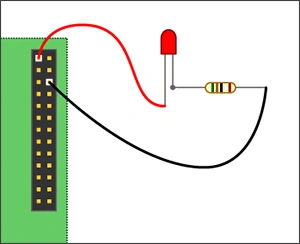 Figure1 - Connection
Controlling the led with our python code
I like to write Python code in IDLE IDE because it comes packaged with Raspbian distribution as it's free and allows us to write to our cod a little bit easier than Python command line or a text editor.
- Power on your RPI and boot all the way in the operating system GUI.
- Open the terminal and launch the IDLE IDE.
- Click File > New to open a new window.
Code
- import RPi.GPIO as GPIO
- GPIO.setmode(GPIO.BOARD)
- GPIO.setup(1, GPIO.OUT)
- GPIO.output(1,True)
- Import GPIO library
- Use board pin numbering
- Setup GPIO Pin 1 to OUT
- Turn on GPIO pin 1


Delpin Susai RajTOP 100Posted Aug 28, 2016, 12:18 AM EDT
Nice
Santhakumar MunuswamyPosted Jun 8, 2016, 8:30 PM EDT
Thank you for nice share
Sr KarthigaPosted Jun 8, 2016, 6:09 PM EDT
"nice share sir"
Vignesh ManiTOP 100Posted Jun 7, 2016, 2:59 AM EDT
Nice
Prasanna MuraliPosted Jun 6, 2016, 11:31 PM EDT
Nice one...
Kumaresh RajalingamPosted Jun 6, 2016, 11:02 PM EDT
Thanks Saha
Debasis SahaTOP 100Posted Jun 6, 2016, 8:55 PM EDT
Nice share..
Kumaresh RajalingamPosted Jun 6, 2016, 5:38 PM EDT
Thanks Sonu Chaudhary
Sonu ChaudharyPosted Jun 6, 2016, 9:50 AM EDT
good one